
Our Short List of 3
All 4 Picks at a Glance
| Product | Specs | Action |
|---|---|---|
 1. Epson Home Cinema 1080 | Check price on Amazon | |
 2. Optoma HD146X | Check price on Amazon | |
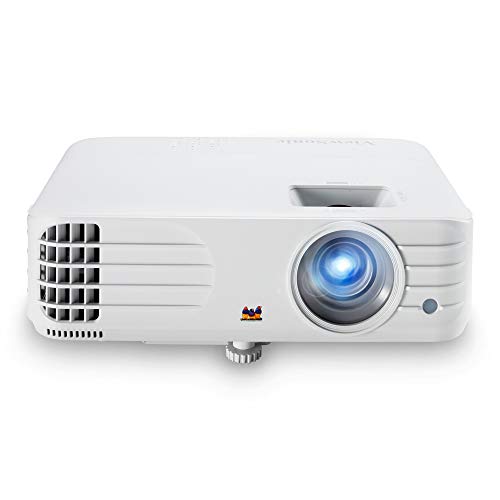 3. ViewSonic PX701HD | Check price on Amazon | |
 4. BenQ TK700STi | Check price on Amazon |
Our Top Picks
The best old projectors are previous-generation models that remain available long after their launch, and they can be a smart buy when the newer replacement costs far more for only a small gain in picture quality. Projector makers refresh their lines slowly, so a model from a few years ago often shares the same lens, the same imaging chip and the same brightness as the current version, with the differences limited to a newer smart platform or a slightly different port layout. That makes older models worth a close look for a bedroom, a classroom, a garage setup or a first home cinema.
Buying an older projector is not the same as buying any projector. Lamp hours, discontinued parts, outdated smart apps and missing inputs are real concerns, and a bargain disappears fast if the lamp is near the end of its life or the model no longer receives firmware updates. The picks below are older models that are still sold as new units with full manufacturer support, so you get the lower cost of an older design without the gamble of a used unit with an unknown history.
This guide explains how to judge an older projector, which specifications still matter, and which five models remain sensible buys. Every pick is a complete projector, not a part or an accessory, and each one is still listed on Amazon US.
How to Choose
1. Native resolution, not supported resolution
A projector that “supports” 1080p may only have a native 720p panel, which produces a softer image. Check the native resolution in the specifications. For a main viewing room, native 1080p is the minimum worth buying, while native 4K is worth the extra cost only on a large screen in a dark room.
2. Brightness for your room
Brightness is measured in lumens, and the number you need depends on ambient light. A dark room works well with 2,000 lumens or more, a living room with curtains needs around 3,000 lumens, and a bright room or daylight viewing needs 3,500 lumens or more. Older models often quote generous figures, so treat the number as a guide rather than a promise.
3. Lamp life and replacement cost
Most older projectors use a lamp rather than a laser or LED light source. A lamp rated for 5,000 hours in normal mode and 10,000 hours or more in eco mode will last years at a few hours per day. Before buying, check that a replacement lamp is still sold and note its cost, because a cheap projector with an expensive lamp is no bargain.
4. Throw distance and screen size
Throw ratio decides how far the projector must sit from the screen. A short-throw model fills a large image from close up, which suits small rooms, while a standard-throw model needs more depth. Measure your room first, then confirm the model can produce your target screen size from the available distance.
5. Inputs and connectivity
An older projector should still offer at least one HDMI input, and two is better when you plan to connect a console and a streaming stick. Built-in Wi-Fi, Bluetooth audio and a USB port for media playback are useful, but a missing smart platform is not a flaw when a streaming stick can add it for little cost.
6. Keystone correction and lens shift
Keystone correction straightens an image when the projector sits off-centre, and lens shift moves the image without degrading it. Older budget models often rely on digital keystone only, which crops the image slightly, so check how much adjustment you actually need before choosing.
7. Fan noise
Fan noise is easy to overlook and hard to live with. Older lamp projectors can be audible in quiet scenes, so look for a published noise figure and favour models known for quiet operation when the projector will sit near the seating area.
Top Picks
1. Epson Home Cinema 1080
The Epson Home Cinema 1080 is a 3LCD projector with native 1080p resolution and 3,400 lumens of colour and white brightness, which makes it one of the brightest older models still available. Its 3LCD design produces strong colour without the rainbow artefacts that some single-chip DLP models show, and the image stays vivid in a living room with the curtains drawn.
Setup is simple, with a 1.2x zoom, horizontal keystone correction and a built-in speaker for casual viewing. It has two HDMI inputs, so a console and a streaming stick can stay connected at the same time. It suits a living room or bedroom where the lights are rarely fully off and where a bright, colourful image matters more than 4K detail.
The main caveat is that it is a 1080p model in a market that has moved toward 4K, so on a very large screen in a dark room the extra detail of a 4K model would show. It also lacks built-in smart apps, so plan on adding a streaming stick. Lamp life is generous in eco mode, and replacement lamps remain widely sold.
2. Optoma HD146X
The Optoma HD146X is a DLP projector with native 1080p resolution and high brightness aimed at bright-room viewing and gaming. Its low input lag makes it a strong choice for console play on a big screen, and the image holds up well with some ambient light in the room.
It offers a 1.1x zoom, vertical keystone correction and a built-in speaker. The lamp is rated for long life in eco mode, and the design is simple enough that there is little to go wrong. It suits a gamer or a family that wants a large image in a room that is never fully dark.
The caveat is the single-chip DLP design, which can show rainbow artefacts to sensitive viewers during fast motion. It has no smart platform built in, so a streaming stick is needed for app viewing. The single HDMI input on some configurations means a switch may be needed when several sources are connected.
3. ViewSonic PX701HD
The ViewSonic PX701HD is a 1080p DLP projector with 3,500 lumens of brightness, aimed squarely at bright rooms and daytime viewing. Its high brightness keeps the image watchable with the lights on, which is exactly where older budget projectors often fail.
It includes dual HDMI inputs, a USB port for media playback and a built-in speaker. The lamp life in eco mode is long, and the 1.1x zoom plus vertical keystone correction make placement forgiving. It suits a classroom, a bright living room or a daytime sports setup.
The caveat is that colour accuracy out of the box is tuned for brightness rather than cinema accuracy, so a quick calibration of the picture modes improves movie watching. It is also a 1080p model, so it will not match a 4K projector for fine detail on a large screen.
4. BenQ TK700STi
The BenQ TK700STi is a short-throw 4K projector with 3,000 lumens of brightness and a built-in Android TV platform, which makes it the most modern-feeling pick in this group despite its age. Its short throw fills a large screen from close to the wall, which suits small rooms and apartments.
Gaming is a strength, with low input lag and a dedicated game mode, and the 4K resolution shows fine detail that the 1080p picks cannot. The built-in smart platform means streaming apps work without an extra stick, and the built-in speaker is adequate for casual viewing.
The main caveat is the cost, which sits above the 1080p picks, and the short-throw lens demands careful placement. The single-chip DLP design can show rainbow artefacts to sensitive viewers. It is the pick for a small room where 4K detail and short-throw placement matter most.
5. TMY V08
The TMY V08 is a compact mini projector with native 720p resolution and 1080p input support, and it is the budget pick in this group. It is small enough to move between rooms, and it works well for casual movie nights, kids rooms and portable use where a full-size projector would be overkill.
It includes HDMI, USB and AV inputs, a built-in speaker and a simple interface. The low cost means it can serve as a second projector or a first projector for someone who wants to learn what a big image feels like before spending more.
The caveat is the native 720p panel, which is visibly softer than the 1080p picks on a large screen, and its brightness is far lower, so it needs a dark room. It is not a home cinema projector, and it should not be bought for a bright living room or a large screen.
Comparison Table
| Projector | Native Resolution | Brightness | Throw | Smart Platform | Best For |
|---|---|---|---|---|---|
| Epson Home Cinema 1080 | 1080p | 3,400 lumens | Standard | None | Bright living rooms |
| Optoma HD146X | 1080p | High | Standard | None | Gaming and bright rooms |
| ViewSonic PX701HD | 1080p | 3,500 lumens | Standard | None | Daylight and classrooms |
| BenQ TK700STi | 4K | 3,000 lumens | Short throw | Android TV | Small rooms and 4K gaming |
| TMY V08 | 720p | Low | Standard | Basic | Budget and portable use |
Which One Is Right for You?
For a bright living room, the Epson Home Cinema 1080 or the ViewSonic PX701HD are the safest choices, because their brightness keeps the image watchable with the lights on. For gaming on a big screen, the Optoma HD146X offers low input lag at a lower cost, while the BenQ TK700STi adds 4K detail and short-throw placement for a small room. For a tight budget or a portable second projector, the TMY V08 is the only pick that makes sense, provided the room can be made dark.
Before buying any older projector, confirm that it is sold as a new unit, that a replacement lamp is still available, and that the inputs match your sources. An older model is a good buy when it is still supported and its specifications still fit your room; it is a poor buy when it is the last of a discontinued line with no parts support.
Frequently Asked Questions
Are old projectors still worth buying?
Yes, when the model is still sold as a new unit with parts and lamp support. A previous-generation projector often shares the same optics and imaging hardware as its replacement, so the image quality can be close while the cost is lower. Avoid used units with unknown lamp hours and models whose lamps are no longer sold.
What should I check before buying an older projector?
Check the native resolution, the lamp life and replacement lamp availability, the number of HDMI inputs, and whether the throw distance fits your room. Also confirm that the model still receives firmware updates if it has a smart platform, and that the seller lists it as new rather than refurbished.
Is a 720p projector good enough?
A native 720p projector is acceptable for casual viewing on a small screen in a dark room, and it suits a budget or portable setup. For a main viewing room or a screen larger than 80 inches, native 1080p is a clear improvement and worth the extra cost.
Do old projectors work with streaming sticks?
Yes. Any projector with an HDMI input works with a streaming stick, which adds current apps to an older model that lacks a smart platform. Check that the projector has a free HDMI port and a USB port or nearby outlet to power the stick.
Disclosure: As an Amazon Associate, we may earn from qualifying purchases.
FAQ
Which One Is Right for You?
Are old projectors still worth buying?
What should I check before buying an older projector?
Is a 720p projector good enough?
Do old projectors work with streaming sticks?
More from Amazon
Programs that pair well with the guide above. Offers and eligibility are set by Amazon and may change.
Free shipping on eligible items, Prime Video and more. Eligible new members can start with a free trial.
Start a Prime free trialAd-free music streaming. Eligible new subscribers can start with a free trial.
Try Music Unlimited freeA Prime membership for ages 18-24 with a trial period. Eligibility is set by Amazon.
See Prime for Young AdultsAudiobooks and podcasts to listen to on the go. Eligible new members can start with a free trial.
Try Audible freeAs an Amazon Associate we earn from qualifying purchases.









