Key takeaways
- Find the best DSL modem routers for Frontier with our guide to VDSL2 and ADSL2+ compatible picks, setup tips, and the checks to run before you buy today.
Finding the best DSL modem routers for Frontier is trickier than shopping for a regular router, because not every modem router speaks the language of a Frontier DSL line. Frontier still runs a large copper DSL network alongside its fiber footprint, and the two need completely different hardware. Buy the wrong box and you end up with a handsome router that cannot sync to your line at all. This guide explains how Frontier DSL works, what to check before you buy, and which modem routers are worth your money.

How Frontier DSL Works (and Why It Matters)
Frontier offers two very different kinds of internet, and the hardware for each is not interchangeable.
Frontier DSL runs over copper telephone lines using ADSL2+ or VDSL2 technology. The modem part of your device must understand those standards, including the VDSL2 profile your line uses, and it must handle the authentication method Frontier uses, usually PPPoE with a username and password. A modem router built for DSL combines the modem and the Wi-Fi router in one box, so you can replace the gateway Frontier supplied and stop renting equipment.
Frontier Fiber, by contrast, arrives through an ONT (optical network terminal) that converts the fiber signal to Ethernet. No DSL modem is involved at all. If you have Frontier Fiber, you need a standard Ethernet router, not a DSL modem router, and every product in this guide would be the wrong purchase.
The third wrinkle is bonded VDSL2. Some Frontier DSL lines bond two copper pairs together for extra speed. Most third-party modem routers, including the ones below, do not support bonded VDSL2. If your line is bonded, you generally need to keep using a Frontier-supplied gateway. Before you buy anything, confirm with Frontier whether your line is a standard single-pair ADSL2+ or VDSL2 connection.
How to Choose a DSL Modem Router for Frontier
1. Confirm your line type first
Log in to your Frontier account or call support and ask three questions: Is my service DSL or fiber? Is it ADSL2+ or VDSL2? Is the line bonded? A single-pair ADSL2+ or VDSL2 line is the green light for the products below. Fiber or a bonded line means a DSL modem router is not the right tool.
2. Match the VDSL2 profile
VDSL2 comes in profiles such as 8a, 12a, 17a, and 30a, which describe the frequency range the line uses. Most Frontier VDSL2 deployments use profile 17a. All three picks in this guide support VDSL2 profile 17a, plus ADSL2+ for older lines, so they cover the common cases. If Frontier tells you your line uses a different profile, double-check compatibility before ordering.
3. Get your PPPoE credentials ready
Frontier DSL usually authenticates with PPPoE. You will need the username and password Frontier assigned to your account, which may not be the same as your MyFrontier login. Have those credentials on hand before you unplug the old gateway, because setup stalls without them.
4. Think about Wi-Fi coverage and speed
DSL plans are modest by modern standards, often well under 100 Mbps, so you do not need a flagship Wi-Fi 6 or Wi-Fi 7 router to keep up with the line. What matters more is coverage: a modem router with external antennas and decent 5 GHz performance will give you a better experience than a faster box with weak radios. Look for dual-band Wi-Fi, gigabit Ethernet ports for wired devices, and a USB port if you want to share a drive or a printer.
5. Check for an Ethernet WAN fallback
A modem router with an Ethernet WAN port can keep working if you later move to Frontier Fiber or cable, since it can act as a plain router behind an ONT or a cable modem. That flexibility protects your investment if Frontier upgrades your neighborhood.
6. Do not expect miracles on old lines
No modem router can make a long, noisy copper line faster than the physical line allows. If your speeds are limited by distance from the DSLAM or by line quality, a new modem router improves Wi-Fi and stability, but the sync speed will stay roughly where it is. If Frontier offers fiber at your address, that upgrade matters far more than any modem.
Top Picks
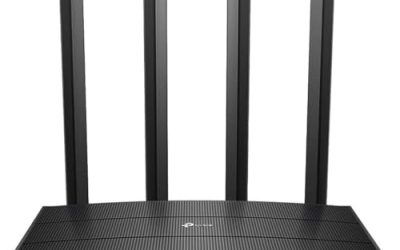
1. TP-Link Archer VR400 — Best Overall Value
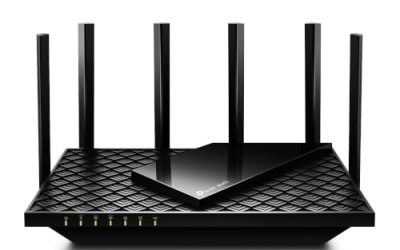
The TP-Link Archer VR400 is the most balanced choice for most Frontier DSL households. It is an AC1200 dual-band modem router, with 300 Mbps on the 2.4 GHz band and 867 Mbps on the 5 GHz band, which is more than enough headroom for any DSL plan. It supports VDSL2, ADSL2+, ADSL2, and ADSL, plus an Ethernet WAN mode, so it can follow you to a fiber or cable connection later.
Three external antennas with beamforming give it solid coverage for a typical apartment or small house, and all four LAN ports are gigabit, so wired PCs, consoles, and streaming boxes are never bottlenecked by a 100 Mbps port. The Tether app makes setup and parental controls straightforward, and OneMesh support lets you add a compatible TP-Link extender later if you find a dead spot. MU-MIMO helps when several phones, laptops, and smart devices are online at once.
For Frontier specifically, the VR400 handles the common single-pair VDSL2 profile 17a and ADSL2+ lines, and its setup wizard walks you through entering your PPPoE credentials. It is the pick to buy if you want a modern, well-supported modem router without paying for speed your DSL line cannot deliver.
Key specs: AC1200 dual-band Wi-Fi 5, VDSL2/ADSL2+ modem, 4 gigabit LAN ports, 1 gigabit WAN/LAN port, 1 USB 2.0 port, 3 external antennas, OneMesh support.
Check the TP-Link Archer VR400 on Amazon
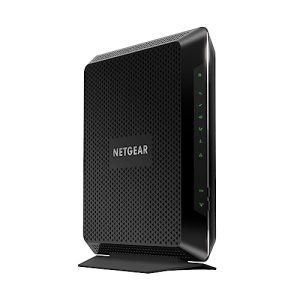
2. NETGEAR Nighthawk D7000 — Best for Power Users
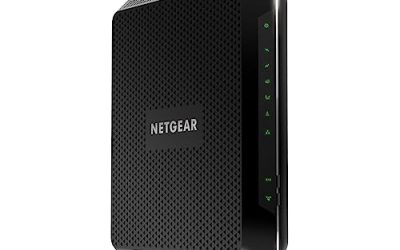
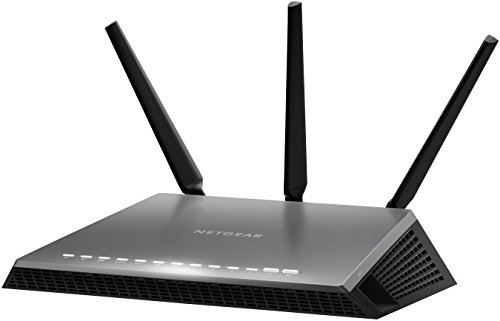
The NETGEAR Nighthawk D7000 is the performance pick of this list, an AC1900 modem router with a 1 GHz dual-core processor and high-powered amplifiers for longer range. It delivers up to 600 Mbps on 2.4 GHz and 1300 Mbps on 5 GHz, and it is explicitly listed as working with Frontier DSL, excluding Fiber, which is exactly the use case this guide covers.
Beyond raw speed, the D7000 brings features that appeal to advanced users: OpenVPN support for secure remote access to your home network, NETGEAR Genie app management, Alexa voice control, and ReadySHARE USB storage sharing with two USB ports. The dual-core processor helps it juggle many connected devices without the interface slowing to a crawl.
Two caveats deserve a clear mention. First, the D7000 does not work with bonded VDSL, so it is only suitable for single-pair lines. Second, NETGEAR has marked the D7000 as end of service, meaning no further firmware updates are planned, so buy it for what it does today rather than for future features. Even so, for a larger home or a household with heavy Wi-Fi use on a Frontier DSL line, it remains the strongest modem router of the three.
Key specs: AC1900 dual-band Wi-Fi 5, VDSL2/ADSL2+ modem, 1 GHz dual-core processor, 4 gigabit LAN ports, 2 USB ports, OpenVPN support, beamforming.
Check the NETGEAR Nighthawk D7000 on Amazon
3. TP-Link Archer VR600 — Best Mid-Range Step Up
The TP-Link Archer VR600 sits between the other two picks: it offers AC1600 dual-band Wi-Fi, with 300 Mbps on 2.4 GHz and 1300 Mbps on 5 GHz, giving you more 5 GHz headroom than the VR400 at a lower cost than the Nighthawk. Like the VR400, it supports VDSL2, ADSL2+, ADSL2, and ADSL, plus Ethernet WAN fallback, so it adapts if your connection type changes.
The VR600 adds beamforming and MU-MIMO for better performance with multiple devices, and its gigabit ports and USB 2.0 port cover the usual wired and sharing needs. Setup runs through the same Tether app as the VR400, with a wizard that covers PPPoE credentials and VDSL settings. If your home has more devices than the VR400 comfortably handles, or if you want extra 5 GHz speed for local file transfers and in-home streaming, the VR600 is the sensible step up.
Key specs: AC1600 dual-band Wi-Fi 5, VDSL2/ADSL2+ modem, 4 gigabit LAN ports, 1 gigabit WAN/LAN port, 1 USB 2.0 port, beamforming, MU-MIMO, Tether app.
Check the TP-Link Archer VR600 on Amazon
Comparison Table
| Modem Router | Wi-Fi Class | DSL Support | Gigabit Ports | USB Ports | Best For |
|---|---|---|---|---|---|
| TP-Link Archer VR400 | AC1200 | VDSL2 / ADSL2+ | 4 LAN + 1 WAN/LAN | 1 | Best overall value |
| NETGEAR Nighthawk D7000 | AC1900 | VDSL2 / ADSL2+ | 4 LAN | 2 | Power users, large homes |
| TP-Link Archer VR600 | AC1600 | VDSL2 / ADSL2+ | 4 LAN + 1 WAN/LAN | 1 | Mid-range step up |
Setting Up Your New Modem Router on Frontier
- Gather your details. Write down your PPPoE username and password, and note your current Wi-Fi network name and password if you want to reuse them.
- Connect the DSL line. Plug the phone cable from the wall jack into the grey DSL port on the new modem router. Use a DSL filter on any other phone jacks that share the line.
- Power on and wait. Give the modem a few minutes to sync. A solid DSL light means it has locked onto the line; a blinking light means it is still training or cannot sync.
- Run the setup wizard. Connect a laptop or phone to the router, open the setup page or app, choose DSL as the connection type, and enter your PPPoE credentials.
- Check the sync and speed. Log into the router status page and confirm the downstream and upstream sync rates look reasonable for your plan, then run a speed test.
- Return the rented gateway. Once the new modem router is stable for a day or two, return Frontier’s gateway so the rental fee stops. Keep the return receipt.
If the DSL light never goes solid, the usual culprits are the wrong line type, a bonded line, a missing DSL filter, or incorrect PPPoE credentials. Double-check each one before assuming the hardware is faulty.
FAQ
Does Frontier allow you to use your own modem router?
Yes, on DSL lines Frontier allows customer-owned equipment that is compatible with the line. You still need the right DSL standards and your PPPoE credentials, and bonded VDSL2 lines are generally an exception that requires a Frontier gateway.
Will these modem routers work with Frontier Fiber?
No. Frontier Fiber uses an ONT and Ethernet, not a DSL line, so a DSL modem router cannot connect to it. The Archer VR400 and VR600 can still serve as ordinary routers behind the ONT using their Ethernet WAN port, but their DSL modem would sit unused.
What is the difference between a modem router and a regular router?
A modem router has a built-in DSL modem that talks directly to the copper phone line, so one box replaces both the modem and the router. A regular router has no modem and must sit behind a separate modem, gateway, or ONT.
Why is my DSL speed slower than my plan after installing a new modem router?
The most common cause is the line itself: distance from the DSLAM, line noise, and old inside wiring cap the sync rate. Check the sync rate on the router status page. If it is well below your plan, the line is the limit, not the router, and Frontier may need to check the wiring.
Do I need to call Frontier to activate a new modem router?
Usually not. DSL authentication happens automatically once the correct PPPoE credentials are entered. You only need to contact Frontier if the line will not sync, if you do not know your credentials, or if the line turns out to be bonded.
Conclusion
The best DSL modem routers for Frontier are the ones that match your actual line: single-pair ADSL2+ or VDSL2, with the right profile and your PPPoE credentials in hand. The TP-Link Archer VR400 is the best all-round value for most homes, the NETGEAR Nighthawk D7000 is the strongest choice for power users and larger homes, and the TP-Link Archer VR600 is a smart middle ground with extra 5 GHz speed. Confirm your line type with Frontier first, then pick the model that fits your home and your device count.
Disclosure: As an Amazon Associate, we earn from qualifying purchases.
FAQ
Does Frontier allow you to use your own modem router?
Will these modem routers work with Frontier Fiber?
What is the difference between a modem router and a regular router?
Why is my DSL speed slower than my plan after installing a new modem router?
Do I need to call Frontier to activate a new modem router?
More from Amazon
Programs that pair well with the guide above. Offers and eligibility are set by Amazon and may change.
Free shipping on eligible items, Prime Video and more. Eligible new members can start with a free trial.
Start a Prime free trialAd-free music streaming. Eligible new subscribers can start with a free trial.
Try Music Unlimited freeA Prime membership for ages 18-24 with a trial period. Eligibility is set by Amazon.
See Prime for Young AdultsAudiobooks and podcasts to listen to on the go. Eligible new members can start with a free trial.
Try Audible freeAs an Amazon Associate we earn from qualifying purchases.