Our Short List of 3
All 3 Picks at a Glance
| Product | Specs | Action |
|---|---|---|
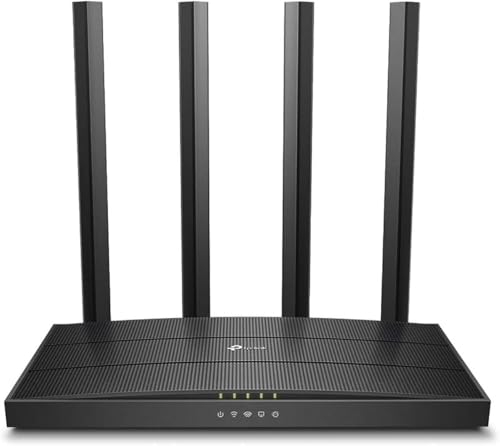 1. TP-Link Archer C80 — Best Overall Dual Band AC Router | Check price on Amazon | |
 2. ASUS RT-AC68U — Best AC Router for Wired Setups and Gaming | Check price on Amazon | |
 3. ASUS RT-AC66U B1 — Best Value AC1750 Router for Families | Check price on Amazon |
Key takeaways
- Find the best dual band wireless AC routers for streaming, gaming, and whole-home coverage, with AC1900 and AC1750 picks compared side by side.
The best dual band wireless AC routers still make a lot of sense in 2026. Wi-Fi 6 and Wi-Fi 7 grab the headlines, but most homes do not need their top speeds, and a good 802.11ac router covers streaming, gaming, video calls, and smart home gear for far less money. A dual band AC router broadcasts on both the 2.4 GHz and 5 GHz bands at the same time, so slower devices and long-range connections can use one band while faster devices enjoy the cleaner, quicker 5 GHz band.
This guide explains what the AC speed classes really mean, which features matter, and which models are still worth buying. Every pick below is a dual band 802.11ac router with gigabit wired ports, and every one is listed on Amazon US. We compared AC1900 and AC1750 models, because those two classes hit the sweet spot between speed, coverage, and value for most households.
How to Choose a Dual Band Wireless AC Router
Understand the AC speed class
Router makers label AC routers with a combined number, such as AC1750 or AC1900. That number adds together the top theoretical speed of the 2.4 GHz band and the top theoretical speed of the 5 GHz band. An AC1750 router, for example, typically pairs 450 Mbps on 2.4 GHz with 1300 Mbps on 5 GHz. An AC1900 router usually pairs 600 Mbps on 2.4 GHz with 1300 Mbps on 5 GHz.
No single device ever sees the combined number, because a device connects to one band at a time. The class is still a useful shorthand: a higher class generally means wider channels, more spatial streams, or both. For a typical home, AC1750 is plenty. Step up to AC1900 if you have many devices, a large home, or a fast internet plan that regularly pushes past a few hundred megabits per second.
Pick the right bands for the right jobs
The 2.4 GHz band travels farther and passes through walls better, but it is crowded and slower. It suits smart plugs, cameras, printers, and devices in far rooms. The 5 GHz band is much faster and less congested, but its range is shorter. It suits phones, laptops, consoles, and streaming boxes near the router. A good dual band router lets you give each band its own network name, or combine them under one name and let the router steer devices. Separate names give you more control; a single combined name is simpler for guests and family.
Look for MU-MIMO and beamforming
Older routers talk to one device at a time, cycling quickly between them. MU-MIMO lets a router serve several devices at once on the same band, which helps in homes where phones, tablets, laptops, and TVs are all active in the evening. Beamforming focuses the wireless signal toward connected devices instead of spraying it in all directions, which can improve range and stability at the edges of your home. Both features are worth having, and the newer AC1900 models in this guide include them.
Count the wired ports
Wireless is convenient, but a cable still wins for gaming consoles, desktop PCs, and streaming boxes that never move. Look for at least four gigabit LAN ports plus a gigabit WAN port for the modem connection. A USB port is a bonus: it can share a printer or an external drive across the network, or serve media files to devices in the house. USB 3.0 is noticeably faster than USB 2.0 for storage sharing, so check which version a router offers.
Check security and parental controls
A router guards your whole network, so its security features matter. Look for a built-in firewall, automatic security updates, and protection against malicious sites if the manufacturer includes it. Parental controls let you pause internet access, block categories of sites, and set schedules per device, which is genuinely useful in a family home. Guest network support is another plus: it gives visitors internet access without exposing your main network or shared files.
Match coverage to your home
Manufacturers quote coverage in square feet, but those numbers assume open space with few walls. As a rough guide, an AC1750 router with three antennas suits apartments and smaller homes, while an AC1900 model with four antennas and beamforming handles larger single-family homes better. Thick walls, metal, mirrors, and multiple floors all shrink real-world range. If one router cannot cover your home, look for a model that supports mesh networking, so you can add a matching node later instead of replacing the router.
Remember that AC is a mature standard
Wi-Fi 5, the marketing name for 802.11ac, is a mature and well-supported standard. Every modern phone, laptop, console, and streaming stick works with it. What AC routers lack is the latest efficiency tech for very dense device counts, such as OFDMA, and support for the 6 GHz band. If your internet plan is gigabit-class and you own many Wi-Fi 6 devices, a newer router may serve you better. For everyone else, a quality AC router delivers reliable performance at a sensible cost, and the models below remain in production or widely stocked.
Our Top Picks
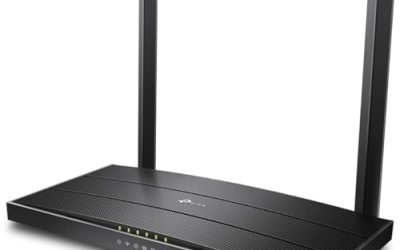
1. TP-Link Archer C80 — Best Overall Dual Band AC Router
The TP-Link Archer C80 is our top pick because it takes the proven AC1900 formula and adds modern touches that older AC routers lack. It delivers combined wireless speeds of up to 1900 Mbps, with 1300 Mbps on the 5 GHz band and 600 Mbps on the 2.4 GHz band, using 3 by 3 MU-MIMO so several devices can stream and game at the same time without tripping over each other.
Four high-performance external antennas with beamforming push the signal toward your devices rather than in every direction, which helps in larger rooms and through interior walls. All five Ethernet ports run at gigabit speed, so wired consoles, PCs, and streaming boxes get the full benefit of a fast connection. Setup runs through the TP-Link Tether app or a web interface, and the process takes only a few minutes, including creating your network names and passwords.
What sets the C80 apart from older AC1750 routers is its newer feature set. It supports WPA3 security, the current wireless encryption standard, alongside the older WPA2 for compatibility with legacy devices. Parental controls let you block content categories and set time limits per device, and a guest network keeps visitors separate from your files and smart home gear. The router also works with EasyMesh, so you can add a compatible extender or node later and build a mesh network if your home outgrows a single router.
The C80 is the model TP-Link points buyers toward as the replacement for its earlier Archer A7, and it shows: faster 2.4 GHz speeds, MU-MIMO, WPA3, and mesh support in the same affordable class. For a family home with a mix of streaming, gaming, video calls, and smart devices, it is the most well-rounded dual band AC router in this guide.
Check the TP-Link Archer C80 on Amazon
2. ASUS RT-AC68U — Best AC Router for Wired Setups and Gaming
The ASUS RT-AC68U has been a favorite among enthusiasts for years, and it earns its place here as the best dual band AC router for homes that lean heavily on wired connections. It is an AC1900 router, with 1300 Mbps on the 5 GHz band and 600 Mbps on the 2.4 GHz band, powered by a dual-core processor that keeps routing, USB sharing, and traffic management running smoothly at the same time.
Where the RT-AC68U stands out is its port selection. It offers four gigabit LAN ports plus a gigabit WAN port, giving a desktop, a console, a streaming box, and a network drive all a wired home at once. It also includes two USB ports, one USB 3.0 and one USB 2.0, so you can share a printer or an external drive across the network, or plug in a 4G dongle as a backup internet connection with dual WAN support.
ASUS packs in software that many rivals charge extra for. AiProtection, powered by Trend Micro, provides network-level security with lifetime updates, blocking malicious sites and flagging infected devices. Adaptive QoS lets you prioritize gaming or streaming traffic with a few clicks, and the ASUS Router app puts setup and monitoring on your phone. The router is also AiMesh compatible, so it can join or anchor a mesh network with other ASUS routers if you need more coverage later.
Three external antennas deliver solid whole-home coverage, and the router has proven itself in years of daily use in homes and small offices. It is a mature model, so check that the firmware is up to date when you install it, and note that newer Wi-Fi 6 models exist if you need the latest standard. But for a dual band AC router that doubles as a wired hub and a gaming-friendly traffic manager, the RT-AC68U remains hard to beat.
Check the ASUS RT-AC68U on Amazon
3. ASUS RT-AC66U B1 — Best Value AC1750 Router for Families
The ASUS RT-AC66U B1 is the budget-friendly pick in this guide, and it is aimed squarely at families who want reliable dual band AC Wi-Fi with strong security built in. It is an AC1750 router, delivering up to 1300 Mbps on the 5 GHz band and up to 450 Mbps on the 2.4 GHz band, which is ample for HD and 4K streaming, online gaming, and video calls in a small to medium home.
A 1 GHz processor drives the dual band 3 by 3 802.11ac radios, and three external antennas using 3 by 3 MIMO help the signal reach across larger homes, with coverage rated up to 3,000 square feet in open conditions. Four gigabit LAN ports and a gigabit WAN port cover wired devices, and two USB ports, one USB 3.0 and one USB 2.0, support printer sharing, storage sharing, and remote file access through AiCloud.
The B1 revision is the one to buy: it adds AiMesh support for mesh networking, the ASUS Router app for mobile management, and AiProtection Pro security with advanced parental controls. Parents can filter content, set schedules, and monitor each family member’s devices from the app, while AiProtection guards the network against intrusions and malicious sites.
One honest caveat: ASUS lists the RT-AC66U B1 as an end-of-life model, so it no longer receives firmware updates. That makes it a value choice rather than a future-proof one, and buyers should weigh that against its low cost and strong feature set. If you want a dependable AC1750 router for everyday family use and you are comfortable with a mature model, the B1 delivers a lot for its class.
Check the ASUS RT-AC66U B1 on Amazon
Comparison Table
| Router | Wi-Fi Class | 2.4 GHz / 5 GHz Speeds | LAN Ports | USB Ports | MU-MIMO | Mesh Support | Best For |
|---|---|---|---|---|---|---|---|
| TP-Link Archer C80 | AC1900 | 600 / 1300 Mbps | 4 x Gigabit | 1 x USB 2.0 | Yes | EasyMesh | Overall performance |
| ASUS RT-AC68U | AC1900 | 600 / 1300 Mbps | 4 x Gigabit | 1 x USB 3.0, 1 x USB 2.0 | Yes | AiMesh | Wired setups and gaming |
| ASUS RT-AC66U B1 | AC1750 | 450 / 1300 Mbps | 4 x Gigabit | 1 x USB 3.0, 1 x USB 2.0 | No | AiMesh | Families on a budget |
Frequently Asked Questions
What does dual band mean on a wireless AC router?
Dual band means the router broadcasts two separate Wi-Fi networks at the same time: one on the 2.4 GHz band and one on the 5 GHz band. The 2.4 GHz band reaches farther and passes through walls better, while the 5 GHz band is faster and less crowded. Devices can use whichever band suits them, and you can steer bandwidth-hungry devices to 5 GHz while leaving 2.4 GHz for smart home gadgets and distant rooms.
Is an AC1750 router fast enough for gaming and 4K streaming?
Yes, for most homes. An AC1750 router offers up to 1300 Mbps on the 5 GHz band, which is far more than a single 4K stream or online game needs. What matters more in practice is a stable connection, low latency, and enough capacity for every device in the house at once. Wired Ethernet is still the best choice for competitive gaming, and all three routers in this guide have gigabit LAN ports for exactly that.
Should I buy a dual band AC router or a Wi-Fi 6 router?
Buy a Wi-Fi 6 router if you have a gigabit internet plan, many Wi-Fi 6 devices, or a very crowded household network, since Wi-Fi 6 handles many simultaneous devices more efficiently. Buy a dual band AC router if your plan and devices are more modest and you want proven performance for less money. AC routers work with every Wi-Fi 6 device, just at Wi-Fi 5 speeds, so nothing you own will be left out.
How many devices can a dual band AC router handle?
A typical AC1750 or AC1900 router comfortably handles 20 to 25 active devices, including phones, laptops, TVs, consoles, and smart home gear. MU-MIMO models cope better when many devices are active at once. If your household regularly runs 30 or more connected devices, consider an AC1900 model with MU-MIMO, or step up to a Wi-Fi 6 router designed for dense device counts.
Where should I place my dual band AC router?
Place it in a central, elevated, open spot, away from thick walls, metal objects, mirrors, and large appliances. Keep it out of closed cabinets and off the floor. The 5 GHz band in particular benefits from line of sight, so a central shelf in the room where you stream and game most often is a good starting point. Avoid putting the router next to the microwave or a baby monitor, which can interfere with the 2.4 GHz band.
Conclusion
The best dual band wireless AC routers prove that you do not need the newest standard to get fast, reliable home Wi-Fi. The TP-Link Archer C80 is the best all-rounder, with AC1900 speeds, MU-MIMO, WPA3, and mesh support. The ASUS RT-AC68U is the pick for wired-heavy homes and gamers, thanks to its five gigabit ports, dual USB, and traffic-prioritization tools. The ASUS RT-AC66U B1 is the value choice for families, offering AC1750 performance with strong parental controls and security, with the caveat that it is an end-of-life model.
Whichever you choose, match the router to your home: AC1750 for smaller households, AC1900 for busier ones, and wired Ethernet for anything that never moves. Check the current listing before buying, confirm the model revision, and update the firmware on day one.
Disclosure: As an Amazon Associate, we earn from qualifying purchases.
FAQ
What does dual band mean on a wireless AC router?
Is an AC1750 router fast enough for gaming and 4K streaming?
Should I buy a dual band AC router or a Wi-Fi 6 router?
How many devices can a dual band AC router handle?
Where should I place my dual band AC router?
More from Amazon
Programs that pair well with the guide above. Offers and eligibility are set by Amazon and may change.
Free shipping on eligible items, Prime Video and more. Eligible new members can start with a free trial.
Start a Prime free trialAd-free music streaming. Eligible new subscribers can start with a free trial.
Try Music Unlimited freeA Prime membership for ages 18-24 with a trial period. Eligibility is set by Amazon.
See Prime for Young AdultsAudiobooks and podcasts to listen to on the go. Eligible new members can start with a free trial.
Try Audible freeAs an Amazon Associate we earn from qualifying purchases.