
Our Short List of 3

- Connectivity: Bluetooth 3.0, pairs with up to 3 devices
- Compatibility: Android 8 or later, plus Windows, macOS, Chrome OS, iOS, and iPadOS
- Battery: 2 AAA batteries, with a manufacturer-stated life of up to 2 years
- Dimensions: 10.9 x 4.9 x 0.6 inches

- Connectivity: Bluetooth 3.0
- Compatibility: Android, iOS, macOS, and Windows tablets, phones, and computers
- Backlight: 7 colours with adjustable brightness levels
- Battery: built-in rechargeable battery, with a manufacturer-stated life of up to 6 months per charge
- Connectivity: Bluetooth, pairs with up to 3 devices
- Compatibility: Android, Chrome OS, Windows, iPadOS, iOS, and macOS
- Battery: 2 CR2032 coin cells, with a manufacturer-stated life of up to 36 months
- Dimensions: 250 x 105 x about 8.8 mm
All 4 Picks at a Glance
| Product | Specs | Action |
|---|---|---|
| 1. Logitech K380 Multi-Device Bluetooth Keyboard |
| Check price on Amazon |
| 2. Arteck HB030B Universal Backlit Bluetooth Keyboard |
| Check price on Amazon |
| 3. Logitech Keys-to-Go 2 Portable Bluetooth Keyboard |
| Check price on Amazon |
 4. Logitech K480 Wireless Multi-Device Keyboard |
| Check price on Amazon |
Our Top Picks
- Arteck Universal Backlit Wireless Bluetooth Keyboard for iPad9.72 x 0.24 x 5.91 inches0.4 poundsCheck on Amazon
- Logitech K480 Wireless Multi-Device Keyboard for Windows12.2 x 1.61 x 7.9 inches1.81 poundsCheck on Amazon
Disclosure: As an Amazon Associate, we earn from qualifying purchases.
Introduction: Why “Without Ads” Changes the Keyboard Search
A keyboard is the one app that sees everything you type: passwords, messages, search queries, notes, and work documents. That makes advertising more serious for keyboards than for almost any other app category. A free keyboard app that shows banner ads or full-screen promotions is not only annoying, it is also running an advertising software kit inside the most sensitive software on your phone.
Most people searching for the best Android keyboards without ads want one of two things: a better on-screen keyboard app that never shows an advertisement, or a real, physical keyboard for an Android phone or tablet, which sidesteps the advertising problem entirely. A physical keyboard has no app, no advertising software kit, and no screen space to sell. It cannot show you an ad because there is nothing to show one on.
This guide covers both angles. It explains which well-known keyboard apps are genuinely ad-free and how to check any keyboard app for ads before you install it. Then it rounds up four physical Bluetooth keyboards for Android available on Amazon US, each clearly labelled as a hardware keyboard rather than an app. If you only want an app, the app section below gives you the shortlist. If you want to type long documents on your Android tablet or phone without ever seeing an ad, the hardware picks are the more complete answer.
How to Choose an Android Keyboard Without Ads
Start with the advertising label, not the star rating
On Google Play, many app listings carry a “Contains ads” label. That label is the single most reliable check available. Before installing any keyboard, open its Play Store listing and look for that line. If it is there, the app shows advertising somewhere, even if the ads only appear in a settings screen or a theme store. If the label is absent, the listing declares no advertising. Well-known ad-free options include Gboard, which carries no ads label, and the open-source keyboards HeliBoard, FlorisBoard, and FUTO Keyboard. Microsoft SwiftKey, by contrast, carries a “Contains ads” label on its Google Play listing, so it is not a fit for this guide.
Star ratings do not answer the advertising question. An app can hold a high rating while still showing ads, because many users tolerate advertising in exchange for free themes. Read recent reviews and search them for the word “ads” before you commit.
Check the permissions a keyboard asks for
A keyboard needs very little to do its basic job: to run as an input method and, optionally, to vibrate or play a keypress sound. Be cautious when a keyboard app asks for full network access, permission to read contacts, or access to files and photos. Open-source keyboards such as HeliBoard and FlorisBoard run entirely on the device and request no network permission at all, which means they cannot send what you type anywhere or download advertising content.
Decide between an app and a physical keyboard
An on-screen keyboard app is convenient, always with you, and free. A physical Bluetooth keyboard is faster for long typing sessions, easier on the thumbs, and free of advertising by design. If you mostly send short messages, an ad-free app is enough. If you write documents, take notes, answer long emails, or use an Android tablet as a laptop replacement, a hardware keyboard will change the experience far more than any app swap.
What to look for in a physical Android keyboard
Android shortcut keys. Android has its own navigation keys, including Home, Back, and app switching. Keyboards designed with Android in mind print those functions on the keys, so you can navigate without touching the screen. Generic Windows-only keyboards will still type, but you lose those shortcuts.
Multi-device switching. A keyboard that pairs with two or three devices and switches between them with a key press or a dial saves constant re-pairing. Bluetooth multi-device support is one of the most useful features in this category.
Battery type and life. Some compact keyboards use replaceable coin or AAA cells that last for months or even years, while others have built-in rechargeable batteries that need a cable every few months. Replaceable cells mean you never wait for a charge; rechargeable designs mean you never buy batteries. Check the manufacturer’s stated battery life and the battery type before buying.
Size and portability. A full-size keyboard with a phone cradle suits a desk setup, while a slim, lightweight keyboard suits a bag or a commute. Foldable keyboards tend to compromise on key feel, so a slim one-piece design is usually the safer pick for daily typing.
Backlighting. If you type in dim rooms or at night, a backlit keyboard is worth prioritising. Backlighting adds battery drain, so look for adjustable brightness if you choose a lit model.
A cradle or stand. A keyboard with a built-in slot for a phone or tablet holds the screen at a readable angle while you type. If the keyboard you like has no cradle, budget for a separate stand.
Ad-Free Android Keyboard Apps Worth Knowing
The four picks below are physical keyboards sold on Amazon. Before those, here is the shortlist of ad-free keyboard apps, because many readers will be satisfied with an app alone. These apps are not sold on Amazon, so they carry no ASIN, and they are listed here as information only, not as shoppable picks.
Gboard is the default keyboard on Pixel phones and most non-Samsung Android devices. It is free, carries no ads label on Google Play, and offers glide typing, voice input, clipboard history, and built-in translation. Prediction runs largely on the device, and personalisation can be switched off in settings.
HeliBoard is an open-source keyboard that runs entirely offline. It requests no network permission, collects no telemetry, and shows no ads. Its prediction is weaker than Gboard, but for privacy-focused users it is the cleanest option available.
FlorisBoard is another open-source, fully on-device keyboard with no advertising. It is still maturing in glide typing and prediction, but it is a strong choice if you want an open, ad-free keyboard and accept a simpler feature set.
FUTO Keyboard combines offline operation with on-device voice dictation, so spoken input never leaves the phone. Its Play listing is free to install and carries no ads label.
Samsung Keyboard ships on Galaxy phones and tablets, carries no advertising, and integrates with Samsung’s handwriting and AI features.
A note on what to avoid: keyboards that promise hundreds of free themes, animated stickers, or emoji packs are the most likely to show advertising or lock basic features behind subscriptions.
Top Picks: Physical Android Keyboards With No Ads to Show
Every pick below is a physical Bluetooth keyboard that works with Android phones and tablets. A hardware keyboard has no screen, no app store listing, and no advertising software, so the “without ads” requirement is met by the nature of the product. Each listing states its Amazon ASIN.
1. Logitech K380 Multi-Device Bluetooth Keyboard
- Connectivity: Bluetooth 3.0, pairs with up to 3 devices
- Compatibility: Android 8 or later, plus Windows, macOS, Chrome OS, iOS, and iPadOS
- Battery: 2 AAA batteries, with a manufacturer-stated life of up to 2 years
- Dimensions: 10.9 x 4.9 x 0.6 inches
The Logitech K380 is the most widely recommended compact Bluetooth keyboard for Android. It pairs with up to three devices at once, and three yellow Easy-Switch keys along the top row move typing between a phone, a tablet, and a computer with a single press. The key legends include Android functions such as Home, Back, and app switching, so the keyboard feels made for Android rather than adapted to it.
Key specifications:
Pros:
Cons:
Who it fits: The K380 fits Android users who want one small keyboard for a phone, a tablet, and a computer, and who value long battery life over backlighting. It is the best all-round pick in this guide.
2. Arteck HB030B Universal Backlit Bluetooth Keyboard
- Connectivity: Bluetooth 3.0
- Compatibility: Android, iOS, macOS, and Windows tablets, phones, and computers
- Backlight: 7 colours with adjustable brightness levels
- Battery: built-in rechargeable battery, with a manufacturer-stated life of up to 6 months per charge
The Arteck HB030B is the pick for typing after dark. It builds a seven-colour backlight with adjustable brightness into an ultra-slim stainless steel body, and it remains one of the lightest keyboards in this category. The backlight can be switched off when not needed, and the keyboard pairs with Android, iOS, macOS, and Windows devices over Bluetooth 3.0.
Key specifications:
Pros:
Cons:
Who it fits: The HB030B fits Android users who type in dim rooms, travel light, and want the thinnest keyboard possible.
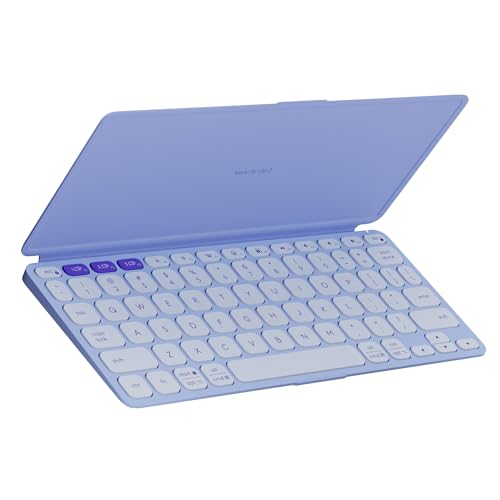
3. Logitech Keys-to-Go 2 Portable Bluetooth Keyboard
- Connectivity: Bluetooth, pairs with up to 3 devices
- Compatibility: Android, Chrome OS, Windows, iPadOS, iOS, and macOS
- Battery: 2 CR2032 coin cells, with a manufacturer-stated life of up to 36 months
- Dimensions: 250 x 105 x about 8.8 mm
The Logitech Keys-to-Go 2 is built for the way people actually carry a keyboard: flat against a tablet, unprotected, in a crowded bag. Its answer is a built-in cover that folds over the keys in transit, then folds back to act as a typing surface. At 222 grams it is barely heavier than the phone it pairs with, and it connects to up to three devices over Bluetooth.
Key specifications:
Pros:
Cons:
Who it fits: The Keys-to-Go 2 fits commuters, students, and travellers who carry an Android tablet everywhere and want the lightest keyboard that can survive a bag.
4. Logitech K480 Wireless Multi-Device Keyboard
- Connectivity: Bluetooth, pairs with up to 3 devices
- Compatibility: Android 3.2 or later, plus Windows, macOS, iPadOS, iOS, and Chrome OS
- Battery: 2 AAA batteries
- Cradle: integrated slot holds phones and tablets up to 10.5 mm thick and 258 mm wide
The Logitech K480 is the desk pick. Unlike the slim travel keyboards above, it is a full-size keyboard with an integrated cradle that holds a phone or tablet at a comfortable reading angle while you type. The cradle accepts most phones and tablets up to 10.5 mm thick and 258 mm wide. An Easy-Switch dial rotates between three paired Bluetooth devices, so a phone, a tablet, and a computer can share one keyboard.
Key specifications:
Pros:
Cons:
Who it fits: The K480 fits Android users who type at a desk or table, want their phone or tablet propped up in front of them, and prefer a full-size layout.
Comparison Table
| Keyboard | ASIN | Connectivity | Devices | Battery | Backlight | Cradle | Best For |
|---|---|---|---|---|---|---|---|
| Logitech K380 | B0148NPH9I | Bluetooth 3.0 | Up to 3 | 2 AAA, up to 2 years | No | No | All-round use |
| Arteck HB030B | B00X5P8BJO | Bluetooth 3.0 | 1 | Rechargeable, up to 6 months | Yes, 7 colours | No | Night typing |
| Logitech Keys-to-Go 2 | B0D2DWGHLG | Bluetooth | Up to 3 | 2 CR2032, up to 36 months | No | No | Travel and portability |
| Logitech K480 | B00MUTWLW4 | Bluetooth | Up to 3 | 2 AAA | No | Yes | Desk setup |
Frequently Asked Questions
Are there really Android keyboards with no ads at all?
Yes. Gboard, Samsung Keyboard, HeliBoard, FlorisBoard, and FUTO Keyboard all ship without advertising, and their Google Play listings carry no “Contains ads” label. Physical Bluetooth keyboards go further: they have no app and no screen, so there is no place for an ad to appear.
How do I check whether a keyboard app shows ads before installing it?
Open the app’s Google Play listing and look for the “Contains ads” label in the data safety and about sections. If the label is present, the app shows advertising somewhere. If it is absent, the listing declares no advertising. Also search recent user reviews for the word “ads”.
Is Gboard really free with no ads?
Yes. Gboard is free to install and use, and its Google Play listing carries no ads label. It includes glide typing, voice input, clipboard history, and translation without charging for those features or showing advertising. Prediction runs largely on the device, and personalisation can be switched off in settings.
Why is Microsoft SwiftKey not recommended here?
SwiftKey is a capable keyboard, particularly for multilingual typing, but its Google Play listing carries a “Contains ads” label, which means it does not meet the ad-free requirement of this guide. If a clean, ad-free experience is the priority, Gboard or one of the open-source options is a better fit.
Will a Bluetooth keyboard work with any Android phone?
Almost any Android phone or tablet with Bluetooth and support for external keyboards will work with the keyboards in this guide. The K380 lists Android 8 or later, the K480 lists Android 3.2 or later, and the Arteck HB030B and Keys-to-Go 2 list broad Android compatibility. In practice, any phone running a recent Android version will pair and type without extra software. Android shortcut keys such as Home and Back work on keyboards that print them.
Do I still need a keyboard app if I buy a physical keyboard?
Yes, your phone still needs an active on-screen keyboard app for moments when the physical keyboard is not connected, such as entering a password on the lock screen. The sensible setup is an ad-free app such as Gboard for on-screen use, plus a physical keyboard for longer typing.
Conclusion
The search for the best Android keyboards without ads has two good answers, and the right one depends on how you type. If you mostly send short messages, an ad-free app is enough: Gboard covers most people, HeliBoard and FlorisBoard cover privacy-focused users, and FUTO Keyboard adds offline voice dictation. Check the “Contains ads” label on any Play Store listing before installing.
If you type for hours, write documents, or use an Android tablet as a work device, a physical keyboard is the bigger upgrade, and it removes advertising from the equation entirely. The Logitech K380 is the best all-round choice, with three-device switching and very long battery life. The Arteck HB030B is the best choice for night typing thanks to its seven-colour backlight. The Logitech Keys-to-Go 2 is the best choice for travel, with its built-in cover and featherweight design. The Logitech K480 is the best choice for a desk, with its integrated cradle.
Whichever route you take, the principle is the same: a keyboard handles everything you type, so it deserves more scrutiny than any other app or accessory on your phone. Choose one that shows no ads, asks for minimal permissions, and stays out of your way while you type.
FAQ
Are there really Android keyboards with no ads at all?
How do I check whether a keyboard app shows ads before installing it?
Is Gboard really free with no ads?
Why is Microsoft SwiftKey not recommended here?
Will a Bluetooth keyboard work with any Android phone?
Do I still need a keyboard app if I buy a physical keyboard?
More from Amazon
Programs that pair well with the guide above. Offers and eligibility are set by Amazon and may change.
Free shipping on eligible items, Prime Video and more. Eligible new members can start with a free trial.
Start a Prime free trialAd-free music streaming. Eligible new subscribers can start with a free trial.
Try Music Unlimited freeA Prime membership for ages 18-24 with a trial period. Eligibility is set by Amazon.
See Prime for Young AdultsAudiobooks and podcasts to listen to on the go. Eligible new members can start with a free trial.
Try Audible freeAs an Amazon Associate we earn from qualifying purchases.
