Our Short List of 3

- Best for: the cheapest reliable Wi-Fi 6 upgrade for gaming.

- Best for: free security, manual QoS, and mesh expansion.

- Best for: the best balance of speed, features and value.
All 4 Picks at a Glance
| Product | Specs | Action |
|---|---|---|
| 1. TP-Link Archer AX21 — Best Budget Pick |
| Check price on Amazon |
| 2. ASUS RT-AX1800S — Best for Control and Security |
| Check price on Amazon |
| 3. TP-Link Archer AX55 — Best All-Round Value |
| Check price on Amazon |
 4. NETGEAR Nighthawk R6700AX — Best Nighthawk Pick |
| Check price on Amazon |
Our Top Picks
- ASUS RT-AX1800S Dual Band WiFi 6 Extendable RouterRouter9.06 x 5.28 x 2.2 inches0.82 poundsCheck on Amazon
The best gaming routers around 100 dollars are not the fastest routers on the shelf, and they do not need to be. For most homes, the job is simpler: keep ping low and steady, keep the connection stable when someone else starts streaming, and give a wired PC or console a clean, fast link to the internet. A router around 100 dollars can do all of that, provided you choose for latency and stability rather than for the biggest speed number on the box.
This guide is written for that budget. Every pick below is a Wi-Fi 6 router with gigabit wired ports, a sensible feature set for gaming, and a track record on Amazon. We explain what actually helps gaming, what is marketing, and how to set up a budget router so it performs like a more expensive one. The keyword says around 100 dollars, and the picks sit in that neighbourhood: some a little below it, some close to it, all chosen because they deliver gaming performance without a flagship price.
How to Choose a Gaming Router Around 100 Dollars
Latency matters more than headline speed
Gaming uses very little bandwidth. A multiplayer match may use only a few megabits per second, far less than a 4K stream. What gaming needs is low latency, low jitter and a stable connection. Latency is the delay between your PC or console and the game server, usually measured in milliseconds. Jitter is how much that delay varies. A connection with low, steady latency feels responsive. A connection with high or spiky latency feels laggy, even if the download speed looks fast.
A router helps latency in three ways. First, a wired Ethernet connection to the router is almost always steadier than Wi-Fi, so gigabit wired ports matter. Second, good quality-of-service controls, known as QoS, let the router prioritise gaming traffic over downloads and streams. Third, a modern Wi-Fi standard with efficient handling of many devices, such as Wi-Fi 6, keeps the wireless side of the network from becoming a bottleneck when phones, televisions and laptops all compete at once.
Do not judge a router by its combined wireless speed alone. A router that advertises a very high combined total is adding together the speeds of its 2.4 GHz and 5 GHz bands, which no single device can use at the same time. For gaming, the speed of the band you actually use, the number of wired ports, and the quality of the QoS controls matter far more.
Wi-Fi 6 and Ethernet
Wi-Fi 6, also known as 802.11ax, is the standard to look for at this budget. It handles many devices more efficiently than Wi-Fi 5, using OFDMA and MU-MIMO to share the wireless channel, and it usually includes WPA3 security. It will not make a single game faster than a good Wi-Fi 5 router on a clean channel, but it copes better in a busy home.
The single biggest improvement you can make to gaming latency costs almost nothing: plug the gaming PC or console into the router with an Ethernet cable. Wired connections avoid Wi-Fi interference and give a steadier ping. Every router in this guide has gigabit Ethernet ports, and you should use one of them for the device you play on most.
Quality of service: the gaming feature that actually helps
QoS is the feature that separates a gaming-friendly router from a basic one. It lets the router recognise gaming traffic, or traffic from a specific device, and give it priority when the network is busy. Without QoS, a large download, a cloud backup or a 4K stream can add latency to a game. With QoS, the router holds back the less urgent traffic and keeps the game smooth.
Different brands call this by different names. TP-Link calls its system HomeShield and QoS, ASUS calls its system Adaptive QoS and offers a gaming profile, and NETGEAR offers Dynamic QoS on its Nighthawk models. At this budget, look for a router that lets you prioritise a device or a type of traffic easily, without a subscription. Some routers put advanced QoS or security features behind a paid subscription after a trial period, so check what is free for the life of the router before you buy.
Top Picks
1. TP-Link Archer AX21 — Best Budget Pick
- Best for: the cheapest reliable Wi-Fi 6 upgrade for gaming.
the cheapest reliable Wi-Fi 6 upgrade for gaming.
The TP-Link Archer AX21 is an AX1800 Wi-Fi 6 router, with dual-band wireless, gigabit ports, EasyMesh support, and compatibility with Alexa. It is the cheapest honest upgrade in this guide, and the one we would recommend first to a gamer who wants Wi-Fi 6 and stable wired gaming without spending more than necessary.
AX1800 means up to 574 megabits per second on the 2.4 GHz band and up to 1,201 megabits per second on the 5 GHz band, in ideal conditions. In a real home the numbers are lower, but they are more than enough for gaming on a typical broadband plan. The four gigabit LAN ports let you wire a PC and a console. EasyMesh is a practical bonus: if coverage falls short, you can add a compatible TP-Link mesh unit later. The AX21 has no dedicated gaming port, but a wired connection with QoS enabled will still give a low, steady ping.
2. ASUS RT-AX1800S — Best for Control and Security
- Best for: free security, manual QoS, and mesh expansion.
free security, manual QoS, and mesh expansion.
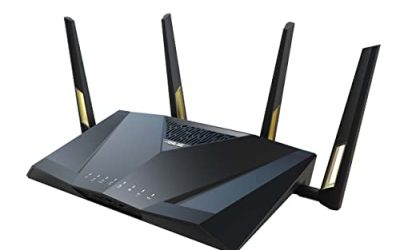
The ASUS RT-AX1800S is a dual-band Wi-Fi 6 extendable router, with subscription-free network security, parental controls, a built-in VPN, AiMesh compatibility, and gaming and streaming support. It is the pick for a gamer who wants deeper control over the network, without paying a subscription for security features.
Like the AX21, it is an AX1800 router. The difference is in the software. AiProtection Classic, powered by Trend Micro, is free for the life of the router, and the QoS controls let you prioritise a gaming device or gaming traffic manually, which is more flexible than the simple priority modes on many budget routers. The built-in VPN lets you connect to a home network remotely. AiMesh lets you add another ASUS router as a mesh node if coverage falls short. The RT-AX1800S has no gaming branding, but its QoS controls are deeper than those on many routers that do.
3. TP-Link Archer AX55 — Best All-Round Value
- Best for: the best balance of speed, features and value.
the best balance of speed, features and value.
The TP-Link Archer AX55 is a dual-band AX3000 Wi-Fi 6 router, with gigabit ports, EasyMesh compatibility, VPN clients and server, HomeShield, OFDMA, MU-MIMO and a USB 3.0 port. It is the strongest all-round pick in this guide, and the one most gamers around 100 dollars should buy if the budget stretches to it.
AX3000 means up to 574 megabits per second on 2.4 GHz and up to 2,402 megabits per second on 5 GHz, double the 5 GHz speed of the AX1800 picks above. That extra headroom helps in a busy home, and the four high-gain antennas and beamforming help the signal reach further. The USB 3.0 port lets you share a drive or printer on the network, VPN client and server support is included, and EasyMesh lets you expand coverage later. Wire the gaming PC or console to one of its gigabit ports, enable QoS, and the router will keep latency low even when the rest of the home is busy.
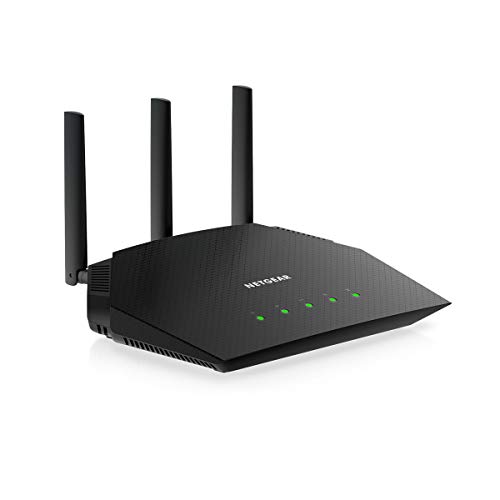
4. NETGEAR Nighthawk R6700AX — Best Nighthawk Pick
- Best for: Nighthawk software, 4-stream Wi-Fi 6, and a busy household.
Nighthawk software, 4-stream Wi-Fi 6, and a busy household.
The NETGEAR Nighthawk R6700AX is a 4-stream Wi-Fi 6 router, with AX1800 wireless speed, coverage for up to 1,500 square feet, support for 20 devices, and the Nighthawk app for setup and management. It is the pick for a gamer who likes the Nighthawk line, wants a straightforward setup, and wants a router that is rated for a busy household.
The R6700AX is a 4-stream AX1800 router, which means it can talk to several devices at once more efficiently than a 2-stream router. That helps when a console, a PC, phones and a television are all active. The Nighthawk app makes setup, speed testing and parental controls easy, and the router includes NETGEAR Armor security features, although some Armor features are tied to a trial or subscription, so check what is included before you buy. NETGEAR rates it for up to 1,500 square feet and 20 devices, which suits a flat or a small house. It is not the fastest router in this guide over Wi-Fi; what you are paying for is the Nighthawk software and the 4-stream design.
Comparison Table
| Router | Wi-Fi | Wired Ports | Best For | Mesh |
|---|---|---|---|---|
| TP-Link Archer AX21 | Wi-Fi 6, AX1800 | 4 gigabit LAN | Cheapest reliable upgrade | EasyMesh |
| ASUS RT-AX1800S | Wi-Fi 6, AX1800 | 4 gigabit LAN | Free security and manual QoS | AiMesh |
| TP-Link Archer AX55 | Wi-Fi 6, AX3000 | 4 gigabit LAN | Best all-round value | EasyMesh |
| NETGEAR Nighthawk R6700AX | Wi-Fi 6, AX1800, 4-stream | 4 gigabit LAN | Nighthawk app and coverage | No mesh system listed |
How to Set Up a Budget Gaming Router
Place the router in the open, at about chest height, near the centre of the home, away from thick walls and metal objects. Do not hide it in a cupboard or on the floor. Wire the gaming device with an Ethernet cable to a gigabit LAN port, and test the ping before and after; you will usually see a steadier result.
Enable QoS and prioritise the gaming device. Turn it on in the router app, set your internet speed correctly, and do not prioritise everything, or nothing is prioritised. Update the firmware on the day you install the router and every few months after that. If the router puts the gaming device on the slower 2.4 GHz band, create separate network names for the two bands and connect the gaming device to 5 GHz in the same room. Test with a wired speed test and a game, and adjust QoS if ping spikes when someone starts a download. A router around 100 dollars will not fix a slow broadband plan, but it will remove the router as the bottleneck.
FAQ
Is a gaming router worth it around 100 dollars?
Yes, if you choose for latency and QoS rather than for branding. A good Wi-Fi 6 router around 100 dollars, with gigabit ports and QoS, will give a lower and steadier ping than an old or basic router, especially in a busy home. It will not make a slow internet plan fast, and it will not fix a distant game server, but it removes the home network as a source of lag.
Do I need Wi-Fi 6 for gaming?
Wi-Fi 6 is the sensible choice for a new router, because it handles many devices more efficiently and is ready for modern PCs, consoles and phones. You can still game well on Wi-Fi 5, and a wired connection matters far more than the Wi-Fi version, but a Wi-Fi 6 router around 100 dollars is good value and will last longer before it needs replacing.
Should I use Wi-Fi or Ethernet for gaming?
Use Ethernet whenever you can. A wired connection is steadier, has lower latency, and is not affected by Wi-Fi interference from neighbours, microwaves or thick walls. Use Wi-Fi for devices that move around the home, and for gaming only when a cable is not practical. If you must use Wi-Fi for gaming, use the 5 GHz band in the same room as the router.
What is QoS, and how do I use it?
QoS, or quality of service, lets the router prioritise some traffic over other traffic when the network is busy. Turn it on in the router app or web interface, set your internet speed, and prioritise the gaming device or gaming traffic. Test a game while someone else streams video, and adjust the priority if the game still lags. Do not prioritise every device, or the feature has no effect.
How many devices can a router around 100 dollars handle?
The routers in this guide are rated for 20 or more devices, and they cope well with a typical home full of phones, laptops, televisions and smart devices. Performance depends on what those devices are doing. A dozen devices browsing the web is easy. A dozen devices streaming 4K video and downloading large files at the same time will test any budget router, which is why QoS and a wired gaming connection matter.
Conclusion
The best gaming routers around 100 dollars are the ones that keep latency low and the connection stable, not the ones with the biggest numbers on the box. For the cheapest reliable upgrade, the TP-Link Archer AX21 gives Wi-Fi 6, gigabit ports and mesh expansion without waste. For deeper control and free security, the ASUS RT-AX1800S offers manual QoS, AiProtection and AiMesh. For the best all-round value, the TP-Link Archer AX55 adds faster AX3000 wireless, a USB 3.0 port and VPN support. For a Nighthawk with a simple app and solid coverage, the NETGEAR Nighthawk R6700AX is the pick.
Whichever you choose, wire the gaming device, enable QoS, place the router in the open, and update the firmware. Do those four things, and a router around 100 dollars will feel fast, stable and responsive, which is exactly what gaming needs.
Disclosure: As an Amazon Associate, we earn from qualifying purchases.
FAQ
Is a gaming router worth it around 100 dollars?
Do I need Wi-Fi 6 for gaming?
Should I use Wi-Fi or Ethernet for gaming?
What is QoS, and how do I use it?
How many devices can a router around 100 dollars handle?
More from Amazon
Programs that pair well with the guide above. Offers and eligibility are set by Amazon and may change.
Free shipping on eligible items, Prime Video and more. Eligible new members can start with a free trial.
Start a Prime free trialAd-free music streaming. Eligible new subscribers can start with a free trial.
Try Music Unlimited freeA Prime membership for ages 18-24 with a trial period. Eligibility is set by Amazon.
See Prime for Young AdultsAudiobooks and podcasts to listen to on the go. Eligible new members can start with a free trial.
Try Audible freeAs an Amazon Associate we earn from qualifying purchases.