Our Short List of 3

All 4 Picks at a Glance
| Product | Specs | Action |
|---|---|---|
 1. ASUS RT-AX86U Pro — Best Overall for Gaming Families | Check price on Amazon | |
 2. TP-Link Archer AXE75 — Best Wi-Fi 6E Value for Families | Check price on Amazon | |
| 3. NETGEAR Nighthawk RAX50 — Best for Large Homes and Living Room Streaming | Check price on Amazon | |
 4. NETGEAR Nighthawk RAXE300 — Best Wi-Fi 6E Pick for Busy Households | Check price on Amazon |
Our Top Picks
- TP-Link AXE5400 Tri-Band WiFi 6E RouterWiFi 6E, Tri-Band AXE540012.91 x 10.43 x 4.72 inches1.5 poundsCheck on Amazon
Introduction: One Router, Two Very Different Evenings
Every evening in a gaming household, the same quiet negotiation plays out over Wi-Fi. In one room, a teenager is deep into an online match where a single lag spike can cost the round. In the living room, a parent is settling in to watch Netflix, expecting the next episode to start instantly in crisp 4K without a buffering wheel. Both share the same connection and the same router, and both expect the network all to themselves.
That is the problem the best gaming routers for parents that watch Netflix are built to solve. A standard router supplied by an internet provider treats every device the same way, so a game download or a 4K stream can crowd out everything else at the worst moment. A good family gaming router recognizes gaming and streaming traffic, gives each what it needs, and keeps the peace without anyone pausing a download.
The picks below are gaming routers chosen with parents in mind, not just players: adaptive quality of service that protects both a match and a movie night, parental controls that actually work, coverage that reaches the bedrooms and the living room, and capacity for a modern family’s phones, tablets, consoles, and smart TVs. Every router here is a real model with an Amazon listing, and every recommendation is based on the specifications published on that listing.
Disclosure: As an Amazon Associate, we earn from qualifying purchases.
How to Choose a Gaming Router When the Whole Family Shares It
Buying a router for a household where kids game and parents stream differs from buying one for a single player. The goal is fair, stable performance for many devices at once, plus controls that let parents set the rules.
Quality of Service That Understands Both Gaming and Streaming
Quality of service, usually shortened to QoS, is the most important feature in a family gaming router: it decides which traffic gets served first when the network is busy. Without it, a large game update can starve a Netflix stream, or a 4K stream can add latency to a match. Look for adaptive or dynamic QoS, which learns what traffic is flowing and adjusts on the fly, so gaming packets get a low-latency path while video keeps a steady flow. Some routers also offer a dedicated gaming port, a single wired LAN port that automatically gives whatever is plugged into it top priority, and per-device priority from a phone app, so a parent can favor the living room TV during movie night or the gaming PC during a tournament.
Tri-Band Wi-Fi and Wi-Fi 6E: Room to Breathe
Dual-band routers broadcast on 2.4 GHz and 5 GHz. Tri-band routers add a third band, and on Wi-Fi 6E models that third band is the new 6 GHz spectrum. For a family, that extra band is genuinely useful: gaming devices get a clean lane of their own while the TV, phones, and tablets share the other bands. Wi-Fi 6 itself is worth having in any new router, because its OFDMA and MU-MIMO technologies let the router serve many devices at once instead of one at a time. Wi-Fi 6E adds wider 160 MHz channels and far less interference from neighbors, and any compatible console, phone, or laptop can use the 6 GHz band.
Parental Controls That Parents Will Actually Use
Parental controls are where family routers separate themselves from pure gaming hardware. The features worth checking are time schedules, content filtering, and per-device profiles. Time schedules let you set internet bedtimes, pause the internet during homework or dinner, and set daily limits without unplugging anything. Content filtering blocks adult sites and malicious pages across every device, including consoles and smart TVs that cannot run their own filtering software. ASUS routers include AiProtection Pro and parental controls at no extra subscription cost, while NETGEAR offers Smart Parental Controls and TP-Link bundles HomeShield parental controls. Check whether advanced filtering requires a paid subscription on the model you choose.
Coverage, Ports, and Security
A router that is fast next to the desk but weak in the far bedroom causes more arguments than any lag spike. Check the coverage figure stated on the listing against your floor plan. If the house is large or multi-storey, look for a router that supports a mesh system, so you can add satellite nodes later instead of replacing the router. Gaming consoles and PCs perform best on a wired connection, so count the Ethernet ports: four gigabit LAN ports is standard, and a 2.5 gigabit port is a bonus for fast internet plans. Several routers below include built-in threat protection without an ongoing subscription, and WPA3 encryption is the current standard to look for.
Top Picks: The Best Gaming Routers for Parents That Watch Netflix
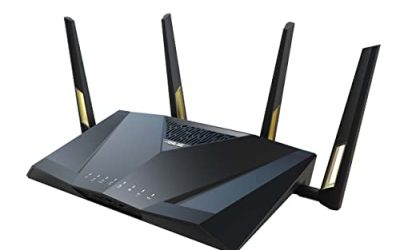
1. ASUS RT-AX86U Pro — Best Overall for Gaming Families
The ASUS RT-AX86U Pro is the strongest all-round choice for a household where kids game and parents stream. It is a dual-band Wi-Fi 6 router rated AX5700, with combined wireless speeds up to 5.7 Gbps across its two bands. A 2.0 GHz quad-core processor and 1 GB of memory keep it responsive with dozens of devices, and Adaptive QoS balances gaming and streaming traffic automatically.
What makes it stand out for parents is the combination of gaming features and family controls in one box. A dedicated gaming port gives the wired gaming PC or console automatic top priority without any configuration, and Mobile Game Mode boosts a phone game from the ASUS Router app with a single tap. AiProtection Pro provides subscription-free network security, and parental controls allow time schedules, content filtering, and per-device rules from the same app. The router is also AiMesh compatible, so it can become the hub of a mesh network later. Key specs include a 2.5 gigabit WAN/LAN port, four gigabit LAN ports, a USB 3.2 port, VPN, port forwarding, and Open NAT for consoles.
Pros: Adaptive QoS balances gaming and 4K streaming; dedicated gaming port gives a wired console or PC instant priority; AiProtection Pro and parental controls with no subscription; 2.5 gigabit port for fast plans; AiMesh support for later expansion.
Cons: Dual-band only, with no 6 GHz band; gaming-focused design may look out of place in a living room; advanced features take time to explore.
Who it is for: Families who want one router for serious gaming and nightly Netflix without constant tweaking, and parents who value strong controls with no ongoing fee.
Check the ASUS RT-AX86U Pro on Amazon — ASIN B0BQ417K47.
2. TP-Link Archer AXE75 — Best Wi-Fi 6E Value for Families
The TP-Link Archer AXE75 brings Wi-Fi 6E into a family-friendly package. It is a tri-band AXE5400 router, with speeds up to 574 Mbps on 2.4 GHz, 2,402 Mbps on 5 GHz, and 2,402 Mbps on the new 6 GHz band. That third band is the key feature for a shared household. A Wi-Fi 6E laptop, phone, or console can use the clean 6 GHz lane while the living room TV streams Netflix on 5 GHz, so the two evening activities stop competing for the same airwaves.
TP-Link’s HomeShield covers the parental side, with parental controls, time limits, content filtering, security scanning, and QoS settings, all managed from the Tether app. A 2.5 gigabit WAN port supports fast internet plans, and OneMesh compatibility means the router can join a TP-Link mesh network with compatible extenders. Six high-performance antennas and Beamforming help the signal reach bedrooms and living spaces, with VPN and WPA3 security.
Pros: 6 GHz band gives gaming devices a clear lane away from streaming traffic; HomeShield parental controls and QoS in one app; 2.5 gigabit WAN port for fast plans; strong value for a Wi-Fi 6E tri-band router; OneMesh support for whole-home expansion.
Cons: Some advanced HomeShield features need a subscription after the included period; no dedicated gaming port, so priority is managed in software; six antennas make it a large unit.
Who it is for: Families with a fast internet plan and at least one Wi-Fi 6E device, who want the newest spectrum separating gaming from streaming.
Check the TP-Link Archer AXE75 on Amazon — ASIN B0B3SQK74L.
3. NETGEAR Nighthawk RAX50 — Best for Large Homes and Living Room Streaming
The NETGEAR Nighthawk RAX50 is the coverage-led pick in this roundup. Its listing states coverage of up to 2,500 square feet for up to 25 devices, a natural fit for a larger family home where the router must reach a living room TV at one end and gaming bedrooms at the other. It is a dual-band Wi-Fi 6 AX5400 router, with combined speeds of up to 5.4 Gbps over six Wi-Fi streams.
For the nightly gaming-versus-Netflix balance, the RAX50 uses Dynamic QoS, which automatically recognizes and prioritizes gaming and streaming traffic. NETGEAR Armor provides network-wide security, and Smart Parental Controls let parents filter content, set time limits, and pause the internet by device in the Nighthawk app. Smart Connect uses a single network name and steers each device to the best band. Key specs include a 1.5 GHz triple-core processor, five gigabit Ethernet ports, and one USB 3.0 port.
Pros: Stated 2,500 square foot coverage suits larger homes; Dynamic QoS prioritizes gaming and streaming automatically; Smart Parental Controls with per-device schedules; five gigabit ports for wired consoles and PCs; simple single-network-name setup.
Cons: Dual-band only, with no 6 GHz band; NETGEAR Armor advanced security needs a subscription after the trial; its winged Nighthawk design is large and distinctive.
Who it is for: Families in larger homes where one router must cover the living room TV and distant bedrooms, and parents who want app-based controls.
Check the NETGEAR Nighthawk RAX50 on Amazon — ASIN B082X17B8P.
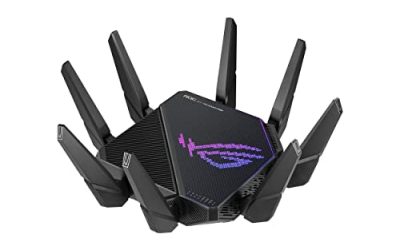
4. NETGEAR Nighthawk RAXE300 — Best Wi-Fi 6E Pick for Busy Households
The NETGEAR Nighthawk RAXE300 steps the family network up to Wi-Fi 6E. It is a tri-band AXE7800 router with combined speeds of up to 7.8 Gbps (574 Mbps on 2.4 GHz, 4,804 Mbps on 5 GHz, and 2,402 Mbps on 6 GHz). Eight Wi-Fi streams and support for up to 40 devices give it capacity for a household where gaming, 4K streaming, video calls, homework, and smart home gadgets all happen at once. Coverage is stated at up to 2,500 square feet.
In practice, the 6 GHz band is what earns this router its place here. A Wi-Fi 6E console or gaming laptop can run on the uncongested 6 GHz band while Netflix streams in 4K on 5 GHz, so neither activity interferes with the other. A 1.7 GHz quad-core processor and 512 MB of memory keep routing smooth, and the wired side includes a 2.5 gigabit Ethernet port alongside four gigabit LAN ports. NETGEAR Armor and Smart Parental Controls cover security and family management, and six internal antennas keep the winged Nighthawk look tidy.
Pros: 6 GHz band separates gaming traffic from Netflix streaming; capacity for up to 40 devices; 2.5 gigabit port for wired gaming rigs and fast plans; strong stated coverage for a single router; six internal antennas for a cleaner look.
Cons: NETGEAR Armor advanced features need a subscription after the trial; a Renewed listing circulates under a separate code, so confirm the new condition at checkout; more router than a small household needs.
Who it is for: Large, device-heavy families who want Wi-Fi 6E headroom, and households keeping the same router for years as more devices gain 6 GHz support.
Check the NETGEAR Nighthawk RAXE300 on Amazon — ASIN B0B1LZMH78.
5. ASUS RT-AX58U — Best Budget Pick for Smaller Family Homes
The ASUS RT-AX58U is the sensible budget choice for a smaller family home. It is a dual-band Wi-Fi 6 router rated AX3000, with speeds of up to 2,402 Mbps on 5 GHz and 574 Mbps on 2.4 GHz, plus OFDMA, MU-MIMO, and 160 MHz channel support: more than enough for online gaming and 4K Netflix on a typical family internet plan.
What makes it remarkable for the money is that it carries the same family software as the more expensive ASUS routers. AiProtection Pro provides lifetime network security with no subscription, and parental controls include time scheduling, content filtering, and per-device profiles through the ASUS Router app. Adaptive QoS balances gaming and streaming traffic automatically, and AiMesh compatibility means it can later join a mesh network. Key specs include a 1.5 GHz tri-core processor in V1 hardware or a 1.7 GHz quad-core in V2 hardware, 256 MB of flash and 512 MB of RAM, four gigabit LAN ports, one gigabit WAN port, and one USB 3.2 Gen 1 port.
Pros: AiProtection Pro and parental controls with no subscription; Adaptive QoS balances gaming and streaming; AiMesh support for future expansion; compact size fits easily on a shelf; strong value for a Wi-Fi 6 router.
Cons: AX3000 speed and dual-band design offer less headroom than the picks above; no 2.5 gigabit port for very fast plans; a Renewed version circulates under the RT-AX3000 name, so confirm the new RT-AX58U listing at checkout.
Who it is for: Families in smaller homes who want real parental controls and gaming-aware QoS without paying for speed their internet plan cannot use.
Check the ASUS RT-AX58U on Amazon — ASIN B07PYZJ2V7.
Comparison Table
| Router | Wi-Fi Standard | Top Speed | Bands | Stated Coverage | Parental Controls | Best For |
|---|---|---|---|---|---|---|
| ASUS RT-AX86U Pro | Wi-Fi 6 | AX5700 | Dual-band | Not stated | AiProtection Pro, app schedules and filtering | Best overall |
| TP-Link Archer AXE75 | Wi-Fi 6E | AXE5400 | Tri-band with 6 GHz | Not stated on listing | HomeShield parental controls | Best Wi-Fi 6E value |
| NETGEAR Nighthawk RAX50 | Wi-Fi 6 | AX5400 | Dual-band | Up to 2,500 sq. ft. | Smart Parental Controls | Large homes |
| NETGEAR Nighthawk RAXE300 | Wi-Fi 6E | AXE7800 | Tri-band with 6 GHz | Up to 2,500 sq. ft. | Smart Parental Controls | Busy households |
| ASUS RT-AX58U | Wi-Fi 6 | AX3000 | Dual-band | Not stated on listing | AiProtection Pro, app schedules and filtering | Smaller homes |
Frequently Asked Questions
Can one router really handle gaming and Netflix at the same time?
Yes, provided the router has adaptive QoS and enough capacity for the household. QoS gives gaming packets a low-latency path while keeping a steady lane open for video, so a match and a 4K stream can run side by side. Tri-band routers help by putting gaming devices on a separate band.
How much internet speed do I need for gaming plus 4K Netflix?
Online gaming uses relatively little bandwidth during play, but it is very sensitive to latency and jitter. A 4K Netflix stream needs a steady 15 to 25 Mbps. The real demand comes from everything happening at once: the stream, the game, downloads, and video calls. A plan of 200 Mbps or more gives a family headroom.
Do I need Wi-Fi 6E for a family gaming router?
Not necessarily, but it helps in busy homes. Wi-Fi 6E adds the 6 GHz band, free of congestion on 2.4 GHz and 5 GHz in crowded neighborhoods. If any gaming device supports Wi-Fi 6E, it can use that clean band while the TV streams on 5 GHz. If no device supports it yet, a good Wi-Fi 6 router with adaptive QoS will still serve the household well.
What parental controls matter most on a gaming router?
Time schedules matter most, because they let parents set internet bedtimes and homework hours per device without arguments or unplugging cables. Content filtering is next, since it protects consoles and smart TVs that cannot run their own filtering apps. Per-device profiles give each child their own rules while the adults keep full access. Check whether advanced filtering needs a subscription.
Should the gaming console or PC be wired or on Wi-Fi?
Wired is better whenever it is practical. An Ethernet cable removes Wi-Fi interference and gives the most stable latency, which online games reward. If the console sits near the router, use a cable and, on routers that have one, plug it into the dedicated gaming port. For devices in other rooms, a strong 5 GHz or 6 GHz signal is the next best option.
Conclusion: Pick the Router That Keeps the Peace
The best gaming router for a family is not the one with the biggest numbers on the box. It is the one that lets a teenager play without lag while a parent watches Netflix in 4K, and lets the parent set the rules for both. Adaptive QoS does the heavy lifting, parental controls set the boundaries, and good coverage includes the whole house.
For most gaming families, the ASUS RT-AX86U Pro is the safest choice, with its dedicated gaming port, adaptive QoS, and subscription-free controls. Households with Wi-Fi 6E devices should look at the TP-Link Archer AXE75 for value or the NETGEAR Nighthawk RAXE300 for maximum capacity. Larger homes will appreciate the stated coverage of the Nighthawk RAX50, and smaller homes on a tighter budget get genuine family features from the ASUS RT-AX58U. Set up the QoS rules and parental schedules on day one: a few minutes in the app turns a fast router into a family one.
FAQ
Can one router really handle gaming and Netflix at the same time?
How much internet speed do I need for gaming plus 4K Netflix?
Do I need Wi-Fi 6E for a family gaming router?
What parental controls matter most on a gaming router?
Should the gaming console or PC be wired or on Wi-Fi?
More from Amazon
Programs that pair well with the guide above. Offers and eligibility are set by Amazon and may change.
Free shipping on eligible items, Prime Video and more. Eligible new members can start with a free trial.
Start a Prime free trialAd-free music streaming. Eligible new subscribers can start with a free trial.
Try Music Unlimited freeA Prime membership for ages 18-24 with a trial period. Eligibility is set by Amazon.
See Prime for Young AdultsAudiobooks and podcasts to listen to on the go. Eligible new members can start with a free trial.
Try Audible freeAs an Amazon Associate we earn from qualifying purchases.