Our Short List of 3

- Wi-Fi 6 tri-band, up to 11,000 Mbps combined
- 2.0 GHz quad-core processor, 1 GB DDR4 RAM
- 10 Gbps WAN/LAN port, 2.5 Gbps port, 4 x gigabit LAN
- Dedicated gaming port, triple-level game acceleration, VPN Fusion

- Wi-Fi 6 dual-band, AX5400, up to 5,400 Mbps combined
- DumaOS 3.0 with geo-filter, ping heatmap, and bandwidth allocation
- 4 x gigabit Ethernet LAN ports, 1 x USB 3.0 port
- NETGEAR Armor security, Nighthawk app

- Wi-Fi 6 dual-band, AX5700, up to 5,700 Mbps combined
- 2.0 GHz quad-core processor
- 2.5 Gbps port, dedicated gaming port, 4 x gigabit LAN
- Adaptive QoS, Mobile Game Mode, Open NAT
All 5 Picks at a Glance
| Product | Specs | Action |
|---|---|---|
| 1. ASUS ROG Rapture GT-AX11000 Pro — Best Overall Gamer Router |
| Check price on Amazon |
| 2. NETGEAR Nighthawk Pro Gaming XR1000 — Best for Competitive Ping Control |
| Check price on Amazon |
| 3. ASUS RT-AX86U Pro — Best Value Gaming Router |
| Check price on Amazon |
 4. ASUS ROG Rapture GT-AX6000 — Best Mid-Range Gamer Router |
| Check price on Amazon |
 5. MSI RadiX AXE6600 — Best Wi-Fi 6E Gamer Router |
| Check price on Amazon |
Our Top Picks
- NETGEAR Nighthawk Pro Gaming 6-Stream WiFi 6 RouterExtra Large11.61 x 7.87 x 2.51 inches1.32 poundsCheck on Amazon
Disclosure: As an Amazon Associate, we earn from qualifying purchases.
Introduction
A fast internet plan is only half of the story for online gaming. The router between your connection and your PC or console decides how that speed is shared, how stable your ping stays when someone else starts a download, and how quickly game traffic reaches the server. A basic router supplied by an internet provider can handle browsing and video, yet it often struggles when a match, a voice chat, and a game update compete for bandwidth at once.
The best gamer routers are built for exactly that situation. They prioritise game traffic, offer wired ports that keep a gaming PC or console on a stable connection, and use modern Wi-Fi standards to cut congestion in busy households. This guide rounds up five strong picks, from a value choice for a single gamer to a flagship for a whole household of players.
How to Choose a Gamer Router
Latency Matters More Than Raw Speed
Router marketing leans heavily on headline wireless speeds, often quoted as a combined total across every band. For gaming, those numbers matter far less than latency. A stable ping in the low tens of milliseconds, with minimal jitter and no packet loss, is what keeps your shots registering and your movement feeling responsive.
Look for a router with a dedicated gaming mode or adaptive Quality of Service, often shortened to QoS. These features identify game traffic and move it to the front of the queue, so a background download or a cloud backup does not cause your ping to jump at the worst moment.
Wired Connections Still Win for Competitive Play
Wi-Fi 6 and Wi-Fi 6E can deliver an excellent wireless gaming experience in the same room as the router. Even so, a wired Ethernet connection remains the most reliable option for competitive play, because it removes wireless interference and delivers the most consistent latency.
Check how many LAN ports a router offers and what speed they run at. Four gigabit LAN ports are a sensible minimum for a gaming household, covering a PC, a console, and a streaming device. A dedicated gaming port is even better: plug your PC or console into that port and the router automatically gives it priority over other wired devices.
Wi-Fi 6, Wi-Fi 6E, and Wi-Fi 7 Explained
Wi-Fi 6, also known as 802.11ax, is the current sweet spot for most gamers. It handles many connected devices far better than older Wi-Fi 5 hardware, thanks to technologies called OFDMA and MU-MIMO that let the router serve several devices at once instead of taking turns.
Wi-Fi 6E adds a third band on the 6 GHz frequency. That band is much less crowded than the 2.4 GHz and 5 GHz bands, so it can deliver lower latency and cleaner throughput for devices that support it. The catch is range: the 6 GHz signal does not travel through walls as well as 5 GHz, so it works best in the same room as the router.
Coverage and Placement
A gaming router cannot fix a bad location. Routers perform best when placed in the open, roughly at chest height, near the centre of the area you use most, and away from thick walls, metal objects, and other electronics that cause interference. External antennas help, and most gaming routers have four or more of them.
Security and Software
A router is the gateway to everything on your home network, so its software matters. Look for WPA3 encryption, automatic firmware updates, and built-in network security that blocks malicious sites without requiring a subscription. A clear companion app is also valuable: it lets you pause devices, set up a guest network, and adjust QoS settings from your phone.
Top Picks
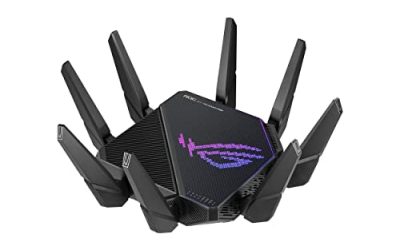
1. ASUS ROG Rapture GT-AX11000 Pro — Best Overall Gamer Router
- Wi-Fi 6 tri-band, up to 11,000 Mbps combined
- 2.0 GHz quad-core processor, 1 GB DDR4 RAM
- 10 Gbps WAN/LAN port, 2.5 Gbps port, 4 x gigabit LAN
- Dedicated gaming port, triple-level game acceleration, VPN Fusion
The ASUS ROG Rapture GT-AX11000 Pro is the flagship pick in this roundup, with tri-band Wi-Fi 6, serious wired connectivity, and the most complete gaming feature set ASUS offers. A 2.0 GHz quad-core processor and 1 GB of DDR4 RAM drive the tri-band wireless, which combines a 2.4 GHz band with two 5 GHz bands for a combined rating of up to 11,000 Mbps.
Wired connectivity is a highlight. The router offers a 10 Gbps WAN/LAN port alongside a 2.5 Gbps port, plus four gigabit LAN ports. Gaming features include triple-level game acceleration, which prioritises game traffic at the device, the game server, and the network level, plus a gaming port that automatically gives a wired PC or console top priority.
Key specs:
Pros:
Cons:
Who it is for: Competitive and multi-gamer households that want the most capable Wi-Fi 6 gaming router available, with wired speed to spare and room to grow.
2. NETGEAR Nighthawk Pro Gaming XR1000 — Best for Competitive Ping Control
- Wi-Fi 6 dual-band, AX5400, up to 5,400 Mbps combined
- DumaOS 3.0 with geo-filter, ping heatmap, and bandwidth allocation
- 4 x gigabit Ethernet LAN ports, 1 x USB 3.0 port
- NETGEAR Armor security, Nighthawk app
The NETGEAR Nighthawk Pro Gaming XR1000 is the pick for players who want direct control over their connection quality. Its headline feature is DumaOS 3.0, a gaming operating system that puts ping, server selection, and bandwidth allocation front and centre.
DumaOS includes a geo-filter that lets you set a distance limit for game servers, helping you avoid distant servers that add latency to every match. A ping heatmap shows latency to different servers before you join, and a bandwidth allocation panel lets you reserve a share of your connection for gaming while capping what other devices can consume.
Wi-Fi 6 wireless is rated at up to 5,400 Mbps combined. Four gigabit LAN ports cover a wired PC and console, and a USB 3.0 port lets you share a drive across the network.
Key specs:
Pros:
Cons:
Who it is for: Competitive players who want to control ping, choose servers, and protect gaming bandwidth from other devices on the network.
3. ASUS RT-AX86U Pro — Best Value Gaming Router
- Wi-Fi 6 dual-band, AX5700, up to 5,700 Mbps combined
- 2.0 GHz quad-core processor
- 2.5 Gbps port, dedicated gaming port, 4 x gigabit LAN
- Adaptive QoS, Mobile Game Mode, Open NAT
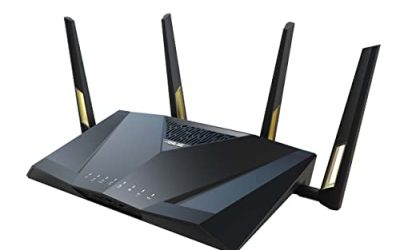
The ASUS RT-AX86U Pro is the value pick in this roundup, and it is the one most gamers should start with. It delivers the gaming features that matter most — a dedicated gaming port, adaptive QoS, and a fast 2.5 Gbps port — in a dual-band Wi-Fi 6 package, while still handling a busy gaming household with ease.
Its dual-band Wi-Fi 6 wireless is rated at AX5700, combining a 2.4 GHz band with a 5 GHz band.
The gaming port is the standout feature at this level. Connect a PC or console to that port and the router automatically prioritises its traffic above other wired devices, with no configuration required.
Key specs:
Pros:
Cons:
Who it is for: Most gamers — especially anyone upgrading from a provider-supplied router who wants a clear step up in latency control and wired speed without paying flagship money.
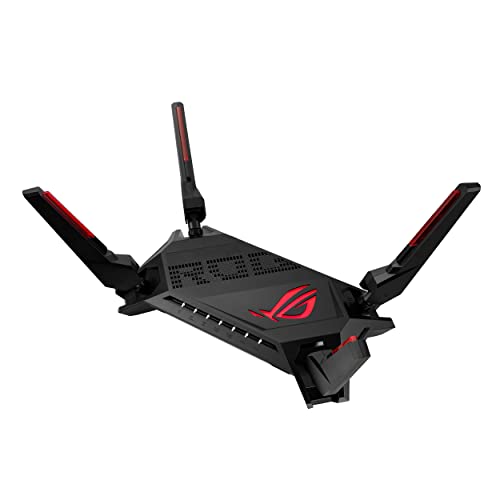
4. ASUS ROG Rapture GT-AX6000 — Best Mid-Range Gamer Router
- Wi-Fi 6 dual-band, up to 6,000 Mbps combined
- 2.0 GHz quad-core processor
- Dual 2.5 Gbps WAN/LAN ports, 4 x gigabit LAN
- Triple-level game acceleration, VPN Fusion, WAN aggregation
The ASUS ROG Rapture GT-AX6000 sits between the value-focused RT-AX86U Pro and the flagship GT-AX11000 Pro, and it is an appealing middle ground for gamers who want dual 2.5 Gbps ports without stepping up to the largest router in the range. It carries the ROG gaming feature set in full, with dual-band Wi-Fi 6 wireless rated at a combined 6,000 Mbps.
Two 2.5 Gbps ports are the headline here. One can serve as the WAN connection to a fast modem, while the other connects a gaming PC or NAS at multi-gigabit speed, and WAN aggregation can combine them for even more throughput where the internet plan supports it.
Key specs:
Pros:
Cons:
Who it is for: Gamers with a fast internet plan who want dual multi-gigabit ports and the full ROG feature set, without stepping up to the flagship model.
5. MSI RadiX AXE6600 — Best Wi-Fi 6E Gamer Router
- Wi-Fi 6E tri-band, up to 6,600 Mbps combined
- 1.8 GHz quad-core processor
- 2.5 Gbps WAN/LAN port, 4 x gigabit LAN, 1 x USB 3.0
- AI QoS, Game Accelerator, Mystic Light RGB
The MSI RadiX AXE6600 is the Wi-Fi 6E pick in this roundup, and it is the right choice if your gaming laptop, phone, or console already supports the 6 GHz band. That extra band is the cleanest wireless spectrum available in a home network, with far less interference from neighbours than the crowded 2.4 GHz and 5 GHz bands, and it can deliver noticeably steadier wireless latency for nearby devices.
The router is tri-band, combining 2.4 GHz, 5 GHz, and 6 GHz bands for a combined rating of up to 6,600 Mbps.
Wired connectivity includes a 2.5 Gbps WAN/LAN port and four gigabit LAN ports, plus a USB 3.0 port. That covers a wired gaming PC and console with room for more, and the 2.5 Gbps port is a good match for a fast internet plan.
Key specs:
Pros:
Cons:
Who it is for: Gamers whose devices support Wi-Fi 6E and who play near the router, or anyone building a modern wireless setup with the cleanest available spectrum.
Comparison Table
| Router | Wi-Fi Standard | Combined Wireless Rating | Fastest Wired Port | Gaming Port | Standout Feature |
|---|---|---|---|---|---|
| ASUS ROG Rapture GT-AX11000 Pro | Wi-Fi 6 tri-band | Up to 11,000 Mbps | 10 Gbps | Yes | Triple-level game acceleration, 10 Gbps port |
| NETGEAR Nighthawk Pro Gaming XR1000 | Wi-Fi 6 dual-band | Up to 5,400 Mbps | 1 Gbps | No | DumaOS geo-filter and ping heatmap |
| ASUS RT-AX86U Pro | Wi-Fi 6 dual-band | Up to 5,700 Mbps | 2.5 Gbps | Yes | Best value, Open NAT, Mobile Game Mode |
| ASUS ROG Rapture GT-AX6000 | Wi-Fi 6 dual-band | Up to 6,000 Mbps | 2.5 Gbps | No | Dual 2.5 Gbps ports, WAN aggregation |
| MSI RadiX AXE6600 | Wi-Fi 6E tri-band | Up to 6,600 Mbps | 2.5 Gbps | No | 6 GHz band, AI QoS |
Frequently Asked Questions
Do I really need a gaming router, or will any fast router work?
A fast standard router can work well for gaming, particularly if you play on a wired connection and your household network is quiet. A gaming router earns its place when several devices compete for bandwidth, when you play ranked games where latency matters, or when you want tools like adaptive QoS, a gaming port, and server selection to keep your connection stable.
Is a wired connection always better than Wi-Fi for gaming?
For competitive play, yes. A wired Ethernet connection removes wireless interference and delivers the most consistent latency, which is why serious players wire their PC or console directly to the router. The best approach is to wire the device you compete on and use Wi-Fi for everything else.
What is QoS, and should I turn it on?
QoS stands for Quality of Service. It identifies different types of traffic on your network and gives priority to the types you choose, such as gaming or voice chat, over less time-sensitive traffic like downloads and cloud backups. On a gaming router, turning on the gaming QoS preset is usually the single most effective setting change you can make.
Does Wi-Fi 6E make a difference for gaming?
Wi-Fi 6E adds a 6 GHz band that is much less crowded than the 2.4 GHz and 5 GHz bands, which can mean lower latency and cleaner throughput for devices that support it. The trade-off is range: the 6 GHz signal does not pass through walls as well as 5 GHz, so it works best in the same room as the router.
How many devices can a gaming router handle?
Most modern gaming routers comfortably handle dozens of connected devices, thanks to Wi-Fi 6 features that serve several devices at once. In practice, the limit that matters for gaming is not the device count but the total bandwidth those devices consume at the same time.
Should I choose Wi-Fi 6, Wi-Fi 6E, or Wi-Fi 7?
For most gamers, Wi-Fi 6 is the sensible choice, with Wi-Fi 6E worth the step up if your devices support the 6 GHz band and you play near the router. Wi-Fi 7 is the newest standard and promises lower latency and wider channels, but routers and devices that support it still carry a premium, and relatively few gaming devices use it yet.
Conclusion
The best gamer routers share a simple goal: keep game traffic first in line, keep latency low and steady, and give you the tools to understand your network when something goes wrong. Raw wireless speed figures matter far less than stable ping, smart traffic prioritisation, and a wired connection for the device you compete on.
The ASUS RT-AX86U Pro suits most gamers, while the NETGEAR XR1000 suits competitive players who want direct ping control. The ASUS ROG Rapture GT-AX6000 adds dual 2.5 Gbps ports for faster plans, the MSI RadiX AXE6600 brings the clean 6 GHz band of Wi-Fi 6E, and the ASUS ROG Rapture GT-AX11000 Pro stands as the most capable all-rounder in this guide.
Wire your main gaming device to the router, enable the gaming QoS preset, and place the router where its signal reaches your setup cleanly.
FAQ
Do I really need a gaming router, or will any fast router work?
Is a wired connection always better than Wi-Fi for gaming?
What is QoS, and should I turn it on?
Does Wi-Fi 6E make a difference for gaming?
How many devices can a gaming router handle?
Should I choose Wi-Fi 6, Wi-Fi 6E, or Wi-Fi 7?
More from Amazon
Programs that pair well with the guide above. Offers and eligibility are set by Amazon and may change.
Free shipping on eligible items, Prime Video and more. Eligible new members can start with a free trial.
Start a Prime free trialAd-free music streaming. Eligible new subscribers can start with a free trial.
Try Music Unlimited freeA Prime membership for ages 18-24 with a trial period. Eligibility is set by Amazon.
See Prime for Young AdultsAudiobooks and podcasts to listen to on the go. Eligible new members can start with a free trial.
Try Audible freeAs an Amazon Associate we earn from qualifying purchases.