Our Short List of 3
All 3 Picks at a Glance
| Product | Specs | Action |
|---|---|---|
 1. Epson Home Cinema 2350 — Best Overall for a 120 Inch Screen | Check price on Amazon | |
 2. ViewSonic PX701-4K — Best for Gaming on a 120 Inch Screen | Check price on Amazon | |
 3. BenQ TK710 — Best Laser Pick for a 120 Inch Screen | Check price on Amazon |
Key takeaways
- Find the best projectors for 120 inch screen setups with our guide to brightness, throw distance, resolution, and top picks for movies and gaming at home.
Finding the best projectors for 120 inch screen setups is mostly a question of brightness, resolution, and room size. A 120 inch image covers a large area, so a projector that looks fine at 80 inches can look washed out or soft when the picture is stretched wider. The good news is that you do not need a dedicated cinema room or an exotic model to get a satisfying result. A well chosen home theater projector with enough light output, true high resolution, and a throw distance that fits your room can fill a 120 inch screen with a bright, detailed image for movies, sport, and gaming.
A 120 inch screen measures about 104 inches wide and 59 inches tall in the common 16:9 format, with a diagonal of 120 inches. That is a lot of surface to light evenly. Before you buy, measure your seating distance, your available throw distance, and the amount of light in the room. Those three facts will narrow the choice far faster than comparing spec sheets alone. This guide explains what to look for, then recommends three projectors that handle a 120 inch image well in different kinds of rooms.
How to Choose a Projector for a 120 Inch Screen
Brightness matters more at this size
Brightness is the first filter for a 120 inch screen. In a dark room, 1,500 to 2,500 ANSI lumens can be enough. With dim, controlled lighting, aim for about 2,500 to 3,000 ANSI lumens. In a living room with lamps on or indirect daylight, 3,000 to 4,000 ANSI lumens plus an ambient light rejecting screen gives a much better result.
Be careful with lumen figures that do not name a standard. ANSI lumens, ISO lumens, and CVIA lumens are measured in comparable ways, while plain marketing lumens often are not. A projector advertised at 15,000 or 20,000 lumens without an ANSI or ISO label is usually describing a very different measurement, and the real brightness can be far lower. Compare ANSI or ISO figures where possible, and treat unlabelled numbers with caution.
Also remember that a projector rarely delivers its full rated brightness in its most accurate picture mode. Calibrated or cinema modes often produce roughly 60 to 75 percent of the headline figure. That is normal, and it is another reason to leave headroom in your brightness target rather than buying the dimmest model that technically qualifies.
Resolution and sharpness
At 120 inches, resolution is easy to see. Native 1080p is the minimum worth considering, and native 4K is noticeably sharper for films, detailed games, and text-heavy content. Some projectors use pixel shifting to produce a 4K image from a lower resolution chip, and good implementations of that approach can look very close to native 4K at normal seating distances. Others only accept a 4K signal and display it at 1080p, which is a different thing entirely, so check whether the specification says native 4K or 4K compatible.
Contrast matters too. A projector with weak contrast will show greyish blacks in dark scenes, which is more obvious on a large screen. Look for a solid contrast ratio, a good HDR mode, and picture settings that let you adjust brightness, colour, and gamma without crushing shadow detail.
Throw distance and placement
Throw distance is the distance from the projector lens to the screen. A standard throw projector typically needs about 10 to 14 feet to fill a 120 inch screen, depending on its zoom range and throw ratio. A short throw model needs less room, while an ultra short throw model sits just below the screen. Measure your room first, then check the throw ratio in the manual or on the maker site.
Lens shift and zoom make placement far easier. Vertical lens shift lets you move the image up or down without tilting the projector, which avoids keystone distortion. A 1.3x zoom gives useful flexibility if your shelf or ceiling mount is not in the ideal spot. Digital keystone correction can help in a pinch, but it crops and rescales the image, so optical adjustment is preferable where possible.
Room light and screen choice
The room and the screen work together. A matte white screen is a good default for a dark room, with a gain of about 1.0. An ambient light rejecting screen helps in a brighter living room by rejecting light from above and from the sides, although it can narrow the viewing angle and cost more. A grey screen can improve perceived black levels in a room with some light, at the cost of a little brightness.
Wall colour matters as well. Light coloured walls reflect the projected image back into the room and wash out dark scenes. Darker walls, curtains, and a dark ceiling improve contrast more cheaply than almost any hardware upgrade. If you cannot darken the whole room, start with curtains over the windows nearest the screen.
Gaming and streaming features
If you plan to game on a 120 inch screen, check input lag and refresh rate. An input lag of 16 milliseconds or less at 4K and 60 frames per second is a good target for most players, while competitive players will want even lower lag at 1080p and higher refresh rates. A 240 hertz refresh rate at 1080p is useful for fast PC games, even if you watch films at lower frame rates.
Built in streaming can be convenient, but it is not essential. Many buyers prefer a separate streaming stick or console because the apps stay updated longer and the interface is faster. Built in speakers are useful for casual viewing, but a soundbar or a home theater system will sound far better at this screen size, so do not let speaker power decide the purchase.
Lamp versus laser
Lamp projectors are usually cheaper to buy, and a replacement lamp is a known running cost. Laser projectors cost more up front, but the light source lasts much longer, holds its brightness more steadily, and starts instantly without a warm up period. LED projectors sit between the two in many cases, with long life and no lamp to replace. For a projector that will be used most evenings, a laser or LED light source is worth considering, while occasional use makes a lamp model perfectly sensible.
Top Picks
1. Epson Home Cinema 2350 — Best Overall for a 120 Inch Screen
The Epson Home Cinema 2350 is a strong all round choice for a 120 inch screen. It uses a 3-chip 3LCD design with 4K PRO-UHD resolution, HDR10 and HLG support, and 2,800 lumens of colour and white brightness. The 3LCD design produces colour brightness equal to its white brightness, which helps films and games look vivid rather than washed out, even in a room with some ambient light.
Placement is flexible, with vertical lens shift, a 1.6x zoom, and keystone correction, so it suits both ceiling mounts and shelf setups. Android TV is built in, which covers streaming without an extra device, and low latency modes make it a capable gaming projector as well. It can project images far larger than 120 inches, but at this size it has enough brightness and sharpness to keep the picture punchy in a dim or moderately lit room.
This is the pick to choose if you want one projector that handles movies, sport, and gaming without demanding a fully darkened room or a complicated setup.
View the Epson Home Cinema 2350 on Amazon
Why it fits a 120 inch screen: 2,800 lumens, 4K PRO-UHD resolution, flexible lens shift and zoom, and built in streaming.
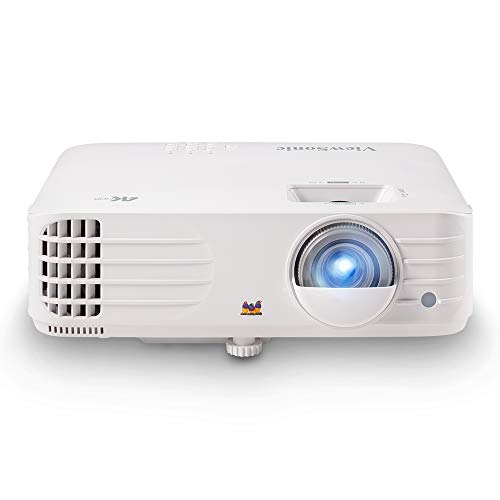
2. ViewSonic PX701-4K — Best for Gaming on a 120 Inch Screen
The ViewSonic PX701-4K is a true 4K projector rated at 3,200 lumens, with a 240 hertz refresh rate and low input lag for gaming. That combination makes it a good fit for a large screen where fast motion needs to stay sharp, whether you are playing a racing game, a shooter, or watching fast paced sport. Dual HDMI inputs make it easy to connect a console and a PC or streaming device at the same time.
HDR support helps bright highlights stand out, and auto keystone correction simplifies setup when the projector cannot sit perfectly square to the screen. It also has horizontal and vertical lens shift, which is useful when the mounting position is slightly off centre. The lamp based design keeps the purchase cost lower than many laser models, while the high brightness gives it headroom for a 120 inch image in a room that is not fully dark.
Choose this model if gaming is a priority and you want a bright, sharp 4K image without moving to a laser projector.
View the ViewSonic PX701-4K on Amazon
Why it fits a 120 inch screen: true 4K resolution, 3,200 lumens, 240 hertz refresh rate, and low input lag.
3. BenQ TK710 — Best Laser Pick for a 120 Inch Screen
The BenQ TK710 is a 4K laser projector rated at 3,200 ANSI lumens, with HDR10 and HLG support, a 240 hertz refresh rate, and low input lag. The laser light source is a real advantage for a projector that will be used often: it holds its brightness over a long life, starts quickly, and avoids lamp replacements. For a 120 inch screen, that steady output helps the image stay consistent from the first month to several years later.
Gaming performance is a strength here, with fast response times and dedicated HDR game modes. Vertical lens shift, 3D keystone correction, and a 1.3x zoom give reasonable placement flexibility, and eARC support makes it easy to connect to a soundbar or receiver for better audio. It is a good match for a living room or media room where the projector is the main display and gets heavy use.
Choose this model if you want a laser projector with bright, stable output and strong gaming performance for a large screen.
Why it fits a 120 inch screen: laser light source, 3,200 ANSI lumens, native 4K, and fast gaming response.
Comparison Table
| Projector | Resolution | Brightness | Light Source | Best For |
|---|---|---|---|---|
| Epson Home Cinema 2350 | 4K PRO-UHD | 2,800 lumens | Lamp | All round home cinema |
| ViewSonic PX701-4K | True 4K | 3,200 lumens | Lamp | Gaming and bright rooms |
| BenQ TK710 | Native 4K | 3,200 ANSI lumens | Laser | Long term, heavy use |
Setting Up Your 120 Inch Screen
Start by choosing the screen size in relation to your seating distance. A common guideline is to sit about 1.5 times the screen width away, which for a 120 inch screen is roughly 13 feet, although many viewers sit closer for a more immersive picture. Sit too close and you may see pixel structure or have to move your eyes across the image; sit too far and the large screen loses its impact.
Mount the projector at the correct height, usually with the lens roughly level with the top or bottom edge of the screen, depending on the model and its lens shift range. Use the zoom and lens shift to fill the screen before touching digital keystone. Then set the focus carefully using a detailed test image or a menu with fine text, and check the corners as well as the centre.
Calibrate the picture after the projector has warmed up. Start with the cinema or movie picture mode, turn off excessive sharpening and motion smoothing for films, and adjust brightness so that dark scenes keep detail without looking grey. If your room has ambient light, try the brighter picture modes and an ambient light rejecting screen before assuming the projector is too dim.
Sound deserves the same attention as the picture. A 120 inch image with small built in speakers feels unbalanced, so add at least a soundbar, and ideally a surround system or a good pair of speakers. Keep cables tidy and leave ventilation space around the projector, since blocked vents lead to heat, noise, and a shorter light source life.
Frequently Asked Questions
How far back should a projector sit for a 120 inch screen?
It depends on the throw ratio, but most standard throw projectors need about 10 to 14 feet to fill a 120 inch screen. Check the throw distance calculator or manual for your exact model, and use its zoom range to fine tune the distance. Short throw models need much less space, while ultra short throw models sit just below the screen.
How many lumens do I need for a 120 inch screen?
In a dark room, 1,500 to 2,500 ANSI lumens can work well. With dim, controlled lighting, aim for 2,500 to 3,000 ANSI lumens. In a living room with lamps or daylight, 3,000 to 4,000 ANSI lumens and an ambient light rejecting screen will give a better result. Always compare ANSI, ISO, or CVIA figures rather than unlabelled marketing lumens.
Is 1080p enough for a 120 inch screen?
Native 1080p can look acceptable from a normal seating distance, especially in a dark room, but 4K is noticeably sharper at this size for films, games, and detailed content. If you are buying a projector mainly for a 120 inch screen and plan to keep it for several years, 4K is the safer choice.
Do I need a special screen for a 120 inch projector?
You do not need a special screen to start, and a plain white wall can work for testing, but a proper screen improves brightness, uniformity, and contrast. A matte white screen suits a dark room, while an ambient light rejecting screen helps in a brighter room. Make sure the screen is flat and correctly sized for the projector throw distance.
Can I use a projector for a 120 inch screen in a bright living room?
Yes, but choose a bright model, control the light with curtains, and consider an ambient light rejecting screen. A projector rated at 3,000 ANSI lumens or more will cope far better than a dimmer model, and darker walls will help. In very bright daylight, even a good projector will struggle, and a television may be the more practical choice for daytime viewing.
Conclusion
The best projectors for 120 inch screen setups balance brightness, resolution, and placement flexibility. The Epson Home Cinema 2350 is the best all round pick for most rooms, the ViewSonic PX701-4K is the best choice for gaming, and the BenQ TK710 is the best laser option for heavy, long term use. Measure your room, check the throw distance, and match the brightness to your lighting before you buy. Get those three things right, and a 120 inch screen can turn an ordinary living room into a proper home cinema.
Disclosure: As an Amazon Associate, we earn from qualifying purchases.
FAQ
How far back should a projector sit for a 120 inch screen?
How many lumens do I need for a 120 inch screen?
Is 1080p enough for a 120 inch screen?
Do I need a special screen for a 120 inch projector?
Can I use a projector for a 120 inch screen in a bright living room?
More from Amazon
Programs that pair well with the guide above. Offers and eligibility are set by Amazon and may change.
Free shipping on eligible items, Prime Video and more. Eligible new members can start with a free trial.
Start a Prime free trialAd-free music streaming. Eligible new subscribers can start with a free trial.
Try Music Unlimited freeA Prime membership for ages 18-24 with a trial period. Eligibility is set by Amazon.
See Prime for Young AdultsAudiobooks and podcasts to listen to on the go. Eligible new members can start with a free trial.
Try Audible freeAs an Amazon Associate we earn from qualifying purchases.