Our Short List of 3

- Best for: a first window display, with everything included.

- Best for: a large window or wall, and year-round films and gaming.
- Best for: a large wall or garage-door display, and gaming.
All 4 Picks at a Glance
| Product | Specs | Action |
|---|---|---|
| 1. Reaper Brothers Spooky Halloween Hollusion Digital Decoration Kit — Best Complete Kit |
| Check price on Amazon |
| 2. Epson EpiqVision Flex CO-FH02 — Best Bright 1080p All-Rounder |
| Check price on Amazon |
| 3. BenQ TH575 — Best Bright Projector for a Big Image |
| Check price on Amazon |
 4. ViewSonic PA503HD — Best High-Brightness Value Pick |
| Check price on Amazon |
Key takeaways
- Find the best projectors for AtmosFX videos for Halloween windows, walls and yards. Compare brightness, resolution, playback and setup before you buy.
The best projectors for AtmosFX videos turn an ordinary window into a haunted house, a plain wall into a graveyard, and a garage door into a stage for ghosts, zombies and witches. AtmosFX videos are short animated digital decorations, sold as downloads and on USB sticks, that loop on a screen, a wall or a translucent window surface. The projector is what makes the illusion work. Pick the wrong one and the ghosts look washed out, small or blurry. Pick the right one and neighbours stop on the pavement to watch.
This guide focuses on video projectors that play AtmosFX clips well, not on small pattern lights that throw a fixed shape on a wall. Every pick below is a real video projector, or a kit built around one, with HDMI or USB playback, a resolution that keeps animated characters sharp, and enough brightness for a darkened room or a night-time window. We explain what matters, compare four very different options, and finish with practical setup advice for Halloween night.
How to Choose a Projector for AtmosFX Videos
Start with where the image will be seen
AtmosFX videos work in three main setups, and each one changes what you need from a projector. A window display is the classic choice. You hang a translucent rear-projection screen inside the window, place the projector behind it indoors, and people outside see the characters as if they are inside the house. This is the Hollusion effect, and it needs a projector that can sit a short distance from the window, focus sharply on a modest screen, and play a looping video without fuss.
A wall or garage-door display is simpler. You project straight onto a pale wall, a sheet or a projection screen, and everyone watches from the front. Here you can use a brighter, larger projector and sit further back. A yard display is the most demanding, because the image is bigger and the surroundings are darker but less controlled. Brightness, throw distance and weather protection all matter more outdoors, even if the projector itself stays under cover.
Before you buy, measure the window or wall, work out where the projector will sit, and check how far back it needs to be to fill that space. A short-throw projector fills a large image from close up, which helps in a small room. A standard-throw projector needs more distance, which is fine in a living room or a garage but awkward in a narrow hallway.
Brightness matters more than resolution at night
AtmosFX scenes are designed to look good in the dark. Even so, brightness decides whether a ghost looks solid or faint. A dim projector in a room with a lamp on, a television glowing nearby, or street light coming through the window will wash out quickly. For a window display viewed from outside at night, look for a projector rated at a genuine brightness level from a known brand, and treat inflated lumen claims from unknown brands with caution.
As a rough guide, a small 720p kit projector is enough for a single window in a dark room. A 1080p projector rated around 3,000 lumens or more is a better choice for a large window, a wall display, or a room that is not fully dark. A projector rated at 4,000 lumens is better still for a big image or a space with some ambient light. Do not chase the biggest number on the box. Check the brand, the light source and the reviews instead, because some listings quote LED lumens that do not compare directly with ANSI lumens.
Playback: USB, HDMI or a streaming stick
AtmosFX videos come as digital files, usually MP4 files on a USB stick or as a download you copy to a USB stick, a laptop or a media player. The simplest setup is a projector with a USB port that can play video files directly, or a USB stick that plugs into the projector and loops automatically. Some kit projectors are built for exactly this, with a remote control and a loop mode.
Most full-size projectors do not play AtmosFX files from USB on their own. They need a source: a laptop, a small media player, a games console or a streaming stick plugged into HDMI. That is not a problem, but it is one more box, one more cable and one more thing to set to loop. If you want a set-and-forget Halloween display, check the playback options before you buy. If you already have a laptop you can leave running by the window, almost any projector with HDMI will do.
Sound is easy to overlook. AtmosFX scenes often include music, creaks, moans and thunder. A projector with a built-in speaker is enough for a window display in a quiet street, but a small external speaker, connected by cable or Bluetooth, sounds far better for a yard or a party. Check whether the projector has an audio output or Bluetooth audio before you rely on its built-in speaker.
Top Picks
1. Reaper Brothers Spooky Halloween Hollusion Digital Decoration Kit — Best Complete Kit
- Best for: a first window display, with everything included.
a first window display, with everything included.
The Reaper Brothers kit is the closest thing to a Halloween display in a box. It bundles a 1280 by 720 mini LED projector with sound and a remote, an AtmosFX video effects USB stick with eight Halloween scenes, and a 5.5 foot by 9 foot holographic translucent rear-projection screen. Hang the screen in a window or doorway, plug in the USB stick, point the projector at the screen from inside, and the ghosts appear to move inside your house.
The 720p resolution is modest by modern home-cinema standards, but it suits this job. Viewers stand outside, several feet from the window, and the translucent screen softens the image slightly anyway. What matters is that the projector, the screen and the content are matched to each other. The wide-angle lens is formatted for this kind of virtual video, and the screen is designed to create a three-dimensional effect rather than a flat picture on glass.
This is the pick for a first-time decorator who wants a reliable result without buying a screen, a USB stick and a projector separately. The trade-off is clear: it is a Halloween specialist, not a film-night machine, and you would not choose it as your only projector for the year.
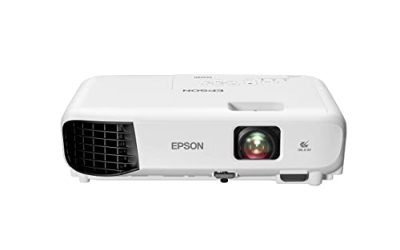
2. Epson EpiqVision Flex CO-FH02 — Best Bright 1080p All-Rounder
- Best for: a large window or wall, and year-round films and gaming.
a large window or wall, and year-round films and gaming.
The Epson EpiqVision Flex CO-FH02 is a full high-definition 1080p smart streaming portable projector, with 3,000 lumens of colour and white brightness, 3-chip 3LCD technology, Android TV, Bluetooth and a built-in 5W speaker. It is the brightest and most versatile projector in this guide, and the one we would choose if the projector also has to serve as a film and gaming screen for the rest of the year.
Brightness is its main advantage for AtmosFX videos. A 3,000-lumen image holds up on a large window or a wall in a room that is not completely dark, and the 3LCD design keeps colours strong instead of washing them out. The 1080p resolution keeps animated characters, text and fine details sharp, even on a large image up to 300 inches. Android TV gives you streaming apps without a separate box, and the HDMI and USB ports accept a laptop, a media player or a streaming stick for AtmosFX playback.
Place it on a table or shelf, connect your AtmosFX source, and adjust the image to fit the window or wall. It is mains powered, so you need a socket nearby. For a window display, pair it with a translucent rear-projection screen.
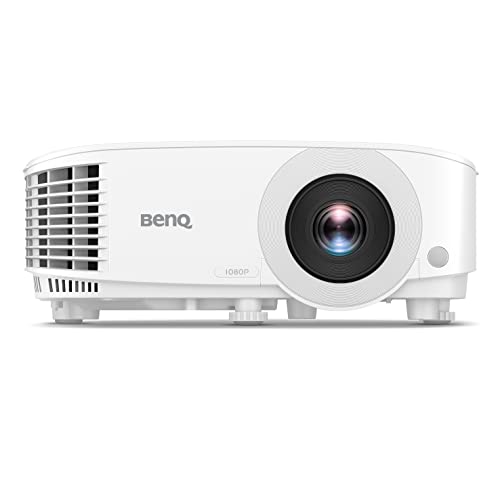
3. BenQ TH575 — Best Bright Projector for a Big Image
- Best for: a large wall or garage-door display, and gaming.
a large wall or garage-door display, and gaming.
The BenQ TH575 is a 1080p indoor projector rated at 3,800 lumens, with low latency, an enhanced game mode, high contrast, dual HDMI ports, 3D support, automatic vertical keystone and a 1.1x zoom. It is built for large, bright images in a living room, and that is exactly what a big AtmosFX wall display needs.
The extra brightness over the Epson makes a visible difference on a very large image or in a room with some light spilling in. Ghosts stay pale and solid, dark backgrounds stay dark, and the image does not fade at the edges. The 1080p resolution and high contrast keep animated scenes crisp, and the low-latency game mode is a bonus if the same projector is used for console gaming after Halloween.
Connectivity is generous, with two HDMI ports and a built-in 10W speaker that is louder than most projector speakers. The standard throw means you need more distance than a short-throw model to fill a big image, so measure your room first. Pair it with a rear-projection screen for a window, or project directly onto a wall.
4. ViewSonic PA503HD — Best High-Brightness Value Pick
- Best for: the brightest image for a large window or wall.
the brightest image for a large window or wall.
The ViewSonic PA503HD is a 1080p Full HD DLP projector rated at 4,000 lumens, with HDMI, USB, optical zoom, automatic keystone, a 120Hz refresh rate and ceiling-mount support. It is the brightest projector in this guide on paper, and a strong value choice for a big AtmosFX display where brightness matters most.
Four thousand lumens is a lot of light for a Halloween display. It lets you fill a large window or a garage door without the image looking faint, and it copes better than a dimmer projector if a porch light or a street light is nearby. The 1080p resolution keeps AtmosFX characters sharp, the 1.1x optical zoom helps you size the image without moving the projector, and automatic keystone corrects the shape when the projector sits above or below the centre of the screen.
This is a classroom and business projector at heart, practical rather than pretty. It has no built-in streaming platform, so connect a laptop, media player or streaming stick by HDMI, and it needs mains power. In return you get a very bright, sharp image for a large display.
Comparison Table
| Projector | Resolution | Brightness | Best For | Playback |
|---|---|---|---|---|
| Reaper Brothers Hollusion Kit | 720p | Kit projector, tuned for windows | Complete first window display | USB stick included |
| Epson EpiqVision Flex CO-FH02 | 1080p | 3,000 lumens | Large window, films and gaming | Android TV, HDMI, USB |
| BenQ TH575 | 1080p | 3,800 lumens | Big wall image and gaming | Dual HDMI, USB |
| ViewSonic PA503HD | 1080p | 4,000 lumens | Brightest large display | HDMI, USB |
How to Set Up an AtmosFX Window Display
Hang the screen first. Stretch the translucent screen taut across the inside of the window, with no folds or sagging, and fix it at the top and sides. A wrinkled screen shows every crease in the projected image. Close curtains or blinds on either side of the window if you can, so the screen is the only bright surface.
Place the projector behind the screen, indoors, as square to the window as possible. Start with the projector a few feet back, project a test scene, and move it until the image fills the screen without spilling onto the frame. Focus carefully, then use keystone only for small corrections. Turn off room lights behind the projector, or the audience outside will see the room instead of the ghosts.
Set the video to loop, test it for a full cycle before the night begins, and check the sound from the pavement after dark. Characters should be centred, with no bright rectangle spilling around the screen, and the image should not be upside down or reversed. Rear projection sometimes needs a mirrored image setting in the projector menu. Keep cables tidy, keep the projector dry and ventilated, and check it after the first hour of a long run.
FAQ
Can any projector play AtmosFX videos?
Almost any video projector with HDMI or USB playback can play AtmosFX videos, because the videos are standard digital files. The difference is in the result. A bright 1080p projector with good contrast will look far better than a dim, low-resolution model, especially on a large window or wall. A kit designed for AtmosFX, with a matched screen and USB stick, removes the guesswork for a first display.
Do I need a special screen for a window display?
A translucent rear-projection screen gives the best Hollusion effect, because it spreads the light evenly and makes figures look as if they are inside the house. A sheer white curtain or a white sheet can work as a substitute, but the image is usually less even and less convincing. For a wall display, a pale, smooth wall or a dedicated projection screen is enough.
What brightness do I need for AtmosFX videos?
For a single window in a dark room, a small kit projector is enough. For a large window, a wall, or a room with some ambient light, look for a projector rated at 3,000 lumens or more from a known brand. Brighter is better for a large image, but brightness alone does not fix a poor screen, a wrinkled sheet, or a projector placed at a bad angle.
How do I make AtmosFX videos loop all night?
Use the loop or repeat mode on your playback device. If you play from a USB stick in the projector, check that the projector supports video playback and looping from USB. If you play from a laptop or media player, set the video player to repeat, and set the computer not to sleep. Test a full loop before Halloween night, and keep a spare USB stick or a second copy of the files nearby.
Can I use the same projector for films and gaming?
Yes, and you should. A 1080p projector with good brightness and low latency, such as the Epson, BenQ or ViewSonic picks in this guide, works well for films, sports and console gaming for the rest of the year. The Halloween kit is the exception: it is tuned for a window display and is not the best choice as a year-round home-cinema projector.
Conclusion
The best projectors for AtmosFX videos are the ones that match your display. For a first window display with no extra shopping, the Reaper Brothers Hollusion kit is the simplest route, because the projector, the AtmosFX USB stick and the screen arrive together and are made to work as a set. For a larger window, a wall or a garage door, and for a projector you will also use for films and gaming, the Epson EpiqVision Flex CO-FH02 is the most versatile pick, with bright 1080p images and built-in streaming. The BenQ TH575 is the choice for the biggest, brightest wall image with gaming in mind, and the ViewSonic PA503HD is the value pick for maximum brightness on a large display.
Whichever you choose, get the basics right: a taut translucent screen for a window, a dark room behind the projector, a square placement, a looping video, and a test run after dark from the pavement. Do that, and the ghosts will look as if they live in your house, not as if they are projected onto it.
Disclosure: As an Amazon Associate, we earn from qualifying purchases.
FAQ
Can any projector play AtmosFX videos?
Do I need a special screen for a window display?
What brightness do I need for AtmosFX videos?
How do I make AtmosFX videos loop all night?
Can I use the same projector for films and gaming?
More from Amazon
Programs that pair well with the guide above. Offers and eligibility are set by Amazon and may change.
Free shipping on eligible items, Prime Video and more. Eligible new members can start with a free trial.
Start a Prime free trialAd-free music streaming. Eligible new subscribers can start with a free trial.
Try Music Unlimited freeA Prime membership for ages 18-24 with a trial period. Eligibility is set by Amazon.
See Prime for Young AdultsAudiobooks and podcasts to listen to on the go. Eligible new members can start with a free trial.
Try Audible freeAs an Amazon Associate we earn from qualifying purchases.