Our Short List of 3

- Best for: A fixed full-size battlestation that mixes long typing days with evening gaming.
- Switch: Cherry MX Brown tactile mechanical switches (switch model listed as cherry_mx_rgb_brown)
- Backlighting: Per-key RGB
- Layout: Full-size, 104 keys, QWERTY NA
- Polling: 8,000Hz hyper-polling

- Best for: A smaller gaming desk where mouse room matters and you want the option to swap switches later.
- Switch: Cherry MX Brown tactile (switch model listed as cherry_mx_rgb_brown)
- Backlighting: RGB
- Layout: Tenkeyless, 87 keys, QWERTY
- Sockets: Hot-swappable switches

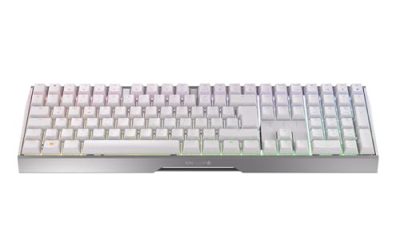
- Best for: A white or light-themed build that treats keyboard lighting as part of the room, not just a key finder.
- Switch: Cherry MX Brown
- Backlighting: RGB
- Layout: Tenkeyless, 80 percent form factor
- Sockets: Hot-swap switches
All 3 Picks at a Glance
| Product | Specs | Action |
|---|---|---|
| Corsair K70 RGB PRO |
| Check price on Amazon |
| Ducky One 3 TKL Matcha |
| Check price on Amazon |
| Ducky One 3 Aura |
| Check price on Amazon |
Key takeaways
- Three mechanical keyboards with genuine Cherry MX Brown switches and RGB backlighting: a full-size Corsair flagship and two hot-swap Ducky TKL boards.
Picking a keyboard around one specific switch sounds simple until you start reading listings. The real decision here is not whether a board feels tactile, but whether the switches inside are genuine Cherry MX Brown units with the clear RGB housing, because plenty of boards advertise a brown switch that turns out to be a clone from another maker, and plenty of Cherry boards ship with a single-colour backlight or none at all. Getting both halves right in one purchase is what this shortlist is for.
The three boards below suit different desks: one full-size flagship for a fixed battlestation, and two tenkeyless Ducky models for smaller setups and switch tinkerers. Every pick was chosen from its Amazon listing name and specification fields, where the switch model and the backlighting type are stated outright rather than implied by marketing photos. That discipline keeps the list short, because most boards fail one half of the brief.
Quick Picks
As an Amazon Associate we earn from qualifying purchases
| Product | Best for | Key spec from title |
|---|---|---|
| Corsair K70 RGB PRO | A full-size wired battlestation that never moves | Cherry MX Brown tactile switches with 8,000Hz hyper-polling |
| Ducky One 3 TKL Matcha | A compact desk that still wants hot-swap sockets | Cherry MX Brown with PBT double-shot keycaps |
| Ducky One 3 Aura | A white build that leans into its lighting | Cherry MX Brown, RGB and hot-swap switches in an Aura White case |
How to Choose
Confirm the Switch Is Really a Cherry MX Brown
Start with the switch field, not the headline. A listing that only says brown switches or tactile brown leaves the maker unstated, and clone browns from other factories differ in bump shape, spring weight and stem wobble. The listings worth trusting name the switch model directly: the Corsair page for the K70 RGB PRO lists its switch model as cherry_mx_rgb_brown, and the Ducky listings print Cherry MX Brown in the product name itself. If a board you are considering hides the switch brand behind a colour alone, treat that as a different product category and keep looking.
Separate True RGB From Any Backlight at All
Backlit covers everything from one fixed colour to full per-key control, and the gap matters once the board is on your desk. The specification field to find is keyboard backlighting colour support, and it should read RGB, as it does on all three listings here. A single-colour LED board can look identical in a thumbnail yet leave you unable to match a setup theme or assign colours to game keys. Per-key RGB also has a practical side: you can light only the keys a particular game uses and dim the rest, which a zone-lit board cannot do.
Match the Layout to the Work the Desk Actually Does
Layout decides what you give up, so be honest about your number pad habits. The full-size K70 RGB PRO keeps all 104 keys plus a volume roller and media keys, which suits spreadsheet work, MMO keybinds and anyone who enters figures daily. Both Ducky boards here are tenkeyless 87-key designs: they free real mouse room for low-sensitivity aiming and fit shallow desks, but data entry slows down and some simulation games lose their favourite cluster. Neither answer is wrong; the mistake is buying the compact board for the look and then bolting on a separate pad you never planned to store.
Check Keycaps and Switch Sockets Before Anything Cosmetic
Two construction details decide how a board ages. Double-shot PBT keycaps, fitted to all three picks, keep their legends readable and resist the shine that smooths out cheaper caps within a year. Hot-swap sockets, fitted to both Ducky models, let you pull a switch with a simple tool and press in a replacement, so a single failing or scratchy switch is a small fix instead of a soldering job or a new keyboard. The Corsair takes the other route with soldered switches on an aluminium frame, trading easy switch changes for a stiffer, heavier chassis that stays planted. Neither approach is a shortcut: one buys repairability, the other buys rigidity, and both beat a thin plastic case with mystery caps.
The 3 Best Options
Corsair K70 RGB PRO
- Best for: A fixed full-size battlestation that mixes long typing days with evening gaming.
- Switch: Cherry MX Brown tactile mechanical switches (switch model listed as cherry_mx_rgb_brown)
- Backlighting: Per-key RGB
- Layout: Full-size, 104 keys, QWERTY NA
- Polling: 8,000Hz hyper-polling
A fixed full-size battlestation that mixes long typing days with evening gaming.
It is wired only and physically large at 17.5 inches wide, so measure a compact desk before ordering.
The K70 RGB PRO is the straightforward flagship answer: a full-size aluminium board whose listing names Cherry MX Brown tactile switches and per-key RGB in the same breath. Corsair’s AXON processing delivers the stated 8,000Hz hyper-polling figure, and the supporting hardware is aimed at a desk that stays put, with a detachable USB Type-C cable, a metal volume roller, dedicated media keys and a tournament switch that locks the board down for competition rules. Onboard storage for up to 50 profiles means your lighting and macros travel with the keyboard rather than living in software on one PC.
Ducky One 3 TKL Matcha
- Best for: A smaller gaming desk where mouse room matters and you want the option to swap switches later.
- Switch: Cherry MX Brown tactile (switch model listed as cherry_mx_rgb_brown)
- Backlighting: RGB
- Layout: Tenkeyless, 87 keys, QWERTY
- Sockets: Hot-swappable switches
A smaller gaming desk where mouse room matters and you want the option to swap switches later.
There is no number pad and no dedicated volume roller, and the matcha colourway will not blend into every setup.
The One 3 TKL Matcha shrinks the same switch brief into an 87-key tenkeyless frame with a green matcha colourway that stands apart from the usual black boards. Its listing records the switch model as cherry_mx_rgb_brown and the backlighting support as RGB, then adds the enthusiast details the Corsair skips: hot-swappable sockets, so switches can be changed without soldering, and Ducky’s QUACK Mechanics construction with double-shot PBT keycaps. At 908 grams it is easy to slide aside or carry between desks, and the wired USB-C connection keeps input behaviour identical at home and at a second workstation.
Ducky One 3 Aura
- Best for: A white or light-themed build that treats keyboard lighting as part of the room, not just a key finder.
- Switch: Cherry MX Brown
- Backlighting: RGB
- Layout: Tenkeyless, 80 percent form factor
- Sockets: Hot-swap switches
A white or light-themed build that treats keyboard lighting as part of the room, not just a key finder.
A pale translucent case shows dust and desk grime quickly, and the glow-first design is hard to tone down in a formal office.
The Aura edition takes the One 3 tenkeyless platform and builds it around the lighting itself, with a translucent Aura White case designed to let the RGB glow through the body of the board rather than only under the caps. The listing still leads with the required hardware: Cherry MX Brown switches, RGB backlighting and hot-swap sockets, plus PBT doubleshot keycaps. Underneath, the QUACK Mechanics layout adds a silicone plate dampener and an EVA foam case dampener, which target the hollow ping and case rattle that bright, light-coloured boards can suffer from during fast typing.
Which One Fits Your Situation
Your Desk Is a Permanent Full-Size Battlestation
Choose the Corsair K70 RGB PRO. It is the only pick here with a number pad, a volume roller and media keys, and its aluminium frame and 50-profile onboard storage suit a machine that never travels. The 8,000Hz polling is more than most players can feel, but the complete control cluster earns its desk space daily, and the tactile switches give feedback without a click track.
You Play Shooters on a Small Desk
Choose the Ducky One 3 TKL Matcha. Dropping the number pad frees the wide mouse arc that low-sensitivity aiming needs, and the 908-gram frame is easy to angle or shift between sessions. You keep genuine Cherry MX Brown switches and full RGB, and the hot-swap sockets let you experiment with a different switch on a few keys before committing the whole board.
Your Build Is White and the Lighting Is the Point
Choose the Ducky One 3 Aura. Its translucent Aura White case spreads the RGB through the board itself, which no opaque case here can match, while the plate and case dampeners keep the sound tidier than most showcase boards. Pick it when the keyboard is meant to be looked at, not just used.
You Want a Board You Can Repair and Modify for Years
Choose either Ducky, and decide by colour. Both One 3 models use hot-swap sockets, so a worn switch is a two-minute swap instead of a repair bill, and both wear double-shot PBT caps that age slowly. The Corsair counters with a stiffer aluminium frame, so if you never plan to touch the switches, its build is the better long-term bet.
Common Mistakes
- Assuming any brown switch is a Cherry MX Brown, when many listings use unnamed or clone browns with a different feel.
- Reading backlit as RGB, then discovering the board only offers one fixed colour or a few preset zones.
- Buying a tenkeyless board for a desk that does daily number entry, then losing the saved space to a separate pad.
- Choosing by colourway photos without checking the switch model field, since the same board often sells in several switch variants.
- Ignoring the variant selector on a listing page, which can quietly switch the board to a different switch or layout before checkout.
Frequently Asked Questions
Are Cherry MX Brown switches good for both gaming and typing?
Yes, that dual role is exactly their reputation. The tactile bump gives feedback you can feel without the audible click of a blue switch, so keystrokes register clearly during long documents and stay quiet enough for shared rooms. Gamers who want the lightest, smoothest press usually prefer linear switches instead, but for a mixed desk the Brown sits comfortably between the two camps.
What makes an MX Brown an RGB version rather than a standard one?
The switch housing. RGB variants use a transparent housing that lets light from the board’s LEDs pass through and around the keycap legend, while standard housings are opaque and block most of that light. The listing for the K70 RGB PRO spells this out in its switch model field, which reads cherry_mx_rgb_brown rather than the plain brown designation.
Does hot-swappable matter if I never plan to change switches?
It matters the first time one switch fails or turns scratchy. On the two Ducky boards here, that fix is pulling the old switch out and pressing a new one in, with no soldering iron and no service bill. On a soldered board the same fault means repair skills or a replacement keyboard, so hot-swap is cheap insurance even for owners who never customise anything.
Will these keyboards work with a Mac or a console?
The Corsair listing names PC, Mac and Xbox among its compatible devices, and its software support covers both Windows and macOS. The Ducky listings name PC and Windows compatibility, and both work as standard USB keyboards for basic typing elsewhere, but expect legends and configuration software to assume a Windows machine first. If you split time between systems daily, the Corsair is the safer purchase.
FAQ
Are Cherry MX Brown switches good for both gaming and typing?
What makes an MX Brown an RGB version rather than a standard one?
Does hot-swappable matter if I never plan to change switches?
Will these keyboards work with a Mac or a console?
More from Amazon
Programs that pair well with the guide above. Offers and eligibility are set by Amazon and may change.
Free shipping on eligible items, Prime Video and more. Eligible new members can start with a free trial.
Start a Prime free trialAd-free music streaming. Eligible new subscribers can start with a free trial.
Try Music Unlimited freeA Prime membership for ages 18-24 with a trial period. Eligibility is set by Amazon.
See Prime for Young AdultsAudiobooks and podcasts to listen to on the go. Eligible new members can start with a free trial.
Try Audible freeAs an Amazon Associate we earn from qualifying purchases.