Our Short List of 3

- Best for: Ableton Live producers who launch clips, sequence drums and mix without leaving the keyboard
- 61 semi-weighted keys
- 16 FSR pads with polyphonic aftertouch
- 8 encoders and 9 faders
- Pitch and modulation wheels with OLED display

- Best for: Producers who want thousands of sounds and DAW control in one box from the first day
- 61 velocity-sensitive keys with hybrid synth-piano feel
- 9 rotary encoders plus 1 clickable encoder
- 9 faders of 30 mm
- 8 touch- and pressure-sensitive RGB pads

- Best for: Piano-trained players who want honest keys and wheels without a control surface attached
- 61 full-size semi-weighted velocity-sensitive keys
- Pitch bend and modulation wheels
- Assignable volume slider and octave up/down buttons
- USB connection, plug-and-play with no drivers required
All 4 Picks at a Glance
| Product | Specs | Action |
|---|---|---|
| Novation Launchkey 61 MK4 |
| Check price on Amazon |
| Arturia KeyLab Essential 61 mk3 |
| Check price on Amazon |
| M-Audio Keystation 61 MK3 |
| Check price on Amazon |
 Nektar Impact GX61 |
| Check price on Amazon |
Key takeaways
- Four 61-key MIDI keyboard controllers compared on key action, pads, faders and DAW integration, with picks for Ableton users and piano-first players.
Picking a 61-key MIDI keyboard is really a decision about how much of your production work happens under your hands instead of on a mouse. Five octaves is enough room for two-handed playing without constant octave shifting, so the genuine differences sit elsewhere: how the keys respond, whether the pads and faders earn their desk space, and how much manual mapping your DAW demands before the controller feels like part of the software rather than an accessory plugged into it.
The four controllers below serve distinct buyers: Ableton Live producers who mix and launch clips from the keyboard, players who want a large sound library included from day one, piano-first musicians who only need honest keys and wheels, and first-time buyers who want real DAW transport control without overspending. Every pick was chosen from the key action, control layout, connectivity, and software printed on its own Amazon listing, and each one is a current 61-key USB MIDI controller rather than an arranger keyboard or a synthesizer with sounds built in.
Quick Picks
As an Amazon Associate we earn from qualifying purchases
| Product | Best for | Key spec from title |
|---|---|---|
| Novation Launchkey 61 MK4 | Ableton Live producers who launch clips and mix from the keyboard | 16 pads with polyphonic aftertouch |
| Arturia KeyLab Essential 61 mk3 | Players who want a large sound library included from day one | 9 encoders, 9 sliders and 8 RGB pads |
| M-Audio Keystation 61 MK3 | Piano-style players who simply want to play virtual instruments | 61 full-size semi-weighted keys |
| Nektar Impact GX61 | First-time buyers who want DAW transport control on a tight budget | Nektar DAW Integration for 11 DAWs |
How to Choose
Key Action Decides How It Feels to Play
Keyboards in this class split between semi-weighted keys, which add spring resistance that piano players find familiar, and lighter synth-action beds built for fast lead lines and organ runs. Full-size keys matter if you learned on a piano, because narrow keys quietly change your fingering. Velocity response is the other half of feel: a controller with several velocity curves can be tuned to your touch, while a single fixed curve forces you to adapt to it. Aftertouch deserves a careful read of the listing, since on many controllers only the pads sense pressure after the initial strike, not the keys themselves.
Pads, Knobs and Faders Are a Second Instrument
Sixteen pads laid out in a grid suit finger drumming and clip launching, while eight larger pads in a row are enough for triggering samples and switching banks. Pressure-sensitive pads open up expressive drum rolls and melodic swells that plain on-off pads cannot reach. Encoders are the controls you will touch most after the keys, because they map to plugin parameters and mixer levels; endless encoders with a display nearby are easier to trust than knobs whose position you must guess. Faders earn their space when you mix or ride organ drawbars, and they are dead weight if your workflow never leaves the piano roll.
DAW Integration Saves the Mapping Hours
A controller that auto-maps to your DAW puts transport, mixing, and device control under your fingers the day it arrives, while a generic controller can spend its first week being taught those jobs one MIDI assignment at a time. Check whether your exact DAW appears in the maker’s integration list, because support depth varies from full mixer control to basic transport only. Bundled software changes the value calculation as well: a lite DAW edition, a flagship sound library, or a beat-making suite can matter more than a small hardware difference, especially if you are starting from an empty plugin folder.
Connectivity and Power Decide Where It Can Play
USB bus power keeps a controller portable and desk-friendly, and every model here runs from the computer cable alone. A 5-pin MIDI output is the feature that separates studio-only boards from ones that can also drive hardware synths and sound modules without a computer in the middle, so check for it if your setup might grow beyond software. Pedal inputs are easy to overlook until you need sustain or expression, and they cannot be added later. Finally, measure your desk: 61-key controllers run roughly 35 to 39 inches wide, which surprises buyers upgrading from a compact 25-key board.
The 4 Best Options
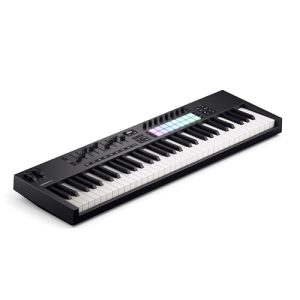
Novation Launchkey 61 MK4
- Best for: Ableton Live producers who launch clips, sequence drums and mix without leaving the keyboard
- 61 semi-weighted keys
- 16 FSR pads with polyphonic aftertouch
- 8 encoders and 9 faders
- Pitch and modulation wheels with OLED display
Ableton Live producers who launch clips, sequence drums and mix without leaving the keyboard
The keys themselves have no aftertouch, only the pads do, so check that split works for how you play
Built around deep DAW integration, the Launchkey 61 MK4 is aimed at producers who would rather keep both hands on hardware than reach for the mouse. Its 16 FSR pads respond to polyphonic aftertouch and double as step sequencers and clip launchers, while eight encoders and nine faders cover device parameters and mixer levels. Scale Mode keeps stray notes out of your takes, three Chord Modes build progressions from single fingers, and the arpeggiator generates patterns on the hardware itself. Support for Native Instruments NKS extends that direct hardware control into third-party plugin libraries as well.
Arturia KeyLab Essential 61 mk3
- Best for: Producers who want thousands of sounds and DAW control in one box from the first day
- 61 velocity-sensitive keys with hybrid synth-piano feel
- 9 rotary encoders plus 1 clickable encoder
- 9 faders of 30 mm
- 8 touch- and pressure-sensitive RGB pads
Producers who want thousands of sounds and DAW control in one box from the first day
There are only 8 pads in a single bank layout, so finger drummers used to a 16-pad grid should check the fit
Arturia pairs a hybrid synth-piano keybed with the deepest software bundle in this group, and the layout follows a mixer logic that recording musicians read instantly: nine encoders, nine faders, and transport switches across the top. The 2.5-inch display with contextual buttons makes browsing Analog Lab presets practical without touching the mouse, and the eight RGB pads answer to both velocity and pressure. Chord, Scale, and Hold modes plus a multi-mode arpeggiator help sketch ideas quickly, while custom scripts give the major DAWs plug-and-play control and MCU and HUI protocols cover most of the rest.
M-Audio Keystation 61 MK3
- Best for: Piano-trained players who want honest keys and wheels without a control surface attached
- 61 full-size semi-weighted velocity-sensitive keys
- Pitch bend and modulation wheels
- Assignable volume slider and octave up/down buttons
- USB connection, plug-and-play with no drivers required
Piano-trained players who want honest keys and wheels without a control surface attached
There are no pads, knobs or extra faders, so plugin tweaking stays on the mouse unless you add a separate controller
The Keystation 61 MK3 strips the controller back to what a keyboard player actually uses: full-size semi-weighted keys, pitch and modulation wheels, a volume slider, and octave buttons, with nothing else competing for panel space. That simplicity is the appeal for musicians who record parts into a DAW rather than operate it, and the 5-pin MIDI output means the board can also play hardware synths directly. M-Audio still includes a workable starter library, with MPC Beats for rhythm production alongside Ableton Live Lite and AIR instruments, so the box opens onto a functional setup even though the hardware stays deliberately plain.
Nektar Impact GX61
- Best for: Beginners and laptop producers who want transport and track control working in their DAW right away
- 61 full-size velocity-sensitive keys
- 4 velocity curves plus 3 fixed velocity options
- Pitch bend and modulation wheels
- 7 transport buttons with a shift layer for 14 MIDI controls
Beginners and laptop producers who want transport and track control working in their DAW right away
There is no 5-pin MIDI output, so it can only reach hardware synths through a computer or USB host
Nektar’s Impact GX61 is the low-cost route into genuine DAW control, built around the company’s integration software for 11 DAWs rather than a long list of physical controls. Seven transport buttons with a shift layer reach 14 MIDI functions, one assignable potentiometer handles volume or a chosen parameter, and LED octave and transpose buttons report their state at a glance. Four velocity curves plus three fixed settings let you shape the synth-action keybed to your touch, and Bitwig 8-Track is included so a first-time buyer can record immediately. At six pounds it is also the easiest board here to move between rooms.
Which One Fits Your Situation
You Produce in Ableton Live and Mix as You Go
Choose the Novation Launchkey 61 MK4. Its pads launch clips and scenes, the faders follow your mixer, and the encoders land on device parameters without a mapping session first. The onboard Scale and Chord modes also keep writing sessions moving when theory slows you down, which makes it the most complete single purchase for an Ableton-centered desk.
You Want Sounds Included, Not Just a Controller
Choose the Arturia KeyLab Essential 61 mk3. Analog Lab V alone supplies a large playable library, and the screen, encoders, and faders are arranged to browse and shape those sounds from the panel. Komplete Select and the UVI grand piano widen the palette further, so this is the pick when your plugin folder is currently empty.
You Play Keys First and Produce Second
Choose the M-Audio Keystation 61 MK3. Full-size semi-weighted keys and proper wheels are what your hands will judge every day, and the absence of pads and knobs keeps the panel uncluttered and the setup instant. Its MIDI output also keeps older hardware synths in play, which matters to players with existing gear.
You Need DAW Control Without Spending Much
Choose the Nektar Impact GX61. The integration files do the setup work for most major DAWs, transport and track navigation work from the panel, and Bitwig 8-Track is in the box for recording your first sessions. You give up pads and faders, but for sketching songs and learning production the essentials are covered.
Common Mistakes
- Expecting the keyboard to make sound by itself, when every controller here is silent until it is connected to software or a hardware sound source
- Choosing 49 keys to save space and then fighting the octave buttons through every two-handed piano part
- Assuming aftertouch applies to the keys when the listing only promises it on the pads
- Skipping the desk measurement and discovering a 61-key board leaves no room for a mouse or audio interface
- Leaving the bundled DAW and instrument licenses unregistered, then losing access to software that formed part of the purchase value
Frequently Asked Questions
Does a 61-key MIDI keyboard make sound on its own?
No. A MIDI controller sends performance data rather than audio, so it stays silent until it is connected to a computer, tablet, or hardware sound module running instruments. Three of the four boards here add a 5-pin MIDI output for driving hardware directly, while the Nektar Impact GX61 works through a computer connection only.
Is 61 keys enough for playing piano parts?
For most popular music, yes. Five octaves cover the great majority of pop, rock, and electronic repertoire, and octave shift buttons extend the reach for occasional high or low passages. Advanced classical pieces that span the full piano range are the main exception, and those are better served by an 88-key instrument.
What is the difference between semi-weighted and synth-action keys?
Semi-weighted keys add spring resistance that imitates some of a piano’s heft, which helps players control dynamics when moving between soft and loud passages. Synth-action keys are lighter and return faster, suiting rapid lead lines, organ slides, and drum-style playing. Neither is better in absolute terms; the right choice follows the repertoire you play most.
Can I use one of these keyboards with an iPad?
Yes, provided the keyboard is class compliant, which all four picks are. An iPad usually needs a powered USB hub or camera adapter because the controller draws its power from the same connection that carries the MIDI data. Once connected, the keyboard works with GarageBand and most iOS instrument apps without extra drivers.
FAQ
Does a 61-key MIDI keyboard make sound on its own?
Is 61 keys enough for playing piano parts?
What is the difference between semi-weighted and synth-action keys?
Can I use one of these keyboards with an iPad?
More from Amazon
Programs that pair well with the guide above. Offers and eligibility are set by Amazon and may change.
Free shipping on eligible items, Prime Video and more. Eligible new members can start with a free trial.
Start a Prime free trialAd-free music streaming. Eligible new subscribers can start with a free trial.
Try Music Unlimited freeA Prime membership for ages 18-24 with a trial period. Eligibility is set by Amazon.
See Prime for Young AdultsAudiobooks and podcasts to listen to on the go. Eligible new members can start with a free trial.
Try Audible freeAs an Amazon Associate we earn from qualifying purchases.