Our Short List of 3

- Best for: A dedicated gaming setup with one wired console or PC that should always come first.
- WiFi 6 with speeds up to 5700 Mbps
- 2.5G port and dedicated gaming port
- 2.0 GHz quad-core CPU with 1 GB RAM
- Mobile Game Mode for low-latency mobile gaming

- Best for: A larger home that needs steady Wi-Fi 6 coverage in rooms far from the router.
- AX5400 dual-band WiFi 6, up to 5400 Mbps
- 5 GHz band up to 4804 Mbps with 4T4R and HE160
- 2.4 GHz band up to 574 Mbps
- Six antennas for long-range coverage

- Best for: A small home or apartment moving to Wi-Fi 7 with one wired gaming PC.
- BE3600 dual-band Wi-Fi 7, up to 3.6 Gbps
- 5 GHz band up to 2882 Mbps and 2.4 GHz band up to 688 Mbps
- 2.5G WAN port plus 2.5G LAN port and 3 gigabit LAN ports
- USB 3.0 port
All 5 Picks at a Glance
| Product | Specs | Action |
|---|---|---|
| ASUS RT-AX86U Pro (AX5700) Dual Band WiFi 6 Gaming Router |
| Check price on Amazon |
| TP-Link AX5400 WiFi 6 Router (Archer AX73) |
| Check price on Amazon |
| TP-Link Dual-Band BE3600 Wi-Fi 7 Router (Archer BE230) |
| Check price on Amazon |
 GL.iNet Flint 2 (GL-MT6000) Wi-Fi 6 Router |
| Check price on Amazon |
 ASUS RT-BE88U Wi-Fi 7 Router |
| Check price on Amazon |
Our Top Picks
Fortnite rewards quick reactions, and a slow or uneven home network can turn a clean build fight into a slide show of missed shots and delayed edits. The router between your console or PC and the internet decides how quickly each input reaches the game server and how steadily the reply comes back. A gaming router with smart traffic controls can put Fortnite ahead of downloads, video streams, and cloud backups, so your match stays smooth while the rest of the house stays online.
The five routers below all bring Wi-Fi 6 or Wi-Fi 7, wired multi-gig ports, and traffic tools that favor game packets over bulk traffic. Some focus on a dedicated gaming port, others on open firmware and deep queue controls, and one brings a wall of wired ports for a full gaming room. Pick the one that matches your home, your connection, and how many people share it, and the rest of this guide will show you what to weigh before you buy.
Quick Picks
As an Amazon Associate we earn from qualifying purchases
| Product | Best for | Key spec from title |
|---|---|---|
| ASUS RT-AX86U Pro (AX5700) Dual Band WiFi 6 Gaming Router | Dedicated gaming port | AX5700 WiFi 6 |
| TP-Link AX5400 WiFi 6 Router (Archer AX73) | Long-range home coverage | AX5400 WiFi 6 |
| TP-Link Dual-Band BE3600 Wi-Fi 7 Router (Archer BE230) | Wi-Fi 7 on a modest footprint | BE3600 Wi-Fi 7 |
| GL.iNet Flint 2 (GL-MT6000) Wi-Fi 6 Router | Open firmware and queue control | AX6000 WiFi 6 |
| ASUS RT-BE88U Wi-Fi 7 Router | Wired-first gaming room | BE7200 Wi-Fi 7 |
How to Choose
Put Fortnite Traffic First
Fortnite sends small packets often, so the router should treat those packets as urgent even when someone else in the house is pulling a large download or streaming a show in 4K. Look for adaptive QoS, a dedicated gaming port, or smart queue management that can hold bulk traffic back during a match. A router that lets you rank game traffic above everything else keeps shots and builds responsive when the network gets busy. Open the router app or admin page, turn the gaming priority on, and point it at your console or PC so the rule follows the right device.
Match Wi-Fi to Your Room and Devices
Wi-Fi 6 handles a busy home well, while Wi-Fi 7 adds wider channels and Multi-Link Operation that can keep a link steady when one band gets crowded. If your gaming spot sits in the same room as the router, either standard will serve you well with a clear 5 GHz link. If you play two rooms away through walls, look for more antennas, stronger coverage claims, and a 5 GHz band that holds up at range. Count the phones, laptops, consoles, and smart home gear on your network too, since a router that juggles many clients keeps game packets moving when everyone is online at once.
Wire the Gaming PC or Console When You Can
A cable removes Wi-Fi interference from the path between your gaming device and the router, and it gives Fortnite the steadiest link your home can offer. Look for a router with at least one multi-gig port so the wired link never caps below your internet plan, and keep a short, good-quality Ethernet cable between the router and your PC or console. If the router sits far from your gaming spot, a cable run through a wall or along a baseboard is worth the effort. Wireless play works well on these routers, but a wired link is the simplest way to keep every match consistent.
Weigh Ports, Antennas, and Firmware Control
Count the wired ports before you buy, because a gaming PC, a console, a streaming box, and a network drive can fill a small router fast. Four or more LAN ports plus a 2.5G or 10G port give you room to grow without adding a switch right away. Antennas shape coverage, so fixed external antennas suit an open living room while a compact box may suit a desk better. Firmware matters too: open firmware, a strong admin app, VPN support, and guest network controls let you tune the router to your home instead of living with defaults that ignore gaming.
The 5 Best Options
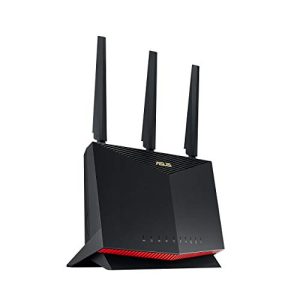
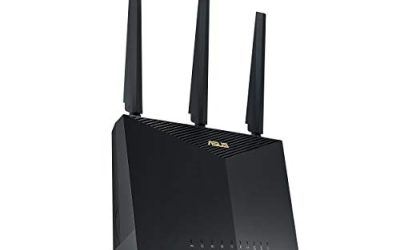
ASUS RT-AX86U Pro (AX5700) Dual Band WiFi 6 Gaming Router
- Best for: A dedicated gaming setup with one wired console or PC that should always come first.
- WiFi 6 with speeds up to 5700 Mbps
- 2.5G port and dedicated gaming port
- 2.0 GHz quad-core CPU with 1 GB RAM
- Mobile Game Mode for low-latency mobile gaming
A dedicated gaming setup with one wired console or PC that should always come first.
Dual-band Wi-Fi 6 only, so it has no 6 GHz band for newer devices.
The RT-AX86U Pro is the most focused gaming router in this group, built around a dedicated gaming port that gives a wired console or PC first claim on the connection. Adaptive QoS ranks game traffic above downloads and streams, while Mobile Game Mode sharpens the link for phones and tablets when you play on the go around the house. A 2.0 GHz quad-core processor and 1 GB of memory keep the routing smooth with many devices online. AiMesh support lets you add another ASUS node later if coverage needs to grow, and the 2.5G port keeps a fast wired link open for your main gaming device.
TP-Link AX5400 WiFi 6 Router (Archer AX73)
- Best for: A larger home that needs steady Wi-Fi 6 coverage in rooms far from the router.
- AX5400 dual-band WiFi 6, up to 5400 Mbps
- 5 GHz band up to 4804 Mbps with 4T4R and HE160
- 2.4 GHz band up to 574 Mbps
- Six antennas for long-range coverage
A larger home that needs steady Wi-Fi 6 coverage in rooms far from the router.
Gigabit ports only, so a wired link tops out at 1 Gbps.
The Archer AX73 brings AX5400 Wi-Fi 6 to a larger home, with six antennas and long-range coverage that hold a steady 5 GHz link across several rooms. Its QoS controls let you favor gaming traffic when the house is busy, and the gigabit WAN and LAN ports suit a wired console or PC beside the router. A triple-core 1.5 GHz processor and 512 MB of memory handle a full household of phones, laptops, and smart gear. OneMesh support means you can widen coverage later with a compatible extender, and HomeShield adds parental controls and security tools for the whole network.
TP-Link Dual-Band BE3600 Wi-Fi 7 Router (Archer BE230)
- Best for: A small home or apartment moving to Wi-Fi 7 with one wired gaming PC.
- BE3600 dual-band Wi-Fi 7, up to 3.6 Gbps
- 5 GHz band up to 2882 Mbps and 2.4 GHz band up to 688 Mbps
- 2.5G WAN port plus 2.5G LAN port and 3 gigabit LAN ports
- USB 3.0 port
A small home or apartment moving to Wi-Fi 7 with one wired gaming PC.
Dual-band only, so it has no 6 GHz band.
The Archer BE230 moves the same household into Wi-Fi 7, with Multi-Link Operation that can bond bands to keep the link steady when one channel gets crowded. Its 2.5G WAN port and one 2.5G LAN port give a wired gaming PC a quick path to the internet, while the remaining gigabit ports cover a console and other wired gear. A 2.0 GHz quad-core processor drives BE3600 wireless speeds, and four antennas spread coverage across an apartment or small house. EasyMesh support, a VPN client and server, and HomeShield round out a router that feels current without demanding a large cabinet or a tangle of cables.
GL.iNet Flint 2 (GL-MT6000) Wi-Fi 6 Router
- Best for: Players who want open firmware and smart queue control for the lowest lag they can tune.
- AX6000 Wi-Fi 6, up to 6 Gbps
- 5 GHz band up to 4804 Mbps and 2.4 GHz band up to 1148 Mbps
- 8-stream Wi-Fi 6
- 2 x 2.5G Ethernet ports and 4 gigabit LAN ports
Players who want open firmware and smart queue control for the lowest lag they can tune.
The deep settings suit confident users more than someone who wants a plug-and-play box.
The Flint 2 is the pick for players who want deep control over their network, with OpenWrt firmware that opens up smart queue management and fine traffic rules beyond a standard admin page. Its 2.5G WAN and 2.5G LAN ports give a wired gaming rig a quick link, while AX6000 Wi-Fi 6 keeps wireless play smooth across the house. A 2.0 GHz quad-core processor with 1 GB of DDR4 memory and 8 GB of storage handles VPN tunnels and many connected devices at once. WireGuard speeds up to 900 Mbps and OpenVPN up to 190 Mbps suit players who route game traffic through a VPN.
ASUS RT-BE88U Wi-Fi 7 Router
- Best for: A gaming room full of wired devices that need many quick ports.
- BE7200 dual-band Wi-Fi 7, up to 7200 Mbps
- 2 x 10G ports, one RJ45 and one SFP+
- 4 x 2.5G ports and 4 x 1G ports
- 34 Gbps WAN and LAN capacity
A gaming room full of wired devices that need many quick ports.
Dual-band only, so it has no 6 GHz band for newer wireless devices.
The RT-BE88U is the wired-first flagship in this group, with two 10G ports, four 2.5G ports, and four gigabit ports that can host a gaming PC, several consoles, and a network drive without a switch in sight. Wi-Fi 7 at BE7200 covers wireless play, with Multi-Link Operation and 4K-QAM keeping the link steady. A 2.6 GHz quad-core processor and 2 GB of memory drive the whole setup, while AiMesh support lets you widen coverage later. Guest Network Pro and AiProtection Pro keep visitors and smart home gear on their own lanes, so game traffic keeps its priority.
Which One Fits Your Situation
You Share the Network With a Busy Household
Pick the RT-AX86U Pro or the Flint 2. The ASUS box gives Fortnite first claim through Adaptive QoS and a dedicated gaming port, so downloads and streams in other rooms stay behind your match. The Flint 2 goes further with open firmware and smart queue controls that hold bulk traffic back in a precise way. Either way, wire your gaming device and turn the gaming priority on, and your household can stay online without stealing your match.
You Play Far From the Router
Pick the Archer AX73. Its six antennas and long-range coverage hold a steady 5 GHz link across several rooms, and its QoS controls keep Fortnite ahead of other traffic on the network. Put the router high and in the open, away from thick walls and metal shelves, and use the 5 GHz band when you can. If the link wavers, a wired run or a mesh node from the same family will steady it more than any setting tweak.
You Want a Wired Gaming Room
Pick the RT-BE88U. Its ten wired ports cover a gaming PC, several consoles, and a network drive at once, with two 10G ports and four 2.5G ports for the quickest links. Run a cable to each gaming device, let the router rank game traffic first, and keep the wireless bands for phones and laptops. The Archer BE230 is the smaller sibling for this setup, with two 2.5G ports and Wi-Fi 7 for a single wired gaming PC.
Common Mistakes
- Buying on wireless speed alone and ignoring QoS, queue control, and wired ports, which matter more for Fortnite than a headline wireless number.
- Putting the router behind a television or inside a closed cabinet, where walls and metal block the signal before it reaches your gaming spot.
- Leaving the gaming priority off after setup, so downloads and streams compete with Fortnite on equal terms.
- Using the 2.4 GHz band for gaming in a crowded home, when a clear 5 GHz link or a cable gives a steadier match.
- Skipping firmware updates, which can leave new traffic controls and security fixes unused on a router you already own.
Frequently Asked Questions
Does a gaming router lower ping in Fortnite?
A gaming router cannot change the distance to the game server, but it can cut the delay added inside your home. QoS and smart queue controls keep Fortnite packets ahead of downloads and streams, and a wired link removes Wi-Fi interference from the path. Together they give you a steadier, lower ping in most matches, even if the raw number depends on your internet plan and server region.
Is Wi-Fi 7 worth it for Fortnite?
Wi-Fi 7 helps when your home is crowded or your devices support the standard. Multi-Link Operation can keep the link steady when one band gets busy, and wider channels move data with less waiting. If you play on a wired PC or console, Wi-Fi 7 matters less, and a Wi-Fi 6 router with QoS will serve you well. Buy Wi-Fi 7 for a setup you plan to keep for years.
Should I use Wi-Fi or a cable for Fortnite?
Use a cable when you can. A wired link skips Wi-Fi interference and gives Fortnite the steadiest path to the router, which shows up as fewer hitches during build fights. Wi-Fi works well too, especially on a clear 5 GHz link near the router. If a cable run is not possible, put the router in the open, use 5 GHz, and keep the gaming priority on.
Can one router cover a whole house for gaming?
One router can cover an apartment or a small house, especially with six antennas or a line to the gaming room. Larger homes with thick walls or floors may need a mesh node or a wired access point to keep the far rooms steady. Place the router centrally and high, use the 5 GHz band near it, and wire the gaming devices that sit far away when you can.
FAQ
Does a gaming router lower ping in Fortnite?
Is Wi-Fi 7 worth it for Fortnite?
Should I use Wi-Fi or a cable for Fortnite?
Can one router cover a whole house for gaming?
More from Amazon
Programs that pair well with the guide above. Offers and eligibility are set by Amazon and may change.
Free shipping on eligible items, Prime Video and more. Eligible new members can start with a free trial.
Start a Prime free trialAd-free music streaming. Eligible new subscribers can start with a free trial.
Try Music Unlimited freeA Prime membership for ages 18-24 with a trial period. Eligibility is set by Amazon.
See Prime for Young AdultsAudiobooks and podcasts to listen to on the go. Eligible new members can start with a free trial.
Try Audible freeAs an Amazon Associate we earn from qualifying purchases.