Our Short List of 3
All 5 Picks at a Glance
| Product | Specs | Action |
|---|---|---|
 Acer Nitro XV272U W2bmiiprx 27 Inch QHD IPS Gaming Monitor | Check price on Amazon | |
 Acer Nitro KG271U F3bmiipx 27 Inch QHD IPS Gaming Monitor | Check price on Amazon | |
 Acer Nitro KG271U N3bmiipx 27 Inch QHD IPS Gaming Monitor | Check price on Amazon | |
 Acer Nitro XV272U F3bmiiprx 27 Inch WQHD IPS Gaming Monitor | Check price on Amazon | |
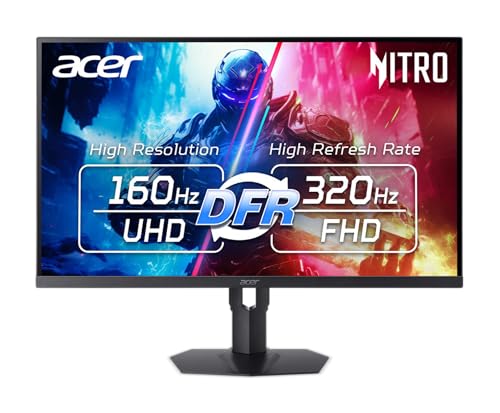 Acer Nitro XV275K V3biipprx 27 Inch 4K UHD MiniLED Gaming Monitor | Check price on Amazon |
Our Top Picks
- MONITOR Acer Nitro 27in QHD 2560x1440 IPS 240Hz27-inch9.2 x 24.2 x 18 inches11.5 poundsCheck on Amazon
- Acer Nitro 27in QHD 2560x1440 IPS 320Hz Gaming27-inch8.28 x 24.18 x 18.05 inches9.87 poundsCheck on Amazon
- Acer Nitro 27in QHD 2560x1440 IPS 180Hz Gaming27-inch8.28 x 24.2 x 18.14 inches12.1 poundsCheck on Amazon
Acer sells gaming monitors under two names, Nitro and Predator, and the Nitro line carries most of the screens a buyer will find on Amazon US. Every pick in this guide comes from the Nitro line. No Predator listing was verified with a current Amazon US buying option in this round, so none appears here.
All five picks are 27-inch flat IPS monitors. Four run at 2560 x 1440, one at 3840 x 2160. Refresh rates run from 180Hz to 320Hz, every listing names AMD FreeSync or FreeSync Premium, and response times are listed at up to 0.5ms gray to gray on all five. The differences that matter are refresh rate, color coverage, ports, and the stand.
Acer reuses model names across its monitor families, and the suffixes do real work. XV272U alone covers several different screens, and KG271U covers at least three. Confirm the full model name and the part number on the listing before ordering, because the family name alone can point at a different screen with a different refresh rate and a different stand.
What to Look for
Resolution decides how much detail the screen can show and how hard the graphics card must work. Four picks here run at 2560 x 1440, listed as QHD or WQHD, and one runs at 3840 x 2160, listed as 4K UHD. A 27-inch screen at 1440p gives about 109 pixels per inch, while the same size at 4K gives about 163.
Refresh rate decides how many new frames the screen can show each second. The slowest pick here runs at 180Hz over DisplayPort, and the fastest runs at 320Hz. A high refresh rate only helps when the graphics card can deliver frames at that pace, so match the screen to the card.
Panel type shapes viewing angles and color. All five picks use IPS panels, which keep colors steady when viewed from the side. The 4K pick adds a MiniLED backlight with 1152 local dimming zones, which controls brightness in small areas of the screen instead of lighting the whole panel at once.
Sync technology keeps the screen and the graphics card in step so frames arrive without tearing. Every pick here names AMD FreeSync or FreeSync Premium on its listing. No listing here names NVIDIA G-SYNC compatibility, so a buyer with an NVIDIA card should confirm sync behavior on the listing before ordering.
Ports decide what can connect and at what refresh rate. Several picks run their highest refresh rate only over DisplayPort, with HDMI capped lower. The XV272U W2 runs at 240Hz over DisplayPort and 144Hz over HDMI, and the KG271U N3 runs at 180Hz over DisplayPort and 144Hz over HDMI. Connect the PC over DisplayPort when the listing names a higher DisplayPort figure.
The stand matters more than it looks. Two picks carry the ErgoStand with height, swivel, and pivot adjustment. The KG271U N3 lists tilt adjustment only, with no height adjustment named on its listing. All five are VESA mountable at 100 x 100 mm.
Color coverage is named on every listing, and the figures differ. The two XV272U picks name 99 percent sRGB, the KG271U N3 names 95 percent DCI-P3, the KG271U F3 names 90 percent DCI-P3, and the 4K pick names 99 percent Adobe RGB and 97 percent DCI-P3. These figures describe different color spaces, so they do not rank the screens in one line.
Acer Nitro XV272U W2bmiiprx 27 Inch QHD IPS Gaming Monitor
The XV272U W2 is the strongest pick in this guide and the most balanced screen here. It is a 27-inch WQHD IPS monitor at 2560 x 1440 with a 240Hz refresh rate over DisplayPort 1.4 and 144Hz over HDMI 2.0. The listing names AMD FreeSync Premium, up to 0.5ms gray to gray response, DisplayHDR 400, 99 percent sRGB coverage, and 400 nits of brightness. The part number is UM.HX2AA.201.
The ErgoStand is the reason this pick leads the guide. It adjusts height across a 4.72-inch range, swivels a full 360 degrees, pivots 90 degrees each way, and tilts from minus 5 degrees to 25 degrees. The KG271U picks do not match that range, and the N3 has no height adjustment at all.
The 240Hz ceiling sits in the middle of this guide. It is faster than the 180Hz KG271U N3 and slower than the 300Hz and 320Hz picks, and that middle ground fits most players. A card that delivers 200 frames per second at 1440p uses nearly all of this screen. The 240Hz figure runs over DisplayPort only, so the PC belongs on the DisplayPort input and the HDMI inputs belong to a console.
DisplayHDR 400 certification means the listing names a peak brightness of 400 nits in HDR mode. That is the same certification the XV272U F3 carries, and it is a step below the DisplayHDR 1000 certification on the 4K pick. HDR on this screen adds punch to bright highlights. The panel is IPS, so colors hold steady from the side, and the 99 percent sRGB figure covers the color space most games and desktop work use.
Confirm the full W2bmiiprx suffix on the listing. Acer sells several screens under the XV272U name, including the F3 at 300Hz and older variants, and the family name alone does not identify this screen. The part number UM.HX2AA.201 is the exact match to check.
Acer Nitro KG271U F3bmiipx 27 Inch QHD IPS Gaming Monitor
The KG271U F3 is the fastest screen in this guide, with a 320Hz refresh rate at 2560 x 1440 on a 27-inch IPS panel. The listing names AMD FreeSync Premium, up to 0.5ms gray to gray response, 90 percent DCI-P3 coverage, two HDMI 2.1 ports, one DisplayPort, a built-in speaker, and a zero-frame design. The part number is UM.HX1AA.310.
A 320Hz ceiling is the headline here, and it is also the figure that needs the most honest framing. The screen can show 320 new frames each second, and a graphics card must deliver 320 frames each second at 1440p for the screen to use it. Few cards sustain that pace in demanding games at 1440p, so the buyer who gains most plays fast competitive titles at reduced settings or owns a card strong enough to hold high frame rates. A buyer whose card delivers 120 frames per second will see no more motion smoothness on this screen than on a 180Hz screen.
The F3 is the sibling of the N3, sharing a family name, size, resolution, and panel type. The differences are refresh rate, sync tier, and ports. The F3 runs at 320Hz with FreeSync Premium and HDMI 2.1 ports, while the N3 runs at 180Hz with standard FreeSync and HDMI 2.0 ports. The F3 also names a speaker on its listing. Confirm the F3bmiipx suffix and the part number UM.HX1AA.310, because the N3 carries part number UM.HX1AA.307 and the two listings look alike at a glance.
Color coverage on the F3 is named at 90 percent DCI-P3, which is the narrowest DCI-P3 figure in this guide. The N3 names 95 percent DCI-P3, and the 4K pick names 97 percent. A buyer who edits photos or grades video should weigh that figure, while a buyer who plays competitive games will care more about the 320Hz ceiling.
Its stand adjusts tilt, and the listing names VESA mounting at 100 x 100 mm for a buyer who wants a monitor arm.
Acer Nitro KG271U N3bmiipx 27 Inch QHD IPS Gaming Monitor
The KG271U N3 is the slowest screen in this guide at 180Hz over DisplayPort and 144Hz over HDMI, and it is also the most straightforward pick. It is a 27-inch QHD IPS monitor at 2560 x 1440 with up to 0.5ms gray to gray response, AMD FreeSync, 95 percent DCI-P3 coverage, HDR10 support, one DisplayPort 1.2, two HDMI 2.0 ports, and a built-in speaker. The part number is UM.HX1AA.307.
The N3 suits a buyer whose graphics card delivers 120 to 180 frames per second at 1440p, which covers a wide range of mid-range cards in current games. A 180Hz ceiling is fast enough for smooth motion in shooters and racing games, and the card does not need to chase the frame rates a 300Hz or 320Hz screen demands.
Color coverage is the N3’s quiet strength. It names 95 percent DCI-P3, which is wider than the F3’s 90 percent figure and sits below only the 4K pick’s 97 percent. The panel is IPS with a matte finish, and the listing names a 1000 to 1 contrast ratio.
The stand is the N3’s clear limit. Acer lists tilt adjustment from minus 5 degrees to 25 degrees and no height adjustment, and the listing names no swivel or pivot. A buyer who needs the screen raised should plan for a monitor arm or choose one of the ErgoStand picks. The screen is VESA mountable at 100 x 100 mm.
Confirm the N3bmiipx suffix and the part number UM.HX1AA.307. The F3 sibling carries part number UM.HX1AA.310, and the two share the KG271U family name. Ordering by family name alone risks receiving the 320Hz screen when the 180Hz screen was wanted, or the reverse.
Acer Nitro XV272U F3bmiiprx 27 Inch WQHD IPS Gaming Monitor
The XV272U F3 pairs a 300Hz refresh rate with a 27-inch WQHD IPS panel at 2560 x 1440, and it is the second-fastest screen in this guide. The listing names AMD FreeSync Premium, up to 0.5ms gray to gray response, 99 percent sRGB coverage, DisplayHDR 400, the ErgoStand, VESA mounting, one DisplayPort 1.4, and two HDMI 2.1 ports. The part number is UM.HX2AA.307.
The F3 sits between the W2 and the KG271U F3 in refresh rate, and it shares its 300Hz ceiling with no other pick here. A card that delivers 240 to 300 frames per second at 1440p uses this screen well, and the HDMI 2.1 ports carry higher refresh rates than the HDMI 2.0 ports on the W2 and the N3.
The ErgoStand matches the W2’s stand, with height, swivel, pivot, and tilt adjustment, so the F3 suits a desk where the screen moves during the day. The W2 and the F3 are the two picks here with a full ErgoStand, and the F3 is the faster of the two.
Color coverage matches the W2 at 99 percent sRGB, and DisplayHDR 400 certification matches the W2 as well. The two screens look alike in color and brightness, and the difference is refresh rate and ports. Choosing between the W2 and the F3 means choosing between 240Hz with HDMI 2.0 and 300Hz with HDMI 2.1, with the same panel size, resolution, color coverage, and stand.
Confirm the full F3bmiiprx suffix and the part number UM.HX2AA.307. Acer reuses the XV272U name across the W2, the F3, and other variants, and the suffix is the only thing on the listing that separates them. The W2 carries part number UM.HX2AA.201, and the F3 carries UM.HX2AA.307.
Acer Nitro XV275K V3biipprx 27 Inch 4K UHD MiniLED Gaming Monitor
The XV275K V3 is the only 4K screen in this guide and the only pick with a MiniLED backlight. It is a 27-inch IPS monitor at 3840 x 2160 with a 160Hz refresh rate at 4K and a 320Hz refresh rate at Full HD through DFR, which the listing calls Dual Frame Rate. The listing names AMD FreeSync Premium, up to 0.5ms gray to gray response, DisplayHDR 1000, 1152 local dimming zones, 99 percent Adobe RGB, 97 percent DCI-P3, one DisplayPort 1.4, and two HDMI 2.1 ports. The part number is UM.HX5AA.303.
The dual-mode design is the reason this screen leads on versatility. At 4K it runs at 160Hz, which suits detailed single-player games and sharp desktop work. At Full HD it runs at 320Hz through DFR, which suits fast competitive play when the graphics card can deliver the frames. The 320Hz figure runs at Full HD resolution, not at 4K, and the listing states that plainly.
The MiniLED backlight with 1152 local dimming zones is the other headline. The backlight divides the panel into small zones and controls brightness in each zone, so bright highlights and dark scenes sit closer together than on an edge-lit screen. DisplayHDR 1000 certification names a peak brightness of 1000 nits, which is the highest brightness figure in this guide by a wide margin. The other picks name 400 nits or less.
Color coverage is the widest in this guide. The listing names 99 percent Adobe RGB and 97 percent DCI-P3, ahead of every other pick here. That coverage suits photo editing and video work alongside gaming.
This pick is the one to confirm live before ordering. Its most recent direct Amazon listing crawl is older than the other picks, and its freshest stock evidence comes from a tracker and from the Acer US store rather than a recent direct listing crawl. Confirm the full V3biipprx suffix and the part number UM.HX5AA.303, because Acer also sells the XV275K name in other variants.
Comparison Table
| Monitor | Size and Resolution | Panel | Refresh Rate | Sync | HDR | Stand |
|---|---|---|---|---|---|---|
| Nitro XV272U W2bmiiprx | 27 inch, 2560 x 1440 | IPS | 240Hz DisplayPort, 144Hz HDMI | FreeSync Premium | DisplayHDR 400 | ErgoStand, height, swivel, pivot, tilt |
| Nitro KG271U F3bmiipx | 27 inch, 2560 x 1440 | IPS | 320Hz | FreeSync Premium | Not named | Tilt, VESA mount |
| Nitro KG271U N3bmiipx | 27 inch, 2560 x 1440 | IPS | 180Hz DisplayPort, 144Hz HDMI | FreeSync | HDR10 | Tilt only, VESA mount |
| Nitro XV272U F3bmiiprx | 27 inch, 2560 x 1440 | IPS | 300Hz | FreeSync Premium | DisplayHDR 400 | ErgoStand, height, swivel, pivot, tilt |
| Nitro XV275K V3biipprx | 27 inch, 3840 x 2160 | IPS MiniLED | 160Hz at 4K, 320Hz at Full HD with DFR | FreeSync Premium | DisplayHDR 1000 | ErgoStand |
Frequently Asked Questions
Which Acer gaming monitor is right for fast competitive games?
The KG271U F3 at 320Hz is the fastest screen in this guide, followed by the XV272U F3 at 300Hz and the XV272U W2 at 240Hz. A fast screen only helps when the graphics card can deliver frames at that pace, so a buyer whose card delivers 150 frames per second at 1440p gains nothing from the 320Hz ceiling over the 240Hz ceiling. The KG271U N3 at 180Hz suits a mid-range card, and the XV275K V3 switches between 4K at 160Hz and Full HD at 320Hz.
Do these monitors work with a console?
All five have HDMI ports, so a console connects without an adapter. The XV272U W2 and the KG271U N3 cap HDMI at 144Hz, while the KG271U F3, the XV272U F3, and the XV275K V3 carry HDMI 2.1 ports. The XV275K V3 runs at 4K and 160Hz. Confirm the HDMI version and the refresh rate the console can use on the listing before ordering, because the listing figures differ by model.
Why do so many Acer monitors share the same name?
Acer reuses family names such as XV272U and KG271U across several screens that differ in refresh rate, ports, color coverage, and stand. The suffix and the part number are the exact identifiers. The XV272U W2 is part UM.HX2AA.201, the XV272U F3 is part UM.HX2AA.307, the KG271U N3 is part UM.HX1AA.307, the KG271U F3 is part UM.HX1AA.310, and the XV275K V3 is part UM.HX5AA.303. Check the full model name and the part number on the listing, and do not order by the family name alone.
How to Choose
Begin with the graphics card. A card that delivers 120 to 180 frames per second at 1440p fits the KG271U N3, and a card that delivers 200 or more fits the XV272U W2. A card that sustains 300 frames per second at 1440p fits the XV272U F3 or the KG271U F3. A card that drives 4K at 160Hz fits the XV275K V3.
Next, weigh the stand and the ports. The two XV272U picks carry the ErgoStand with height, swivel, and pivot, while the KG271U N3 lists tilt only. The F3, the XV272U F3, and the XV275K V3 carry HDMI 2.1 ports, while the W2 and the N3 carry HDMI 2.0.
Then weigh color and brightness. The XV275K V3 leads on both, with 99 percent Adobe RGB, 97 percent DCI-P3, and DisplayHDR 1000 certification. The two XV272U picks name 99 percent sRGB and DisplayHDR 400. The KG271U N3 names 95 percent DCI-P3 with HDR10, and the KG271U F3 names 90 percent DCI-P3. A buyer who edits photos or grades video should weigh those figures, while a buyer who plays competitive games should weigh refresh rate first.
Confirm the exact model on the listing last, because it is the step that prevents the most common mistake in this guide. Check the full suffix and the part number for the screen chosen, confirm a new-unit buying option, and confirm that the refresh rate named on the listing matches the connection planned for it.
Disclosure: As an Amazon Associate, we may earn a commission from qualifying purchases made through links in this article, at no additional cost to you.
FAQ
Which Acer gaming monitor is right for fast competitive games?
Do these monitors work with a console?
Why do so many Acer monitors share the same name?
More from Amazon
Programs that pair well with the guide above. Offers and eligibility are set by Amazon and may change.
Free shipping on eligible items, Prime Video and more. Eligible new members can start with a free trial.
Start a Prime free trialAd-free music streaming. Eligible new subscribers can start with a free trial.
Try Music Unlimited freeA Prime membership for ages 18-24 with a trial period. Eligibility is set by Amazon.
See Prime for Young AdultsAudiobooks and podcasts to listen to on the go. Eligible new members can start with a free trial.
Try Audible freeAs an Amazon Associate we earn from qualifying purchases.