Our Short List of 3
All 3 Picks at a Glance
| Product | Specs | Action |
|---|---|---|
 1. Babysense 5-Inch HD Split-Screen Baby Monitor With 2 Cameras | Check price on Amazon | |
| 2. Comfyer 7-Inch HD Split-Screen Baby Monitor With 2 1080p Cameras | Check price on Amazon | |
 3. HelloBaby 5-Inch Baby Monitor With 2 Cameras and 30-Hour Battery | Check price on Amazon |
Key takeaways
- Find the best video monitors for two rooms with two-camera split-screen picks, no-WiFi privacy, night vision, and long range for twins and siblings today.
The best video monitors for two rooms solve a problem that a single-camera monitor cannot. When you have twins in separate nurseries, a newborn and a toddler in different bedrooms, or two children who nap at different times, you need to see both spaces at once. Buying two separate monitors means juggling two parent units, two chargers, and two sets of alerts. A two-camera video monitor puts both rooms on one screen, with one parent unit to carry around the house.
That setup sounds simple, but the details matter. Some systems show both cameras side by side in a true split-screen view, while others only let you switch between cameras one at a time. Some use WiFi and a phone app, while others use a closed local wireless link with no internet connection. Battery life, range through walls, night vision, pan and tilt, two-way audio, and room temperature alerts all change how useful a monitor is at two in the morning.
This guide focuses on video monitors built for two rooms from the start. Every pick below ships with two cameras in the box, offers a way to view both rooms without constantly switching, and uses a dedicated parent unit so you are not tied to a phone.
How to Choose Video Monitors for Two Rooms
Choosing a monitor for two rooms is different from choosing one for a single nursery. The camera count is only the starting point. How the system shows those cameras, how it handles sound, and how far its signal reaches through your walls decide whether it actually helps.
Split-Screen or Camera Switching
The first question is whether the parent unit shows both cameras at the same time. A true split-screen display divides the screen in two, so you can see both rooms side by side without touching a button. That is the most useful layout for twins or for two children who are both sleeping, because a glance tells you whether either child needs you.
Other systems use camera switching instead. You see one room at a time and press a button, or let the monitor cycle automatically, to check the other room. They can work well, but they are slower when something happens in the room you are not viewing. A few offer a scan mode that swaps the audio between cameras every few seconds, so you hear both rooms in turn even while you only see one.
If you want the calmest experience, look for a model that lists split-screen as a named feature and pairs it with a screen large enough to make both halves readable. A five-inch screen split in two gives each room a small but usable picture, while a seven-inch screen gives each room noticeably more detail.
WiFi or No WiFi
WiFi monitors connect to your home network and usually offer a phone app, remote viewing away from home, and cloud features such as sleep tracking or recorded clips. That flexibility is attractive, but it also means the monitor depends on your router, your internet connection, and the security of an app account.
No-WiFi monitors use a closed local wireless link, often described as FHSS, between the cameras and the parent unit. They do not need a router or an app, and they keep the video inside your home. For many parents, that privacy and simplicity is the main reason to choose them. They also keep working during an internet outage, and the parent unit is the whole system: you pick it up, carry it to the kitchen, and both rooms travel with you.
Range, Battery, and Night Vision
Manufacturers often quote range in open space, which means a clear line of sight with no walls, floors, or furniture in the way. A monitor rated for 1,000 feet in open space will reach far less inside a house, especially if the cameras are upstairs and the parent unit is downstairs. For two rooms, range matters twice over, because the parent unit must stay connected to both cameras at once, and the farther camera is usually the one that drops first.
Battery life is quoted in different ways. Video mode, with the screen on continuously, drains the battery far faster than VOX mode, in which the screen sleeps until a camera detects sound. Many monitors list a long battery figure that applies only to VOX or ECO mode, with a much shorter figure for continuous video. If you want the screen on all night, look for the continuous video figure and a large battery.
Night vision is essential, because most monitoring happens after dark. Infrared night vision should give a clear black-and-white picture of the crib or bed without a visible light that disturbs the child. Remote pan and tilt let you follow a toddler who moves around the room without entering it, and a two-times zoom is usually enough for a closer look at a crib.
Two-Way Audio, Temperature, and Expandability
Two-way audio lets you talk to a child through the camera speaker, which can soothe a toddler back to sleep without a trip down the hall. Most split-screen systems play audio from one camera at a time, and let you choose which one or cycle between them.
Room temperature display is a small feature that earns its place on a two-room monitor. Two bedrooms can run at different temperatures, especially if one faces the sun or sits over a garage. A monitor that shows the temperature for each room, and alerts you when a room gets too hot or too cold, helps you adjust a fan, a vent, or a blanket before discomfort wakes a child.
A monitor that pairs with up to four cameras gives you room to add a third camera later for a playroom, a third child, or another bedroom, without buying a whole new system.
Top Picks
The three monitors below all ship with two cameras, are designed for two-room viewing, and use a dedicated parent unit with no WiFi requirement. They differ in screen size, camera resolution, battery life, and viewing style, so the right choice depends on whether you value the largest screen, the longest battery, or the most balanced setup.
1. Babysense 5-Inch HD Split-Screen Baby Monitor With 2 Cameras
The Babysense HD S2 is a strong all-round choice for two rooms because it puts the features that matter most into one balanced package. The five-inch parent unit shows both cameras side by side in split-screen, so you can watch two children at once without switching views. The cameras record in 720p high definition, which is clear enough to see a sleeping child, a blanket, and the shape of the crib in low light.
Range is rated up to 1,000 feet in open space, and the system uses a 2.4GHz FHSS wireless link with no WiFi, so the video stays local to your home. The parent unit carries a 4,000mAh battery, with up to 20 hours of use in ECO mode and around 12 hours with the screen on in regular mode, according to the listing. That is enough for a full night in most homes, especially in VOX mode.
Each camera offers remote pan, tilt, and zoom, with two-times and four-times zoom for a closer look without entering the room. Night vision switches on automatically in the dark, two-way audio lets you speak to either child, and the system pairs with up to four cameras in total. The five-inch screen is a good middle ground: large enough to make split-screen readable, yet small enough to carry from room to room.
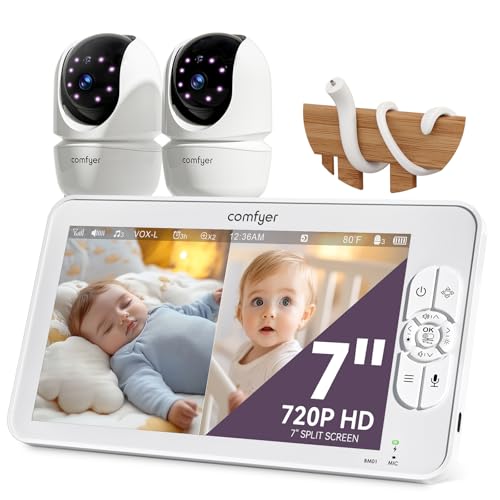
2. Comfyer 7-Inch HD Split-Screen Baby Monitor With 2 1080p Cameras
The Comfyer BM01 is the pick for parents who want the largest and clearest split-screen view. Its seven-inch parent unit is noticeably bigger than the five-inch screens on most rivals, and each of its two cameras records in 1080p, so the picture stays sharper when you look closely at a child in a dark room. For two rooms, that extra screen space matters, because each half of a split-screen view is effectively a smaller display on its own.
The system is a no-WiFi monitor that uses a 2.4GHz FHSS link with digital encryption, so it works without a router and keeps the video inside the home. The parent unit has a 6,000mAh battery, with up to 13 hours of video streaming on a single charge, or far longer in VOX mode, where the screen sleeps until a camera detects sound.
In split-screen mode, the Comfyer shows both cameras at once while the audio focuses on one camera at a time. A scan mode swaps the audio between the cameras every 15 seconds, so you hear from both rooms in turn without touching a button. Remote pan, tilt, and zoom, automatic night vision, and two-way audio are included, and the system can connect up to four cameras. The larger screen makes the parent unit bulkier than a five-inch model, but if you value a clear picture above portability, that trade is easy to accept.
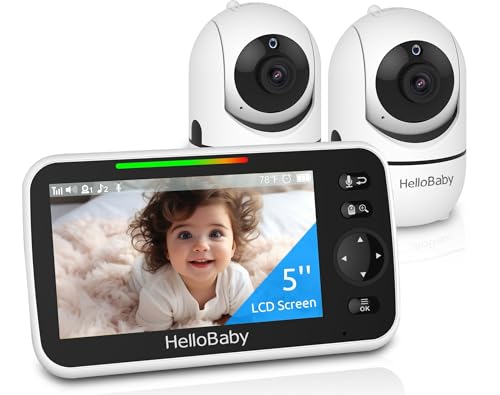
3. HelloBaby 5-Inch Baby Monitor With 2 Cameras and 30-Hour Battery
The HelloBaby HB6550-2 is the pick for long battery life and simple, reliable two-room coverage. Its five-inch parent unit pairs with two pan-tilt-zoom cameras, and the system is rated for up to 30 hours in VOX and ECO mode, or around 16 hours in video mode. That is the longest battery figure in this group, and it means the monitor can run through the night and well into the next day without a recharge.
The HB6550-2 uses a no-WiFi 2.4GHz FHSS connection with a range rated up to 1,000 feet, and it needs no app and no router. You see two rooms on one large screen with automatic or one-tap switching between views, so you can check either child quickly. Each camera pans 355 degrees, which helps you follow a toddler who moves around the room, and the cameras offer two-times zoom for a closer look.
Night vision, two-way talk, eight lullabies, and a room temperature display are all included. The system expands to up to four cameras, and the cameras are corded, which avoids the problem of a camera battery dying in the middle of the night. The HelloBaby is not a true side-by-side split-screen monitor in the same way as the two picks above, because it relies on switching between views. For parents who value battery life above a constant split view, that is a reasonable trade.
Comparison Table
| Monitor | Screen | Cameras in Box | Camera Resolution | Split-Screen View | Connection | Battery | Range |
|---|---|---|---|---|---|---|---|
| Babysense HD S2 | 5 inch | 2 | 720p | Yes, side by side | No WiFi, FHSS | Up to 20 hours in ECO mode | Up to 1,000 feet in open space |
| Comfyer BM01 | 7 inch | 2 | 1080p | Yes, side by side | No WiFi, FHSS | Up to 13 hours video, longer in VOX mode | Long range, local wireless |
| HelloBaby HB6550-2 | 5 inch | 2 | Standard video | Switching between rooms | No WiFi, FHSS | Up to 30 hours in VOX mode | Up to 1,000 feet |
How to Set Up Two Cameras in Two Rooms
Place each camera where it can see the whole sleeping area without pointing directly at a window or a bright lamp, which can wash out the picture. A high corner or a wall mount usually gives a better view than a low shelf, and it keeps the camera and its cord out of reach. Keep cords at least three feet from the crib or bed, and secure any loose cable so a child cannot pull it down.
Test the parent unit from the places where you will actually use it, such as the kitchen and your own bedroom, before you rely on it overnight. Check that both cameras stay connected, especially the camera farthest from where you spend the evening. If the signal drops in one spot, moving the parent unit a few feet can make a real difference.
Label the cameras by room, not by number alone, and keep the layout consistent, so the left side of the screen is always the same room. Charge the parent unit during the day if you use continuous video at night, or use VOX mode to stretch the battery.
Frequently Asked Questions
Can one video monitor really cover two rooms?
Yes, if it ships with two cameras and offers split-screen viewing or fast camera switching. A two-camera system uses one parent unit to receive video from both cameras, so you can watch two rooms without buying two separate monitors. Check that both cameras are included in the box, because some listings sell a single-camera version under a similar name.
Is split-screen better than switching between cameras?
Split-screen is better when you want to see both children at the same time, especially for twins or for two children who are both asleep. Switching is workable when you mainly watch one child at a time and only check the other room occasionally. In most split-screen systems, the video shows both rooms at once while the audio follows one camera at a time, or cycles between them.
Do I need WiFi for a video monitor for two rooms?
No. The monitors in this guide use a closed local wireless link and a dedicated parent unit, so they work without WiFi, a router, or a phone app. That keeps the video inside your home and keeps the monitor working during an internet outage. WiFi is only needed if you want remote viewing away from home or app-based features.
How far can a two-room video monitor reach?
It depends on the model and on your house. Many no-WiFi monitors are rated up to 1,000 feet in open space, but walls, floors, and metal objects reduce that range indoors. Test the parent unit from the rooms where you will actually use it, and pay attention to the camera farthest from the parent unit, because that connection is usually the first to weaken.
Can I add a third camera later?
Many two-camera systems pair with up to four cameras in total, including the Babysense HD S2, the Comfyer BM01, and the HelloBaby HB6550-2. You can buy an additional compatible camera later and pair it with the same parent unit. Check compatibility before you buy an extra camera, because a camera from one brand or model line may not pair with a different parent unit.
Conclusion
The best video monitors for two rooms are the ones that make watching two children feel simple rather than complicated. A true split-screen view, a reliable local wireless link, night vision, and a battery that lasts through the night matter far more than extra features you will rarely use.
If you want a balanced all-round system, the Babysense HD S2 covers two rooms with a clear five-inch split-screen view, long battery life in ECO mode, and room to add cameras later. If you want the clearest picture and the largest screen, the Comfyer BM01 gives you a seven-inch display and 1080p cameras for two rooms. If you want the longest time between charges and a straightforward setup, the HelloBaby HB6550-2 offers up to 30 hours in VOX mode with two pan-tilt-zoom cameras.
Choose the layout that fits how you watch, test the signal from the rooms where you will actually use the monitor, and set both cameras up before the first overnight use. With the right two-camera system, you can see both rooms at a glance.
Disclosure: As an Amazon Associate, we earn from qualifying purchases.
FAQ
Can one video monitor really cover two rooms?
Is split-screen better than switching between cameras?
Do I need WiFi for a video monitor for two rooms?
How far can a two-room video monitor reach?
Can I add a third camera later?
More from Amazon
Programs that pair well with the guide above. Offers and eligibility are set by Amazon and may change.
Free shipping on eligible items, Prime Video and more. Eligible new members can start with a free trial.
Start a Prime free trialAd-free music streaming. Eligible new subscribers can start with a free trial.
Try Music Unlimited freeA Prime membership for ages 18-24 with a trial period. Eligibility is set by Amazon.
See Prime for Young AdultsAudiobooks and podcasts to listen to on the go. Eligible new members can start with a free trial.
Try Audible freeAs an Amazon Associate we earn from qualifying purchases.