Our Short List of 3
All 4 Picks at a Glance
| Product | Specs | Action |
|---|---|---|
 1. PreSonus Eris 3.5 Gen 2 — Best Compact Pair for a Small Desk | Check price on Amazon | |
 2. JBL 305P MkII Pair — Best All Round Five Inch Monitors | Check price on Amazon | |
 3. Yamaha HS5 Pair — Best for Critical Midrange and Mixing Accuracy | Check price on Amazon | |
 4. KRK ROKIT 5 Generation Five Pair — Best Modern Five Inch Monitors With DSP Tuning | Check price on Amazon |
Key takeaways
- Looking for the best 4 studio monitors for mixing, gaming, and home production? Compare four proven powered pairs for accuracy, bass, and desk fit now.
Introduction
If you are searching for the best 4 studio monitors, you probably want a short, honest shortlist rather than a catalogue of dozens of speakers that all look the same on paper. A good studio monitor does a very different job from a regular computer speaker or a home theatre speaker. It is designed to reveal what is really in a recording, including mistakes, harsh frequencies, muddy low end, and small details that coloured speakers tend to hide. That honesty makes mixing, editing, podcast production, video work, and serious listening much easier.
This guide focuses on four powered nearfield studio monitors for the most common home studio situations. One is a compact pair for a small desk. The other three are five inch models for a dedicated mixing desk, a gaming room that doubles as a production space, and a room where accurate midrange matters more than sheer bass. All four are active monitors, so each speaker has its own built in amplifier and needs no separate power amplifier. Connect them to an audio interface, a mixer, a computer, or a DAC, place them at ear height, and start listening.
Before you buy, remember that the room matters almost as much as the speaker. Bare walls, a desk pushed hard against a wall, and speakers sitting directly on a hard surface can all change what you hear. Moving the monitors away from the wall and adding isolation pads can make a real difference. The best one for you depends on your desk size, your room, and whether you mix music, edit video, stream, or want a more truthful sound for gaming and everyday listening.
How to Choose Studio Monitors
Work through a few practical questions first. The answers will point you toward the right size, connections, and features, and help you avoid paying for performance your room cannot reveal.
Woofer Size and Bass Response
Woofer size is the first thing most buyers notice, and it does matter. A 3.5 inch woofer is compact and works well on a crowded desk, in a bedroom studio, or beside a laptop. It will not produce deep sub bass on its own, so it suits vocal work, acoustic music, podcast editing, and gaming where a separate subwoofer may be added later. A 5 inch woofer reaches lower and gives a fuller picture of bass guitars, kick drums, and synth sounds, which is why five inch monitors are the most common starting point for home studios. Larger woofers go deeper still, but they also need more space and can overwhelm a small untreated room.
Do not judge a monitor by woofer size alone. Cabinet design, port tuning, amplifier power, and tweeter quality all affect the final sound, and a well designed 5 inch monitor can sound more accurate than a poorly designed larger one. Look for a flat, neutral response rather than a speaker that boosts bass or treble to sound impressive in a demonstration.
Powered or Passive
Almost all modern home studio monitors are powered, also called active. Each speaker contains its own amplifier, matched by the manufacturer to the drivers inside, which makes setup simple. Passive monitors need an external amplifier, which adds cost and complexity, and they are now uncommon in home studios. All four picks here are powered, so you only need a source, cables, and a power outlet for each speaker.
Inputs and Connectivity
Check the inputs before you order. Most studio monitors offer balanced XLR and quarter inch TRS inputs, which reject hum and interference over longer cable runs. Many also offer unbalanced RCA inputs, handy for connecting directly to a computer or phone. If your audio interface has balanced outputs, use balanced cables. A front panel headphone jack and volume control, found on some compact models, is genuinely useful when you need to check a mix quietly at night.
Room Tuning Controls
No two rooms sound the same, so room tuning controls are valuable. Many monitors include rear panel switches for high frequency trim, low frequency trim, and acoustic space settings. These let you reduce bass when a speaker sits close to a wall, or soften treble in a bright, reflective room. Some newer models add digital signal processing and a companion app for more precise tuning. These controls do not replace acoustic treatment, but they help a monitor adapt to a real room instead of an ideal one.
Listening Distance and Placement
Nearfield monitors are designed to be heard from a short distance, usually about three to five feet away. That close position reduces the influence of the room and lets you hear the direct sound from the speakers. Place the two monitors and your head in a triangle, with the tweeters at ear height and the speakers angled slightly toward you. Keep both monitors the same distance from the side walls where possible, and avoid placing one speaker in a corner while the other sits in open space.
What About a Subwoofer
A subwoofer can extend the low end below what a five inch monitor can reproduce, which helps when you mix bass heavy music or work on film sound. It is not essential for every buyer, and a poorly set up subwoofer can cause more problems than it solves. If you are starting out, spend your money on the best pair of monitors you can afford and learn how they sound in your room first. You can add a matched subwoofer later, once you know which frequencies you are missing.
Top Picks
1. PreSonus Eris 3.5 Gen 2 — Best Compact Pair for a Small Desk
The PreSonus Eris 3.5 Gen 2 is the most desk friendly monitor in this group, and a sensible starting point if space is tight or if this is your first pair of studio monitors. Each speaker uses a 3.5 inch woven composite woofer and a 1 inch silk dome tweeter, driven by a built in amplifier. The pair is sold as a set, with one powered speaker and one passive companion speaker connected by a speaker cable, which keeps setup simple.
Despite its size, the Eris 3.5 Gen 2 is designed as a real monitoring tool rather than a dressed up computer speaker. It has balanced quarter inch TRS inputs and unbalanced RCA inputs on the rear, plus a front panel volume control, a headphone output, and an auxiliary input for a phone or media player. Rear acoustic tuning controls let you adjust high and low frequencies to suit your desk and room, which is especially useful when the speakers sit close to a wall.
The sound is clear and focused in the midrange, where vocals, guitars, and most instruments live. Bass is present and controlled for a speaker of this size, but it will not shake the room, and very deep synth bass will be less obvious than on a five inch monitor. That is a fair trade for a speaker that fits on a crowded desk beside a monitor, a keyboard, and an audio interface.
This pair suits beginners, podcasters, video editors, students, and gamers who want a clear, honest sound without giving up half their desk. It also works well as a second pair in a larger studio, for checking how a mix sounds on small speakers.
2. JBL 305P MkII Pair — Best All Round Five Inch Monitors
The JBL 305P MkII pair is one of the most widely recommended five inch studio monitors for home studios, earning that reputation with a clean, detailed sound and a wide sweet spot. Each monitor pairs a 5 inch woofer with a 1 inch tweeter mounted in JBL Image Control Waveguide, a shaped horn that controls how high frequencies spread across the room. The result is a stable stereo image that holds up even if you move your head a little while you work.
Each 305P MkII is a powered monitor with dual Class D amplifiers, one for the woofer and one for the tweeter. The rear panel offers balanced XLR and quarter inch TRS inputs, plus a boundary EQ switch and a high frequency trim control. The boundary EQ is particularly useful if your desk sits against a wall, because it lets you reduce the bass build up that often happens there.
The 305P MkII is detailed without being harsh, and the bass is tight and controlled for a five inch speaker. Vocals sit clearly in the centre of the stereo image, and small details such as reverb tails and the attack of a snare drum are easy to hear. That clarity makes it easier to spot problems in a mix, such as a vocal that is too loud or a low end that is muddy rather than powerful.
This pair is sold as a factory matched stereo set, so you get two monitors designed to work together. It suits music production, mixing, video editing, streaming, and gaming in a dedicated room. If you can fit five inch monitors on your desk and you want one pair that does almost everything well, the JBL 305P MkII pair is the safest all round choice in this guide.
3. Yamaha HS5 Pair — Best for Critical Midrange and Mixing Accuracy
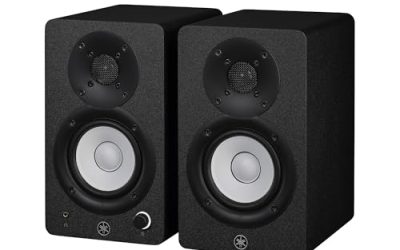
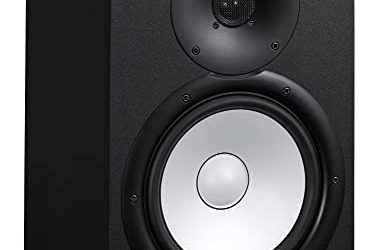
The Yamaha HS5 pair has a long history in home and professional studios, and it is best known for a flat, honest midrange that makes mixing decisions easier. Each monitor uses a 5 inch cone woofer and a 1 inch dome tweeter in a ported cabinet, with a bi amplified design that gives each driver its own amplifier. The white cone woofer is part of a design lineage many engineers trust for translation, which means a mix that sounds balanced on these monitors tends to sound balanced on other systems too.
The HS5 pair offers balanced XLR and quarter inch TRS inputs, plus room control and high trim switches on the rear. The room control switch lets you reduce low frequencies when the monitors sit close to a wall, while the high trim switch lets you adjust the treble to suit a bright or dull room.
The sound is deliberately unflattering in the best sense. The HS5 does not add warmth or excitement to a recording, so a dull mix will sound dull and a harsh mix will sound harsh. That can be a surprise if you are used to consumer speakers, but it is exactly what you want when you are mixing, because problems are revealed rather than hidden. Bass is tight and defined rather than deep, so you will hear the pitch and timing of bass notes clearly, even if the very lowest frequencies are less prominent than on a larger monitor.
This pair suits producers and engineers who prioritise translation and accuracy over sheer fun, and it is a strong choice for acoustic music, vocals, rock, and any genre where the midrange carries the song. If you already own a subwoofer, or you plan to add one later, the HS5 pair becomes even more versatile, helping you build mixes that travel well to headphones, car speakers, and other playback systems.
4. KRK ROKIT 5 Generation Five Pair — Best Modern Five Inch Monitors With DSP Tuning
The KRK ROKIT 5 Generation Five pair, also known as the RP5G5, is the current generation of one of the most recognisable studio monitors in home production. Each monitor uses a 5 inch woofer and a 1 inch tweeter, with a redesigned cabinet, a new tweeter design, and built in digital signal processing for room tuning.
The Generation Five model adds 25 onboard EQ presets that can be selected from the rear panel display, along with a companion app for visual EQ adjustment. That makes it easier to adapt the monitors to a difficult room, a desk against a wall, or a corner placement, without needing external measurement software. The rear panel also offers balanced XLR and quarter inch TRS inputs and unbalanced RCA inputs, so it connects easily to an audio interface, a mixer, or a computer.
The ROKIT 5 Generation Five is detailed and forward, with a lively top end and a solid low end for a five inch monitor. It is a good fit for electronic music, hip hop, pop, and gaming, where energy and low end impact matter, while still being accurate enough for serious mixing work. The stereo image is wide and stable, and the monitors remain clear at moderate listening levels.
This pair suits producers who want modern tuning features and a monitor that looks as good as it sounds in a home studio or streaming setup. It is also a good choice if your room is not ideal and you want onboard EQ to help compensate for wall proximity or a bright, reflective space.
Comparison Table
| Monitor | Woofer Size | Best For | Inputs | Room Tuning |
|---|---|---|---|---|
| PreSonus Eris 3.5 Gen 2 | 3.5 inch | Small desks and first monitors | TRS, RCA, Aux in | High and low frequency controls |
| JBL 305P MkII Pair | 5 inch | All round mixing and production | XLR, TRS | Boundary EQ and high frequency trim |
| Yamaha HS5 Pair | 5 inch | Critical mixing and midrange accuracy | XLR, TRS | Room control and high trim |
| KRK ROKIT 5 Generation Five Pair | 5 inch | Modern DSP tuning and electronic music | XLR, TRS, RCA | 25 EQ presets and app tuning |
Frequently Asked Questions
Are two studio monitors enough, or do I need four speakers?
For most home studios, a stereo pair of two monitors is enough, and that is what all four picks in this guide provide. The phrase best 4 studio monitors here means four recommended monitor models, each sold as a pair or a set for stereo listening. A second pair can be useful for checking a mix on different speakers, but a single good stereo pair is the right starting point.
Do studio monitors need a subwoofer?
Not always. Five inch monitors cover most of the frequency range you need for mixing, and many producers work without a subwoofer for years. A subwoofer helps if you mix bass heavy music or work on film sound. If you add one, choose a model designed to match your monitors, set the crossover carefully, and place it where it sounds even rather than boomy.
Can I use studio monitors for gaming and everyday listening?
Yes. Studio monitors work well for gaming, films, and music listening, because they are clear and detailed. Unlike gaming speakers, monitors do not add extra bass or excitement, so games and films may sound less dramatic at first. Many listeners grow to prefer the cleaner sound, especially for dialogue, footsteps, and positional audio cues in competitive games.
What cables do I need for powered studio monitors?
You need one audio cable per monitor, plus a power cable for each speaker. If your audio interface has balanced outputs, use balanced XLR or quarter inch TRS cables. If you connect directly to a computer, you may need RCA cables or an adapter, depending on your sound card or DAC. Keep cable runs short, and avoid running audio cables parallel to power cables for long distances.
How far from the wall should studio monitors sit?
A good starting point is at least a few inches from the wall, with more space if your room allows it. Rear ported monitors are more sensitive to wall proximity, and bass can build up quickly when a speaker sits in a corner. Use the boundary EQ or room control switch to reduce bass if you cannot move them further from the wall.
Conclusion
The best 4 studio monitors for most home studios are the PreSonus Eris 3.5 Gen 2 for a small desk, the JBL 305P MkII pair for all round mixing, the Yamaha HS5 pair for critical midrange accuracy, and the KRK ROKIT 5 Generation Five pair for modern DSP tuning. Each is a powered nearfield monitor with a clear use case, and each will help you hear your music, mixes, and games more honestly than a regular computer speaker.
Choose by desk size and room first, then by the kind of work you do most. A compact pair that fits your desk and that you learn well will serve you better than a larger pair squeezed into a corner. Set the monitors up carefully, give yourself time to learn their sound, and use reference tracks to check your work.
Disclosure: As an Amazon Associate, we earn from qualifying purchases.
FAQ
Are two studio monitors enough, or do I need four speakers?
Do studio monitors need a subwoofer?
Can I use studio monitors for gaming and everyday listening?
What cables do I need for powered studio monitors?
How far from the wall should studio monitors sit?
More from Amazon
Programs that pair well with the guide above. Offers and eligibility are set by Amazon and may change.
Free shipping on eligible items, Prime Video and more. Eligible new members can start with a free trial.
Start a Prime free trialAd-free music streaming. Eligible new subscribers can start with a free trial.
Try Music Unlimited freeA Prime membership for ages 18-24 with a trial period. Eligibility is set by Amazon.
See Prime for Young AdultsAudiobooks and podcasts to listen to on the go. Eligible new members can start with a free trial.
Try Audible freeAs an Amazon Associate we earn from qualifying purchases.