
Our Short List of 3

- Best for: First-time recordists and podcast editors working close to a small desk.
- Brand: PreSonus
- Model family: Eris 3.5
- Format: Pair, as stated in the listing title
- Type: Powered, active monitor speakers

- Best for: Small-room mixing where a single-cabinet purchase plan and rear response controls matter.
- Brand: Yamaha
- Model: HS5
- Format: Single powered studio monitor listing
- Design: 2-way bass-reflex bi-amplified nearfield studio monitor

- Best for: Producers in untreated rooms who want voicing modes and tuning combinations built into the pair.
- Brand: KRK
- Model: RP5G5 ROKIT 5 Generation Five
- Format: Pair, set name stated as Pair on the Amazon page, with 2 items
- System type: 2-way active studio monitor
All 5 Picks at a Glance
| Product | Specs | Action |
|---|---|---|
| PreSonus Eris 3.5 Studio Monitors |
| Check price on Amazon |
| Yamaha HS5 Powered Studio Monitor |
| Check price on Amazon |
| KRK RP5G5 ROKIT 5 Generation Five |
| Check price on Amazon |
 JBL Professional 305P MkII |
| Check price on Amazon |
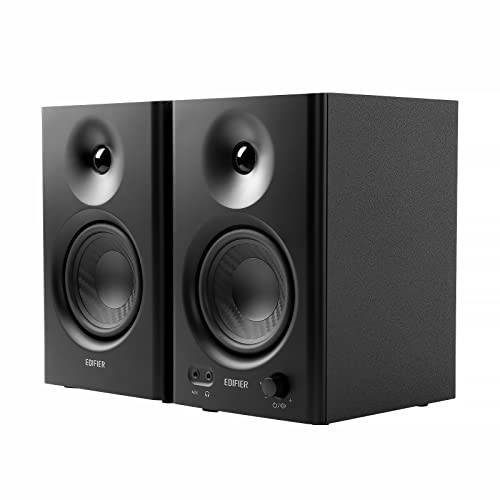 Edifier MR4 Powered Studio Monitor Speakers |
| Check price on Amazon |
Key takeaways
- Five studio recording monitors compared by woofer size, inputs and single or pair format, from compact 3.5-inch pairs to a 5-inch DSP-tuned set.
Choosing recording monitors is really a decision about honesty: whether the speakers on your desk will tell you when a vocal is too loud, a kick drum is muddy, or a reverb tail is hiding a mistake. A monitor that flatters every track feels pleasant for an evening and then betrays you when the mix moves to a car, earbuds, or a different room.
This guide is for home recordists setting up a first nearfield pair, podcasters and streamers who edit spoken word daily, and producers upgrading from multimedia speakers. Every pick below was chosen from the name and specifications stated on its Amazon listing, including whether that listing sells a single monitor or a pair, what inputs it accepts, and which driver sizes it uses for close listening work.
Quick Picks
As an Amazon Associate we earn from qualifying purchases
| Product | Best for | Key spec from title |
|---|---|---|
| PreSonus Eris 3.5 Studio Monitors | Small desks and first recording setups | 3.5-inch powered monitors, sold as a pair |
| Yamaha HS5 Powered Studio Monitor | Mix decisions in a compact room | 5-inch cone woofer and 1-inch dome tweeter |
| KRK RP5G5 ROKIT 5 Generation Five | Producers who need room tuning controls | 5-inch powered studio monitor, sold as a pair |
| JBL Professional 305P MkII | Wide sweet spot on a shared desk | 5-inch 2-way powered monitor, sold individually |
| Edifier MR4 Powered Studio Monitor Speakers | Near-field reference on a tight desk | 4-inch active near-field speaker, black pair |
How to Choose
Start With Woofer Size and the Room You Actually Have
Woofer diameter shapes how much low frequency a small cabinet can reproduce, and it also decides how much desk and distance the monitor needs. A 3.5-inch pair such as the Eris 3.5 suits a shallow desk where your ears sit close, while a 5-inch model reaches lower and stays composed when you push the level during a chorus check. Match the driver to the space first: oversized monitors crammed against a wall in a tiny untreated room usually create more confusion than a modest pair placed well and listened to at moderate volume.
Check Whether the Listing Sells One Monitor or a Pair
This is the easiest expensive mistake in the category, because listings in this guide differ. The PreSonus, KRK and Edifier options here are sold as pairs, while the Yamaha HS5 listing and the JBL 305P MkII listing each cover a single monitor, so stereo recording work needs two units. Read the title and the number-of-items field before ordering, and budget for two singles where that applies. Ordering one half of a stereo image leaves you monitoring in mono, which hides panning errors and makes reverb and backing-vocal placement almost impossible to judge.
Match the Inputs to Your Interface or Mixer
Your monitors only receive what your interface, mixer, or controller can send, so the connector list matters as much as the drivers. Balanced XLR and quarter-inch TRS inputs, stated on listings such as the Yamaha HS5 and JBL 305P MkII, suit audio interfaces and help reject hum over longer cable runs in a room full of computer power supplies. Smaller desktop pairs lean on simpler connections for computers and controllers. List the outputs you own today, then confirm the monitor accepts them without adapters stacked on adapters, which add noise, loose contacts, and troubleshooting time.
Use Room Controls Instead of Guessing With EQ Later
Few home recording spaces are symmetrical, treated, or free of corners, so rear-panel or DSP controls earn their place. The Yamaha HS5 listing names Room Control and High Trim response controls, the JBL offers HF and LF trim, and the KRK ROKIT 5 G5 goes further with three voicing modes and twenty-five boundary and tuning EQ combinations stated on its Amazon page. Those adjustments let you compensate for a desk boundary or a wall behind one speaker at the monitor itself, rather than carving your mix bus to fix a placement problem that follows every song.
The 5 Best Options
PreSonus Eris 3.5 Studio Monitors
- Best for: First-time recordists and podcast editors working close to a small desk.
- Brand: PreSonus
- Model family: Eris 3.5
- Format: Pair, as stated in the listing title
- Type: Powered, active monitor speakers
First-time recordists and podcast editors working close to a small desk.
The small woofer format limits deep low-frequency information, so check bass decisions on another playback system as well.
For a first recording desk, the Eris 3.5 pair removes the two biggest friction points: it arrives as a complete stereo pair, and its 3.5-inch format fits desks where larger cabinets would crowd the screen and push the tweeters past your ears. PreSonus positions this listing for near field music production, desktop computer use, and hi-fi audio, which matches the beginner recordist who tracks, edits, and listens in the same seat. It is the simplest starting point here for spoken-word editing, compact songwriting rigs, and small rooms where moderate listening levels are the honest working range.
Yamaha HS5 Powered Studio Monitor
- Best for: Small-room mixing where a single-cabinet purchase plan and rear response controls matter.
- Brand: Yamaha
- Model: HS5
- Format: Single powered studio monitor listing
- Design: 2-way bass-reflex bi-amplified nearfield studio monitor
Small-room mixing where a single-cabinet purchase plan and rear response controls matter.
This is one monitor, not a pair, so a stereo setup requires ordering two units.
The HS5 is the pick for recordists who want a compact monitor built around plain, stated facts: a 5-inch cone woofer, a 1-inch dome tweeter, and a bi-amp system split between low and high frequencies. Yamaha’s listing describes a 2-way bass-reflex bi-amplified nearfield design with Room Control and High Trim, which suits a small control corner where one speaker inevitably sits nearer a wall than the other. Because this listing covers one monitor, plan on two for stereo work. In return you get a focused nearfield tool sized for desks that cannot accommodate larger cabinets.
KRK RP5G5 ROKIT 5 Generation Five
- Best for: Producers in untreated rooms who want voicing modes and tuning combinations built into the pair.
- Brand: KRK
- Model: RP5G5 ROKIT 5 Generation Five
- Format: Pair, set name stated as Pair on the Amazon page, with 2 items
- System type: 2-way active studio monitor
Producers in untreated rooms who want voicing modes and tuning combinations built into the pair.
The tuning options reward careful setup, so allow time to work through the modes rather than leaving the pair on a default setting.
Choose the ROKIT 5 Generation Five pair when your room, not your interface, is the problem you keep fighting. Its Amazon page centres on adjustment: three voicing modes named Mix, Focus, and Create, plus twenty-five boundary and tuning EQ combinations intended to minimise and correct problems in the acoustic environment. The drivers pair a 5-inch woven Kevlar aramid fibre woofer with a 1-inch silk dome tweeter, driven by bi-amplified Class D power. For producers moving between writing, mixing, and checking midrange detail in one chair, that switchable approach is the clearest reason to pick this pair over a fixed-voicing alternative.
JBL Professional 305P MkII
- Best for: Shared desks and producers who move around the sweet spot while tracking and editing.
- Brand: JBL Professional
- Model: 305P MkII
- Format: Sold individually, as stated in the listing title, with 1 item
- System type: Powered 5-inch two-way studio monitor
Shared desks and producers who move around the sweet spot while tracking and editing.
Sold individually means the stereo total is two units, two power connections, and two cables to plan for.
The 305P MkII suits a desk where more than one person listens, or where you lean across to a keyboard, controller, or second screen while a take plays back. JBL’s Amazon page highlights its Image Control Waveguide for detailed imaging and a broad, room-friendly sweet spot, alongside refined transducers and a Slip Stream low-frequency port. The listing is explicit that this monitor is sold individually, so stereo recording needs two. Each cabinet is a powered 5-inch two-way design with balanced inputs, making it a straightforward match for a typical two-output audio interface once you buy the matching second unit.
Edifier MR4 Powered Studio Monitor Speakers
- Best for: Compact recording desks that need a complete pair with a step up in woofer size from 3.5-inch models.
- Brand: Edifier
- Model: MR4
- Format: Pair, as stated in the listing title
- Colour in this listing: Black
Compact recording desks that need a complete pair with a step up in woofer size from 3.5-inch models.
Confirm the colour and pair format on the listing before ordering, because the same model also appears in other colour listings.
The MR4 pair fills the middle ground between the tiny Eris 3.5 and the full 5-inch models: a 4-inch active near-field format, sold as a pair in black, for desks that need a stereo image without surrendering the whole work surface. Edifier calls this listing a powered studio monitor and a near-field reference speaker, which frames it for close listening while tracking, editing video sound, or checking a podcast mix at arm’s length. If your chair sits near the speakers and your room is small, that in-between woofer size is often the practical compromise rather than a step down.
Which One Fits Your Situation
You Are Building a First Recording Desk From Nothing
Start with a pair-format listing so the stereo image is complete on day one. The PreSonus Eris 3.5 pair suits the smallest desks and spoken-word work, while the Edifier MR4 pair gives you a 4-inch format if your desk has slightly more depth. Either route leaves your attention on microphone placement, interface levels, and learning your room, instead of on ordering a second single monitor later to finish the setup.
Your Room Is Untreated and One Speaker Sits Near a Wall
Look first at the KRK ROKIT 5 Generation Five pair, whose voicing modes and twenty-five tuning combinations are stated on its Amazon page for correcting problems in the acoustic environment. The Yamaha HS5 is the alternative when you prefer simpler rear controls, since its listing names Room Control and High Trim. In both cases, adjust the monitors themselves before reaching for mix EQ to compensate for placement.
You Edit at a Shared or Shifting Desk Position
Pick the JBL 305P MkII and order two, because the listing sells each monitor individually. Its Amazon page emphasises a broad, room-friendly sweet spot from the Image Control Waveguide, which helps when you slide between a MIDI keyboard, a controller, and the centre chair during a session. Keep both cabinets at equal height and distance so that wide sweet spot supports, rather than masks, your panning decisions.
You Mix Music in a Small Room and Check Every Detail
The Yamaha HS5 fits this situation when bought as a matched two-unit setup, with its 5-inch woofer, stated frequency response, and response controls for a compact space. Producers who instead want switchable voicing for writing versus mixing should take the KRK pair. Either way, work at consistent moderate levels and re-check finished mixes elsewhere, because no 5-inch nearfield monitor tells the whole low-frequency story alone.
Common Mistakes
- Ordering a single-monitor listing such as the HS5 or 305P MkII and expecting a stereo pair in the box.
- Placing both monitors directly on a hard desk at different heights, then blaming the speakers for a shifting stereo image.
- Choosing the largest woofer for the smallest room, leaving no distance between the cabinets, your ears, and the rear wall.
- Connecting balanced interface outputs with whatever cable is nearby, without checking whether the monitor listing states XLR, TRS, or another input.
- Mixing at high volume for hours to compensate for a noisy room, instead of lowering the level and moving closer to the monitors.
Frequently Asked Questions
Do recording monitors need an audio interface?
Most setups benefit from one, because an interface provides the balanced outputs, level control, and headphone monitoring that recording work assumes. Several listings here state balanced XLR or quarter-inch TRS inputs, which pair naturally with interface outputs. A computer headphone socket can start a simple editing rig, but it limits level control, connectivity, and clean gain staging as your recording chain grows.
Why are some monitors sold singly and others as pairs?
Manufacturers package studio monitors both ways, and the listings in this guide reflect that split. The Eris 3.5, ROKIT 5 G5, and MR4 listings here are pairs, while the HS5 and 305P MkII listings cover one monitor each. Always read the title and item count, then order two singles when stereo recording, mixing, or editing is the job.
How far should nearfield monitors sit from my ears?
Nearfield monitors are designed for close listening, typically with the tweeters near ear height and both cabinets forming a rough triangle with your head. Exact distances depend on desk depth and room size, so start close, keep both sides symmetrical, and adjust using the controls the listing states. Asymmetry between left and right placement causes more confusion than a modest distance change applied equally.
Can recording monitors also handle everyday listening and gaming?
Yes, and several listings here explicitly include desktop computer and hi-fi audio among their stated uses. A nearfield pair will play games, films, and music from the same desk without extra equipment beyond a suitable source connection. Just remember that a monitor aims for an honest presentation rather than boosted bass or treble, so casual listening may sound plainer than multimedia speakers designed to flatter.
FAQ
Do recording monitors need an audio interface?
Why are some monitors sold singly and others as pairs?
How far should nearfield monitors sit from my ears?
Can recording monitors also handle everyday listening and gaming?
More from Amazon
Programs that pair well with the guide above. Offers and eligibility are set by Amazon and may change.
Free shipping on eligible items, Prime Video and more. Eligible new members can start with a free trial.
Start a Prime free trialAd-free music streaming. Eligible new subscribers can start with a free trial.
Try Music Unlimited freeA Prime membership for ages 18-24 with a trial period. Eligibility is set by Amazon.
See Prime for Young AdultsAudiobooks and podcasts to listen to on the go. Eligible new members can start with a free trial.
Try Audible freeAs an Amazon Associate we earn from qualifying purchases.
