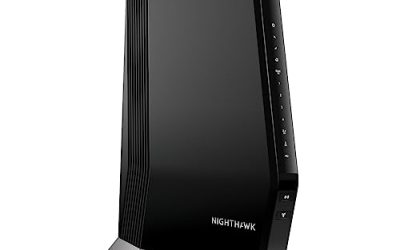
Our Short List of 3

- Best for: Homes on multi-gig cable plans that want one router to serve several wired gaming stations.
- WiFi standard: WiFi 7, tri-band BE19000, 12-stream, up to 19 Gbps combined
- Wired ports: 2 x 10G ports and 4 x 2.5G ports, plus 1 x USB 3.0
- Gaming features: Turbo Acceleration, dedicated gaming port and game panel
- Processor: 2.2 GHz quad-core with 2 GB RAM

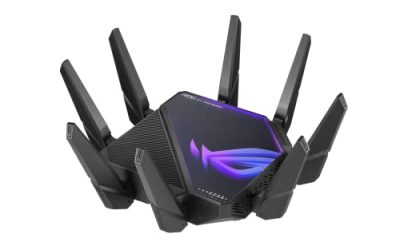
- Best for: Enthusiasts who wire their main rig and want 10G headroom for a future faster Arris modem.
- WiFi standard: WiFi 6, tri-band AX11000
- Wired ports: 10G WAN/LAN port and 2.5G WAN port, dual WAN support
- Gaming features: Triple-Level Game Acceleration and VPN Fusion
- Security: AiProtection Pro with subscription-free network security
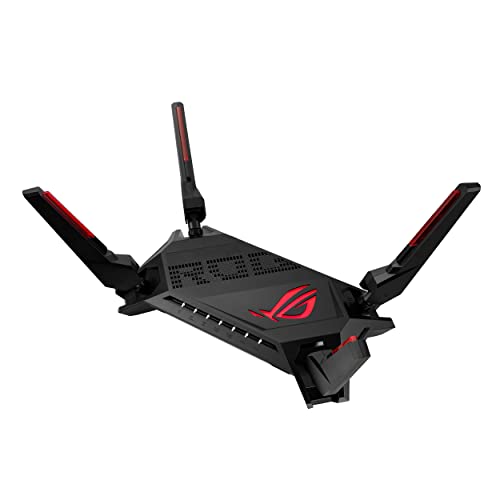
- Best for: Gigabit and lower multi-gig households that want one wired gaming PC plus strong whole-home WiFi.
- WiFi standard: WiFi 6, dual-band AX6000, up to 6000 Mbps combined
- Wired ports: dual 2.5G WAN/LAN ports with WAN aggregation support
- Processor: 2.0 GHz quad-core CPU with 1 GB RAM
- Gaming features: Triple-Level Game Acceleration and VPN Fusion
All 5 Picks at a Glance
| Product | Specs | Action |
|---|---|---|
| TP-Link Archer GE800 |
| Check price on Amazon |
| ASUS ROG Rapture GT-AX11000 Pro |
| Check price on Amazon |
| ASUS ROG Rapture GT-AX6000 |
| Check price on Amazon |
 MSI RadiX AXE6600 |
| Check price on Amazon |
 NETGEAR Nighthawk XR1000 |
| Check price on Amazon |
Our Top Picks
- NETGEAR Nighthawk Pro Gaming 6-Stream WiFi 6 RouterExtra Large11.61 x 7.87 x 2.51 inches1.32 poundsCheck on Amazon
If your cable internet arrives through an Arris modem or gateway, adding a gaming router is mostly a wiring and settings job rather than a compatibility gamble. Any standalone router with an Ethernet WAN port can take over routing duties behind Arris hardware. The real decision is which router gives your games priority once it is in charge: capable QoS, a WAN port fast enough for your plan, and enough wired ports for the desk where you play.
This guide is for cable subscribers who game on a PC or console and feel the limits of an Arris gateway’s built-in WiFi or basic routing controls. The picks below are standalone gaming routers sold on Amazon, chosen for their WAN port speeds, game-focused traffic management, and WiFi standards, ranging from proven WiFi 6 models to a WiFi 7 flagship with 10G ports. Every specification comes from the product listing for that router.
Quick Picks
As an Amazon Associate we earn from qualifying purchases
| Product | Best for | Key spec from title |
|---|---|---|
| TP-Link Archer GE800 | Fastest cable plans | 2 x 10G and 4 x 2.5G ports |
| ASUS ROG Rapture GT-AX11000 Pro | Wired gaming rigs | 10G and 2.5G ports, dual WAN |
| ASUS ROG Rapture GT-AX6000 | Most Arris households | Dual 2.5G WAN/LAN ports |
| MSI RadiX AXE6600 | 6 GHz gaming devices | WiFi 6E tri-band, 2.5G WAN/LAN |
| NETGEAR Nighthawk XR1000 | Ping and server control | DumaOS 3.0 gaming software |
How to Choose
Decide how the Arris box hands off the connection
Start by checking whether your Arris device is a plain modem or a gateway that also routes and broadcasts WiFi. A modem-only unit hands a public connection straight to your new router, which is the simplest setup. A gateway needs bridge mode enabled in its settings so it passes the connection through and stops routing. Without bridge mode, both boxes route at once, creating double NAT that can break voice chat, port forwarding, and matchmaking. If your provider locks the gateway settings, ask them to enable bridge mode or supply a modem-only unit before you shop.
Match the WAN port to your cable plan
The router can never pass more traffic than its WAN port accepts, so this port decides whether you actually receive the speed you pay for. A gigabit WAN port is fine for cable plans at or below gigabit speed, which still covers most Arris installations. Faster tiers need more: many newer Arris modems output 2.5G Ethernet, and a router with only a gigabit WAN port quietly caps those plans. If you pay for multi-gig service, or expect to upgrade soon, choose a router with a 2.5G or 10G WAN port so the Arris hardware is not wasted.
Put gaming QoS ahead of headline WiFi speed
Big combined WiFi numbers on the box matter less to your matches than how the router schedules traffic when the network is busy. Look for QoS that recognizes game traffic and protects it from downloads, cloud backups, and 4K streams running at the same time. Gaming routers package this differently: ASUS lists Triple-Level Game Acceleration, TP-Link lists Turbo Acceleration with a dedicated gaming port, MSI lists AI QoS, and NETGEAR’s DumaOS adds a geo filter for choosing game servers. Any of these approaches beats a basic router that treats a ranked match and a software update as equals.
Count wired ports and plan for coverage
A wired connection from the router to your PC or console removes WiFi jitter entirely, so count the LAN ports against the devices at your desk. Multi-gig LAN ports matter if you also run a fast NAS or a second gaming PC. Then think about the rest of the home: tri-band models dedicate a band to gaming or backhaul, WiFi 6E adds the 6 GHz band for nearby compatible devices, and mesh support such as AiMesh or EasyMesh lets you add nodes later instead of replacing the router when coverage falls short.
The 5 Best Options
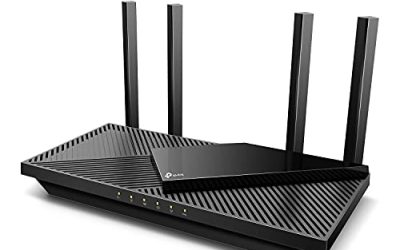
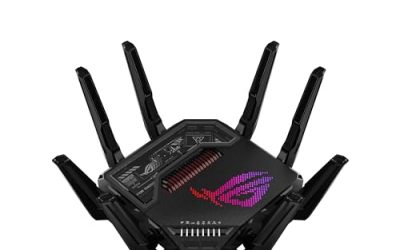
TP-Link Archer GE800
- Best for: Homes on multi-gig cable plans that want one router to serve several wired gaming stations.
- WiFi standard: WiFi 7, tri-band BE19000, 12-stream, up to 19 Gbps combined
- Wired ports: 2 x 10G ports and 4 x 2.5G ports, plus 1 x USB 3.0
- Gaming features: Turbo Acceleration, dedicated gaming port and game panel
- Processor: 2.2 GHz quad-core with 2 GB RAM
Homes on multi-gig cable plans that want one router to serve several wired gaming stations.
Its size, lighting, and flagship feature set are more than a small apartment or a sub-gigabit plan can use.
The Archer GE800 is the flagship option for Arris households on the fastest cable tiers. Its 10G WAN input can accept the full output of a multi-gig Arris modem, and the extra 2.5G ports keep wired PCs and consoles off WiFi entirely. TP-Link lists a dedicated gaming port and a game panel with Turbo Acceleration, so game traffic receives priority without hand-built rules. The tri-band WiFi 7 radio also supports Multi-Link Operation for compatible clients, which helps busy homes where streams and downloads compete with ranked matches every evening.
ASUS ROG Rapture GT-AX11000 Pro
- Best for: Enthusiasts who wire their main rig and want 10G headroom for a future faster Arris modem.
- WiFi standard: WiFi 6, tri-band AX11000
- Wired ports: 10G WAN/LAN port and 2.5G WAN port, dual WAN support
- Gaming features: Triple-Level Game Acceleration and VPN Fusion
- Security: AiProtection Pro with subscription-free network security
Enthusiasts who wire their main rig and want 10G headroom for a future faster Arris modem.
The eight-antenna chassis is bulky, and its tri-band WiFi 6 radio lacks the 6 GHz band found on WiFi 6E rivals.
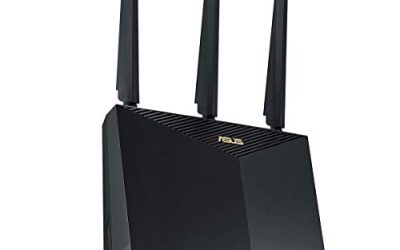
The ROG Rapture GT-AX11000 Pro suits gamers who want wired headroom and deep tuning controls behind an Arris gateway. It offers both a 10G port and a 2.5G port that can serve as WAN connections, plus dual WAN support for households that keep a backup connection. ASUS lists Triple-Level Game Acceleration, which prioritizes game packets along the path from your device to the game server, and subscription-free AiProtection Pro security. It is a large tri-band WiFi 6 unit, and AiMesh support lets it anchor a mesh system later instead of being replaced.
ASUS ROG Rapture GT-AX6000
- Best for: Gigabit and lower multi-gig households that want one wired gaming PC plus strong whole-home WiFi.
- WiFi standard: WiFi 6, dual-band AX6000, up to 6000 Mbps combined
- Wired ports: dual 2.5G WAN/LAN ports with WAN aggregation support
- Processor: 2.0 GHz quad-core CPU with 1 GB RAM
- Gaming features: Triple-Level Game Acceleration and VPN Fusion
Gigabit and lower multi-gig households that want one wired gaming PC plus strong whole-home WiFi.
With only two bands, heavy wireless traffic shares the same 5 GHz band your wireless gaming devices use.
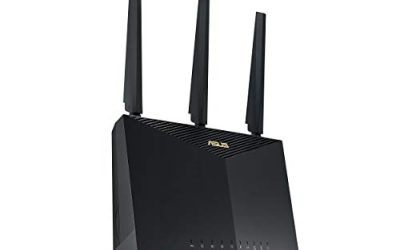
The ROG Rapture GT-AX6000 is the balanced pick for most Arris cable homes, especially on gigabit plans. It carries two 2.5G ports that can be assigned as WAN or LAN, so the link from a 2.5G-equipped Arris modem is not capped at gigabit, and a wired gaming PC still gets a multi-gig path. ASUS lists Triple-Level Game Acceleration, WAN aggregation, and AiProtection security included for the life of the product. Dual-band WiFi 6 keeps the design simpler than tri-band flagships while still covering larger homes with its RangeBoost Plus antennas.
MSI RadiX AXE6600
- Best for: Players with WiFi 6E devices who want an uncongested 6 GHz band close to the gaming setup.
- WiFi standard: WiFi 6E, tri-band, up to 6600 Mbps, 8-stream
- Processor: 1.8 GHz quad-core
- Wired ports: 2.5G WAN/LAN port and 4 x 1G LAN ports
- Features: AI QoS, MU-MIMO, beamforming, and WPA3 security
Players with WiFi 6E devices who want an uncongested 6 GHz band close to the gaming setup.
The 6 GHz band has shorter range through walls, so it rewards placing the router near the room you play in.
The MSI RadiX AXE6600 is the pick when your gaming laptop or PC already supports WiFi 6E and you want the 6 GHz band behind your Arris modem. MSI lists AI QoS that recognizes game traffic and prioritizes it automatically, plus a Game Accelerator mode tied to the illuminated dragon shield on the chassis. A 2.5G WAN/LAN port matches faster cable tiers, while four gigabit LAN ports cover consoles and desktops. The six-antenna design with Mystic Light RGB also suits gaming desks where the router stays on display rather than hidden away.
NETGEAR Nighthawk XR1000
- Best for: Competitive players on gigabit cable who want control over which servers their games connect to.
- WiFi standard: WiFi 6, AX5400, up to 5.4 Gbps, 6-stream
- Software: DumaOS 3.0 with geo filtering and gaming QoS
- Wired ports: 4 x 1G Ethernet ports and 1 x USB 3.0 port
- Model number: XR1000-100NAS
Competitive players on gigabit cable who want control over which servers their games connect to.
Every wired port is gigabit, so it cannot pass a multi-gig Arris plan to a wired PC at full speed.
The Nighthawk XR1000 focuses less on raw radio speed and more on connection control, which matters on cable networks where evening congestion pushes ping upward. It runs DumaOS 3.0, and NETGEAR lists tools such as a geo filter that limits which game servers you connect to, alongside QoS built around gaming traffic. The AX5400 WiFi 6 radio covers typical homes, and four gigabit Ethernet ports plus a USB 3.0 port handle wired rigs and shared storage. It is a sensible match for gigabit Arris plans where server choice matters more than multi-gig ports.
Which One Fits Your Situation
You pay for a multi-gig cable plan
If your Arris modem already outputs more than a gigabit, the WAN port is your bottleneck, not the WiFi. Choose the Archer GE800 or the GT-AX11000 Pro so the router accepts the modem’s full output and still offers multi-gig LAN ports for your gaming PC. Buying a gigabit-WAN router for this plan strands speed you are already paying for every month.
Your Arris box is a gateway you cannot replace
Many providers supply an Arris gateway and expect it to stay in place. Enable bridge mode if the settings allow it, then let the GT-AX6000 handle routing, QoS, and WiFi for the whole home. If bridge mode is unavailable, place the new router in the gateway’s DMZ or access point mode instead, and turn off the gateway’s own WiFi to avoid interference and double NAT symptoms.
You play competitive titles on a wired rig
Server choice and traffic priority decide your ping more than raw bandwidth does. The Nighthawk XR1000 and its DumaOS geo filter fit players who want to lock onto nearby servers, while the GT-AX11000 Pro suits wired players who also want 10G headroom. Either way, run an Ethernet cable from the router to your PC or console and let QoS guard that traffic.
Your home streams and games at the same time
When matches share the network with streaming TVs and other downloads, tri-band hardware and automatic prioritization earn their keep. The RadiX AXE6600 can move compatible devices to the quiet 6 GHz band, and the Archer GE800 spreads load across three WiFi 7 bands. Both keep game traffic scheduled ahead of bulk downloads without you pausing someone else’s stream mid-match.
Common Mistakes
- Leaving the Arris gateway in router mode while the new router also routes, which causes double NAT and breaks voice chat and port forwarding.
- Skipping the modem reboot after swapping routers, so the Arris box keeps serving the old device’s address and the new router never comes online.
- Plugging the router’s cable into a LAN port on the gateway when the gateway expects bridge mode on a specific port, then blaming the router.
- Buying a gigabit-WAN router for a multi-gig plan, which silently caps every device in the home at the slower port speed.
- Leaving both the gateway WiFi and the router WiFi broadcasting the same network name, so devices cling to the weaker gateway signal.
Frequently Asked Questions
Does any gaming router work with an Arris modem?
Yes, in practice. Arris modems and gateways hand off internet over standard Ethernet, and every router in this guide has an Ethernet WAN port that accepts that handoff. Compatibility problems almost always trace back to settings, such as a gateway that still routes, rather than the brands involved. Enable bridge mode on the Arris unit and the router takes over cleanly.
What is bridge mode on an Arris gateway, and do I need it?
Bridge mode turns off the gateway’s routing and WiFi so it behaves like a plain modem, passing the public connection to your router. You need it whenever the Arris box is a gateway and you want the gaming router to run QoS, port forwarding, and NAT. Without it, two routers stack their firewalls, which adds latency and breaks some game services.
Can I keep using the WiFi built into my Arris gateway instead?
You can, but doing so gives up the main reasons for buying a gaming router. Gateway WiFi usually lacks game-aware QoS, modern WiFi standards, and useful traffic controls, and it still routes through the gateway’s basic software. If you add a router, let it handle both routing and WiFi, and switch the gateway radios off to keep the airwaves clear for your devices.
Should I choose a 2.5G or a 10G WAN port for cable internet?
Match the port to the plan you have or realistically expect during the router’s life. A 2.5G WAN port covers current gigabit and lower multi-gig cable tiers served by most Arris modems, with room to spare. A 10G port only pays off on the fastest multi-gig plans or when you also move large files locally, since no cable plan can exceed what the modem itself delivers.
FAQ
Does any gaming router work with an Arris modem?
What is bridge mode on an Arris gateway, and do I need it?
Can I keep using the WiFi built into my Arris gateway instead?
Should I choose a 2.5G or a 10G WAN port for cable internet?
More from Amazon
Programs that pair well with the guide above. Offers and eligibility are set by Amazon and may change.
Free shipping on eligible items, Prime Video and more. Eligible new members can start with a free trial.
Start a Prime free trialAd-free music streaming. Eligible new subscribers can start with a free trial.
Try Music Unlimited freeA Prime membership for ages 18-24 with a trial period. Eligibility is set by Amazon.
See Prime for Young AdultsAudiobooks and podcasts to listen to on the go. Eligible new members can start with a free trial.
Try Audible freeAs an Amazon Associate we earn from qualifying purchases.