Our Short List of 3

- Best for: typing long messages on PS4 while keeping a phone or tablet propped in front of you.
- Connectivity: Bluetooth
- Multi-device: Easy-Switch dial switches between 3 connected Bluetooth devices
- Integrated cradle: holds phones and tablets up to 10.5 mm thick and 258 mm wide
- Power: 2 pre-installed AAA batteries, rated up to 24 months

- Best for: a dark living room where a backlit board is the difference between typing and guessing.
- Connectivity: Bluetooth 3.0
- Backlight: 7-color LED with 2 adjustable brightness levels
- Battery: built-in rechargeable Li-polymer battery, rated up to 6 months per charge with backlight off
- Continuous use with backlight on: rated up to 40 hours

- Best for: a shared living room where the keyboard lives on the coffee table between sessions.
- Connectivity: Bluetooth 3.0
- Layout: 78-key QWERTY with 12 multimedia keys
- Battery: 2 AAA batteries, not included, rated up to 400 hours
- Auto-sleep after 10 minutes inactive
All 4 Picks at a Glance
| Product | Specs | Action |
|---|---|---|
| Logitech K480 Bluetooth Multi-Device Keyboard |
| Check price on Amazon |
| Arteck HB030B Universal Backlit Bluetooth Keyboard |
| Check price on Amazon |
| OMOTON KB066 Ultra-Slim Bluetooth Keyboard |
| Check price on Amazon |
 Logitech Keys-To-Go 2 Portable Bluetooth Keyboard |
| Check price on Amazon |
Our Top Picks
- Logitech K480 Wireless Multi-Device Keyboard for Windows12.2 x 1.61 x 7.9 inches1.81 poundsCheck on Amazon
- Arteck Universal Backlit Wireless Bluetooth Keyboard for iPad9.72 x 0.24 x 5.91 inches0.4 poundsCheck on Amazon
Buying a keyboard for a PlayStation 4 is a different decision from buying one for a PC, because the console only lets a keyboard do certain jobs. The PS4 pairs standard Bluetooth keyboards and uses them for typing messages, entering search terms, filling in web forms and navigating menus, which helps in party chat and the PlayStation Store. What it does not do is turn most games into keyboard-and-mouse games, so a board bought mainly for gameplay will disappoint.
This guide is for PS4 owners who want faster typing on the couch, for households that share one console between gaming and browsing, and for players who already own a Bluetooth keyboard and want to know whether it will pair. Every keyboard below is a standard Bluetooth HID device, which is the profile the PS4 accepts, and each one was chosen from its name and specifications on its Amazon product page rather than from any claim that it was built for consoles.
Quick Picks
As an Amazon Associate we earn from qualifying purchases
| Product | Best for | Key spec from title |
|---|---|---|
| Logitech K380 Multi-Device Bluetooth Keyboard | Switching between PS4, tablet and phone | Bluetooth, pairs with up to 3 devices |
| Logitech K480 Bluetooth Multi-Device Keyboard | Typing with a phone propped in front of you | Bluetooth, integrated device cradle |
| Arteck HB030B Universal Backlit Bluetooth Keyboard | Typing in a dark room | Bluetooth 3.0, 7-color backlight |
| OMOTON KB066 Ultra-Slim Bluetooth Keyboard | A light board for the coffee table | Bluetooth 3.0, 78-key layout |
| Logitech Keys-To-Go 2 Portable Bluetooth Keyboard | Carrying a keyboard to a friend’s PS4 | Bluetooth LE, built-in cover |
How to Choose
Check the Bluetooth profile, not the brand
The PS4 pairs keyboards that use the standard Bluetooth HID profile, which is the same profile almost every general-purpose Bluetooth keyboard uses. A keyboard that only works through a proprietary 2.4 GHz USB dongle will not pair over Bluetooth, and a board that needs a companion app or driver on a computer will lose those features on a console. Before buying, look for the words Bluetooth and HID on the listing, and treat any mention of a USB receiver as a sign the board may need that receiver plugged into the PS4 instead. The safest picks are plain Bluetooth boards with no dongle at all.
Set honest expectations about games
Most PS4 games do not accept keyboard input for gameplay, and no keyboard on this list changes that. A handful of titles and apps support keyboards for chat or text entry, and the console system software uses them for messages, search and the web browser. If your main goal is faster texting in party chat, a compact Bluetooth board is a real upgrade over the on-screen keyboard. If your main goal is aiming with a keyboard in a shooter, you will need to research that specific game first, because the console will not make it work on its own.
Pick a layout that fits the couch
A full-size board with a number pad is comfortable at a desk but awkward on a sofa, where a compact board without a number pad leaves room for the controller and a drink. A built-in phone cradle is genuinely handy if you type on a phone while the PS4 runs, and a backlit board earns its keep in a dark living room. Round or low-profile keys are fine for short messages, while anyone writing long messages will prefer standard scissor keys with a little travel. Measure the space between you and the TV stand before choosing.
Think about batteries and waking the board
Bluetooth keyboards either use disposable batteries or a built-in rechargeable cell, and the difference matters on a console that cannot charge them. A board rated for months on two AAA batteries can sit beside the sofa and always be ready, while a rechargeable board needs a USB cable and a reminder to top it up. Auto-sleep saves battery but can add a short delay on the first keystroke after a pause, which is normal and not a fault. Keep spare batteries or a charging cable near the console so the keyboard is ready when you sit down.
The 5 Best Options
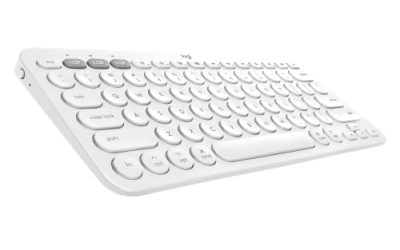
Logitech K380 Multi-Device Bluetooth Keyboard
The K380 is the most sensible first pick for a PS4 household because it is small, quiet and built around switching between devices. Its three Easy-Switch keys let you pair it with the PS4 and two other devices, such as a tablet and a phone, and jump between them with one press. The round keys take a short while to get used to, but the board is light enough to rest on a lap and the battery lasts so long that it effectively disappears as a chore.
Specs
- Connectivity: Bluetooth 3.0
- Multi-device: pairs with up to 3 devices with Easy-Switch keys
- Power: 2 AAA batteries, rated up to 24 months
- Weight: 423 g
- Dimensions: 299 x 124 x 20 mm
- Compatibility: Windows, Mac, Chrome OS, Android, iPad, iPhone, Apple TV, and any Bluetooth-enabled device supporting external keyboards with HID profile
Best for: PS4 owners who also type on a tablet or phone and want one board for all three.
Watch out for: there is no backlight and no number pad, so dark-room typing and heavy number entry are both harder.
Logitech K480 Bluetooth Multi-Device Keyboard
- Best for: typing long messages on PS4 while keeping a phone or tablet propped in front of you.
- Connectivity: Bluetooth
- Multi-device: Easy-Switch dial switches between 3 connected Bluetooth devices
- Integrated cradle: holds phones and tablets up to 10.5 mm thick and 258 mm wide
- Power: 2 pre-installed AAA batteries, rated up to 24 months
typing long messages on PS4 while keeping a phone or tablet propped in front of you.
Logitech lists this model as end-of-life, so remaining stock is finite and support may be limited; confirm the listing is the Black retail version before ordering.
The K480 suits a PS4 owner who keeps a phone in hand while playing, because its built-in cradle holds a phone or tablet upright at a readable angle while you type. The Easy-Switch dial turns to move between three paired Bluetooth devices, and the familiar full layout with shortcut keys feels closer to a desktop board than the compact models here. It is heavier and wider than the K380, which is the trade for the cradle and the more conventional key spacing.
Watch out for: Logitech lists this model as end-of-life, so remaining stock is finite and support may be limited; confirm the listing is the Black retail version before ordering.
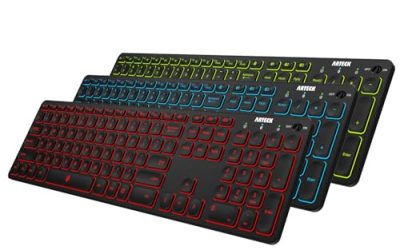
Arteck HB030B Universal Backlit Bluetooth Keyboard
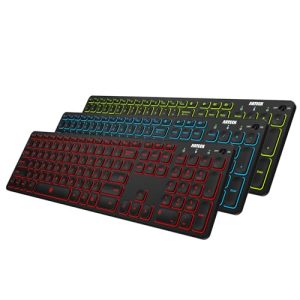
- Best for: a dark living room where a backlit board is the difference between typing and guessing.
- Connectivity: Bluetooth 3.0
- Backlight: 7-color LED with 2 adjustable brightness levels
- Battery: built-in rechargeable Li-polymer battery, rated up to 6 months per charge with backlight off
- Continuous use with backlight on: rated up to 40 hours
a dark living room where a backlit board is the difference between typing and guessing.
Bluetooth 3.0 is an older standard, and there is no multi-device switching, so it is best kept paired to the PS4 alone.
The HB030B is the pick for evening play, because its seven-color LED backlight with two brightness levels makes the keys readable when the room lights are off. It is one of the lightest boards here at under 170 grams, and the slim stainless body slips into a drawer or a bag without a fuss. The rechargeable battery is rated for up to six months per charge with the backlight off, though heavy backlight use shortens that considerably, so it suits a PS4 that gets used most evenings rather than all day.
Watch out for: Bluetooth 3.0 is an older standard, and there is no multi-device switching, so it is best kept paired to the PS4 alone.
OMOTON KB066 Ultra-Slim Bluetooth Keyboard
- Best for: a shared living room where the keyboard lives on the coffee table between sessions.
- Connectivity: Bluetooth 3.0
- Layout: 78-key QWERTY with 12 multimedia keys
- Battery: 2 AAA batteries, not included, rated up to 400 hours
- Auto-sleep after 10 minutes inactive
a shared living room where the keyboard lives on the coffee table between sessions.
the listing is aimed at iPad and iPhone users, so treat it as a general Bluetooth HID board for PS4 and confirm pairing on arrival; buy AAA batteries with it, since none are included.
The KB066 is the plain, light option for a PS4 that sits in a shared living room, where a keyboard needs to live on a coffee table without dominating it. Its 78-key layout covers the full alphabet and a row of 12 multimedia keys, and the slim body is barely thicker than a phone. Two AAA batteries power it for a rated 400 hours of use, with a ten-minute auto-sleep that stretches that further, though the batteries are not included in the box.
Watch out for: the listing is aimed at iPad and iPhone users, so treat it as a general Bluetooth HID board for PS4 and confirm pairing on arrival; buy AAA batteries with it, since none are included.
Logitech Keys-To-Go 2 Portable Bluetooth Keyboard
- Best for: carrying a keyboard to another PS4 or between rooms without adding bulk to a bag.
- Connectivity: Bluetooth LE, also Logi Bolt compatible
- Multi-device: pairs with up to 3 devices
- Keys: scissor keys with 1 mm travel
- Battery: 2 CR2032 coin cells, rated up to 3 years
carrying a keyboard to another PS4 or between rooms without adding bulk to a bag.
Logitech sells this model in Apple and Universal layouts with different key labels, so check which layout the listing shows before ordering.
The Keys-To-Go 2 is the travel pick, built for a PS4 owner who plays at a friend’s house or carries a keyboard between rooms. Its built-in cover protects the keys in a bag, the whole board weighs about 222 grams, and two coin-cell batteries are rated for up to three years of use. Scissor keys with 1 mm of travel give it a firmer feel than most ultra-thin boards, and it pairs with up to three devices over Bluetooth LE.
Watch out for: Logitech sells this model in Apple and Universal layouts with different key labels, so check which layout the listing shows before ordering.
Which One Fits Your Situation
You mainly want faster party chat
Pick the Logitech K380. Its compact size sits comfortably on a lap, the quiet keys will not drown out voice chat, and the three Easy-Switch keys mean the same board can serve the PS4 and a phone. The long battery life is a bonus, since a chat keyboard that is dead when you sit down is worse than no keyboard at all.
You type on your phone while you play
Pick the Logitech K480. The cradle holds your phone upright where you can read it, the dial switches between the PS4 and the phone in one motion, and the familiar layout suits longer messages. Remember it is the heaviest board here and that Logitech lists it as end-of-life, so buy while the Black retail listing is still available.
Your living room is dark in the evenings
Pick the Arteck HB030B. The seven-color backlight is the feature that matters most after sunset, and its featherweight body makes it easy to pick up and put down between sessions. Keep it paired to the PS4 only, since it has no multi-device switching, and recharge it before the battery runs flat.
You want the lightest board for the coffee table
Pick the OMOTON KB066 in White. It is slim, light and simple, with a full 78-key layout and multimedia keys for the PS4 media apps. Buy a pair of AAA batteries at the same time, since none are in the box, and expect a short wake-up delay after its ten-minute auto-sleep.
Common Mistakes
- Buying a keyboard for PS4 gameplay without checking whether the specific game supports keyboard input, since most PS4 games do not.
- Choosing a board that only works through a proprietary USB dongle and then discovering the PS4 cannot use its Bluetooth mode.
- Picking a full-size board with a number pad for a sofa, where a compact layout leaves room for the controller.
- Forgetting that rechargeable boards need charging and AAA boards need spare batteries, then finding the keyboard dead mid-session.
- Assuming a keyboard listed for iPad or iPhone will not pair with PS4, or assuming it definitely will, without checking that it uses the standard Bluetooth HID profile.
Frequently Asked Questions
Can I use any Bluetooth keyboard with a PS4?
Most standard Bluetooth keyboards pair with a PS4 because the console accepts the Bluetooth HID profile that general-purpose keyboards use. Open Settings, then Devices, then Bluetooth Devices, and put the keyboard in pairing mode. Boards that need a proprietary dongle, a companion app or a driver may not work, so check the listing for plain Bluetooth support first.
Do Bluetooth keyboards work for playing PS4 games?
Almost always no. Most PS4 games are designed for the DualShock 4 controller and do not accept keyboard input during gameplay. Keyboards are useful for typing messages, searching the store, entering text in the web browser and navigating menus. A few games and apps support keyboards for chat, so check the specific title before buying a board for gameplay.
How do I pair a Bluetooth keyboard with a PS4?
Put the keyboard into pairing mode, then on the PS4 go to Settings, Devices and Bluetooth Devices. The console scans for nearby devices and lists the keyboard by name. Select it, and if the console shows a pairing code, type it on the keyboard and press Enter. Once paired, the keyboard stays remembered and reconnects when it wakes.
Will a keyboard made for iPad or Android work with PS4?
Often yes, if it is a standard Bluetooth HID keyboard, because the PS4 does not care which device the board was marketed for. Media keys and shortcut rows may behave differently, and some function keys may do nothing on the console. The letter keys, Enter, Backspace and arrow keys work as expected on any board that pairs successfully.
FAQ
Can I use any Bluetooth keyboard with a PS4?
Do Bluetooth keyboards work for playing PS4 games?
How do I pair a Bluetooth keyboard with a PS4?
Will a keyboard made for iPad or Android work with PS4?
More from Amazon
Programs that pair well with the guide above. Offers and eligibility are set by Amazon and may change.
Free shipping on eligible items, Prime Video and more. Eligible new members can start with a free trial.
Start a Prime free trialAd-free music streaming. Eligible new subscribers can start with a free trial.
Try Music Unlimited freeA Prime membership for ages 18-24 with a trial period. Eligibility is set by Amazon.
See Prime for Young AdultsAudiobooks and podcasts to listen to on the go. Eligible new members can start with a free trial.
Try Audible freeAs an Amazon Associate we earn from qualifying purchases.