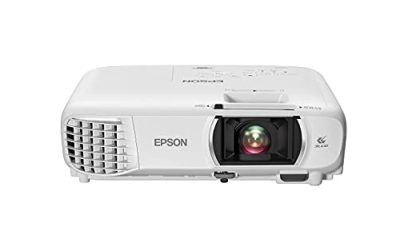
Our Short List of 3

- XGA resolution, 3-chip 3LCD
- 3,600 lumens colour and white brightness
- 15,000 to 1 contrast ratio
- HDMI input, built-in speaker, portable body

- WXGA resolution, 1280 by 800
- 4,000 lumens brightness
- HDMI and VGA inputs, vertical keystone
- SuperColor technology, 3D compatible

- Full HD 1080p, 3-chip 3LCD
- 4,100 lumens colour and white brightness
- Wireless with AirPlay and Miracast, two HDMI ports
- 1.6x optical zoom, built-in speaker
All 4 Picks at a Glance
| Product | Specs | Action |
|---|---|---|
| Epson EX3280 |
| Check price on Amazon |
| ViewSonic PA503W |
| Check price on Amazon |
| Epson Pro EX9270 |
| Check price on Amazon |
 Epson Home Cinema 1080 |
| Check price on Amazon |
Key takeaways
- best projectors for business graphics: four projectors for sharp slides, charts and meeting rooms, compared on brightness and clarity.
The best projectors for business graphics need to do one thing well: make slides, charts and spreadsheets readable from the back of a meeting room. This guide compares four projectors built for that job, from a bright 3LCD business model to a wireless presentation projector with AirPlay. Every pick below gives strong brightness for a lit room, a clear image for text and graphs, and the ports a presenter needs. Business graphics are different from films: a chart with thin lines and small labels punishes a soft lens or a dim lamp, so this guide puts brightness, resolution and colour accuracy ahead of cinematic contrast. Read the buying criteria first, then compare the four picks side by side.
How to Choose
Brightness for a lit room
A meeting room rarely goes dark, so brightness is the first number to check. A projector rated near three thousand lumens or above keeps slides readable with the lights on, while a dimmer model forces the room into darkness. Colour brightness matters as much as white brightness for charts, because a graph that loses its colours loses its meaning. Check both figures where the listing gives them.
Resolution for text and charts
XGA resolution suits simple slides and large text, while WXGA and Full HD give sharper edges for small labels, thin chart lines and spreadsheets. If your slides carry detailed tables or small annotations, a higher resolution is worth the step up. Check that the projector’s native resolution matches the figure in the listing, rather than a supported input resolution that gets scaled down.
Colour accuracy for graphs
Business graphics rely on colour to separate data series, so a projector that renders colours accurately keeps a chart readable. 3LCD designs give strong colour brightness, while DLP designs give sharp text and high contrast. Look for a presentation or sRGB mode in the projector’s settings, and avoid a vivid mode that oversaturates colours and hides detail.
Connectivity for presenters
Two HDMI ports let a laptop and a second device stay connected, and wireless presentation features let a presenter share a screen without a cable. AirPlay, Miracast and similar features suit a mixed-device office, while a USB port can play files from a drive or power a streaming stick. Check that the projector works with the laptops and phones your team actually uses.
Setup speed and keystone
A meeting should start on time, so quick setup matters: auto keystone, fast warm-up and a simple menu save minutes every session. Optical zoom lets you size the image without moving the projector, and a lens shift or digital keystone straightens the picture when the unit sits off-centre. A remote with a clear layout helps the presenter more than a clever app.
Noise, lamp life and running costs
A loud fan distracts a small meeting room, so check the noise figure, especially in eco mode. Lamp life in the thousands of hours keeps running costs low, and an accessible dust filter makes maintenance simple. A projector that will live in a meeting room should be easy to ceiling-mount, with mounting points and a lens that suits the room’s throw distance.
Top Picks
Epson EX3280
- XGA resolution, 3-chip 3LCD
- 3,600 lumens colour and white brightness
- 15,000 to 1 contrast ratio
- HDMI input, built-in speaker, portable body
XGA resolution is coarse for detailed spreadsheets, so a higher-resolution pick suits dense tables.
The Epson EX3280 is a 3-chip 3LCD XGA business projector with 3,600 lumens of colour and white brightness, an HDMI input, a built-in speaker and a 15,000 to 1 contrast ratio. Its 3LCD design keeps chart colours strong in a lit room, and its brightness is high for a compact business unit. The projector suits a meeting room or classroom where slides and charts must stay readable with the lights on. Use the new-unit listing under this ASIN, not the renewed version that circulates under a different code.
Check the Epson EX3280 on Amazon
Who it suits: a meeting room or classroom that needs bright, colourful slides in a lit room.
Watch out for: XGA resolution is coarse for detailed spreadsheets, so a higher-resolution pick suits dense tables.
ViewSonic PA503W
- WXGA resolution, 1280 by 800
- 4,000 lumens brightness
- HDMI and VGA inputs, vertical keystone
- SuperColor technology, 3D compatible
DLP colour brightness can trail 3LCD at the same lumen figure, so check chart colours in the room before a big presentation.
The ViewSonic PA503W is a WXGA DLP business projector with 4,000 lumens of brightness, HDMI and VGA inputs, vertical keystone and SuperColor technology. Its WXGA resolution gives sharper text than XGA for slides with small labels, and its brightness is the highest in this group, so it holds up in a bright room. The PA503W suits a business or education setting where a large, bright image matters more than cinematic colour.
Check the ViewSonic PA503W on Amazon
Who it suits: a bright meeting room or classroom where maximum brightness and sharper text are the priority.
Watch out for: DLP colour brightness can trail 3LCD at the same lumen figure, so check chart colours in the room before a big presentation.
Epson Pro EX9270
- Full HD 1080p, 3-chip 3LCD
- 4,100 lumens colour and white brightness
- Wireless with AirPlay and Miracast, two HDMI ports
- 1.6x optical zoom, built-in speaker
Wireless setup needs a network that allows screen sharing, so check it on the office network before the first meeting.
The Epson Pro EX9270 is a wireless 1080p 3LCD projector with 4,100 lumens of colour and white brightness, Apple AirPlay, Miracast, two HDMI ports, 1.6x optical zoom and a built-in speaker. Its Full HD resolution gives the sharpest text in this group, and its wireless features let presenters share a screen from a phone or laptop without a cable. The EX9270 is the most capable business graphics pick here for a modern meeting room.
Check the Epson Pro EX9270 on Amazon
Who it suits: a modern meeting room where wireless presenting and sharp Full HD slides matter.
Watch out for: Wireless setup needs a network that allows screen sharing, so check it on the office network before the first meeting.
Epson Home Cinema 1080
- Full HD 1080p, 3-chip 3LCD
- 3,400 lumens colour and white brightness
- 16,000 to 1 contrast ratio
- Dual HDMI, built-in speaker, auto picture skew
It is a home cinema unit without business wireless features, so presenters should plan on an HDMI cable.
The Epson Home Cinema 1080 is a 3-chip 3LCD Full HD projector with 3,400 lumens of colour and white brightness, dual HDMI inputs and a built-in speaker. Its Full HD panel gives crisp edges for charts and text, and its 3LCD colour brightness keeps graphs readable in a room with some light. Although it is sold as a home cinema model, its brightness and resolution make it a capable business graphics projector for a small meeting room or a home office.
Check the Epson Home Cinema 1080 on Amazon
Who it suits: a small meeting room or home office that needs Full HD slides and strong colour.
Watch out for: It is a home cinema unit without business wireless features, so presenters should plan on an HDMI cable.
Comparison Table
| Pick | Standout feature | Panel or format | Connectivity | Best for |
|---|---|---|---|---|
| Epson EX3280 | Bright 3LCD colour | XGA, 3,600 lumens | HDMI | Lit meeting rooms |
| ViewSonic PA503W | Brightest in group | WXGA, 4,000 lumens | HDMI, VGA | Bright classrooms |
| Epson Pro EX9270 | Wireless Full HD | Full HD, 4,100 lumens | 2x HDMI, AirPlay | Modern meeting rooms |
| Epson Home Cinema 1080 | Full HD colour | Full HD, 3,400 lumens | Dual HDMI | Small meeting rooms |
Running a Meeting With a Projector
Arrive a few minutes early, connect your laptop, and put a slide on screen before anyone sits down, because a meeting that opens with a working picture sets the tone. Set the projector to its presentation mode, which is usually the brightest and sharpest preset, and check that the smallest text on your densest slide reads from the back of the room. Keep a spare HDMI cable and an adapter for the laptops your team uses, since a missing adapter is the most common cause of a delayed meeting. Dim the lights near the screen but leave enough light for note-taking, and pause the image with the blank or freeze button when the discussion moves away from the slides. After the meeting, let the projector cool before packing it away, and coil the cables loosely so they last longer.
Choosing a Screen for Business Graphics
A screen matters for business graphics because charts and small text punish a poor surface. A matte white screen with a gain near one gives even brightness across the image and a wide viewing angle, which suits a meeting room where people sit to the sides. A grey screen can deepen blacks in a bright room, but it can also dim fine text, so it suits film more than slides. Size the screen to the room: the people at the back should read the smallest text on your densest slide, which usually means a larger screen than a film setup needs. A fixed frame screen suits a dedicated meeting room, while a pull-down or portable screen suits a shared room. Keep the screen clean and flat, because a crease or a stain sits across every slide you show.
Which One Is Right for You?
Choose the Epson Pro EX9270 if you want the sharpest slides and wireless presenting in one unit, since it pairs Full HD resolution with the highest brightness here. Pick the ViewSonic PA503W if maximum brightness on a straightforward budget is the priority, and the Epson EX3280 if you want 3LCD colour brightness in a compact business body. Take the Epson Home Cinema 1080 for a small meeting room or home office where Full HD text and strong colour matter more than wireless features. Match the resolution to your densest slides first, then let brightness and connectivity settle the choice.
Frequently Asked Questions
How bright should a business projector be?
For a meeting room with the lights on, look for three thousand lumens or above. All four picks in this guide clear that bar, with the Epson Pro EX9270 and ViewSonic PA503W reaching the highest figures.
Is Full HD necessary for business slides?
Simple slides with large text read well at XGA or WXGA, but Full HD gives sharper edges for small labels, thin chart lines and spreadsheets. If your slides carry detailed tables, Full HD is worth the step up.
What is the difference between colour brightness and white brightness?
White brightness measures a white image, while colour brightness measures a colour image. A projector can be bright in white and dull in colour, which matters for charts, so check both figures where the listing gives them.
Should a business projector have wireless presenting?
Wireless presenting suits a mixed-device office, because presenters can share a screen without hunting for a cable. It needs a network that allows screen sharing, so check it on the office network before relying on it.
Disclosure: As an Amazon Associate, we may earn from qualifying purchases.
FAQ
Which One Is Right for You?
How bright should a business projector be?
Is Full HD necessary for business slides?
What is the difference between colour brightness and white brightness?
Should a business projector have wireless presenting?
More from Amazon
Programs that pair well with the guide above. Offers and eligibility are set by Amazon and may change.
Free shipping on eligible items, Prime Video and more. Eligible new members can start with a free trial.
Start a Prime free trialAd-free music streaming. Eligible new subscribers can start with a free trial.
Try Music Unlimited freeA Prime membership for ages 18-24 with a trial period. Eligibility is set by Amazon.
See Prime for Young AdultsAudiobooks and podcasts to listen to on the go. Eligible new members can start with a free trial.
Try Audible freeAs an Amazon Associate we earn from qualifying purchases.