Our Short List of 3
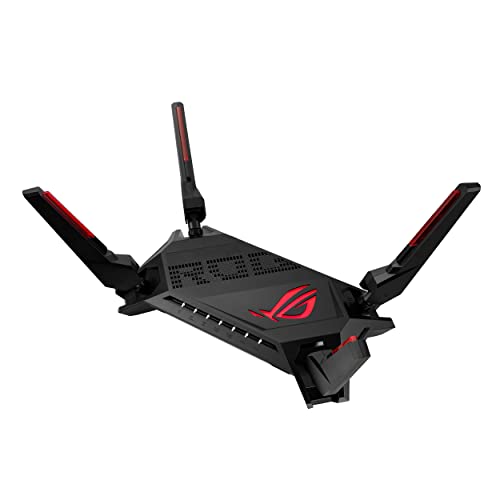
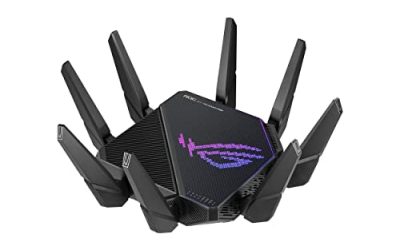
- Best overall gaming router: ASUS ROG Rapture GT-AX6000 — ASIN B09L8PCTPT
- Best for competitive play: NETGEAR Nighthawk Pro Gaming XR1000 — ASIN B08FWNNWTB
- Best for larger homes: NETGEAR Nighthawk RAX50 — ASIN B082X17B8P
- Best budget Wi-Fi 6 pick: ASUS RT-AX3000 — ASIN B08DMZFNMK

- Best for: Competitive and ranked players who want to choose nearby servers, monitor ping, and protect game traffic from the rest of the household.
- Wi-Fi 6 dual-band, AX5400 speeds up to 5.4 Gbps
- 6-stream design, four external antennas with beamforming
- DumaOS 3.0 with Geo-Filter, ping heatmap, and bandwidth allocation
- Four 1 Gbps Ethernet ports, one USB 3.0 port

- Best for: Larger homes and families where the router must cover more ground, serve many devices, and still keep online games running smoothly.
- Wi-Fi 6 dual-band, AX5400 speeds up to 5.4 Gbps
- Coverage up to 2,500 square feet, up to 25 devices
- 6-stream design, four external antennas
- Four gigabit LAN ports, one USB 3.0 port
All 3 Picks at a Glance
| Product | Specs | Action |
|---|---|---|
| Our Top Picks at a Glance |
| Check price on Amazon |
| 2. NETGEAR Nighthawk Pro Gaming XR1000 — Best for Competitive Play |
| Check price on Amazon |
| 3. NETGEAR Nighthawk RAX50 — Best for Larger Homes |
| Check price on Amazon |
Key takeaways
- Discover the best gaming wirelss routers for lag-free online play, with Wi-Fi 6 speed, game prioritization, and strong coverage for every setup at home.
A great gaming setup deserves a network that keeps up with it. When a match hinges on a split-second reaction, the difference between a smooth session and a frustrating one often comes down to the router sitting in the corner of the room. The best gaming wirelss routers do more than broadcast a signal: they prioritize game traffic, keep latency low when the rest of the household is streaming, and deliver stable wireless coverage to every corner where a console, PC, or handheld might live.
This guide rounds up four wireless gaming routers, from a flagship model with multi-gigabit ports to a budget-friendly Wi-Fi 6 option for smaller homes. Every pick is a genuine wireless router built for gaming, with specifications taken from its Amazon product listing.
Disclosure: As an Amazon Associate, we earn from qualifying purchases.
How to Choose a Gaming Wireless Router
Start With Your Internet Plan
A router cannot deliver more speed than the connection feeding it. Before comparing models, check the download and upload speeds on your internet plan. If your plan tops out at gigabit speeds, a router with a 2.5 Gbps WAN port gives you headroom for future upgrades, but a standard gigabit WAN port will not hold you back today. Multi-gigabit fiber plans call for 2.5 Gbps or faster WAN ports.
Wi-Fi Generation Matters
All four routers in this guide use Wi-Fi 6, which brings real improvements for gaming households: OFDMA and MU-MIMO let the router serve several devices at once instead of making them wait in line, and 160 MHz channels open up wider lanes for high-bandwidth traffic. Wi-Fi 6 also handles crowded device lists better than older standards, which matters when phones, smart TVs, consoles, and laptops all share one network. Wi-Fi 6E and Wi-Fi 7 routers cost more and only pay off if your devices support the newer bands, so Wi-Fi 6 remains the sweet spot for most gamers.
Look for Game Traffic Prioritization
Raw speed is only half the story. Gaming traffic is light on bandwidth but extremely sensitive to delay, so the best gaming routers include quality-of-service tools that recognize game packets and push them to the front of the queue. ASUS calls this approach Adaptive QoS and Triple-Level Game Acceleration, while NETGEAR uses DumaOS to let players pick nearby game servers and limit lag. These features are what keep a ranked match stable while someone else in the house starts a 4K stream.
Ports, Antennas, and Coverage
Wireless is the focus here, but wired ports still matter: a dedicated gaming LAN port or a 2.5 Gbps port gives a desktop PC or console the most stable connection possible, and it is worth using for competitive play whenever the setup allows. Antenna count and stated coverage help judge whether a router can reach a gaming room two floors up. Manufacturer coverage figures assume open, ideal conditions, so expect real-world range to be lower through walls and floors.
Security and Extras Worth Having
A router guards everything on the network, so built-in security is more than a bonus. Lifetime network protection, automatic threat blocking, and parental controls add genuine value, especially in homes with children. Mesh compatibility is another useful extra: adding a node from the same brand extends coverage without replacing the router.
Our Top Picks at a Glance
- Best overall gaming router: ASUS ROG Rapture GT-AX6000 — ASIN B09L8PCTPT
- Best for competitive play: NETGEAR Nighthawk Pro Gaming XR1000 — ASIN B08FWNNWTB
- Best for larger homes: NETGEAR Nighthawk RAX50 — ASIN B082X17B8P
- Best budget Wi-Fi 6 pick: ASUS RT-AX3000 — ASIN B08DMZFNMK
1. ASUS ROG Rapture GT-AX6000 — Best Overall Gaming Router
The ASUS ROG Rapture GT-AX6000 is the most complete gaming router in this roundup, and it earns the top spot by combining strong wireless performance with the ports and software that serious gamers actually use. It is a dual-band Wi-Fi 6 router with combined wireless speeds of up to 6000 Mbps, split between up to 4804 Mbps on the 5 GHz band and up to 1148 Mbps on the 2.4 GHz band, using 160 MHz channels for extra throughput.
Under the hood, a 2.0 GHz quad-core 64-bit CPU with 1 GB of RAM keeps the network responsive when dozens of devices connect at once. The port selection is a highlight: dual 2.5 Gbps ports handle WAN and LAN duties, with support for WAN aggregation and flexible port configurations, alongside four gigabit LAN ports.
Gaming features are where the GT-AX6000 pulls ahead. Triple-Level Game Acceleration prioritizes game traffic from the device all the way to the game server, and the dedicated gaming port automatically gives top priority to whatever is plugged into it. Mobile Game Mode in the ASUS Router app reduces lag on phones with a single tap, and VPN Fusion lets a VPN connection run alongside a regular connection so only selected traffic goes through the tunnel. Aura RGB lighting adds gamer styling, AiMesh support lets the router anchor a mesh network later, and lifetime internet security plus Instant Guard round out the package.
Key specifications:
- Wi-Fi 6 dual-band, up to 6000 Mbps combined
- 2.0 GHz quad-core 64-bit CPU, 1 GB RAM, 256 MB flash
- Dual 2.5 Gbps WAN/LAN ports plus four gigabit LAN ports
- Four external antennas, 160 MHz channel support
- Triple-Level Game Acceleration, Mobile Game Mode, VPN Fusion
- AiMesh compatible, lifetime network security included
Pros:
- Dual 2.5 Gbps ports suit multi-gigabit internet plans
- Deep gaming software with device, packet, and server prioritization
- Strong quad-core processing for busy households
- Mesh-ready and includes lifetime security features
Cons:
- No 6 GHz band, so it cannot serve Wi-Fi 6E or Wi-Fi 7 devices on that band
- Large footprint and bold ROG styling will not suit every living room
Best for: Gamers who want one router to handle competitive play, streaming, and a house full of devices, with multi-gigabit ports ready for faster internet plans.
2. NETGEAR Nighthawk Pro Gaming XR1000 — Best for Competitive Play
- Best for: Competitive and ranked players who want to choose nearby servers, monitor ping, and protect game traffic from the rest of the household.
- Wi-Fi 6 dual-band, AX5400 speeds up to 5.4 Gbps
- 6-stream design, four external antennas with beamforming
- DumaOS 3.0 with Geo-Filter, ping heatmap, and bandwidth allocation
- Four 1 Gbps Ethernet ports, one USB 3.0 port
Competitive and ranked players who want to choose nearby servers, monitor ping, and protect game traffic from the rest of the household.
The NETGEAR Nighthawk Pro Gaming XR1000 is built around a single idea: give competitive players control over their connection. It is a Wi-Fi 6 router with AX5400 wireless speeds of up to 5.4 Gbps across its dual bands, using a 6-stream design to serve multiple devices at once. Four external antennas and beamforming focus the signal toward connected devices rather than broadcasting it evenly in all directions.
What sets the XR1000 apart is DumaOS 3.0, NETGEAR gaming dashboard software. Its Geo-Filter lets players limit matchmaking to nearby servers, which helps keep ping low and predictable, while the ping heatmap shows connection quality to game servers before a match starts. Bandwidth allocation controls let the household carve up available speed so a game always gets its share, even when other devices are streaming or downloading. NETGEAR states the router can cut ping rates by up to 93 percent in supported scenarios, a manufacturer-stated figure rather than a guarantee for every connection.
On the hardware side, the XR1000 provides four 1 Gbps Ethernet ports and a USB 3.0 port for shared storage or media. The Nighthawk app handles setup and monitoring, and NETGEAR Armor security features protect connected devices. The router is designed for internet plans up to 1 Gbps, which covers the large majority of gaming households.
Key specifications:
Pros:
Cons:
3. NETGEAR Nighthawk RAX50 — Best for Larger Homes
- Best for: Larger homes and families where the router must cover more ground, serve many devices, and still keep online games running smoothly.
- Wi-Fi 6 dual-band, AX5400 speeds up to 5.4 Gbps
- Coverage up to 2,500 square feet, up to 25 devices
- 6-stream design, four external antennas
- Four gigabit LAN ports, one USB 3.0 port
Larger homes and families where the router must cover more ground, serve many devices, and still keep online games running smoothly.
The NETGEAR Nighthawk RAX50 is the coverage pick in this guide. Its Amazon listing states coverage of up to 2,500 square feet for up to 25 devices, which makes it the natural choice when the gaming setup sits far from where the router must live, or when the router needs to serve a larger single-story home without extra hardware. It is a dual-band Wi-Fi 6 router with AX5400 wireless speeds of up to 5.4 Gbps, built on a 6-stream design with four external antennas.
The RAX50 handles the gaming essentials well: OFDMA and MU-MIMO keep latency steady when many devices are active, and the router supports the latest 1 Gbps internet plans. Four gigabit LAN ports cover wired consoles and PCs, and a USB 3.0 port adds shared storage. NETGEAR Armor security protects the network, and the Nighthawk app provides setup, device management, and parental controls.
Unlike the XR1000, the RAX50 skips the dedicated gaming dashboard in favor of range and capacity, suiting households where coverage matters more than server selection.
Key specifications:
Pros:
Cons:
4. ASUS RT-AX3000 — Best Budget Wi-Fi 6 Pick
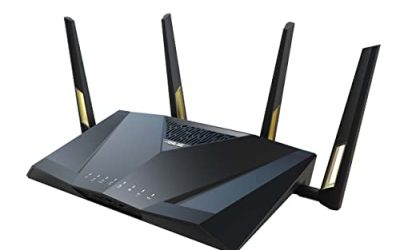
The ASUS RT-AX3000 proves that a gaming-ready wireless router does not have to be a flagship. It is a dual-band Wi-Fi 6 router with combined speeds of up to 3000 Mbps, made up of up to 2402 Mbps on the 5 GHz band and up to 574 Mbps on the 2.4 GHz band, with 160 MHz bandwidth and 1024-QAM for efficient wireless connections. A 1.5 GHz tri-core processor with 512 MB of RAM drives the router, and the four external antennas provide solid coverage for apartments and smaller homes.
Despite the lower speed class, the RT-AX3000 keeps the features that matter for gaming. OFDMA and MU-MIMO reduce waiting time for connected devices, Adaptive QoS can prioritize gaming traffic, and AiProtection Pro provides lifetime network security powered by Trend Micro. AiMesh compatibility means it can join or anchor an ASUS mesh system if coverage needs grow, and the ASUS Router app covers setup and day-to-day management. Ports include one gigabit WAN port, four gigabit LAN ports, and a USB 3.1 port.
The trade-offs are clear. This router suits internet plans up to gigabit speeds and homes where the gaming setup is not far from the router. It will not match the flagship picks for raw throughput, but for a first Wi-Fi 6 upgrade or a bedroom gaming setup, it covers the essentials.
Key specifications:
- Wi-Fi 6 dual-band, AX3000 speeds up to 3000 Mbps
- 1.5 GHz tri-core processor, 512 MB RAM, 256 MB flash
- 160 MHz bandwidth, 1024-QAM, OFDMA, MU-MIMO
- One gigabit WAN port, four gigabit LAN ports, one USB 3.1 port
- AiProtection Pro lifetime security, Adaptive QoS, AiMesh compatible
Pros:
- Genuine Wi-Fi 6 gaming features at a budget tier
- Lifetime AiProtection Pro security included
- AiMesh support allows coverage to grow later
Cons:
- Gigabit ports only, with no 2.5 Gbps option
- Lower total throughput than the AX5400 and AX6000 picks
Best for: Budget-conscious gamers, smaller homes, and anyone upgrading from an older Wi-Fi 5 router who wants modern gaming features without flagship cost.
Comparison Table
| Router | Wi-Fi | Top Wireless Speed | Wired Ports | Gaming Features | Best For |
|---|---|---|---|---|---|
| ASUS ROG Rapture GT-AX6000 | Wi-Fi 6, dual-band | Up to 6000 Mbps | Dual 2.5 Gbps plus 4x gigabit LAN | Triple-Level Game Acceleration, gaming port, Mobile Game Mode, VPN Fusion | Best overall gaming router |
| NETGEAR Nighthawk Pro Gaming XR1000 | Wi-Fi 6, dual-band | Up to 5.4 Gbps | 4x gigabit LAN, 1x USB 3.0 | DumaOS 3.0, Geo-Filter, ping heatmap, bandwidth allocation | Competitive and ranked play |
| NETGEAR Nighthawk RAX50 | Wi-Fi 6, dual-band | Up to 5.4 Gbps | 4x gigabit LAN, 1x USB 3.0 | OFDMA, MU-MIMO, NETGEAR Armor | Larger homes and coverage |
| ASUS RT-AX3000 | Wi-Fi 6, dual-band | Up to 3000 Mbps | 4x gigabit LAN, 1x USB 3.1 | Adaptive QoS, AiProtection Pro, AiMesh | Budget Wi-Fi 6 upgrade |
Frequently Asked Questions
Do I need a gaming router, or will any Wi-Fi 6 router work?
Any good Wi-Fi 6 router can run online games, but a gaming router adds traffic prioritization that keeps game packets first in line when the network gets busy. If you play competitively, share the connection with streamers, or notice lag spikes when others use the network, those gaming features are worth having. For casual play on a quiet network, a standard Wi-Fi 6 router is often enough.
Is Wi-Fi 6 enough for gaming, or should I wait for Wi-Fi 7?
Wi-Fi 6 is more than enough for current consoles, PCs, and handhelds. It delivers low latency, handles many devices at once, and supports speeds far beyond what most internet plans provide. Wi-Fi 7 routers cost considerably more and only show their advantage with Wi-Fi 7 devices and multi-gigabit plans, so most gamers are better served by a strong Wi-Fi 6 router now.
How much does router placement affect gaming performance?
Placement matters a great deal. A router tucked behind a TV cabinet or in a basement corner will struggle to reach a second-floor gaming room. Put the router in a central, elevated, open spot, away from thick walls, metal objects, and other electronics. If a wired connection is possible, use an Ethernet cable for the gaming PC or console even with a great wireless router, since a cable removes wireless interference entirely.
What is the difference between the GT-AX6000 and the XR1000?
The GT-AX6000 is the more powerful all-rounder, with dual 2.5 Gbps ports, a faster quad-core processor, and broader gaming software that covers device, packet, and server prioritization. The XR1000 focuses on competitive control through DumaOS, with server selection and ping monitoring that serious ranked players value. Choose the GT-AX6000 for maximum speed and future headroom, and the XR1000 when server choice and ping control matter most.
Can these routers handle a house full of devices?
Yes, within their stated limits. The RAX50 lists support for up to 25 devices with coverage up to 2,500 square feet, while the GT-AX6000 and XR1000 use 6-stream and 8-stream designs with OFDMA and MU-MIMO to serve many devices at once. The RT-AX3000 suits smaller households with fewer simultaneous users. If the home regularly runs more than 30 connected devices, the higher-end picks will hold up better.
Should I use the 5 GHz band or the 2.4 GHz band for gaming?
Use the 5 GHz band for gaming whenever the device is within good range of the router. It offers higher speeds and less interference, which translates to lower latency. The 2.4 GHz band reaches farther through walls, so it is the fallback when the gaming setup sits far from the router, but expect higher latency there. A wired Ethernet connection beats both bands for competitive play.
Conclusion
The best gaming wirelss routers balance three things: low latency when it matters, enough wireless speed for the whole household, and the right features for the way you play. The ASUS ROG Rapture GT-AX6000 leads this roundup as the most complete package, with dual 2.5 Gbps ports and deep game prioritization that covers both casual and competitive play. The NETGEAR Nighthawk Pro Gaming XR1000 is the pick for ranked players who want DumaOS server control and ping monitoring. The NETGEAR Nighthawk RAX50 wins on coverage for larger homes, and the ASUS RT-AX3000 delivers the core Wi-Fi 6 gaming experience at a budget tier.
Match the router to your internet plan first, then to your home layout and the games you play. A multi-gigabit plan calls for the GT-AX6000, a far-flung gaming room calls for the RAX50, and a competitive ladder climb calls for the XR1000.
FAQ
Do I need a gaming router, or will any Wi-Fi 6 router work?
Is Wi-Fi 6 enough for gaming, or should I wait for Wi-Fi 7?
How much does router placement affect gaming performance?
What is the difference between the GT-AX6000 and the XR1000?
Can these routers handle a house full of devices?
Should I use the 5 GHz band or the 2.4 GHz band for gaming?
More from Amazon
Programs that pair well with the guide above. Offers and eligibility are set by Amazon and may change.
Free shipping on eligible items, Prime Video and more. Eligible new members can start with a free trial.
Start a Prime free trialAd-free music streaming. Eligible new subscribers can start with a free trial.
Try Music Unlimited freeA Prime membership for ages 18-24 with a trial period. Eligibility is set by Amazon.
See Prime for Young AdultsAudiobooks and podcasts to listen to on the go. Eligible new members can start with a free trial.
Try Audible freeAs an Amazon Associate we earn from qualifying purchases.