Our Short List of 3
All 4 Picks at a Glance
| Product | Specs | Action |
|---|---|---|
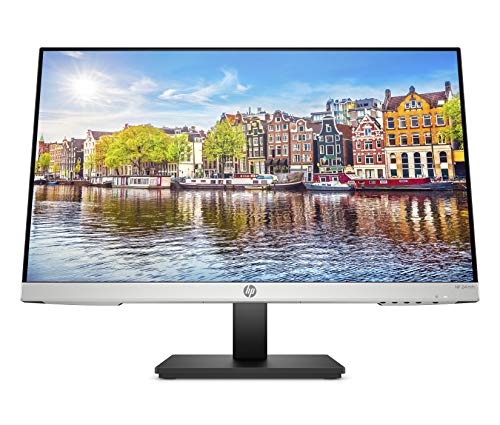 HP 24mh | Check price on Amazon | |
 Sceptre E248W-FPT | Check price on Amazon | |
 ASUS VA24EHF2 | Check price on Amazon | |
 AOC 24G2SE | Check price on Amazon |
Key takeaways
- Compare the best 24 inch monitors under 200, from sharp IPS office screens to fast panels for gaming, study, and everyday work.
The best 24 inch monitors under 200 prove that a good desk screen does not need a large panel or a large outlay. At 24 inches, a Full HD panel looks sharp from a normal desk distance, the screen fits on a small desk, and the monitor pairs well with a laptop or a compact PC. This guide compares 24-inch monitors in this tier on panel type, sharpness, refresh rate, ports, and the stand that holds it all up.
A 24-inch monitor in this tier is a working screen first: documents, browsing, study, and video calls fill most of its hours, with games and films after hours. The picks below cover the main shapes of this size: a dependable office IPS screen, a slim frameless model, a fast gaming panel, and two value screens that cover a second monitor or a shared family computer. Every pick is a 24-inch class panel, so the choice comes down to panel quality and features rather than size.
How to Choose
1. Panel type and viewing angles
IPS panels keep colors steady when you view from the side, which matters when a second person leans in or the monitor sits at an angle. VA panels offer deeper blacks and stronger contrast for films, while TN panels are fast but narrow in viewing angle. For mixed desk work, IPS is the safe default in this size.
2. Resolution and sharpness
A Full HD panel at 24 inches gives a pixel density that keeps text crisp at a normal desk distance. Check that text looks sharp at your usual scaling setting, and that the monitor’s coating does not add a grainy haze to white backgrounds. A matte coating suits a bright room; a glossy coating suits a dim room but shows reflections.
3. Refresh rate and motion
A 60 Hz panel is enough for documents, browsing, and video. A 75 Hz or 144 Hz panel smooths scrolling and motion, and a fast panel is worth it if games share the screen. Check the refresh rate over the port you will actually use, because some monitors reach their fastest rate only over one input.
4. Ports and connectivity
HDMI covers most laptops and consoles, while DisplayPort suits a desktop GPU and higher refresh rates. A VGA port still helps an older office PC. Check that the monitor includes the cable you need in the box, or plan on adding one.
5. Stand, tilt, and mounting
A tilt adjustment is the minimum; height adjustment and a VESA mount make a real difference to comfort over a long day. A monitor that sits too low forces your neck down, so a stand with height adjustment or a cheap monitor arm is worth having. Check the VESA pattern before buying an arm.
6. Eye comfort
Look for flicker-free backlighting and a low blue light mode for evening work. A monitor that strains your eyes by mid-afternoon is a poor bargain at any tier. Brightness control that reaches low enough for a dim room matters as much as peak brightness.
Top Picks
HP 24mh
The HP 24mh is a 24-inch Full HD IPS monitor with slim bezels, a clean stand, and built-in speakers. Its IPS panel keeps colors steady across the screen and from the side, which suits documents and shared viewing. It connects over HDMI and VGA, so it works with a modern laptop and an older office PC alike. Its thin frame looks neat on a desk and suits a two-monitor setup where the bezels meet in the middle.
This monitor fits a home office or study desk where the screen serves documents, browsing, and video calls. It suits buyers who want a dependable IPS panel with a tidy design and no fuss. It also fits a second monitor beside a laptop, where its slim bezels and light weight make placement easy.
Its refresh rate is standard for office work, so fast-paced games will not feel as smooth as on a high-refresh panel. Its built-in speakers are handy for calls but modest for films or music. Its stand tilts but offers limited height adjustment, so a monitor arm or a small riser may be needed for the best viewing height.
Sceptre E248W-FPT
Check the Sceptre E248W-FPT on Amazon
The Sceptre E248W-FPT is a 24-inch Full HD monitor with a slim profile and a straightforward set of inputs. Its panel gives a bright, clear image for documents and video, and its thin bezels keep the desk looking tidy. It includes speakers and a simple on-screen menu, and its light weight makes it easy to move between desks or rooms when needed.
This monitor fits a spare desk, a student room, or a family computer where a clear, simple screen is enough. It suits buyers who want a second screen for a laptop or a first monitor for a compact PC. It also fits a setup where the monitor moves often, because it is light and easy to carry.
Its panel is a value panel, so colors and viewing angles trail a good IPS screen when viewed from the side. Its stand offers basic tilt only, and its speakers are modest. Its build is light, which keeps the weight down but means it needs a stable desk surface to sit firmly.
ASUS VA24EHF
Check the ASUS VA24EHF on Amazon
The ASUS VA24EHF is a 24-inch Full HD IPS monitor with a frameless design, a 100 Hz refresh rate, and eye-care features built in. Its IPS panel keeps colors consistent, and its faster refresh rate smooths scrolling and casual games compared with a standard office panel. It connects over HDMI and VGA, and its slim frame suits a side-by-side setup with a second screen.
This monitor fits a desk where documents share time with browsing, video, and light gaming. It suits buyers who want a step up from a basic office panel without leaving this tier. It also fits a two-monitor setup, where its frameless design keeps the join between screens narrow.
Its stand tilts but does not adjust in height, so check your desk and chair height before ordering. Its speakers are absent, so plan on external speakers or headphones for sound. Its 100 Hz refresh rate is a real step up from standard panels but still trails a dedicated gaming monitor.
ASUS VA24EHF2
Check the ASUS VA24EHF2 on Amazon
The ASUS VA24EHF2 is a 24-inch Full HD IPS monitor in the same family as the VA24EHF, with a frameless design and a smooth refresh rate for everyday use. Its IPS panel gives steady colors and wide viewing angles, and its eye-care features reduce flicker and blue light for long sessions. It connects over HDMI, and its slim body fits neatly on a small desk.
This monitor fits a home office or study desk where the screen runs all day. It suits buyers who want an IPS panel with eye-care features and a tidy frameless look. It also fits a dual-monitor setup where two matching screens keep the desk looking uniform.
Its stand offers tilt only, so a riser or arm may be needed for the best height. It has no built-in speakers, so sound needs headphones or external speakers. Its refresh rate suits everyday use and light gaming but is not aimed at competitive play.
AOC 24G2SE
Check the AOC 24G2SE on Amazon
The AOC 24G2SE is a 24-inch Full HD monitor with a fast refresh rate and a VA panel that gives strong contrast for films and games. Its fast panel smooths motion in games and scrolling, and its slim bezels suit a multi-monitor desk. It connects over HDMI and DisplayPort, and its stand tilts and adjusts in height, which helps set a comfortable viewing position.
This monitor fits a desk where games share time with documents and video. It suits buyers who want a fast panel in this size without giving up contrast for films. It also fits a compact gaming setup where a 24-inch screen keeps everything within easy view.
Its VA panel gives deep blacks but narrower viewing angles than IPS, so colors shift when viewed from the side. Its speakers are modest, and its stand, while adjustable, is light. Its fast refresh rate needs the right port and cable to reach its top speed, so check the inputs before ordering.
Comparison Table
| Product | Best for | Key specs |
|---|---|---|
| HP 24mh | Home office, IPS | 24-inch Full HD IPS, HDMI, VGA, speakers |
| Sceptre E248W-FPT | Spare desk, second screen | 24-inch Full HD, slim, speakers |
| ASUS VA24EHF | Office plus light gaming | 24-inch Full HD IPS, 100 Hz, frameless |
| ASUS VA24EHF2 | All-day desk work | 24-inch Full HD IPS, frameless, eye care |
| AOC 24G2SE | Gaming and films | 24-inch Full HD VA, fast refresh, height stand |
Which One Is Right for You?
Start with the panel. For documents and shared viewing, the HP 24mh and the two ASUS IPS models give the steadiest colors and the widest angles. For games, the AOC 24G2SE is the pick: its fast refresh rate and strong contrast suit motion and dark scenes. For a second screen or a spare desk, the Sceptre E248W-FPT covers the basics at the lowest tier. If you sit at the desk all day, eye care and a height-adjustable stand matter as much as the panel: the AOC and the ASUS models cover those needs best. In every case, measure your desk depth first, because a 24-inch screen needs room for the stand and a comfortable viewing distance.
Frequently Asked Questions
Is Full HD sharp enough on a 24-inch monitor?
Yes. At 24 inches, a Full HD panel gives a pixel density that keeps text crisp at a normal desk distance. Higher resolutions help on larger screens, but at this size the difference is small for documents and browsing. If you edit photos or video at a professional level, a higher-resolution panel is still worth considering.
What refresh rate do I need for a 24-inch monitor?
A standard refresh rate is enough for documents, browsing, and video. A faster panel smooths scrolling and helps in games, and it is worth having if games share the screen. Check that the refresh rate you want is available over the port you will use, because some monitors reach their fastest rate only over DisplayPort.
Can I use a 24-inch monitor with a laptop?
Yes. Connect over HDMI or DisplayPort, and the monitor becomes a second screen or the main screen while the laptop lid stays closed. A 24-inch screen pairs well with a 13-inch or 14-inch laptop because the sizes complement each other. Check that your laptop has the right output port or an adapter.
Do I need built-in speakers on a 24-inch monitor?
Built-in speakers are handy for video calls and casual video, but they are modest for films and music. If you watch films or play games on the monitor, headphones or external speakers give a much better result. A monitor without speakers is fine when you already have a sound setup.
Disclosure: As an Amazon Associate, we may earn from qualifying purchases.
FAQ
Which One Is Right for You?
Is Full HD sharp enough on a 24-inch monitor?
What refresh rate do I need for a 24-inch monitor?
Can I use a 24-inch monitor with a laptop?
Do I need built-in speakers on a 24-inch monitor?
More from Amazon
Programs that pair well with the guide above. Offers and eligibility are set by Amazon and may change.
Free shipping on eligible items, Prime Video and more. Eligible new members can start with a free trial.
Start a Prime free trialAd-free music streaming. Eligible new subscribers can start with a free trial.
Try Music Unlimited freeA Prime membership for ages 18-24 with a trial period. Eligibility is set by Amazon.
See Prime for Young AdultsAudiobooks and podcasts to listen to on the go. Eligible new members can start with a free trial.
Try Audible freeAs an Amazon Associate we earn from qualifying purchases.