
Our Short List of 3

- Best for: Gamers and power users who want maximum customization and a precise sensor.
- HERO 25K sensor
- 100 to 25,600 DPI range
- 11 programmable buttons
- Five 3.6-gram adjustable weights

- Best for: Daily use where a comfortable ergonomic shape matters most.
- 6400 DPI optical sensor
- 5 programmable buttons
- Mechanical switches rated for 10 million clicks
- Right-handed ergonomic shape
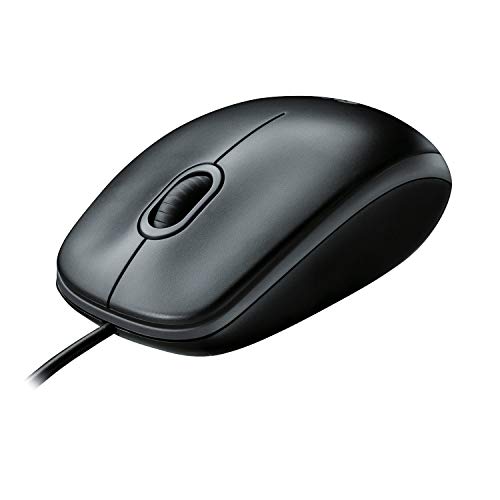
- Best for: Simple everyday use where a reliable plug-and-play mouse is all you need.
- 800 DPI optical sensor
- 3 buttons
- Ambidextrous shape
- USB and PS/2 connection
All 3 Picks at a Glance
| Product | Specs | Action |
|---|---|---|
| Logitech G502 HERO |
| Check price on Amazon |
| Razer DeathAdder Essential |
| Check price on Amazon |
| Logitech B100 |
| Check price on Amazon |
Our Top Picks
Pros & cons
- 11 programmable buttons add extensive control customization
- Adjustable weights let you fine-tune balance and feel
- LIGHTSYNC RGB syncs lighting with other Logitech gear
- Wired connection limits cable-free desk setups
- Heavier than typical lightweight esports mice at 0.27 pounds
- Razer DeathAdder Essential Ergonomic Wired Gaming Mouse5.01 x 2.86 x 1.69 inches0.3 poundsCheck on Amazon
- Logitech B100 Ambidextrous Wired Mouse1 Count (Pack of 1)1.49 x 2.44 x 4.44 inches0.24 poundsCheck on Amazon

A wired mouse is the simplest upgrade for a laptop, giving you a precise pointer, a comfortable grip and zero batteries to charge or pair. The real decision is not just the sensor: the shape, the weight, the number of buttons and the cable length all decide whether the mouse feels right after a full day of work. A mouse that suits a large hand will cramp a small one, and a gaming mouse with eleven buttons can overwhelm someone who only needs left, right and a scroll wheel. A wired connection also responds the same way every time, with no lag from a low battery.
This guide is for laptop users who want a dependable corded mouse for work, study and light gaming, from students and office workers to players who prefer a wired connection for its steady response. Every mouse below was chosen from the name and specifications shown on its Amazon page, with the focus on wired models that work well with a laptop.
Quick Picks
As an Amazon Associate we earn from qualifying purchases
| Product | Best for | Key spec from title |
|---|---|---|
| Logitech G502 HERO | Gaming and heavy customization for power users | HERO 25K sensor, 25,600 DPI |
| Razer DeathAdder Essential | Comfortable ergonomic shape for daily work and play | 6400 DPI optical sensor |
| Logitech B100 | Simple plug-and-play mouse for any laptop and user | 800 DPI, ambidextrous shape |
How to Choose
Sensor and sensitivity
The sensor decides how accurately the mouse tracks your hand, and the DPI range tells you how far the pointer moves per inch of hand movement. A sensor that reaches 25,600 DPI suits gamers who flick across the screen, while an 800 DPI sensor is enough for documents, browsing and spreadsheets. Look for the sensor name and the DPI range in the listing, since a modern optical sensor tracks cleanly on most surfaces without the jitter of an old laser design. Adjustable DPI buttons let you switch sensitivity on the fly, which helps when you move between precise design work and fast gaming. A higher polling rate also keeps fast movements smooth.
Shape, size and grip
Shape matters more than any specification once the mouse is in your hand for hours, because a shape that fits your grip keeps your wrist relaxed and your fingers loose. Right-handed ergonomic mice support the thumb and curve to the palm, which suits long sessions, while ambidextrous mice work for either hand and suit shared desks. Size is just as important: a full-size mouse fills a large hand, while a compact mouse suits small hands and travel. Check the dimensions and weight in the listing, and think about your grip style, since palm, claw and fingertip grips all favor different shapes. Test the shape in your hand first when you can.
Buttons and scroll wheel
Buttons decide how much you can do without reaching for the keyboard, and the right number depends on how you work. Three buttons cover the basics for documents and browsing, while five or more programmable buttons let gamers bind abilities and workers bind shortcuts. A scroll wheel with a free-spin mode helps you fly through long documents and web pages, while a standard click wheel gives more control for precise scrolling. Check the listing for the button count and whether the buttons are programmable, and note the switch rating, since a higher click rating usually means a longer life. Keep side buttons near your thumb so they are easy to reach.
Cable, connection and compatibility
A wired mouse connects over USB and works the moment you plug it in, with no batteries, dongles or pairing to manage. Cable length matters for a laptop setup: a cable around 1.8 meters reaches a desktop tower under the desk, while a shorter cable suits a laptop on a small table. Check whether the listing names USB-A or USB-C, since newer laptops may need an adapter for a USB-A mouse. Compatibility is usually broad, with most wired mice working on Windows, macOS, Linux and ChromeOS without extra software, though programmable buttons may need the maker’s app. A braided cable resists tangles better than a smooth rubber one.
The 3 Best Options
Logitech G502 HERO
- Best for: Gamers and power users who want maximum customization and a precise sensor.
- HERO 25K sensor
- 100 to 25,600 DPI range
- 11 programmable buttons
- Five 3.6-gram adjustable weights
Gamers and power users who want maximum customization and a precise sensor.
The eleven buttons and heavier frame take time to learn, and the mouse suits larger hands better than small ones.
The G502 HERO is the most capable mouse in this group, with a HERO 25K sensor that tracks from 100 to 25,600 DPI with no smoothing, filtering or acceleration. Its eleven programmable buttons give gamers and power users plenty of room for macros and shortcuts, and the dual-mode hyper-fast scroll wheel switches between a precise click and a free spin for long documents. Five 3.6-gram weights let you tune the balance and heft to your hand, and the on-board memory stores your profiles on the mouse itself. RGB lighting adds a personal touch, and the braided cable keeps the connection steady during fast play. Its shape supports a palm grip.
Watch out for: The eleven buttons and heavier frame take time to learn, and the mouse suits larger hands better than small ones.
Razer DeathAdder Essential
- Best for: Daily use where a comfortable ergonomic shape matters most.
- 6400 DPI optical sensor
- 5 programmable buttons
- Mechanical switches rated for 10 million clicks
- Right-handed ergonomic shape
Daily use where a comfortable ergonomic shape matters most.
The 6400 DPI ceiling is lower than the G502 HERO, so players who use very high sensitivity may want the faster sensor.
The DeathAdder Essential is the comfort pick in this group, with a right-handed ergonomic shape that has become one of the most copied designs in gaming. Its 6400 DPI optical sensor tracks cleanly for everyday work and casual games, and the five programmable buttons cover the essentials without overwhelming you. Mechanical switches rated for 10 million clicks give a crisp, consistent feel, and the rubber side grips keep the mouse secure in your hand during long sessions. The 1.8-meter cable reaches comfortably from a laptop to a desk edge, and the mouse works on Windows and macOS without extra setup. The matte finish keeps it secure in hand.
Watch out for: The 6400 DPI ceiling is lower than the G502 HERO, so players who use very high sensitivity may want the faster sensor.
Logitech B100
- Best for: Simple everyday use where a reliable plug-and-play mouse is all you need.
- 800 DPI optical sensor
- 3 buttons
- Ambidextrous shape
- USB and PS/2 connection
Simple everyday use where a reliable plug-and-play mouse is all you need.
The 800 DPI sensor and three buttons suit basic tasks, so gamers and designers will want a faster mouse with more controls.
The B100 is the simplest mouse in this group, and that is exactly its strength: plug it into a USB port and it works, with no software, no batteries and no setup at all. Its 800 DPI optical sensor gives precise cursor control for documents, browsing and spreadsheets, and the ambidextrous shape suits left- and right-handed users alike. Three buttons cover the basics, and the mouse works on Windows, macOS, Linux and ChromeOS, so it fits any laptop you own now or later. At 3.84 ounces it is light enough to carry in a laptop bag without noticing it, and the 1-year warranty covers the essentials. It suits travel too.
Watch out for: The 800 DPI sensor and three buttons suit basic tasks, so gamers and designers will want a faster mouse with more controls.
Which One Fits Your Situation
You game on your laptop and want full control
Pick the Logitech G502 HERO, since its HERO 25K sensor, eleven programmable buttons and adjustable weights give you the most control here. The dual-mode scroll wheel helps with long documents too, and on-board memory keeps your profiles on the mouse when you move between machines. Spend a little time setting up buttons and weights, because the mouse rewards tuning with a feel that matches your hand and games.
You work long hours and want comfort first
Choose the Razer DeathAdder Essential, with its right-handed ergonomic shape and rubber side grips that keep your hand relaxed through a full workday. The 6400 DPI sensor is plenty for documents, browsing and casual games, and the five programmable buttons cover shortcuts without clutter. Its 1.8-meter cable reaches easily from a laptop on a desk, and the mechanical switches stay crisp after months of daily clicks. It suits most hands.
You want a mouse that just works anywhere
The Logitech B100 is the pick here, with a plug-and-play design that works on any laptop and any operating system without software. Its ambidextrous shape suits either hand, and the light body slips into a laptop bag without adding bulk. Keep one in your bag as a spare and one on your desk, since the simple design means there is nothing to configure and nothing to go wrong. It just works.
You share a laptop or a desk with others
The B100 suits shared use best, since its ambidextrous shape works for left- and right-handed users and it needs no software or profiles. The G502 HERO and DeathAdder Essential are right-handed designs with personal settings, so they suit a single owner better. If the desk is shared, the B100 is the mouse everyone can pick up and use without adjustment. No one needs to change settings or learn new buttons.
Common Mistakes
- Choosing a mouse by DPI alone and ignoring shape, size, grip style and hand size.
- Buying a large gaming mouse for small hands, which causes strain and discomfort over a long day.
- Picking a USB-A mouse for a laptop with only USB-C ports and forgetting to buy an adapter.
- Ignoring cable length, which decides whether the mouse reaches comfortably from your laptop on a desk.
- Expecting a three-button mouse to handle gaming shortcuts that need extra programmable buttons.
Frequently Asked Questions
Is a wired mouse better than a wireless one for a laptop?
A wired mouse is better when you want a steady connection with no batteries to charge and no dongle to lose. A wireless mouse is better when you travel often or hate cables. For a laptop that stays on one desk, a wired mouse gives reliability and zero maintenance, which suits work and gaming alike.
What DPI should I look for in a laptop mouse?
The right DPI depends on how you use the mouse: 800 DPI suits documents and browsing, while 1600 to 3200 DPI suits gaming and design work. Higher DPI lets the pointer cross the screen with a smaller hand movement, which helps on large displays. Choose adjustable DPI so you can switch sensitivity for different tasks.
Do wired mice work with MacBooks and Chromebooks?
Most wired mice work with MacBooks and Chromebooks over standard USB, needing no drivers for basic pointing and clicking. Programmable buttons may need the maker’s software, which is often Windows only. Check the listing for the operating systems it names, and keep a USB-C adapter handy if your laptop has no USB-A port.
How do I keep a wired mouse cable from getting in the way?
Route the cable behind your laptop or through a clip so it stays clear of your wrist, and leave slack for the mouse to move freely. A mouse bungee holds the cable off the desk, which keeps it from dragging or catching on the edge. Avoid pulling the cable tight or letting it hang off the desk.
FAQ
Is a wired mouse better than a wireless one for a laptop?
What DPI should I look for in a laptop mouse?
Do wired mice work with MacBooks and Chromebooks?
How do I keep a wired mouse cable from getting in the way?
More from Amazon
Programs that pair well with the guide above. Offers and eligibility are set by Amazon and may change.
Free shipping on eligible items, Prime Video and more. Eligible new members can start with a free trial.
Start a Prime free trialAd-free music streaming. Eligible new subscribers can start with a free trial.
Try Music Unlimited freeA Prime membership for ages 18-24 with a trial period. Eligibility is set by Amazon.
See Prime for Young AdultsAudiobooks and podcasts to listen to on the go. Eligible new members can start with a free trial.
Try Audible freeAs an Amazon Associate we earn from qualifying purchases.









