Our Short List of 3

- Best for: Daily typing at a tidy desk shared by a laptop and a tablet.
- Low-profile fluid keycaps
- Smart backlighting that adjusts to light
- Bluetooth and Logi Bolt connectivity
- USB-C rechargeable battery

- Best for: Typing across a laptop, tablet and phone from one small board.
- Bluetooth multi-device keyboard
- Connects to up to 3 devices
- 2-year battery life on 2 AAA batteries
- Compact lightweight design
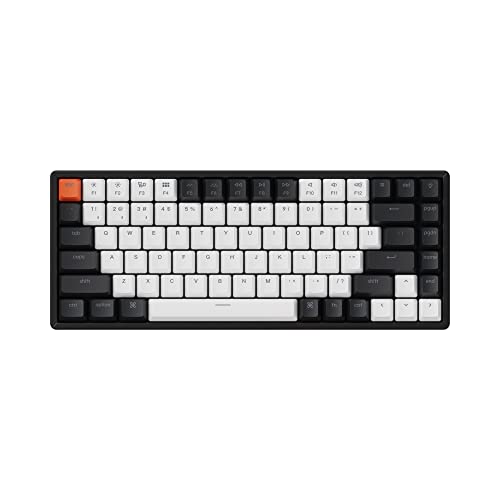
- Best for: Mechanical typing feel in a compact board that travels.
- 75% layout with 84 keys
- Hot-swappable switches
- Bluetooth and USB wired connectivity
- Double-shot keycaps
All 4 Picks at a Glance
| Product | Specs | Action |
|---|---|---|
| Logitech MX Keys S |
| Check price on Amazon |
| Logitech K380 |
| Check price on Amazon |
| Keychron K2 Version 2 |
| Check price on Amazon |
 Logitech ERGO K860 |
| Check price on Amazon |
Our Top Picks
- Logitech MX Keys S Wireless Keyboard Low Profile1.701.56 x 5.81 x 17.74 inches1.79 poundsCheck on Amazon
A laptop keyboard is a compromise: short travel, cramped spacing and no number pad, all squeezed into a thin chassis. An external keyboard fixes that trade-off, giving the hands a full layout, better key feel and a more comfortable typing angle. The real decision is what kind of external board fits the setup: a slim wireless model for a tidy desk, a compact multi-device board for a laptop and tablet, a mechanical board for feel, or a split ergonomic board for long sessions. Choosing well means typing faster with less strain, and the right board can turn a cramped laptop setup into a proper workstation.
This guide is for laptop owners, tablet users and multi-device workers who spend hours typing away from a desktop. It also suits buyers setting up a home office around a laptop that docks at one desk. Every board below was chosen from the names and specifications printed on its Amazon product page, so the details in this guide match what those listings state.
Quick Picks
As an Amazon Associate we earn from qualifying purchases
| Product | Best for | Key spec from title |
|---|---|---|
| Logitech MX Keys S | Tidy desks and daily typing | Low profile, backlit, multi-device |
| Logitech K380 | Laptops, tablets and phones | Compact, Bluetooth, 3 devices |
| Keychron K2 Version 2 | Mechanical feel on the move | three-quarter layout, hot-swappable, RGB |
| Logitech ERGO K860 | Long sessions without wrist strain | Split design, wrist rest, Bluetooth |
How to Choose
Layout and size
Layout decides how much desk the keyboard takes and how much it offers. A full-size board adds a number pad for spreadsheets and data entry, while a compact three-quarter board keeps the function row and arrows in a smaller footprint that leaves room for the mouse. Tenkeyless boards sit between the two, dropping the number pad but keeping the navigation cluster. Measure the desk before choosing, and think about whether the keyboard travels in a bag or stays in one place, since size matters far more for a board that moves daily. A board that never leaves the desk can be as large as the desk allows.
Switch and key feel
Key feel decides whether typing is a pleasure or a chore. Low-profile scissor keys feel like a laptop keyboard, only roomier, and suit buyers who want a familiar touch. Mechanical switches offer deeper travel and a more distinct press, with linear switches gliding smoothly and tactile switches adding a small bump. Membrane keys are quiet and soft but can feel vague over long sessions. Try to match the feel to the work: fast typists often prefer mechanical or low-profile keys, while quiet offices favour soft, low-travel boards.
Connectivity and multi-device
An external keyboard should connect the way the setup demands. Bluetooth pairs with laptops, tablets and phones without a dongle, while a USB receiver offers a steadier link for a desktop that stays put. Multi-device switching matters when one keyboard serves a laptop and a tablet, since a dedicated switch key moves between them in a second. Wired USB-C suits long sessions with no battery worries and no pairing at all. Check how many devices the board remembers and whether switching needs software or just a key press. A board that remembers three devices covers most setups without any extra steps.
Ergonomics and comfort
Comfort decides whether a keyboard stays on the desk after the first week. A split design angles each half of the board toward the natural resting position of the hands, which reduces wrist twist over long sessions. A pillowed wrist rest supports the palms without forcing the wrists upward, and adjustable tilt lets the typist set a flat or raised angle. Low-profile boards suit buyers with smaller hands, while taller mechanical boards suit those who rest their palms on a separate rest. Pick the shape that matches the hands, not just the looks.
The 4 Best Options
Logitech MX Keys S
- Best for: Daily typing at a tidy desk shared by a laptop and a tablet.
- Low-profile fluid keycaps
- Smart backlighting that adjusts to light
- Bluetooth and Logi Bolt connectivity
- USB-C rechargeable battery
Daily typing at a tidy desk shared by a laptop and a tablet.
The low-profile keys feel different from a full mechanical board, so typists switching from one should expect an adjustment period.
The Logitech MX Keys S is the polished all-rounder in this group, with low-profile keys that feel familiar to laptop typists and smart backlighting that adjusts to the room. It pairs over Bluetooth or the Logi Bolt receiver and switches between up to three devices with dedicated keys, which suits a desk shared by a laptop and a tablet. The USB-C rechargeable battery keeps it going for months between charges with the backlight off, and programmable keys adapt the board to the software in use. It is the safe pick for daily typing.
Logitech K380
- Best for: Typing across a laptop, tablet and phone from one small board.
- Bluetooth multi-device keyboard
- Connects to up to 3 devices
- 2-year battery life on 2 AAA batteries
- Compact lightweight design
Typing across a laptop, tablet and phone from one small board.
There is no number pad and no backlight, so data entry and dark-room typing are less comfortable.
The Logitech K380 is the compact traveller of this group, a small Bluetooth board that pairs with a laptop, tablet and phone and switches between them with three yellow device keys. Its round keys and slim body slip into a bag easily, and the two-year battery life on two AAA batteries means charging is rarely a thought. It suits buyers who type on several devices through the day and want one keyboard that follows them. The board is simple, light and ready to use with no software needed. Its small size also leaves plenty of desk space for a notebook or a coffee.
Keychron K2 Version 2
- Best for: Mechanical typing feel in a compact board that travels.
- 75% layout with 84 keys
- Hot-swappable switches
- Bluetooth and USB wired connectivity
- Double-shot keycaps
Mechanical typing feel in a compact board that travels.
The board is taller than a low-profile keyboard, so a wrist rest helps during long sessions.
The Keychron K2 Version 2 brings a mechanical feel to laptop setups, with a three-quarter layout that keeps the function row and arrows while dropping the number pad. Its hot-swappable sockets let the owner change switches without soldering, and the aluminium frame gives the board a solid weight on the desk. Bluetooth and wired USB connections cover both portable and docked use, and the RGB backlighting suits evening work. It is the pick for typists who want a mechanical board that still travels well. The solid frame keeps the board planted during fast typing, even on a smooth desk.
Logitech ERGO K860
- Best for: Long typing sessions where wrist comfort matters most.
- Split ergonomic design
- Pillowed wrist rest
- Curved split keyframe
- Bluetooth and USB connectivity
Long typing sessions where wrist comfort matters most.
The split layout takes a few days to learn, and the board is too wide to carry in most laptop bags.
The Logitech ERGO K860 is the comfort pick in this group, splitting the key layout into two angled halves with a pillowed wrist rest underneath. Its curved, split keyframe lets the hands rest in a more natural position, which suits long typing sessions that leave wrists aching on a flat board. Bluetooth and USB connectivity cover laptops and desktops, and the stain-resistant fabric wrist rest wipes clean easily. It is the board for buyers whose wrists matter more than portability.
Which One Fits Your Situation
A laptop that stays on one desk
Choose the Logitech MX Keys S when the laptop docks at the same desk every day. Its low-profile keys feel familiar, the backlighting adapts to the room, and multi-device switching covers a tablet beside the laptop. The rechargeable battery means no spare batteries to keep, and the board looks at home on a tidy desk.
Working across a laptop, tablet and phone
Pick the Logitech K380 when one keyboard must serve three devices. Its three device keys switch between a laptop, tablet and phone in a second, and the compact body slips into a bag for the commute. The two-year battery life means the board is always ready, with no charging cable to remember. The board pairs in seconds, so switching devices never breaks the flow of work.
Long typing sessions without wrist strain
Take the Logitech ERGO K860 when typing sessions run for hours and the wrists feel it first. Its split layout and pillowed wrist rest keep the hands in a natural position, which reduces strain over a working day. The board stays on the desk, so its size is a fair trade for the comfort it gives.
A mechanical feel on the go
Choose the Keychron K2 Version 2 when the typing feel matters and the board still needs to travel. Its mechanical switches and aluminium frame give a solid, satisfying press, while the three-quarter layout fits a bag more easily than a full-size board. Bluetooth covers portable use and wired USB covers the desk.
Common Mistakes
- Buying a full-size board for a small desk and leaving no room for the mouse.
- Choosing a mechanical keyboard for a shared office without checking how loud the switches are.
- Picking a board with no multi-device switching, then juggling two keyboards for a laptop and a tablet.
- Forgetting the number pad, then finding spreadsheets painful on a compact layout.
- Ignoring wrist position and blaming the keyboard when a flat board and a high desk cause the strain, instead of adjusting the chair and the desk height first.
Frequently Asked Questions
Can I use an external keyboard with a laptop?
Yes, any laptop with Bluetooth or a free USB port accepts an external keyboard. Bluetooth boards pair in seconds, while USB receiver and wired boards connect with no setup at all. The laptop screen can stay open beside the board or closed with an external monitor, and the external keyboard takes over all typing duties. No drivers are needed.
Is a mechanical keyboard better than a membrane one?
It depends on the typist. Mechanical switches offer deeper travel and a more distinct press, which many fast typists prefer, while membrane boards are quieter and softer. Low-profile boards sit between the two with a familiar laptop-like feel. Try both types if possible and pick the feel that suits the hands and the noise level of the room.
How do I switch one keyboard between two devices?
Look for a board with dedicated device keys, like the K380 or the MX Keys S. Pair each device once, then press the device key to move between them. Bluetooth boards remember several pairings, so switching takes a second and needs no re-pairing. Wired boards cannot switch devices without unplugging the cable first.
Do ergonomic keyboards really help with wrist pain?
A split design and a wrist rest can reduce wrist twist and support the palms during long sessions, which many typists find more comfortable. They help most when paired with a good chair height and a flat typing angle. Anyone with ongoing wrist pain should speak with a clinician, since a keyboard alone cannot fix a medical issue.
FAQ
Can I use an external keyboard with a laptop?
Is a mechanical keyboard better than a membrane one?
How do I switch one keyboard between two devices?
Do ergonomic keyboards really help with wrist pain?
More from Amazon
Programs that pair well with the guide above. Offers and eligibility are set by Amazon and may change.
Free shipping on eligible items, Prime Video and more. Eligible new members can start with a free trial.
Start a Prime free trialAd-free music streaming. Eligible new subscribers can start with a free trial.
Try Music Unlimited freeA Prime membership for ages 18-24 with a trial period. Eligibility is set by Amazon.
See Prime for Young AdultsAudiobooks and podcasts to listen to on the go. Eligible new members can start with a free trial.
Try Audible freeAs an Amazon Associate we earn from qualifying purchases.