Our Short List of 3
All 4 Picks at a Glance
| Product | Specs | Action |
|---|---|---|
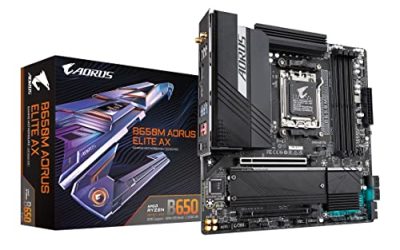
 GIGABYTE B650 AORUS Elite AX | Check price on Amazon | |
 MSI MAG B650 Tomahawk WiFi | Check price on Amazon | |
 ASUS TUF Gaming B650-Plus WiFi | Check price on Amazon | |
 ASUS ROG Strix Z790-E Gaming WiFi II | Check price on Amazon |
Our Top Picks
A gaming and streaming PC asks more of a motherboard than a gaming PC alone. The game loads the processor and graphics card, while the stream adds a capture device, a camera, a microphone or audio interface, a stream deck, chat displays, and recording software, all running at the same time. If the board runs short of USB ports, delivers unstable power under a long session, or relies on a weak network connection, the problems show up live, in dropped frames, crackling audio, and peripherals that disconnect at the worst moment.
This guide compares five motherboards built for that combined workload, covering both the AMD AM5 platform and the Intel LGA 1700 platform. Each board offers wired networking rated at 2.5 gigabits, built-in Wi-Fi, multiple M.2 storage slots, and enough rear USB ports for a typical streaming desk. The sections below explain what matters most for a dual-purpose rig, then walk through each board, its listed specifications, and the kind of builder it suits best.
As an Amazon Associate, we earn from qualifying purchases.
How to Choose a Motherboard for Gaming and Streaming
Start with the processor, because the socket decides everything else. AMD AM5 boards in this guide support Ryzen 7000, 8000, and 9000 series desktop processors and use DDR5 memory. Intel LGA 1700 boards support 12th, 13th, and 14th generation Core processors, and the two Intel boards here also use DDR5. A motherboard cannot be swapped between platforms, so confirm the exact processor model against the board support list, and check whether a BIOS update is needed for a newer chip before planning the build.
Power delivery matters more for streaming than many buyers expect. Encoding, recording, and running a game at once can hold a processor near full load for hours, which is a different demand from short gaming bursts. Boards with more power stages and large heatsinks are better placed to sustain that load without throttling. The specifications below list the power design stated for each board, so a builder planning a high core count processor can favor the stronger designs, while a mid-range processor leaves more freedom to choose on ports and networking instead.
Networking is the next priority, and wired Ethernet should be the default for a live broadcast. Every board in this guide includes 2.5 gigabit Ethernet, which gives headroom above a typical home connection and keeps the upload path stable while other devices share the network. Wi-Fi 6, Wi-Fi 6E, or Wi-Fi 7, depending on the board, is a useful backup and a convenient way to connect secondary devices, but a cable remains the safer choice for the stream itself. Bluetooth, included on these boards, also helps with wireless controllers and headsets away from the desk.
Count USB ports before buying, and count them honestly. A streaming desk can easily use ports for a capture card, a camera, a microphone, a stream controller, a keyboard, a mouse, a headset dongle, and an external drive for recordings. Look at both the speed and the mix of Type-A and Type-C ports on the rear panel, plus the internal headers for front panel ports on the case. A board with a 20 gigabit Type-C rear port, such as the AM5 models below, also moves large recording files to fast external storage more quickly after a session ends.
Storage and expansion shape how the rig grows. Multiple M.2 slots let a builder separate the system and games from a dedicated recording drive. A PCIe 5.0 graphics slot adds future headroom on several boards here, while additional PCIe slots can hold an internal capture card. Check lane sharing notes in the manual, because filling a particular M.2 slot can change the speed of another slot.
Finally, consider audio. Onboard codecs differ between boards, and a cleaner audio path helps when a microphone or headset connects directly to the board. Features such as BIOS flashback and tool-free M.2 latches do not change frame rates, but they shorten time spent building and troubleshooting.
GIGABYTE B650 AORUS Elite AX
The GIGABYTE B650 AORUS Elite AX is an ATX board for the AMD AM5 platform, built around the B650 chipset. Its listed design uses a 14 plus 2 plus 1 power phase configuration, DDR5 memory support, and a PCIe 5.0 M.2 slot alongside additional M.2 storage, which makes it a balanced starting point for a Ryzen gaming and streaming build. Wi-Fi 6E and 2.5 gigabit Ethernet cover both wireless and wired networking, and the rear panel includes USB 3.2 Gen 2×2 Type-C connectivity for fast external devices.
For streaming, the appeal is port count and storage flexibility. Multiple M.2 slots allow room for a system drive, a game library drive, and a separate recording drive, while wired Ethernet carries the broadcast. Support for Ryzen 9000, 8000, and 7000 series processors also gives the build a clear upgrade path within the same socket.
Who It Suits
This board suits Ryzen builders who want a full ATX layout, PCIe 5.0 storage headroom, and both Wi-Fi 6E and fast wired networking in one package. It is a sensible center for a single PC streaming setup where the same machine runs the game and the broadcast software. Builders who want the higher tier X870E feature set, or who need an Intel platform, should look at the other boards in this guide instead.
MSI MAG B650 Tomahawk WiFi
The MSI MAG B650 Tomahawk WiFi is another AM5 ATX option, and its listing emphasizes a 14 plus 2 plus 1 Duet Rail power system, DDR5 memory support up to 6400 megahertz and beyond with overclocking profiles, and three M.2 Gen4 slots. Networking comes from Wi-Fi 6E with Bluetooth 5.3 and a 2.5 gigabit LAN connection, and the audio section uses the Realtek ALC4080 codec with 7.1 channel high definition audio and an optical S/PDIF output, which is relevant for streamers connecting audio gear directly to the PC.
The Tomahawk line favors a plain, heatsink-heavy design, with extended heatsinks and M.2 Shield Frozr covers intended to keep components cooler during long sessions. Rear connectivity includes a USB 3.2 Gen 2×2 Type-C port rated at 20 gigabits, HDMI 2.1, and DisplayPort. Six SATA ports remain available for older drives used as recording archives.
Who It Suits
This board suits Ryzen builders who value storage count, a strong audio codec, and a restrained design. The three M.2 slots and six SATA connectors suit a streaming PC that stores many hours of recordings locally. Builders who want a PCIe 5.0 M.2 slot should compare the GIGABYTE and ASUS AM5 boards here, since the Tomahawk storage listed here is Gen4.
ASUS TUF Gaming B650-Plus WiFi
The ASUS TUF Gaming B650-Plus WiFi rounds out the AM5 choices with a durability-focused design. The listing describes 14 power stages, described in the product details as 12 plus 2 teamed stages, PCIe 5.0 M.2 support, and DDR5 memory with a listed memory clock speed of 6400 megahertz. Networking pairs Wi-Fi 6 with Realtek 2.5 gigabit Ethernet and TUF LANGuard protection on the network port, and the board also lists USB4 support through its header provision, plus Aura Sync lighting headers for builders who use compatible cases and coolers.
For a gaming and streaming rig, the TUF board covers the essentials without moving into the flagship tier. PCIe 5.0 M.2 support gives a fast drive option, wired Ethernet handles the broadcast, and USB provision covers camera, capture, and control peripherals. The product title references Ryzen 9000, 8000, and 7000 series support, so confirming the BIOS version for a newer processor is worthwhile before assembly.
Who It Suits
This board suits Ryzen builders who want a straightforward, sturdily built ATX board with PCIe 5.0 storage support and dependable wired networking for streaming. It fits a builder who does not need Wi-Fi 6E specifically, since this model is listed with Wi-Fi 6, and who prefers to spend the rest of the budget on the processor, graphics card, camera, and microphone that viewers actually see and hear.
ASUS ROG Strix Z790-E Gaming WiFi II
The ASUS ROG Strix Z790-E Gaming WiFi II is the premium Intel option in this guide, built for LGA 1700 processors from the 12th, 13th, and 14th generations. Its listed specification includes 18 plus 1 plus 2 power stages, DDR5 memory slots, five M.2 slots with heatsinks, and a PCIe 5.0 x16 slot for the graphics card. Networking moves up a step as well, with Wi-Fi 7 and 2.5 gigabit LAN, and the front panel connector provision includes USB power delivery rated up to 30 watts, as described in the product title.
Five M.2 slots is the standout figure for a streaming build, leaving room to separate system, games, and recording storage without adapters. The stronger power design also suits higher tier Intel processors encoding and gaming at once for extended periods. Builders should read the lane sharing notes carefully, since boards with this many high speed slots commonly adjust slot speeds depending on which connectors are populated.
Who It Suits
This board suits Intel builders planning a high-end single PC streaming setup, especially those who want many M.2 drives, Wi-Fi 7, and a strong power design for a demanding processor. It is more board than a mid-range processor and a modest peripheral set require, so builders with a simpler desk setup may find the MSI Z790 board below, or one of the AM5 options, to be a better match for their plans.
MSI MAG Z790 Tomahawk WiFi
The MSI MAG Z790 Tomahawk WiFi gives Intel builders a more restrained alternative to the ROG Strix board. The listing describes support for 12th, 13th, and 14th generation Intel processors on the LGA 1700 socket, DDR5 memory, a PCIe 5.0 graphics slot, and M.2 storage, with DDR5 memory boost rated at 7200 megahertz and above with overclocking in the motherboard specification. Networking includes Wi-Fi 6E, Bluetooth 5.3, and 2.5 gigabit LAN, and rear connectivity includes USB 3.2 Gen 2 ports, HDMI, and DisplayPort.
In a streaming build, this board covers the same core needs as its AM5 Tomahawk counterpart: stable wired networking, enough high speed USB ports for capture and audio gear, and multiple M.2 slots for separating recordings from the game library. The specification lists four M.2 Gen4 slots, ample for most single PC setups. Check the processor support list and BIOS notes for a 14th generation chip before building.
Specs
| Item | Detail |
|---|---|
| Brand | MSI |
| Model | MAG Z790 Tomahawk WiFi |
| Socket | Intel LGA 1700 |
| Chipset | Intel Z790 |
| Form factor | ATX |
| Memory | DDR5, 7200 megahertz and above with overclocking, as listed |
| Storage | M.2 slots, 4 M.2 Gen4 in the listed specification |
| Graphics slot | PCIe 5.0 |
| Networking | Wi-Fi 6E, Bluetooth 5.3, 2.5 Gbps LAN |
| USB highlight | USB 3.2 Gen 2 |
| ASIN | B0BL8K1YH1 |
Who It Suits
This board suits Intel builders who want Z790 features, Wi-Fi 6E, and a clean design without stepping up to the premium ROG tier. It is a practical center for a PC built around a 13th or 14th generation Core processor. Builders who want Wi-Fi 7 or five M.2 slots should compare the ROG Strix board above.
FAQ
Does a streaming PC need a different motherboard from a gaming PC?
Not a different category of board, but a different set of priorities. A streaming build benefits from more USB ports for capture, camera, and audio gear, a wired 2.5 gigabit Ethernet connection for a stable upload, and enough M.2 slots to keep recordings on a separate drive. Any board in this guide covers gaming first, with those streaming needs built in.
Should a streamer use Wi-Fi or Ethernet for broadcasting?
Ethernet is the safer choice for the live broadcast, because a wired connection avoids the interference and signal changes that can affect wireless links in a busy home. All five boards here include 2.5 gigabit Ethernet alongside Wi-Fi, so the wired option is available even if the PC normally connects wirelessly for everyday use.
How many M.2 slots does a gaming and streaming PC need?
Two slots cover a basic build, with one drive for the system and games and another for recordings. Three or more slots, as offered by most boards in this guide, add flexibility to expand the game library or archive footage without replacing an existing drive. Check lane sharing notes, because filling certain slots can change the speed of other connectors on some boards.
Can these motherboards be used in a two PC streaming setup?
Yes. In a two PC setup, the gaming machine still needs a capable board for the game itself, while the streaming machine needs capture connectivity, USB ports for audio and control gear, and reliable networking. A board from this guide can serve in either role, and the capture card connection, whether USB or PCIe, should be checked against the available ports and slots on the chosen model.
Final Verdict
There is no single best board here, only the best match for a chosen platform and desk setup. On the AMD side, the GIGABYTE B650 AORUS Elite AX offers a balanced mix of PCIe 5.0 storage, Wi-Fi 6E, and a full ATX layout, the MSI MAG B650 Tomahawk WiFi adds a strong audio codec and generous SATA and M.2 counts, and the ASUS TUF Gaming B650-Plus WiFi keeps the formula simple and sturdy with Wi-Fi 6 and PCIe 5.0 M.2 support. On the Intel side, the ASUS ROG Strix Z790-E Gaming WiFi II is the premium pick with five M.2 slots and Wi-Fi 7, while the MSI MAG Z790 Tomahawk WiFi delivers the core Z790 streaming features in a more restrained package.
Whichever platform is chosen, the same checklist applies: confirm the processor appears on the support list, count USB ports against every peripheral, plan a wired Ethernet connection, and leave an M.2 slot free for future recording storage.
Product and ASIN Reference
| Product | ASIN |
|---|---|
| GIGABYTE B650 AORUS Elite AX | B0BH7GTY9C |
| MSI MAG B650 Tomahawk WiFi | B0BHCCNSRH |
| ASUS TUF Gaming B650-Plus WiFi | B0BHN7GGBQ |
| ASUS ROG Strix Z790-E Gaming WiFi II | B0CJMQ2S5M |
| MSI MAG Z790 Tomahawk WiFi | B0BL8K1YH1 |
FAQ
Does a streaming PC need a different motherboard from a gaming PC?
Should a streamer use Wi-Fi or Ethernet for broadcasting?
How many M.2 slots does a gaming and streaming PC need?
Can these motherboards be used in a two PC streaming setup?
More from Amazon
Programs that pair well with the guide above. Offers and eligibility are set by Amazon and may change.
Free shipping on eligible items, Prime Video and more. Eligible new members can start with a free trial.
Start a Prime free trialAd-free music streaming. Eligible new subscribers can start with a free trial.
Try Music Unlimited freeA Prime membership for ages 18-24 with a trial period. Eligibility is set by Amazon.
See Prime for Young AdultsAudiobooks and podcasts to listen to on the go. Eligible new members can start with a free trial.
Try Audible freeAs an Amazon Associate we earn from qualifying purchases.