
Our Top Picks
 msi Gaming RTX 3050 Ventus 2X 6G OC1.7" x 4.3" x 7.4"7.4 x 4.3 x 0.1 inches1.3 poundsCheck on Amazon
A graphics card for Windows 10 has to clear one hurdle before anything else matters: the maker must still release drivers for your operating system. A fast card with no matching driver is a paperweight, and a card whose driver lags behind leaves you without the fixes and features that keep games and creative apps running smoothly. The three cards in this guide all have current Windows 10 driver support from their makers, alongside the memory and outputs that make them useful in a real machine. Picking among them comes down to memory size, power draw, and the ports your monitors need.
This guide is for Windows 10 users upgrading an older PC, for players keeping a trusted machine going, and for anyone building a budget desktop around the operating system they already know. Every card below was chosen from the name and specifications shown on its Amazon page, with Windows 10 driver availability, memory, cooling, and display outputs weighed together.
Quick Picks
As an Amazon Associate we earn from qualifying purchases
| Product | Best for | Key spec from title |
|---|---|---|
| ASUS Dual RTX 4060 EVO White OC 8GB | Modern games and creation | 8GB GDDR6 with DLSS 3 |
| MSI Ventus RTX 3050 2X 6G OC | Older PCs and small cases | 6GB GDDR6 dual-fan design |
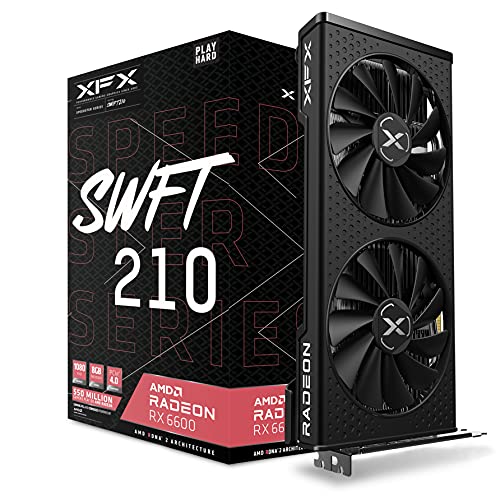
| XFX Speedster SWFT210 RX 6600 | 1080p gaming with 8GB | 8GB GDDR6 with 3 DisplayPorts |
How to Choose
Confirm Windows 10 driver support first
Driver support is the first thing to check, before memory or clock speed. Both NVIDIA and AMD still release Windows 10 drivers for the cards in this guide, which means the card will install cleanly and keep receiving updates. Before you order, visit the card maker’s driver page and confirm your exact card model is listed for Windows 10, and note whether the driver is a 64-bit build that matches your system. A card that only lists newer operating systems on its driver page is a warning sign, even if the hardware itself would run. Keep the driver current after installing, since updates fix bugs and add support for new games and apps.
Pick enough memory for your games
Video memory decides how large a game or project the card can hold without slowdowns. Eight gigabytes is the sensible level for modern 1080p gaming, giving you room for higher texture settings and the occasional heavier title. Six gigabytes still handles popular and older games well, and it suits lighter workloads such as office apps and media playback, but it leaves less headroom for the next wave of demanding releases. The memory type matters too: GDDR6 is the current standard for these cards, and faster memory speeds help the card move textures quickly. Memory is fixed at purchase, so choose the largest amount your budget stretches to.
Check the power supply and the size
A graphics card has to fit your case and your power supply, and both are easy to overlook when you are focused on performance. Check the recommended power supply wattage on the listing, since a card that asks for 550 watts will not be happy on an old 450-watt unit, and confirm your supply has the right power connector for the card. Measure the space inside your case as well, since dual-fan cards need room from the slot to the front of the case, and a card that is too long will not fit at all. A quick check of wattage, connectors, and length now saves a return later.
Match the outputs to your monitors
The card’s ports set the shape of your desk, since every monitor plugs into it. Most cards in this guide carry one or two HDMI ports and one or more DisplayPort connections, which suits a two-monitor setup with a main display and a second screen for chat or work. DisplayPort 1.4a supports high refresh rates at 1080p and 1440p, while HDMI 2.1a covers modern televisions and monitors. Tally your screens first, then check the card’s ports against the cables you already have. An adapter can fix a mismatch, but a card with the right ports from the start is simpler and cheaper.
The 3 Best Options
ASUS Dual RTX 4060 EVO White OC 8GB
This card leads the guide because it pairs modern features with a clean white design that suits light-coloured builds. Eight gigabytes of GDDR6 memory handles modern 1080p gaming well, and DLSS 3 support lifts frame rates in games that use it. The dual Axial-tech fans with zero-decibel technology stay silent under light loads, and the Dual BIOS switch lets you choose between a quiet profile and a performance profile. With an HDMI 2.1a port and three DisplayPort 1.4a outputs, it drives a multi-monitor desk without adapters. Windows 10 drivers are available from NVIDIA, so it installs cleanly on the system this guide is built around.
Specs
- 8GB GDDR6 memory
- Boost clock 2535 MHz in OC mode and 2505 MHz in default mode
- PCIe 4.0 interface
- DLSS 3 support
- 1 HDMI 2.1a output and 3 DisplayPort 1.4a outputs
- Axial-tech fan design with 0dB technology
- Dual BIOS switch
- Auto-Extreme Technology manufacturing
Best for: Windows 10 users who want a modern card for gaming and creation.
Watch out for: The white finish shows dust more readily than a black card, so keep the case filters clean.
ASIN: B0DKS9D5DD
MSI Ventus RTX 3050 2X 6G OC
The Ventus RTX 3050 is the compact, undemanding pick in this guide, a card that suits older PCs and smaller cases. Its six gigabytes of GDDR6 memory handle popular and older games well at 1080p, and the dual-fan cooler keeps the card steady without taking up much space. One DisplayPort 1.4a and two HDMI 2.1a outputs give you flexible monitor options, and the card draws modest power, which suits many existing power supplies. The factory overclock lifts the boost clock to 1492 MHz, and the Ampere architecture brings ray tracing support to a budget card. For a Windows 10 machine that needs a straightforward upgrade, this is the easy choice.
Specs
- 6GB GDDR6 memory
- 96-bit memory interface
- Boost clock of 1492 MHz
- Memory speed of 14 Gbps
- 1 DisplayPort 1.4a output and 2 HDMI 2.1a outputs
- Dual-fan cooling design
- Ampere architecture with ray tracing support
Best for: Older Windows 10 PCs and smaller cases that need a straightforward upgrade.
Watch out for: Six gigabytes of memory leaves less headroom for the most demanding new titles, so keep texture settings modest.
ASIN: B0CTK1SFVD
XFX Speedster SWFT210 RX 6600
The Speedster RX 6600 brings eight gigabytes of memory and three DisplayPort outputs to Windows 10 users who want a capable AMD card. Its boost clock reaches up to 2491 MHz, and the dual-fan cooler keeps the card steady during long sessions. The HDMI port plus three DisplayPort connections suit a multi-monitor desk, and the three-year manufacturer warranty is listed on the product page. AMD releases Windows 10 drivers for this card, so it installs cleanly alongside the rest of your system. The listing notes a 550-watt minimum power supply, so check your unit before ordering, but the card itself is a strong, well-rounded pick for 1080p gaming.
Specs
- 8GB GDDR6 memory
- Boost clock up to 2491 MHz
- Memory speed of 14 Gbps
- 1 HDMI output and 3 DisplayPort outputs
- Dual-fan Speedster SWFT210 cooling design
- Minimum power supply requirement of 550 watts
- 3-year manufacturer warranty
- AMD RDNA 2 architecture
Best for: Windows 10 users who want eight gigabytes of memory and three DisplayPort outputs.
Watch out for: The 550-watt minimum power supply may mean an upgrade for older machines.
ASIN: B09HHLX543
Which One Fits Your Situation
You want a modern card for games and creation
Pick the ASUS Dual RTX 4060 EVO White OC 8GB. Its eight gigabytes of memory, DLSS 3 support, and quiet dual-fan design cover modern 1080p gaming and creative apps alike. The Dual BIOS switch lets you favour silence or speed, and the four display outputs suit a multi-monitor desk. Confirm your power supply and case space, then enjoy a card with real headroom for years to come.
You are upgrading an older PC on a tight plan
Pick the MSI Ventus RTX 3050 2X 6G OC. Its compact dual-fan design fits smaller cases, its modest power draw suits many existing power supplies, and six gigabytes of memory handles popular titles well. The factory overclock to 1492 MHz and ray tracing support give you more than a basic card, and Windows 10 drivers are available from NVIDIA.
You want eight gigabytes and three DisplayPorts
Pick the XFX Speedster SWFT210 RX 6600. Its eight gigabytes of GDDR6 and three DisplayPort outputs make it the most flexible card here for a multi-monitor desk, and the boost clock up to 2491 MHz keeps 1080p gaming smooth. Check the 550-watt power supply requirement first, and confirm your case has room for the dual-fan cooler, and note the three-year warranty on the product page.
You are keeping a trusted Windows 10 machine going
Pick the card that matches your power supply and your monitors rather than the fastest one on paper. The Ventus RTX 3050 suits the smallest and oldest machines, the Speedster RX 6600 suits a multi-monitor desk, and the Dual RTX 4060 suits the most demanding use. Confirm Windows 10 driver support for your exact model on the maker’s driver page before ordering, and download the driver that matches your build.
Common Mistakes
- Buying a card without confirming Windows 10 driver support for that exact model.
- Choosing six gigabytes of memory and then struggling with newer titles at higher settings.
- Neglecting the power supply and learning too late that the card asks for more wattage than the old unit can give.
- Overlooking the port list and finding the card has no socket for your second monitor.
- Ordering a card that is too long for the case and having to return it.
Frequently Asked Questions
Do these graphics cards work with Windows 10?
Yes, all three cards in this guide have current Windows 10 driver support from their makers. NVIDIA releases Windows 10 drivers for the RTX 4060 and RTX 3050, and AMD releases them for the RX 6600. Before ordering, confirm your exact card model on the maker’s driver page and download the 64-bit driver that matches your Windows 10 build.
How much video memory do I need for Windows 10 gaming?
Eight gigabytes is the sensible level for modern 1080p gaming on Windows 10, giving you room for higher texture settings and heavier titles. Six gigabytes still handles popular and older games well, and it suits lighter workloads. Video memory is soldered onto the card, so pick the largest amount your budget allows if you play newer releases.
Will a new graphics card work in an older Windows 10 PC?
Yes, if the card fits your case, your power supply can feed it, and your motherboard has a PCIe slot, which most desktops from the last decade have. Check the recommended power supply wattage on the listing and confirm your unit has the right power connector. Measure the space inside the case, since cards need room.
What should I check before fitting a new graphics card?
Measure the space inside your case, since longer cards need room to spare. Check the recommended power supply wattage and confirm your unit has the right connectors. Download the matching Windows 10 driver from the card maker’s site before you install the card, and confirm your monitors plug into the ports the card provides.
FAQ
Do these graphics cards work with Windows 10?
How much video memory do I need for Windows 10 gaming?
Will a new graphics card work in an older Windows 10 PC?
What should I check before fitting a new graphics card?
More from Amazon
Programs that pair well with the guide above. Offers and eligibility are set by Amazon and may change.
Free shipping on eligible items, Prime Video and more. Eligible new members can start with a free trial.
Start a Prime free trialAd-free music streaming. Eligible new subscribers can start with a free trial.
Try Music Unlimited freeA Prime membership for ages 18-24 with a trial period. Eligibility is set by Amazon.
See Prime for Young AdultsAudiobooks and podcasts to listen to on the go. Eligible new members can start with a free trial.
Try Audible freeAs an Amazon Associate we earn from qualifying purchases.









