
Our Short List of 3
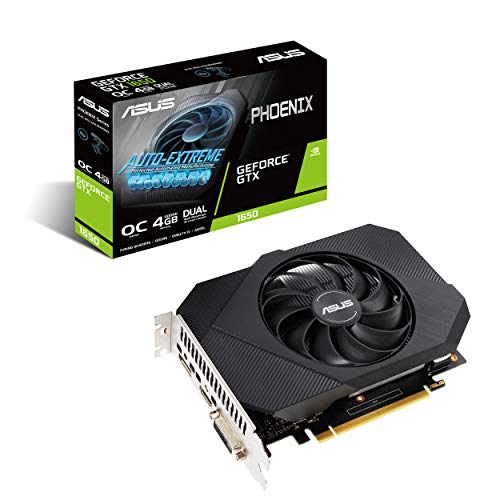
- Best for: Small cases and light FSX flying.
- NVIDIA GeForce GTX 1650 graphics
- 4GB GDDR6 memory
- 1635 MHz memory clock
- Single Axial-tech fan

- Best for: Modern 1080p FSX with add-on scenery.
- NVIDIA GeForce RTX 3050 graphics
- 6GB GDDR6 memory
- Boost clock 1492 MHz
- 14 Gbps memory speed
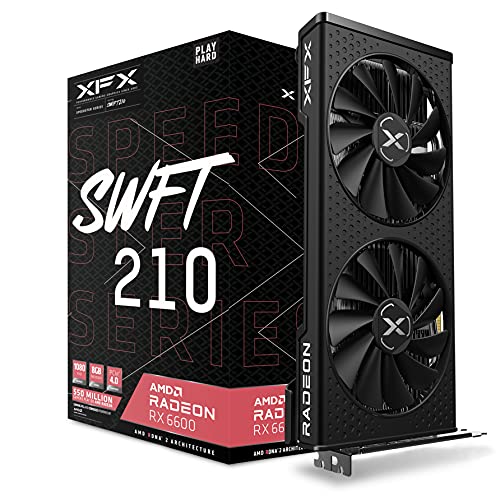
- Best for: Heavy add-on scenery and multi-monitor cockpits.
- AMD Radeon RX 6600 graphics
- 8GB GDDR6 memory
- Boost clock up to 2491 MHz
- 14 Gbps memory speed
All 3 Picks at a Glance
| Product | Specs | Action |
|---|---|---|
| ASUS Phoenix GTX 1650 OC |
| Check price on Amazon |
| MSI RTX 3050 Ventus 2X 6G OC |
| Check price on Amazon |
| XFX Speedster SWFT210 RX 6600 Core |
| Check price on Amazon |
Our Top Picks
- msi Gaming RTX 3050 Ventus 2X 6G OC1.7" x 4.3" x 7.4"7.4 x 4.3 x 0.1 inches1.3 poundsCheck on Amazon
Microsoft Flight Simulator X is an old simulator, and that age shapes the graphics card choice in a useful way: FSX does not need a flagship card, because its engine was built for hardware from another era. The real decision is which budget card gives you smooth 1080p flight with headroom for add-on scenery and aircraft, without spending on power the simulator will never use. A modest modern card runs FSX well and leaves budget for the rest of the machine.
This guide is for flight sim fans who still fly FSX, whether on a rebuilt older PC or a budget new build, and who want smooth frames over detailed scenery. Every card below was chosen from the name and specifications shown on its Amazon page, so the memory, clocks and outputs match what the listings state. Three cards follow for small cases, modern flying and heavy scenery.
Quick Picks
As an Amazon Associate we earn from qualifying purchases
| Product | Best for | Key spec from title |
|---|---|---|
| ASUS Phoenix GTX 1650 OC | Small cases, light FSX | 4GB GDDR6, single-fan design |
| MSI RTX 3050 Ventus 2X 6G OC | Modern 1080p flight | 6GB GDDR6, 1492 MHz boost |
| XFX RX 6600 Core | 8GB for heavy scenery | 8GB GDDR6, 2491 MHz boost |
How to Choose
What FSX Actually Needs
FSX is a DirectX 10-era simulator, and its engine leans on the processor more than the graphics card for flight modeling and scenery loading. The graphics card still matters for smooth frames, high-resolution textures and anti-aliasing, but the demands are modest by modern standards. A card with 4GB of video memory handles FSX at 1080p with add-on scenery, while 6GB or 8GB gives headroom for dense photo scenery and complex aircraft. The card does not need ray tracing or the newest architecture, so a budget card from the last few years is the right tier. A faster processor helps more than a faster card once the basics are covered, so balance the build.
Video Memory for Add-On Scenery
Add-on scenery is where FSX shows its age, because photo-real terrain and detailed airports load large textures that compete for video memory. Four gigabytes is enough for the default scenery and light add-ons, while six or eight gigabytes keeps dense scenery smooth without texture pop-in. If you fly with heavy add-on packages, step up to the 8GB card in this group. Memory speed matters too: GDDR6 memory moves textures faster than older GDDR5, which helps when the simulator loads new terrain as you fly. Check the scenery packages you actually fly with, since one dense region can use more memory than the default world.
Size, Power and Cooling
FSX machines are often older builds or compact cases, so the card’s size and power needs deserve a check. Single-fan cards like the Phoenix GTX 1650 fit small cases and need little power, while dual-fan cards need more room and a stronger power supply. The RX 6600 in this group lists a 550-watt minimum power supply, so confirm your unit meets that figure before ordering. Cooling matters for long flights: a dual-fan card stays quieter during a three-hour session than a single-fan card working hard. Measure the case from the rear bracket to the nearest obstruction before ordering any card.
Outputs and Multi-Monitor Setups
Flight sim fans often run two screens, with the cockpit on one and charts or a map on the other, so check the outputs before you buy. All three cards here offer HDMI and DisplayPort, which covers most dual-monitor setups. If you plan to add a third screen later, count the ports now, because a card with only one DisplayPort limits your options. Check the maximum resolution the card supports as well, since a 4K monitor needs a card that can drive it even if FSX itself runs at 1080p. A second screen for charts keeps your eyes forward instead of buried in menus.
The 3 Best Options
ASUS Phoenix GTX 1650 OC
- Best for: Small cases and light FSX flying.
- NVIDIA GeForce GTX 1650 graphics
- 4GB GDDR6 memory
- 1635 MHz memory clock
- Single Axial-tech fan
Small cases and light FSX flying.
The 4GB of memory limits heavy add-on scenery, so step up to 6GB or 8GB if you fly dense photo terrain.
The ASUS Phoenix GTX 1650 OC is the compact pick of this group, a single-fan card built for small cases and modest power supplies. Four gigabytes of GDDR6 memory and a 1635 MHz memory clock handle FSX at 1080p with default and light add-on scenery. The Axial-tech fan keeps the card cool in tight spaces, and the card carries HDMI, DisplayPort and DVI-D outputs for older monitors. The model number is PH-GTX1650-O4GD6, which is the GDDR6 version to confirm on the listing, since a GDDR5 variant with a different code also exists. A three-year warranty covers the card. The single fan stays quiet at the light loads FSX creates.
MSI RTX 3050 Ventus 2X 6G OC
- Best for: Modern 1080p FSX with add-on scenery.
- NVIDIA GeForce RTX 3050 graphics
- 6GB GDDR6 memory
- Boost clock 1492 MHz
- 14 Gbps memory speed
Modern 1080p FSX with add-on scenery.
The 96-bit memory interface is narrower than wider cards, so very dense scenery can still push it.
The MSI RTX 3050 Ventus 2X 6G OC is the modern pick, a dual-fan card that brings current Ampere architecture to FSX at 1080p. Six gigabytes of GDDR6 memory running at 14 Gbps gives room for add-on scenery and complex aircraft, and the 1492 MHz boost clock keeps frames smooth over dense terrain. The 96-bit memory interface is narrower than some alternatives, but it is enough for a simulator of this era. One DisplayPort 1.4a port and two HDMI 2.1a ports cover dual-monitor setups, and a three-year warranty covers the card. Note that a different variant listing exists, so confirm the Ventus 2X 6G OC model on the listing.
XFX Speedster SWFT210 RX 6600 Core
- Best for: Heavy add-on scenery and multi-monitor cockpits.
- AMD Radeon RX 6600 graphics
- 8GB GDDR6 memory
- Boost clock up to 2491 MHz
- 14 Gbps memory speed
Heavy add-on scenery and multi-monitor cockpits.
The 550-watt power requirement is the highest in this group, and a renewed listing of the same part number exists.
The XFX Speedster SWFT210 RX 6600 Core is the memory pick of this group, with 8GB of GDDR6 memory that gives FSX the most headroom for heavy add-on scenery. A boost clock of up to 2491 MHz and dual-fan cooling keep frames smooth over photo-real terrain, and the card carries HDMI and three DisplayPort outputs for multi-monitor cockpits. The part number is RX-66XL8LFDQ, the Core Edition of the SWFT210 line. The listing states a 550-watt minimum power supply, so confirm your unit before ordering. Note that a renewed listing of the same part number exists, so confirm the listing is new. Three DisplayPort outputs suit cockpits with several screens.
Which One Fits Your Situation
Small Cases and Older Builds
The ASUS Phoenix GTX 1650 OC is the pick for small cases and older builds, because its single-fan design fits tight spaces and needs little power. The 4GB of memory handles FSX with default scenery and light add-ons. If your case is a compact prebuilt or a small form factor build, this is the card that fits without a power supply upgrade. The low power draw suits older power supplies too.
Modern 1080p Flying With Add-Ons
The MSI RTX 3050 Ventus 2X 6G OC is the pick for modern 1080p flying with add-on scenery and aircraft, because its 6GB of memory and current architecture handle dense terrain smoothly. The dual-fan cooler stays quiet during long flights, and the HDMI and DisplayPort outputs cover a second screen for charts. This is the balanced pick of the three. That balance is why it suits most FSX pilots.
Heavy Scenery and Multi-Monitor Cockpits
The XFX RX 6600 Core is the pick for heavy scenery and multi-monitor setups, because its 8GB of memory gives FSX the most room for photo-real terrain, and three DisplayPort outputs drive extra screens. Confirm the 550-watt power supply requirement first, and check that the listing is new rather than the renewed version of the same part number. The extra memory is the reason to pick it.
Budget Rebuilds and First Sim PCs
The ASUS Phoenix GTX 1650 OC is the pick for a budget rebuild or a first sim PC, because it needs the least power and fits the most cases. It runs FSX well at 1080p and leaves budget for a better processor, which FSX leans on more than the graphics card. Step up to the RTX 3050 only if you fly with heavy add-ons. The savings leave room for a faster processor.
Common Mistakes
- Buying a flagship card for FSX and spending on power the old simulator engine will never use during a long flight.
- Choosing a card with too little memory, then watching textures pop in over dense add-on scenery as you fly.
- Ordering a dual-fan card that is longer than the case clearance, then having to return it and wait for a replacement.
- Forgetting to check the power supply, and finding the card needs more watts than the unit provides on installation day.
- Running FSX on a single monitor and missing how much easier flying feels with charts on a second screen beside the cockpit.
Frequently Asked Questions
Can a budget graphics card run Flight Simulator X?
Yes. FSX is a DirectX 10-era simulator, and a budget card from the last few years runs it smoothly at 1080p in most setups. The GTX 1650 handles default scenery and light add-ons, while the RTX 3050 and RX 6600 add headroom for dense scenery and complex aircraft. The processor matters at least as much as the card for FSX.
How much VRAM do I need for FSX with add-on scenery?
Four gigabytes is enough for default scenery and light add-ons, while six or eight gigabytes keeps dense photo scenery smooth without texture pop-in. If you fly with heavy add-on packages, the 8GB RX 6600 in this guide is the safest pick. Memory speed matters too, and all three cards here use GDDR6. Check your scenery packages first.
Does FSX benefit from a modern graphics card?
It benefits up to a point: a modern budget card gives smooth frames, fast texture loading and clean anti-aliasing at 1080p. Beyond that, the old engine leans on the processor for flight modeling and scenery loading, so a flagship card adds little. Spend the savings on a faster processor or more memory instead. A balanced build beats a single fast part.
What power supply do I need for these cards?
The GTX 1650 and RTX 3050 run on modest power supplies, while the RX 6600 lists a 550-watt minimum. Check the card’s requirement on its listing and confirm your power supply meets it with the right connectors. If your unit is older, check its wattage and connector count before ordering any card. Older units may lack the connectors new cards need.
FAQ
Can a budget graphics card run Flight Simulator X?
How much VRAM do I need for FSX with add-on scenery?
Does FSX benefit from a modern graphics card?
What power supply do I need for these cards?
More from Amazon
Programs that pair well with the guide above. Offers and eligibility are set by Amazon and may change.
Free shipping on eligible items, Prime Video and more. Eligible new members can start with a free trial.
Start a Prime free trialAd-free music streaming. Eligible new subscribers can start with a free trial.
Try Music Unlimited freeA Prime membership for ages 18-24 with a trial period. Eligibility is set by Amazon.
See Prime for Young AdultsAudiobooks and podcasts to listen to on the go. Eligible new members can start with a free trial.
Try Audible freeAs an Amazon Associate we earn from qualifying purchases.









