Our Short List of 3

- Best for: Bright living rooms where the wall is the everyday viewing surface
- Display technology: 3-chip 3LCD
- Native resolution: 1920 x 1080
- Brightness: 3400 lumens color and white brightness
- Contrast ratio: 16,000:1
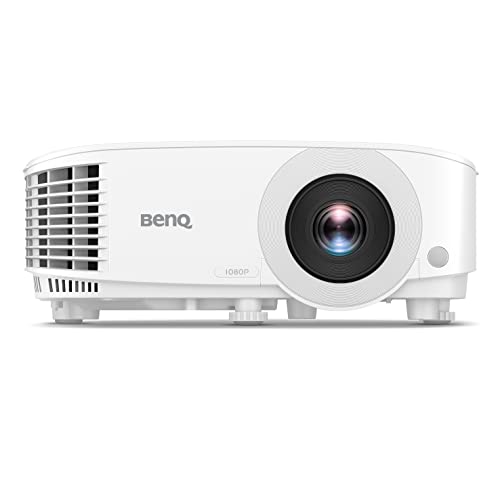
- Best for: Console gaming and sports on a large wall in a lit room
- Display technology: DLP
- Native resolution: 1920 x 1080
- Brightness: 3800 lumens
- Input lag: 16.7ms low latency with enhanced game mode
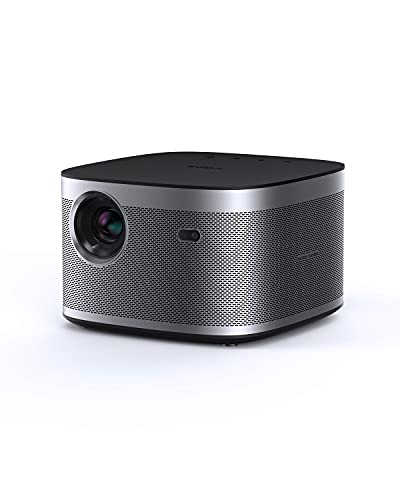
- Best for: Bedrooms and rented rooms where the projector sits off center or moves often
- Display technology: DLP
- Native resolution: 1920 x 1080, 4K supported
- Brightness: 1500 ISO lumens
- Operating system: Android TV 10.0
All 4 Picks at a Glance
| Product | Specs | Action |
|---|---|---|
| Epson Home Cinema 1080 |
| Check price on Amazon |
| BenQ TH575 |
| Check price on Amazon |
| XGIMI HORIZON |
| Check price on Amazon |
 ViewSonic PX701-4K |
| Check price on Amazon |
Key takeaways
- Compare four projectors that work well on a bare wall, with brightness, throw distance, keystone and resolution explained for living rooms and bedrooms.
Projecting straight onto a bare wall sounds simple, but the wall changes everything about the purchase. A screen hides texture, tint and minor bumps, while a painted surface shows all three, so brightness, image size and correction tools matter more than they would in a dedicated theater. Choosing the wrong model usually means a washed-out picture in daylight or an image too large and dim for the room.
This guide serves living room viewers who want movie nights without installing a screen, bedroom viewers working with a short wall, and gamers who want a large image from a console. The four projectors below were chosen from their Amazon listing names and stated specifications, focusing on rated brightness, native resolution, throw style and keystone tools that suit unprepared wall surfaces.
Quick Picks
As an Amazon Associate we earn from qualifying purchases
| Product | Best for | Key spec from title |
|---|---|---|
| Epson Home Cinema 1080 | Bright living rooms with painted walls | 3400 lumens color and white brightness |
| BenQ TH575 | Console gaming on a large wall image | 3800 lumens with 16.7ms low latency |
| XGIMI HORIZON | Rooms where the projector sits off center | 1500 ISO lumens with auto keystone correction |
| ViewSonic PX701-4K | Large wall images where detail matters | 4K UHD with 3200 lumens |
How to Choose
Brightness for Unprepared Wall Surfaces
A bare wall reflects less light evenly than a screen, and many walls carry a warm or gray tint that softens color. Brightness therefore does more work here than in a dark theater. The Epson Home Cinema 1080 rates 3400 lumens of both color and white brightness, and the BenQ TH575 rates 3800 lumens, so both hold up better when curtains stay open. The XGIMI HORIZON rates 1500 ISO lumens, which suits a dimmed bedroom more than a sunny lounge. Match the rating to the room first, because no setting can add light the lamp or light source never produced.
Throw Distance and Image Size
Standard throw projectors need real distance between lens and wall, and that distance decides image size. The BenQ TH575 listing describes a standard throw design with 1.1x zoom, giving a modest range to fine tune size without moving furniture. Before buying, measure from the planned shelf or table to the wall, then check the maker distance guide for that model. A smaller image is also brighter, so in a short bedroom it often makes sense to accept a moderate picture rather than filling every inch of wall and losing punch.
Resolution for Large Wall Images
As a wall image grows, individual pixels spread further apart, and fine detail in faces, subtitles and game interfaces becomes harder to read. A native 1920 x 1080 picture, as listed for the Epson, BenQ and XGIMI models here, stays clean at common living room sizes. The ViewSonic PX701-4K lists 3840 x 2160 resolution, which helps when the image pushes toward the largest sizes a room allows. Remember that supported input resolution is different from native resolution, so read the listing carefully and favor the native figure when comparing two models side by side.
Keystone and Setup Flexibility
Few rooms let a projector sit perfectly square to the wall, and a tilted image on a plain surface looks obvious. Auto vertical keystone on the BenQ TH575 and ViewSonic PX701-4K corrects a raised or lowered placement, while the XGIMI HORIZON adds auto focus and auto keystone correction for off center positions. The Epson lists auto picture skew for quick alignment. Correction has limits, though, since heavy adjustment crops the image and can soften edges. Use these tools for small errors and still aim the lens as squarely as the furniture allows.
The 4 Best Options
Epson Home Cinema 1080
- Best for: Bright living rooms where the wall is the everyday viewing surface
- Display technology: 3-chip 3LCD
- Native resolution: 1920 x 1080
- Brightness: 3400 lumens color and white brightness
- Contrast ratio: 16,000:1
Bright living rooms where the wall is the everyday viewing surface
Confirm the throw distance in your room, since this is a standard throw model and needs space from the wall
The Epson Home Cinema 1080 suits viewers whose wall sits in a room that never gets fully dark. Its listing rates 3400 lumens of color brightness and 3400 lumens of white brightness from a 3-chip 3LCD design, a combination that helps colors stay natural on painted surfaces during daytime sports or family viewing. Dual HDMI ports make it easy to leave a streaming player and a console connected. A built-in speaker covers casual use, and auto picture skew helps square the image when the projector sits slightly low on a media console.
BenQ TH575
- Best for: Console gaming and sports on a large wall in a lit room
- Display technology: DLP
- Native resolution: 1920 x 1080
- Brightness: 3800 lumens
- Input lag: 16.7ms low latency with enhanced game mode
Console gaming and sports on a large wall in a lit room
Check that vertical keystone alone covers your placement, since the listing does not promise full auto setup from an angle
The BenQ TH575 fits gamers and sports viewers who want the brightest picture in this group on a plain wall. The listing rates 3800 lumens with a native 1080p picture, an enhanced game mode and 16.7ms low latency, so fast console play stays responsive on a large image. Dual HDMI ports accept a console and a streaming device together, and 3D readiness adds an option for compatible discs and players. Auto vertical keystone and 1.1x zoom simplify placement on a coffee table or shelf, which matters when the projector shares space with everyday furniture.
XGIMI HORIZON
- Best for: Bedrooms and rented rooms where the projector sits off center or moves often
- Display technology: DLP
- Native resolution: 1920 x 1080, 4K supported
- Brightness: 1500 ISO lumens
- Operating system: Android TV 10.0
Bedrooms and rented rooms where the projector sits off center or moves often
Plan for curtains or evening viewing, since the listed brightness is lower than the lamp models in this guide
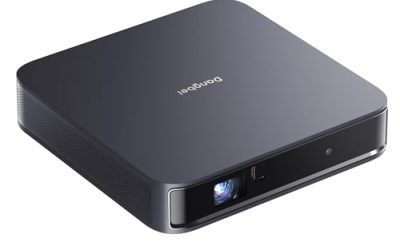
The XGIMI HORIZON is the easiest model here to live with when the projector cannot sit directly in front of the wall. Its listing combines auto focus, auto keystone correction and auto object avoidance, so it can adjust when placed on a side table or moved between rooms. Android TV 10.0 is built in, removing the need for a separate streaming stick, and Harman Kardon speakers handle sound without extra equipment. At 1500 ISO lumens it asks for a dimmer room than the brighter lamp models, making it a stronger fit for evening bedroom viewing than midday use.
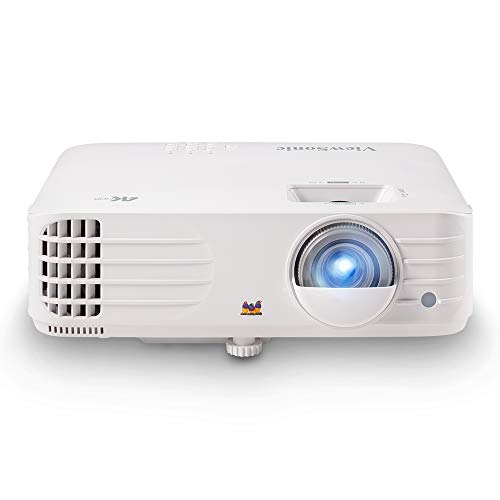
ViewSonic PX701-4K
- Best for: Big wall images for films and games where fine detail matters
- Native resolution: 3840 x 2160 4K UHD
- Brightness: 3200 lumens
- Refresh rate: 240Hz
- Response: 4.2ms
Big wall images for films and games where fine detail matters
Verify your source device and cables match the resolution and refresh settings you plan to use before setup
The ViewSonic PX701-4K serves viewers who want the largest, sharpest wall image their room can hold. Its listing states 4K UHD resolution at 3840 x 2160 with 3200 lumens, plus HDR support, so detailed film scenes and game worlds keep their texture when spread across a wide wall. A 240Hz refresh rate and 4.2ms response figure in the title speak to fast motion and gaming use. Auto keystone, four corner adjustment and 1.1x optical zoom give more ways to square the picture on an imperfect wall than basic vertical correction alone.
Which One Fits Your Situation
Your Living Room Gets Daylight All Day
Choose the BenQ TH575 or the Epson Home Cinema 1080, because their listings carry the highest brightness figures in this group. The BenQ adds a game mode and low latency for consoles, while the Epson uses 3LCD color brightness that helps everyday television and sports. Either way, keep the image moderate in size, since a smaller picture concentrates the available light on a wall that reflects less evenly than a screen.
The Projector Has to Sit on a Side Table
Pick the XGIMI HORIZON. Auto focus, auto keystone correction and auto object avoidance are all in its listing, and those tools exist for placements that are not square to the wall. Built-in Android TV and Harman Kardon speakers also reduce the cables and extra boxes a side table setup usually needs. Just dim the room, because its listed brightness is the lowest here and a bright lamp nearby will wash the picture out.
You Want One Wall for Movies and Fast Games
Look at the ViewSonic PX701-4K first. The listing pairs 4K UHD resolution with a 240Hz refresh rate and a 4.2ms response figure, covering detailed film viewing and fast game motion in one machine. Its four corner adjustment also helps when the wall or the stand is slightly uneven. If your sources are mostly 1080p consoles, the BenQ TH575 remains a simpler alternative with higher listed brightness and its own dedicated game mode.
You Rent and Cannot Install Anything
Any model here works without installation, but the XGIMI HORIZON and Epson Home Cinema 1080 suit rental living best. Both sit on ordinary furniture, need no mount and leave the wall untouched. The XGIMI wins when placement is awkward, while the Epson wins when the room stays bright. Measure the clear wall area before choosing, and keep the projector on a stable surface where vents stay unobstructed during long viewing sessions.
Common Mistakes
- Filling the whole wall with the image, then blaming the projector when the picture looks dim and soft at that size.
- Ignoring wall color and texture, even though a warm tint or heavy orange peel texture changes color and sharpness.
- Relying on heavy keystone correction instead of moving the projector closer to square with the wall.
- Comparing supported input resolution instead of native resolution when two listings use different wording.
- Forgetting sound, then discovering the room needs a speaker plan for dialogue heavy films and games.
Frequently Asked Questions
Can a projector look good on a wall without a screen?
Yes, when the wall is smooth, light colored and mostly free of bumps or strong texture. Brightness matters more than on a screen, so a model with a higher listed rating holds up better in a lit room. A matte painted surface usually gives the most even result, while glossy paint can create a bright hotspot near the center.
How bright should a projector be for a bedroom wall?
A dim bedroom used mainly at night can work with a lower rated model such as the XGIMI HORIZON at 1500 ISO lumens. If the bedroom gets street light or early sun, a brighter listing gives more headroom. Keep the image size moderate, because spreading the same light across a larger wall area always reduces how bright the picture appears.
Does 4K matter when projecting onto a painted wall?
It matters most at large image sizes, where a 1080p picture spreads its pixels thin and fine detail softens. The ViewSonic PX701-4K lists native 3840 x 2160 output in its specifications here as 4K UHD, which helps text, faces and game interfaces stay defined on a wide wall. At smaller sizes in a bedroom, the difference is harder to notice.
Where should the projector sit for the straightest image?
Place it on a stable surface directly in front of the wall, at the height the maker recommends, with the lens aimed at the center of the intended picture. Square placement avoids keystone correction, which can crop and soften the image. If furniture forces an offset, choose a model whose listing includes auto keystone and object avoidance, and still keep the angle modest.
FAQ
Can a projector look good on a wall without a screen?
How bright should a projector be for a bedroom wall?
Does 4K matter when projecting onto a painted wall?
Where should the projector sit for the straightest image?
More from Amazon
Programs that pair well with the guide above. Offers and eligibility are set by Amazon and may change.
Free shipping on eligible items, Prime Video and more. Eligible new members can start with a free trial.
Start a Prime free trialAd-free music streaming. Eligible new subscribers can start with a free trial.
Try Music Unlimited freeA Prime membership for ages 18-24 with a trial period. Eligibility is set by Amazon.
See Prime for Young AdultsAudiobooks and podcasts to listen to on the go. Eligible new members can start with a free trial.
Try Audible freeAs an Amazon Associate we earn from qualifying purchases.