Our Short List of 3

- Keyboard: MSI Vigor GK30, full-size wired layout
- Switches: mech-membrane plunger switches
- Lighting: 6-zone RGB keyboard backlighting
- Design: splash-resistant keyboard construction
- Keyboard: Redragon 75 percent membrane keyboard
- Mouse sensitivity: 100 to 12,800 DPI via software; presets 400/800/1600/2400/3200
- Polling rate: adjustable 125 to 1,000 Hz
- Mouse buttons: 7, programmable

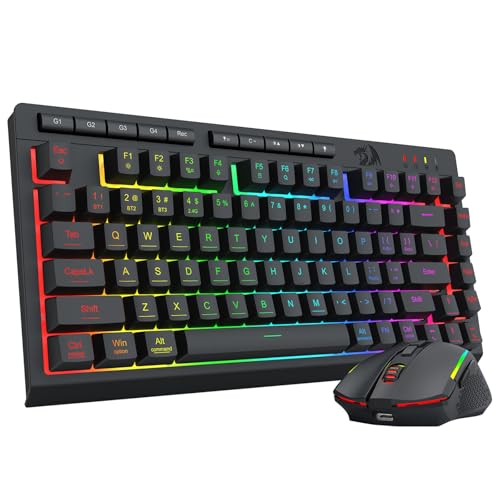
- Keyboard: RedThunder K84, 75 percent layout, 84 keys
- Mouse: honeycomb-shell optical mouse, about 65 g
- Sensor: optical, up to 3,200 DPI
- Batteries: 1,850 mAh keyboard, 500 mAh mouse, rechargeable
All 4 Picks at a Glance
| Product | Specs | Action |
|---|---|---|
| 1. MSI Vigor GK30 Combo White |
| Check price on Amazon |
| 3. Redragon S155-PRO Wireless Combo |
| Check price on Amazon |
| 4. RedThunder K84 Wireless Combo |
| Check price on Amazon |
 5. Redragon S101-3 PRO Wired Combo |
| Check price on Amazon |
Key takeaways
- Find the best gaming keyboard and mouse for PUBG: five combo sets with fast switches, high-polling mice, compact layouts and anti-ghosting for fights.
PUBG asks more of a keyboard and mouse than most shooters. A single match swings between slow, careful looting and sudden close-range fights where a lean-peek, a weapon swap and a burst of fire all land within a second of each other. The keyboard has to register several keys at once without dropping one, and the switches need to react quickly enough that a counter-strafe or a quick lean feels instant. The mouse carries just as much weight: long-range taps with a Kar98 or an SKS punish shaky tracking, while full-auto sprays at mid range reward a sensor that stays accurate through fast, wide swipes.
Buying the two devices as one combo set solves the pairing problem in a single box. A matched set shares one design language, one software package in most cases, and, for wireless sets, often a single receiver. The five combos below were chosen for the things PUBG players actually use: fast, consistent switches, mice with adjustable DPI and polling rates up to 1,000 Hz, anti-ghosting on the movement cluster, and layouts that leave real room for the mouse hand. Compact boards free up desk space for low-sensitivity aiming, while full-size sets keep a number pad for extra keybinds. Each entry lists the specifications that matter so the sets can be compared on hardware rather than on lighting effects.
Disclosure: As an Amazon Associate, we earn from qualifying purchases made through links on this page, at no extra cost to you.
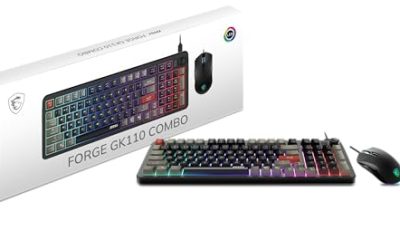
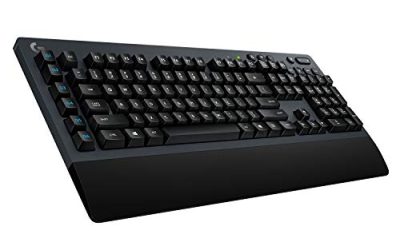
1. MSI Vigor GK30 Combo White
- Keyboard: MSI Vigor GK30, full-size wired layout
- Switches: mech-membrane plunger switches
- Lighting: 6-zone RGB keyboard backlighting
- Design: splash-resistant keyboard construction
The MSI Vigor GK30 Combo pairs a full-size wired keyboard with the Clutch GM11 gaming mouse, and it is the most traditional set in this group. The GK30 uses mech-membrane plunger switches, a hybrid design that adds a crisper, more mechanical-feeling keypress than a plain membrane board while keeping the key travel smooth. For PUBG, that matters on the movement cluster: strafing, leaning with Q and E, and jumping all stay distinct under the fingers, and the board’s anti-ghosting support keeps simultaneous inputs registering during a fight.
The Clutch GM11 mouse runs a PixArt PMW-3325 optical sensor with sensitivity up to 5,000 DPI, a range that covers the low-to-mid settings most PUBG players settle on for scoped work. DPI can be stepped through on the mouse itself, so switching between a low setting for long-range taps and a higher one for looting and driving takes a button press rather than a trip into software. The wired connection on both devices removes battery management from the equation entirely, which suits long sessions and tournament-style play where a flat battery is not an option. Six-zone RGB lighting on the keyboard and a splash-resistant design round out a set built for everyday use at a desk that also sees drinks and snacks during long queues.
2. Redragon S144 60% Wireless Combo (K617 PRO + M693)
The Redragon S144 is built around the single biggest advantage a PUBG player can give their mouse hand: space. Its K617 PRO keyboard uses a 60 percent layout that removes the number pad, navigation cluster and function row, shrinking the board’s footprint so the mouse can sweep widely without striking the keyboard’s edge. Players who aim with a low sensitivity and large arm movements feel that difference in every compound fight.
Small does not mean stripped down. The K617 PRO is hot-swappable, accepting 3-pin and 5-pin switches without soldering, so the stock switches can be replaced with faster or lighter ones as preferences develop. Both devices connect three ways, through Bluetooth, a shared 2.4 GHz receiver, or a USB-C cable, and the shared receiver means one USB port runs the whole set. The bundled M693 mouse is listed at up to 7,200 DPI in this set, with sensitivity adjustable for the usual PUBG split between close-range sprays and scoped shots. Because the board drops dedicated arrow keys and the F-row, some PUBG binds move to a function layer; players who lean on F-key binds for throwables should weigh that trade before choosing this set. For players whose desk space limits their aim, the trade is usually worth it.
Specs
- Keyboard: Redragon K617 PRO, 60 percent layout, 61 keys
- Switches: hot-swappable sockets for 3-pin and 5-pin switches
- Mouse: Redragon M693 wireless gaming mouse
- Sensor: optical, up to 7,200 DPI as listed for this set
- Connection: Bluetooth, 2.4 GHz shared receiver, USB-C wired
- Extras: tri-mode connection on both devices, one shared dongle
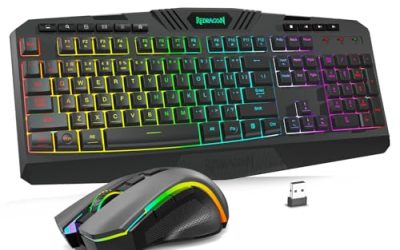
3. Redragon S155-PRO Wireless Combo
- Keyboard: Redragon 75 percent membrane keyboard
- Mouse sensitivity: 100 to 12,800 DPI via software; presets 400/800/1600/2400/3200
- Polling rate: adjustable 125 to 1,000 Hz
- Mouse buttons: 7, programmable
The Redragon S155-PRO takes a 75 percent keyboard and pairs it with a mouse whose headline figure is its ceiling: sensitivity adjustable from 100 to 12,800 through the software, with onboard steps at 400, 800, 1,600, 2,400 and 3,200. Just as relevant for PUBG, the mouse polling rate adjusts between 125 and 1,000 Hz, and running it at the top setting keeps cursor updates as frequent as a wired connection, which helps micro-corrections during spray control feel consistent.
The keyboard is a membrane design, and that is the honest trade in this set: keypresses are quiet and soft rather than crisp and mechanical. In return, the set is built for long wireless sessions. A 4,000 mAh battery in the keyboard and a 700 mAh battery in the mouse, one shared 2-in-1 receiver, and tri-mode connection over Bluetooth 5.0, 2.4 GHz and USB-C wired mean the set can run a gaming PC and a laptop without re-pairing. The 75 percent layout keeps the arrow keys that the smaller S144 gives up, which many PUBG players use for map work and menu navigation, and 26-key anti-ghosting covers the movement cluster during fights. Seven programmable mouse buttons leave room for binds such as zeroing, throwables or a dedicated push-to-talk key.
4. RedThunder K84 Wireless Combo
- Keyboard: RedThunder K84, 75 percent layout, 84 keys
- Mouse: honeycomb-shell optical mouse, about 65 g
- Sensor: optical, up to 3,200 DPI
- Batteries: 1,850 mAh keyboard, 500 mAh mouse, rechargeable
The RedThunder K84 splits the difference between the full-size and 60 percent sets. Its 84-key board keeps dedicated arrow keys and media keys while dropping the number pad, so it stays compact enough to open up mouse room without pushing everyday binds onto a function layer. For PUBG players who want a smaller board but refuse to give up physical arrow keys for map panning and menu work, this layout is the natural middle ground.
The mouse is the standout piece for aim. Its honeycomb shell brings the weight down to roughly 65 grams, and a lighter mouse is easier to start, stop and redirect during the fast flicks PUBG demands when a fight starts without warning. Sensitivity runs up to 3,200 DPI, which covers the settings most players use, and the optical sensor keeps tracking consistent across cloth pads. Both devices share a single 2.4 GHz receiver stored in the mouse, run on rechargeable batteries (1,850 mAh in the keyboard, 500 mAh in the mouse), and sleep automatically after two minutes idle to stretch the charge. The keyboard keys carry a 10 million keystroke lifespan figure and double-shot ABS keycaps that resist fading, useful on a WASD cluster that takes constant punishment. Expect to recharge often during heavy weeks, since the maker quotes around eight hours of use with the lighting switched on.
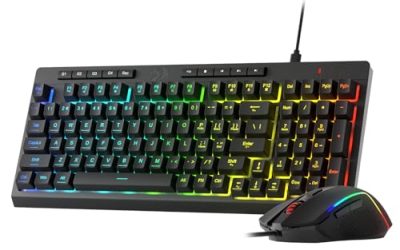
5. Redragon S101-3 PRO Wired Combo
- Keyboard: Redragon full-size wired keyboard
- Extras: independent macro record keys, software support
- Mouse: programmable gaming mouse with software support
- Lighting: RGB backlit keyboard
The S101-3 PRO is the wired, full-size option for players who want programmability above everything else. Both the keyboard and the mouse work with Redragon’s software, so keybinds, lighting and mouse settings live in one place, and the keyboard adds independent macro record keys. In PUBG terms, macros and extra binds are best spent on convenience rather than automation: a single key for a common loot sequence, a dedicated zeroing adjustment, or a push-to-talk that never collides with movement keys.
A full-size layout keeps the number pad, which some players load with less urgent binds such as seat swaps in vehicles or specific healing items, keeping the main cluster uncluttered for movement and combat. The wired connection keeps input behaviour identical every session, with no receiver placement or battery level to think about before dropping into a match. The mouse is programmable through the same software, including its sensitivity behaviour, so one profile can hold a general setting and a scoped setting side by side. RGB backlighting on the keyboard can be set per zone or per key group, which offers a practical trick for PUBG: light the movement cluster and the healing keys in one colour and everything else in another, so the right key is findable at a glance in a dark room during a late-circle fight.
How to Choose a Keyboard and Mouse Combo for PUBG
Switch behaviour decides how a keyboard feels in a fight. Mechanical and optical switches actuate quickly and reset cleanly, which helps repeated inputs such as counter-strafing and lean spam. Hot-swappable boards add flexibility, since a switch that feels too heavy or too light can be replaced without replacing the keyboard. Membrane boards, including mech-membrane hybrids, feel softer and quieter; they remain workable for PUBG, but players chasing the fastest possible inputs usually land on true mechanical or optical switches.
Polling rate and sensor behaviour decide how the mouse feels. A 1,000 Hz polling rate reports the mouse position a thousand times per second, and at that level the difference between wired and good 2.4 GHz wireless connections becomes very hard to feel in play. DPI is widely misunderstood: higher is not better. Most PUBG players use settings somewhere between 400 and 1,600, adjusting their in-game sensitivity around that, so a mouse only needs to be accurate and consistent inside that band. Adjustable onboard DPI steps are still useful, because scoped and unscoped play often want different sensitivity.
Layout is a genuine performance choice in this game. A full-size board keeps every bind on its own key, including a number pad for vehicle seats and healing items. A 75 percent board keeps arrow keys while opening mouse room. A 60 percent board maximises mouse room for low-sensitivity aiming but moves some binds to a function layer. Match the layout to the aiming style first, then check the remaining boxes: anti-ghosting or full rollover on the movement cluster, at least two usable side buttons on the mouse for binds such as lean, zeroing or push-to-talk, and software that saves profiles to the devices rather than only to one PC.
Finally, think about the connection. Wired sets are the simplest and most consistent, and they never need charging. Wireless sets clear the desk and, with a shared receiver, take a single USB port for both devices; the discipline they demand is charging before a long session rather than during one. Either way, a combo set guarantees the keyboard and mouse were designed to work together, with matching software and a single point of setup before the first drop into Erangel.
FAQ
Is a wired or wireless combo better for PUBG?
Both work at a high level. A wired set is consistent, never needs charging, and keeps behaviour identical every session. A modern 2.4 GHz wireless set with a 1,000 Hz polling rate feels equally responsive in play and keeps the desk clear for wide mouse movements. Choose wired for simplicity, wireless for space and tidiness.
What polling rate and DPI should a PUBG mouse have?
A polling rate of 1,000 Hz is the setting to aim for, since it gives the most frequent position updates the sets here offer. For DPI, most players settle between 400 and 1,600 and tune the in-game sensitivity around it, so any mouse in this guide covers the useful range; consistency of tracking matters more than a large maximum figure.
Does a 60 percent keyboard work for PUBG?
Yes, and it gives the mouse hand the most room, which helps low-sensitivity aiming. The trade is that arrow keys, the function row and the number pad move to a function layer or disappear, so binds for throwables, vehicle seats and healing items may need remapping. Players who rely on many dedicated keys often prefer a 75 percent or full-size layout instead.
Why does anti-ghosting matter in PUBG?
PUBG regularly asks for three or four keys at once: sprinting while strafing, leaning around a corner, then jumping or crouching. On a board without adequate anti-ghosting, one of those inputs can fail to register, which usually means a lost fight. Look for anti-ghosting across the movement cluster at minimum, or full key rollover where it is offered.
FAQ
Is a wired or wireless combo better for PUBG?
What polling rate and DPI should a PUBG mouse have?
Does a 60 percent keyboard work for PUBG?
Why does anti-ghosting matter in PUBG?
More from Amazon
Programs that pair well with the guide above. Offers and eligibility are set by Amazon and may change.
Free shipping on eligible items, Prime Video and more. Eligible new members can start with a free trial.
Start a Prime free trialAd-free music streaming. Eligible new subscribers can start with a free trial.
Try Music Unlimited freeA Prime membership for ages 18-24 with a trial period. Eligibility is set by Amazon.
See Prime for Young AdultsAudiobooks and podcasts to listen to on the go. Eligible new members can start with a free trial.
Try Audible freeAs an Amazon Associate we earn from qualifying purchases.