Our Short List of 3

- Connection: Wired USB-A, plug and play
- Microphone: Noise-cancelling boom, rotates 270 degrees
- Controls: In-line volume and mute on the cable
- Cable length: 1.9 m (6.23 ft)

- Connection: Bluetooth 5.1 with BT700 USB-A adapter, multipoint
- Noise cancelling: Hybrid ANC with three settings
- Microphone: Boom with Acoustic Fence noise-cancelling array
- Talk time: Up to 19 hours
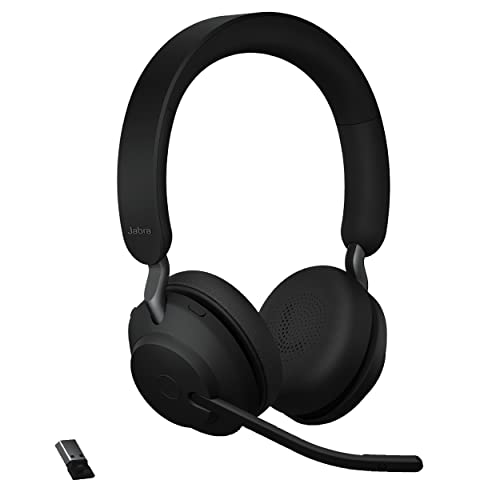
- Connection: Bluetooth with Link 380a USB-A adapter, multipoint
- Battery life: Up to 37 hours
- Microphone: Three-microphone call technology on a boom
- Busylight: Integrated 360-degree busylight
All 5 Picks at a Glance
| Product | Specs | Action |
|---|---|---|
| Logitech H390 USB Headset |
| Check price on Amazon |
| Poly Voyager Focus 2 UC (USB-A) |
| Check price on Amazon |
| Jabra Evolve2 65 UC Stereo (Link 380a) |
| Check price on Amazon |
 Poly Voyager 4320 UC (USB-A, with Charge Stand) |
| Check price on Amazon |
 Logitech Zone Vibe 100 (Graphite) |
| Check price on Amazon |
Key takeaways
- Compare the best VoIP headsets for softphone calls, with noise-cancelling boom mics, USB and Bluetooth connections, and UC support for Zoom and Teams.
A VoIP headset has one job that a music headphone never has to worry about: your voice has to arrive clean at the other end of a softphone call, even when the room around you is not quiet. The headsets in this guide are built for that job. Every pick is a call headset with a real microphone, designed for VoIP platforms such as Zoom, Microsoft Teams, Webex, Google Meet, and the softphone apps that run modern office and call-center work.
That focus matters when you shop. This guide is about internet calling in general, so it is different from a roundup built around one platform or a roundup for physical desk phones. If your calls run through a computer or a phone app, the five headsets below cover the main shapes of the category: a wired USB model that never needs charging, lightweight wireless models for people who move around, and noise-cancelling flagships for open offices and busy homes.
The picks span budget, mid-range, and premium tiers, and each one earns its place through its microphone first. Speaker quality, comfort, and battery life all matter, but on a VoIP call the microphone is the product. A noise-cancelling boom that keeps a barking dog or a keyboard out of your meeting is worth more than any audio tuning.
As an Amazon Associate, we earn from qualifying purchases.
Logitech H390 USB Headset
- Connection: Wired USB-A, plug and play
- Microphone: Noise-cancelling boom, rotates 270 degrees
- Controls: In-line volume and mute on the cable
- Cable length: 1.9 m (6.23 ft)
The Logitech H390 is the wired workhorse of this category and the simplest recommendation on this page. It plugs into a USB-A port, the computer recognizes it as an audio device, and it works with every major softphone without drivers, apps, or pairing steps. For IT departments handing headsets to a room of new hires, that zero-setup design is the entire appeal.
The microphone is the reason the H390 has stayed in offices for so long. The rigid boom carries a noise-cancelling mic that focuses on your voice and reduces steady background sound, and the boom rotates out of the way when you are listening rather than talking. In-line controls on the cable handle volume and mute, so you never have to hunt for an on-screen button while someone is asking you a question.
Comfort is basic but honest: padded leatherette ear cushions, an adjustable headband, and a light on-ear frame. It is a budget-tier headset, so the build is mostly plastic and the sound is tuned for speech rather than music. For back-to-back VoIP calls on a single computer, though, it covers the fundamentals at the lowest commitment in this guide, and it never runs out of battery because there is no battery to run out.
Poly Voyager Focus 2 UC (USB-A)
- Connection: Bluetooth 5.1 with BT700 USB-A adapter, multipoint
- Noise cancelling: Hybrid ANC with three settings
- Microphone: Boom with Acoustic Fence noise-cancelling array
- Talk time: Up to 19 hours
The Voyager Focus 2 is the premium pick for people whose VoIP calls happen in genuinely noisy places. It is a stereo Bluetooth headset with hybrid active noise cancelling in the earcups, so the room fades out for you, and Poly’s Acoustic Fence microphone technology works the other direction, using the boom’s multi-mic array to build a noise boundary that keeps your surroundings out of the call.
It connects through the included BT700 USB-A adapter for a stable, managed link to a PC or Mac, and multipoint Bluetooth lets it stay paired with a phone at the same time. That makes it a natural fit for a worker who takes softphone calls at a desk and mobile calls away from it. Call controls sit on the earcup, a smart sensor answers when you put the headset on, and the boom mutes when you flip it up.
Battery life is rated at up to 19 hours of talk time with noise cancelling off, and the headset also works in a wired USB audio mode while it charges, which is a useful safety net during a long call day. At 175 g it is light for an ANC model, and the plush ear cushions are shaped for full-day wear. This is the headset to choose when call quality is the job, not a side task.
Jabra Evolve2 65 UC Stereo (Link 380a)
- Connection: Bluetooth with Link 380a USB-A adapter, multipoint
- Battery life: Up to 37 hours
- Microphone: Three-microphone call technology on a boom
- Busylight: Integrated 360-degree busylight
The Evolve2 65 is Jabra’s mid-premium wireless standard for hybrid work, and it is the most call-center-ready wireless headset in this guide. Its three-microphone call technology is tuned to separate your voice from the sounds around you, and Jabra quotes up to 37 hours of battery life, which stretches across a full working week of calls for most people.
The included Link 380a USB-A adapter gives a pre-paired, reliable connection to a computer, which is exactly what you want for VoIP: softphones behave better with a dedicated adapter than with a laptop’s built-in Bluetooth. The headset also pairs directly with phones over Bluetooth, and the integrated busylight glows red on calls, visible from every angle, which quietly tells the household or the office that you are busy.
The earcups use memory foam with an angled fit for passive noise isolation, and the 40 mm speakers give calls a fuller sound than most call headsets manage. At just over 176 g, with a soft headband and a boom that tucks away, it is comfortable across long shifts. Choose this one if you want a single headset that handles a heavy VoIP schedule at a desk and on the move, with UC certification across the major platforms.
Poly Voyager 4320 UC (USB-A, with Charge Stand)
- Connection: Bluetooth with BT700 USB-A adapter, multipoint
- Microphone: Dual-mic boom with Acoustic Fence noise cancelling
- Talk time: Up to 24 hours
- Charging: Charge stand included in this listing
The Voyager 4320 sits in the middle of Poly’s range and covers the daily VoIP routine without the flagship price of the Focus 2. It is a stereo on-ear headset with a dual-microphone boom that uses Acoustic Fence technology to trim background noise out of your voice, which is the feature that matters most when your office is a kitchen table.
This listing includes the charge stand, and that detail changes how the headset fits a desk routine: it lives on the stand, always charged, and you lift it off when a call comes in. Talk time is rated at up to 24 hours, so even without the stand it shrugs off long call days. The BT700 USB-A adapter handles the computer connection, multipoint keeps a phone connected too, and on-ear controls manage volume, mute, and call answer.
At 162 g it is one of the lighter stereo call headsets available, and the padded headband and memory foam ear cushions suit glasses wearers well. It lacks active noise cancelling in the earcups, so it suits a moderately quiet room better than a loud open office. For a home worker whose VoIP calls are the core of the day, it is a well-judged mid-range balance of mic quality, comfort, and convenience.
Logitech Zone Vibe 100 (Graphite)
- Connection: Bluetooth 5.2, multipoint (no USB adapter included)
- Microphone: Flip-to-mute noise-cancelling mic
- Battery life: Up to 18 hours talk, 20 hours listening
- Speakers: 40 mm drivers
The Zone Vibe 100 is the lightest full-size wireless headset in this guide, and it takes a different design path from the Poly and Jabra models. Instead of a fixed boom, its noise-cancelling microphone flips down from the left earcup for calls and flips back up to mute, disappearing into the frame. Between calls it looks and feels like a pair of casual over-ear headphones.
That dual life is the point. It connects over Bluetooth 5.2 with multipoint, so it can stay linked to a laptop and a phone, and it is certified to work with Teams, Zoom, and Google Meet. The 40 mm drivers and a customizable equalizer in the Logi Tune app give it a warmer sound for music and video between meetings, while memory foam and fabric ear cushions keep the 185 g frame comfortable.
Battery life is rated at up to 18 hours of talk time and 20 hours of listening, and it charges over USB-C. It has no USB adapter in the box, so computers without Bluetooth, or IT setups that require a managed dongle, are better served by the Poly or Jabra picks. For a hybrid worker who wants one lightweight headset for VoIP calls and everything else, it is the most versatile mid-range option here.
How to Choose
Start with the microphone, because that is what the people on your calls actually hear. A boom microphone positioned near your mouth will almost always beat a mic built into an earcup, and noise-cancelling arrays such as Poly’s Acoustic Fence or Jabra’s multi-mic systems earn their keep in homes with kids, pets, and appliances. If your room is quiet and your calls are short, a simple wired mic like the H390’s is enough.
Decide between wired and wireless based on your desk, not on fashion. A wired USB headset never needs charging, never drops a pairing, and costs the least, which is why call centers still buy them by the box. Wireless pays off when you stand up during calls, refill coffee mid-meeting, or split time between a computer and a phone. If you go wireless, prefer a model with a USB adapter: the adapter gives the softphone a stable device to talk to and usually extends your range across the room.
Check certification against your platform. UC versions work broadly across Zoom, Webex, Google Meet, and softphone apps, while Teams-certified versions add native call control from the headset buttons inside Teams. Either works for general VoIP, but matching the certification to your main platform avoids odd mute and answer behavior.
Finally, weigh comfort honestly. On-ear models like the Voyager 4320 and Evolve2 65 feel lighter and let in some awareness of the room; over-ear models like the Zone Vibe 100 and Voyager Focus 2 isolate better and suit concentration. If you wear glasses, softer cushions and a lighter clamp matter more than any spec on the box. Battery claims also deserve a reality check: anything rated past a full workday of talk time is effectively a charge-it-weekly device, and a charge stand removes even that chore.
Frequently Asked Questions
Do VoIP headsets work with any softphone app?
Almost always, yes. A USB or Bluetooth headset appears to the computer as a standard audio device, so Zoom, Teams, Webex, Google Meet, and softphone apps from providers such as RingCentral or 8×8 can all use it. Certified models add working call-control buttons for their platform, but basic audio and microphone function do not depend on certification.
Is a wired or wireless headset better for VoIP calls?
Neither is better at the call itself; both carry the same voice quality when the microphone is good. Wired headsets win on simplicity and reliability, with no battery or pairing to manage. Wireless headsets win on movement, letting you walk during long calls and switch between a computer and a phone. Pick based on how you actually spend your call time.
What does UC certified mean on a headset?
UC stands for unified communications. A UC-certified headset is built and verified to work across the major calling and meeting platforms rather than being tuned for one of them. A Teams-certified variant is the better match if Microsoft Teams is your main platform, because its buttons and mute sync work natively there. For mixed platforms, UC is the safer choice.
Can one headset connect to my computer and phone at once?
Yes, if it supports multipoint Bluetooth, as the Poly and Jabra wireless picks in this guide do. The headset stays paired with both devices and switches to whichever one rings. Models with a USB adapter handle the computer side through the adapter and the phone side through direct Bluetooth, which is the most reliable version of this setup.
Final Verdict
For most people buying a VoIP headset today, the Jabra Evolve2 65 is the safest all-round choice: a proven noise-cancelling boom, a dedicated USB adapter, week-long battery life, and certification across the platforms that matter. If your workspace is loud and calls are your whole job, step up to the Poly Voyager Focus 2 for active noise cancelling and the strongest microphone filtering here.
On a tighter budget, the Logitech H390 remains the rational buy, delivering a dependable noise-cancelling mic with zero setup. The Voyager 4320 with its charge stand suits desk-based home workers who want wireless convenience without flagship pricing, and the Zone Vibe 100 is the pick for anyone who wants one lightweight headset to cover calls, music, and everything between. Match the headset to your room and your platform, and your VoIP calls will sound professional from the first meeting.
Product and ASIN Reference
| Product | ASIN |
|---|---|
| Logitech H390 USB Headset (Off White) | B09XQ5WSF5 |
| Poly Voyager Focus 2 UC USB-A Headset | B092TFZLS2 |
| Jabra Evolve2 65 UC Stereo Headset with Link 380a | B0897YVLPF |
| Poly Voyager 4320 UC USB-A Headset with Charge Stand | B09BBSWV89 |
| Logitech Zone Vibe 100 Wireless Headset (Graphite) | B09NBVS84T |
FAQ
Do VoIP headsets work with any softphone app?
Is a wired or wireless headset better for VoIP calls?
What does UC certified mean on a headset?
Can one headset connect to my computer and phone at once?
More from Amazon
Programs that pair well with the guide above. Offers and eligibility are set by Amazon and may change.
Free shipping on eligible items, Prime Video and more. Eligible new members can start with a free trial.
Start a Prime free trialAd-free music streaming. Eligible new subscribers can start with a free trial.
Try Music Unlimited freeA Prime membership for ages 18-24 with a trial period. Eligibility is set by Amazon.
See Prime for Young AdultsAudiobooks and podcasts to listen to on the go. Eligible new members can start with a free trial.
Try Audible freeAs an Amazon Associate we earn from qualifying purchases.