Our Short List of 3

- Wi-Fi standard: Wi-Fi 6, dual-band AX3000
- Kit size: 3 nodes
- Rated coverage: up to 6,500 sq. ft.
- Device capacity: 150+ devices

- Wi-Fi standard: Wi-Fi 6, dual-band AX3000
- Kit size: 3 nodes
- Rated coverage: up to 4,500 sq. ft.
- Device capacity: 75+ devices

- Wi-Fi standard: Wi-Fi 6E, tri-band AXE5400
- Kit size: 3 nodes
- Rated coverage: up to 7,200 sq. ft.
- Device capacity: up to 200 devices
All 5 Picks at a Glance
| Product | Specs | Action |
|---|---|---|
| TP-Link Deco X55 (3-Pack) |
| Check price on Amazon |
| Amazon eero 6+ (3-Pack) |
| Check price on Amazon |
| TP-Link Deco XE75 (3-Pack) |
| Check price on Amazon |
 Google Nest Wifi Pro (3-Pack) |
| Check price on Amazon |
 NETGEAR Orbi RBK863S (3-Pack) |
| Check price on Amazon |
Our Top Picks
- TP-Link Deco XE75 AXE5400 Tri-Band WiFi 6E System3 Pack4.13 x 4.13 x 6.65 inches3.5 poundsCheck on Amazon
A single router parked next to the modem has one job it cannot finish: pushing a strong signal through walls, floors, and a long hallway to every room in the house. The result is familiar — fast speeds at the desk, buffering in the bedroom, and a gaming PC in the back room fighting for scraps of signal. Whole home WiFi routers solve this differently. Instead of one box shouting from a corner, a mesh system spreads several cooperating nodes around the home, and they hand your devices from one node to the next under a single network name as you move.
This guide compares five mesh Wi-Fi systems that replace a standalone router outright. Every pick below is a multi-node kit sold as a whole-home solution — no single routers, no plug-in extenders that create a second network name. The lineup runs from a budget Wi-Fi 6 three-pack for apartments and smaller houses up to a premium tri-band system with a 10-gigabit internet port for very large homes and multi-gig fiber plans. Between them sit three Wi-Fi 6E kits that add the wide, uncongested 6 GHz band for households full of newer phones, laptops, and consoles.
A quick note on how to read the coverage figures: every manufacturer rates its kit in square feet under favorable conditions. Treat those numbers as a comparison tool between systems, not a promise. Brick, concrete, and metal ducting shrink real coverage, and node placement matters as much as node count. The How to Choose section below explains how to match a kit to your floor plan, your internet plan, and the devices you actually own.
As an Amazon Associate, we earn from qualifying purchases.
TP-Link Deco X55 (3-Pack)
- Wi-Fi standard: Wi-Fi 6, dual-band AX3000
- Kit size: 3 nodes
- Rated coverage: up to 6,500 sq. ft.
- Device capacity: 150+ devices
The Deco X55 is the budget entry in this roundup, and it covers the fundamentals properly. It is a dual-band Wi-Fi 6 system rated AX3000, splitting its speed between a 5 GHz band and a 2.4 GHz band, and TP-Link rates the three-pack for homes up to 6,500 square feet with more than 150 connected devices. For a household whose internet plan sits in the few-hundred-megabit range, that is plenty of headroom for streaming, video calls, and online gaming running at the same time.
Each Deco X55 unit carries three gigabit Ethernet ports, which is generous for this tier. The node beside the TV can hard-wire a console, a streaming box, and a media PC at once, and any node can use one of those ports for wired backhaul if you have Ethernet in the walls. Setup runs through the Deco app, and the system includes TP-Link HomeShield basics such as network scanning and parental controls, with advanced security features behind an optional subscription. If your home is small-to-medium and your plan is not gigabit-class, the X55 is the sensible place to start.
Amazon eero 6+ (3-Pack)
- Wi-Fi standard: Wi-Fi 6, dual-band AX3000
- Kit size: 3 nodes
- Rated coverage: up to 4,500 sq. ft.
- Device capacity: 75+ devices
The eero 6+ is built around simplicity. It is a dual-band Wi-Fi 6 system rated for internet plans up to a gigabit, and Amazon rates the three-pack for up to 4,500 square feet and more than 75 connected devices. The eero app walks through placement and setup in plain language, applies updates automatically overnight, and keeps day-to-day management about as light as mesh networking gets. For a home that wants coverage without a settings project, this is the easiest kit on the list to live with.
What lifts the eero 6+ beyond basic networking is its second job as a smart home hub. Each unit includes a built-in Zigbee smart home hub, and the system supports Thread and Matter, so compatible lights, locks, and sensors can connect through the mesh instead of needing a separate hub on the shelf. Each node has two auto-sensing gigabit Ethernet ports — one for the modem or a wired device, one spare — and the system works with Alexa for basic voice control. Homes on gigabit plans that also run a growing pile of smart devices are exactly who this mid-range kit is aimed at.
TP-Link Deco XE75 (3-Pack)
- Wi-Fi standard: Wi-Fi 6E, tri-band AXE5400
- Kit size: 3 nodes
- Rated coverage: up to 7,200 sq. ft.
- Device capacity: up to 200 devices
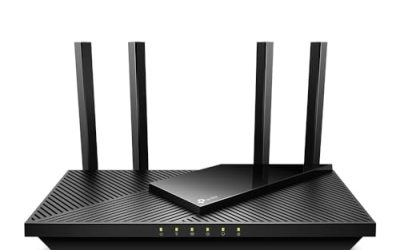
The Deco XE75 steps up to Wi-Fi 6E, and the headline is the 6 GHz band. As a tri-band AXE5400 system, it adds a wide, clean band that newer phones, laptops, and handhelds can use with almost no neighboring networks competing for space. TP-Link rates the three-pack for up to 7,200 square feet and up to 200 connected devices, which makes it a strong mid-range fit for larger two-story homes where the X55’s dual-band design would start to feel its limits.
Because it is tri-band, the XE75 can dedicate one band to backhaul traffic between nodes while the other two serve your devices, which helps speeds hold up at the far node instead of collapsing at the end of the chain. Each unit has three gigabit Ethernet ports, so wired backhaul and hard-wired consoles are both on the table. The Deco app handles setup, and HomeShield adds parental controls and network security scanning, with the deeper protection features offered as an optional paid tier. For most households upgrading from an aging single router, this is the balanced pick: modern band support, real coverage, and no compromises that sting later.
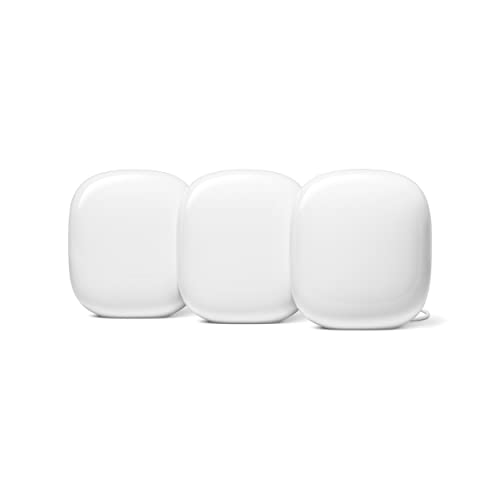
Google Nest Wifi Pro (3-Pack)
- Wi-Fi standard: Wi-Fi 6E, tri-band AXE5400
- Kit size: 3 router units
- Rated coverage: up to 6,600 sq. ft.
- Device capacity: up to 100 devices per network segment, 200 across the home
The Nest Wifi Pro takes a different route to the same goal: Wi-Fi 6E in hardware designed to sit on a shelf instead of hiding behind one. The tri-band AXE5400 three-pack in Snow is rated for up to 6,600 square feet, and Google manages the system through the Google Home app, which will feel familiar to anyone already running Nest cameras, speakers, or a Chromecast. Setup is guided, updates are automatic, and the app keeps network controls deliberately simple.
Under the surface, the Nest Wifi Pro doubles as smart home infrastructure. Every unit is a Matter hub and a Thread border router, so Thread-based sensors and accessories can join the network through whichever node is closest. Each router unit has two gigabit Ethernet ports, enough for the modem connection plus one wired device or a switch. The trade-off for the clean design is control: advanced users who want deep manual settings, custom DNS on every client, or granular per-device rules will find the Deco and Orbi systems below more flexible. For a Google-centered home that values a tidy app and unobtrusive hardware, it is a polished mid-range choice.
NETGEAR Orbi RBK863S (3-Pack)
- Wi-Fi standard: Wi-Fi 6, tri-band AX6000
- Kit size: 1 router plus 2 satellites
- Rated coverage: up to 8,000 sq. ft.
- Device capacity: up to 100 devices
The Orbi RBK863S is the premium system in this roundup, built for large homes and fast plans. It is a tri-band Wi-Fi 6 system rated AX6000 with a dedicated backhaul band, and NETGEAR rates the router-plus-two-satellite kit for up to 8,000 square feet and 100 devices. The router carries a 10-gigabit WAN port, which makes this one of the few mesh kits that will not bottleneck a multi-gig fiber or cable plan now or on the next upgrade cycle.
Port counts are the other place the Orbi pulls ahead. The router and each satellite carry multiple gigabit LAN ports, so a satellite in the office or media room can hard-wire a gaming PC, a NAS, and a printer without a separate switch. The kit includes a year of NETGEAR Armor security, and the Orbi app plus web interface offer more manual control than the app-only systems above, including separate IoT and guest networks. It is the most expensive tier here and physically the largest hardware, but for a big house with a fast plan and a lot of wired gear, it is the system that asks for the fewest compromises.
How to Choose
Start with your floor plan, not the speed rating on the box. A two-node kit usually covers an apartment or a compact single-story home; a three-node kit is the safe default for two-story houses and long floor plans, because the third node lets you turn a corner instead of forcing one node to shout down a hallway. Place nodes in the open, roughly halfway between the main router and the dead zone, and avoid tucking them inside cabinets or behind TVs.
Match the system to your internet plan next. A dual-band Wi-Fi 6 kit like the Deco X55 or eero 6+ comfortably serves plans in the few-hundred-megabit range and gigabit plans in typical homes. If you pay for multi-gig service, look at the WAN port before anything else: a gigabit WAN port caps your whole network at gigabit no matter what the wireless rating says, which is why the Orbi’s 10-gigabit port matters for fiber households.
Then consider the band question. Wi-Fi 6E systems — the Deco XE75 and Nest Wifi Pro here — add the 6 GHz band, which is wide and currently uncrowded. Devices that support 6E get a cleaner, faster lane, and tri-band systems can use the extra band to keep node-to-node backhaul from eating the bandwidth your devices see. If most of your gear is Wi-Fi 5 or Wi-Fi 6, a good Wi-Fi 6 kit still serves it well; 6E is about headroom for the next few years of upgrades.
Count Ethernet ports if you game or work at a desk. A node with spare ports next to your PC or console gives you a wired connection without running cable across the house, and ports on every node also enable wired backhaul, the single biggest stability upgrade a mesh system can get. Finally, look at the app and the extras: smart home households may value the eero’s Zigbee hub or the Nest’s Thread border router, while tinkerers should favor systems with a web interface and manual controls.
Frequently Asked Questions
Do mesh systems replace my modem as well as my router?
No. Every system in this guide replaces your router, but you still need a modem from your internet provider or one you own. The main mesh node plugs into the modem by Ethernet, and the remaining nodes connect to the main node wirelessly or by cable. If your provider gave you a combined modem-router box, the mesh system can usually take over routing duties while that box is switched to bridge mode.
Will a mesh system slow down my gaming PC?
A mesh hop adds a small amount of latency compared with a direct wired connection, but a well-placed tri-band system keeps that penalty small, and a strong mesh signal is far better for gaming than a weak signal from a distant single router. For the lowest latency, put a node in the gaming room and plug the PC into that node’s Ethernet port, or use wired backhaul between nodes if your home has Ethernet runs.
How many nodes does my home actually need?
Use the rated coverage as a rough guide, then adjust for construction. Open-plan homes with wood and drywall often do fine at the rated figure, while brick, concrete, or plaster-and-lath walls can cut effective coverage sharply. When in doubt, a three-pack gives you placement flexibility, and every system here lets you add another compatible node later if a dead zone survives.
Can I mix nodes from different brands in one mesh network?
Generally, no. Mesh nodes form one coordinated system only with hardware from the same product family, so a Deco node will not join an eero network. The practical approach is to pick one ecosystem and expand within it — TP-Link, eero, Google, and NETGEAR all sell additional compatible nodes for their current lines.
Final Verdict
For most homes, the TP-Link Deco XE75 is the whole home WiFi router to buy first: Wi-Fi 6E headroom, tri-band backhaul, and three-pack coverage sized for real houses at a mid-range tier. Budget shoppers and smaller homes are well served by the Deco X55, while the eero 6+ is the easiest system to set up and the natural pick for Alexa and smart home households. The Nest Wifi Pro suits Google Home users who want tidy hardware and Thread built in. And if your home is large, your plan is multi-gig, or your desk is full of wired gear, the NETGEAR Orbi RBK863S is the premium system that covers all of it without asking you to compromise.
Product and ASIN Reference
| Product | ASIN |
|---|---|
| TP-Link Deco X55 AX3000 Mesh Wi-Fi 6 System (3-Pack) | B09PRB1MZM |
| Amazon eero 6+ Mesh Wi-Fi 6 System (3-Pack) | B08ZK2BHP2 |
| TP-Link Deco XE75 AXE5400 Mesh Wi-Fi 6E System (3-Pack) | B0B88T5RDY |
| Google Nest Wifi Pro Wi-Fi 6E Mesh System (3-Pack, Snow) | B0BCQSYPZB |
| NETGEAR Orbi RBK863S AX6000 Mesh Wi-Fi 6 System (3-Pack) | B0BF7PV6PK |
FAQ
Do mesh systems replace my modem as well as my router?
Will a mesh system slow down my gaming PC?
How many nodes does my home actually need?
Can I mix nodes from different brands in one mesh network?
More from Amazon
Programs that pair well with the guide above. Offers and eligibility are set by Amazon and may change.
Free shipping on eligible items, Prime Video and more. Eligible new members can start with a free trial.
Start a Prime free trialAd-free music streaming. Eligible new subscribers can start with a free trial.
Try Music Unlimited freeA Prime membership for ages 18-24 with a trial period. Eligibility is set by Amazon.
See Prime for Young AdultsAudiobooks and podcasts to listen to on the go. Eligible new members can start with a free trial.
Try Audible freeAs an Amazon Associate we earn from qualifying purchases.