
Our Short List of 3

- Best for: smaller homes replacing a rented ISP gateway on a standard plan.
- AX1800 dual-band WiFi 6 (802.11ax): up to 1200 Mbps on 5 GHz and up to 574 Mbps on 2.4 GHz
- OFDMA and MU-MIMO for simultaneous connections to multiple devices
- WPA3 security
- 4 external antennas with beamforming

- Best for: larger homes with many connected devices and several simultaneous streams.
- AX5400 dual-band WiFi 6, 6-stream, speeds up to 5.4 Gbps
- Coverage up to 2,500 sq. ft.
- Supports up to 25 devices
- Model number RAX50-100NAS
- Best for: homes with a multi-gig plan, wired desktops or consoles, and a need for faster-than-gigabit ports.
- AX6000 dual-band WiFi 6
- Dual 2.5G ports
- WPA3 security
- Adaptive QoS
All 3 Picks at a Glance
| Product | Specs | Action |
|---|---|---|
| TP-Link Archer AX21 |
| Check price on Amazon |
| NETGEAR Nighthawk RAX50 |
| Check price on Amazon |
| ASUS RT-AX88U Pro |
| Check price on Amazon |
Our Top Picks
The choice facing most households is not which router looks fastest on the box. It is whether to keep an ageing Wi-Fi 5 box that stutters every evening, or move to Wi-Fi 6 and let the network handle phones, laptops, televisions, consoles and smart home gear at the same time. Wi-Fi 6, also called 802.11ax, changes how a router shares airtime, so a busy evening with four streams running and a video call in progress stops being a contest for bandwidth. That shift in behaviour, rather than any single speed figure, is what makes the generation worth buying into now.
This guide is for households replacing a rented ISP gateway, for families whose device count has crept past twenty, and for anyone on a gigabit plan who wants the router to stop being the bottleneck. Every model below is a standalone dual-band Wi-Fi 6 router, and every specification comes from its Amazon listing, so the comparison rests on what the manufacturer states for the exact model you would buy.
Quick Picks
As an Amazon Associate we earn from qualifying purchases.
| Product | Best for | Key spec |
|---|---|---|
| TP-Link Archer AX21 | Smaller homes replacing a rented ISP gateway | AX1800 dual-band WiFi 6, up to 1200 Mbps on 5 GHz |
| NETGEAR Nighthawk RAX50 | Larger homes with many connected devices | AX5400 dual-band WiFi 6, 6-stream, up to 5.4 Gbps |
| ASUS RT-AX88U Pro | Homes with a multi-gig plan and wired gear | AX6000 dual-band WiFi 6, dual 2.5G ports |
How to Choose
Match the AX number to your plan and your device count
The AX number on the box is a combined ceiling across both bands, not the speed any single device will see. An AX1800 router pairs a 1200 Mbps 5 GHz band with a 574 Mbps 2.4 GHz band, which suits a standard gigabit plan and a household of ten to twenty devices. An AX5400 or AX6000 model adds wider channels and more streams, which matters when thirty devices share the network and several of them stream video at once. Before comparing models, check the speed your plan actually delivers and count the devices that connect every day, including cameras, speakers and appliances. Buying far above that count wastes money; buying below it leaves the evening slowdown exactly where it is.
Check OFDMA and MU-MIMO instead of chasing the headline speed
Wi-Fi 6 earns its keep through two features that older routers lack. OFDMA splits a channel into smaller resource units, so the router can answer several devices in a single transmission instead of serving them one at a time. MU-MIMO lets the router talk to multiple devices simultaneously on the downlink, which keeps a video call steady while someone else starts a download. A router that lists both features will feel calmer under load than a faster-sounding model without them. Read the listing for those two terms specifically, and treat a big combined speed number on its own as decoration rather than proof of capacity.
Look at the ports before you buy the router
Wireless specifications get the attention, yet the wired side decides whether the router fits a desk setup. Count the Ethernet ports and check their speed: most Wi-Fi 6 routers carry Gigabit ports, which cap any wired connection at a gigabit, while a small number add a 2.5G port for a multi-gig plan or a fast network drive. A household with a desktop PC, a console and a network drive needs at least three free LAN ports after the modem connection, plus a spare for later. If the listing mentions a USB port, that usually means shared storage or a printer can hang off the router, though it is a convenience rather than a reason to choose one model over another.
Confirm WPA3 and ongoing firmware support
Security on a router is easy to ignore until a neighbour guesses the password or a flaw goes unpatched. WPA3 is the current wireless security standard on Wi-Fi 6 hardware, and every model in this guide lists it, so a new router should not still be sold on WPA2 alone. Firmware support matters just as much: a manufacturer that keeps issuing updates will patch problems for years, while an abandoned model slowly becomes a liability on the edge of the network. Check the listing for WPA3, look at how recently the model received attention from its maker, and favour routers from brands with a track record of long support windows.
The 3 Best Options
TP-Link Archer AX21
- Best for: smaller homes replacing a rented ISP gateway on a standard plan.
- AX1800 dual-band WiFi 6 (802.11ax): up to 1200 Mbps on 5 GHz and up to 574 Mbps on 2.4 GHz
- OFDMA and MU-MIMO for simultaneous connections to multiple devices
- WPA3 security
- 4 external antennas with beamforming
smaller homes replacing a rented ISP gateway on a standard plan.
all five ports are Gigabit, so a plan faster than a gigabit will be capped at the port speed, and there is no USB port for shared storage.
The Archer AX21 is the straightforward replacement for a weak ISP gateway in a smaller home. Its AX1800 dual-band Wi-Fi 6 radio covers the usual mix of streaming, browsing and video calls, while OFDMA and MU-MIMO keep the connection steady when the whole household comes online in the evening. Four external antennas and beamforming aim the signal toward connected devices rather than spraying it evenly, and the Tether app keeps setup short enough to finish in one sitting. EasyMesh support leaves a path open to add a compatible node later if a dead spot appears, without replacing the router itself.
Watch out for: all five ports are Gigabit, so a plan faster than a gigabit will be capped at the port speed, and there is no USB port for shared storage.
NETGEAR Nighthawk RAX50
- Best for: larger homes with many connected devices and several simultaneous streams.
- AX5400 dual-band WiFi 6, 6-stream, speeds up to 5.4 Gbps
- Coverage up to 2,500 sq. ft.
- Supports up to 25 devices
- Model number RAX50-100NAS
larger homes with many connected devices and several simultaneous streams.
this model dates from early 2020, so confirm the listing sells a new unit rather than a renewed one, and check that current firmware is installed after setup.
The Nighthawk RAX50 suits a larger home where the device count has grown past what a basic router handles gracefully. Its six-stream AX5400 radio reaches up to 5.4 Gbps across the two bands, and the listing states coverage up to 2,500 square feet with support for up to 25 devices, which covers a family home with cameras, speakers, consoles and laptops all connected. The extra streams give the router more room to juggle simultaneous traffic without one heavy download crowding everything else out. It is a general-purpose Wi-Fi 6 router rather than a specialist box, so it fits households that want capacity without gaming-specific extras.
Watch out for: this model dates from early 2020, so confirm the listing sells a new unit rather than a renewed one, and check that current firmware is installed after setup.
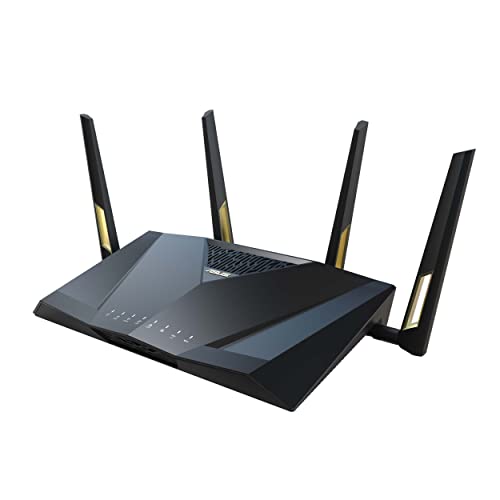
ASUS RT-AX88U Pro
- Best for: homes with a multi-gig plan, wired desktops or consoles, and a need for faster-than-gigabit ports.
- AX6000 dual-band WiFi 6
- Dual 2.5G ports
- WPA3 security
- Adaptive QoS
homes with a multi-gig plan, wired desktops or consoles, and a need for faster-than-gigabit ports.
confirm the listing is the Pro variant, not the older non-Pro RT-AX88U, since the two models share a similar name and very different port speeds.
The RT-AX88U Pro is the pick for a household whose internet plan or wired setup has outgrown Gigabit ports. Its AX6000 dual-band Wi-Fi 6 radio pairs with dual 2.5G ports, so a multi-gig connection and a fast wired device can both run without a Gigabit bottleneck in between. Adaptive QoS lets the router prioritise latency-sensitive traffic, WAN aggregation combines two WAN links where the provider supports it, and AiMesh support means a second ASUS router can extend coverage later. Lifetime internet security and WPA3 come as part of the package, which suits a home where the router is expected to stay in service for years.
Watch out for: confirm the listing is the Pro variant, not the older non-Pro RT-AX88U, since the two models share a similar name and very different port speeds.
Which One Fits Your Situation
A flat or small house on a standard plan
Choose the TP-Link Archer AX21. Its AX1800 radio matches a standard gigabit plan, OFDMA and MU-MIMO handle the evening rush of phones and televisions, and the Gigabit ports are no limitation when the plan itself tops out at a gigabit. EasyMesh support gives the household a cheap way to fix a dead spot later without starting over.
A larger house with dozens of devices
Choose the NETGEAR Nighthawk RAX50. The six-stream AX5400 radio and the stated support for up to 25 devices give the router headroom when cameras, speakers, consoles and laptops all stay connected, and the coverage figure suits a family home better than a basic single-room router. Check the unit is new, not renewed, before the return window closes.
A household with a multi-gig plan or heavy wired gear
Choose the ASUS RT-AX88U Pro. The dual 2.5G ports are the deciding feature here: they let a multi-gig connection and a wired desktop or drive both run faster than Gigabit Ethernet allows. Adaptive QoS and WAN aggregation add flexibility that the other two models do not list, and AiMesh keeps an expansion path open.
A home that may grow into mesh coverage later
Choose the Archer AX21 or the RT-AX88U Pro, depending on the size of the home. The AX21 works with EasyMesh nodes for a small home, while the RT-AX88U Pro works with AiMesh nodes for a larger one. Either way, buying a router with a mesh system already in mind avoids replacing the main unit when a single box stops covering every room.
Common Mistakes
- Buying an AX rating far above the internet plan and then wondering why nothing feels faster, when the plan itself is the ceiling.
- Placing the router inside a cabinet or behind a television, which weakens the signal before it ever reaches the next room.
- Ignoring the port speeds and discovering too late that every wired connection is capped at a gigabit.
- Choosing a Wi-Fi 6E or Wi-Fi 7 model by accident when the goal was Wi-Fi 6, and paying for a 6 GHz band the household has no devices to use.
- Skipping the firmware update after setup, which leaves the router running the software it shipped with months earlier.
Frequently Asked Questions
Is Wi-Fi 6 still worth buying when Wi-Fi 7 routers exist?
Yes, for most households. Wi-Fi 6 covers gigabit plans and dozens of devices comfortably, and the routers cost far less than early Wi-Fi 7 models. Wi-Fi 7 makes sense for a multi-gig plan or a house full of Wi-Fi 7 devices, but a household without either will not feel the difference day to day.
Do I need a new modem to use a Wi-Fi 6 router?
No modem change is needed in most cases. These routers connect to a separate modem or an ONT by Ethernet cable, and the existing modem keeps working. A modem-router combination unit is a different case: check whether its router section can be put into bridge mode first.
Will a Wi-Fi 6 router speed up older Wi-Fi 5 devices?
Older devices will not gain Wi-Fi 6 features, but they still benefit. OFDMA and MU-MIMO improve how the router shares airtime, so a Wi-Fi 5 phone or laptop competes less with everything else on the network, and overall congestion drops even before every device is replaced.
How many devices can a Wi-Fi 6 router handle?
It depends on the model and what the devices do. The RAX50 in this guide lists support for up to 25 devices, while the AX1800 and AX6000 models suit smaller and larger counts respectively. Light devices such as smart bulbs add little load, while several simultaneous video streams are what actually strain a router.
FAQ
Is Wi-Fi 6 still worth buying when Wi-Fi 7 routers exist?
Do I need a new modem to use a Wi-Fi 6 router?
Will a Wi-Fi 6 router speed up older Wi-Fi 5 devices?
How many devices can a Wi-Fi 6 router handle?
More from Amazon
Programs that pair well with the guide above. Offers and eligibility are set by Amazon and may change.
Free shipping on eligible items, Prime Video and more. Eligible new members can start with a free trial.
Start a Prime free trialAd-free music streaming. Eligible new subscribers can start with a free trial.
Try Music Unlimited freeA Prime membership for ages 18-24 with a trial period. Eligibility is set by Amazon.
See Prime for Young AdultsAudiobooks and podcasts to listen to on the go. Eligible new members can start with a free trial.
Try Audible freeAs an Amazon Associate we earn from qualifying purchases.









