Our Short List of 3

- Best for: Households that watch sports and films in a bright living room.
- Display technology: 3-chip 3LCD
- Native resolution: 1920 x 1080
- Brightness: 3,400 lumens color and white brightness
- Contrast ratio: 16,000:1
- Best for: Console and PC gamers who also watch films in the same room.
- Display technology: DLP
- Native resolution: 1920 x 1080
- Brightness: 3,800 ANSI lumens
- Input lag: 16.7ms in Enhanced Game Mode

- Best for: First-time theater builders mixing movies with casual gaming.
- Display technology: DLP single chip
- Native resolution: 1920 x 1080
- Brightness: 3,600 lumens
- Enhanced Gaming Mode with 16ms response time
All 5 Picks at a Glance
| Product | Specs | Action |
|---|---|---|
| Epson Home Cinema 1080 |
| Check price on Amazon |
| BenQ TH575 |
| Check price on Amazon |
| Optoma HD146X |
| Check price on Amazon |
 ViewSonic PX701HDH |
| Check price on Amazon |
 XGIMI MoGo 2 Pro (New) |
| Check price on Amazon |
Key takeaways
- Five high definition projectors with true native 1080p chips, compared on brightness, throw, lag and ports for movies, sports and big-screen gaming.
The hard part of buying a high definition projector is not picking a brand. It is seeing through the word “supported.” Plenty of budget models accept a 1080p or even 4K signal yet project a far softer native picture, so a film that looks crisp on paper turns hazy on the wall. The decision that actually matters is the chip’s native resolution, and every model below renders a genuine 1920 x 1080 image.
This roundup suits living-room movie watchers who want a screen no television can match, console players chasing a 100-inch image, and households replacing an aging 720p unit. Each pick was chosen from the name and specifications printed on its Amazon product page, with brightness, throw and input lag compared on the figures the listings themselves state.
Quick Picks
As an Amazon Associate we earn from qualifying purchases
| Product | Best for | Key spec from title |
|---|---|---|
| Epson Home Cinema 1080 | Bright living rooms used during the day | 3,400 lumens of color and white brightness |
| BenQ TH575 | Console and PC gaming on a huge screen | 16.7ms low latency in Enhanced Game Mode |
| Optoma HD146X | Movie nights with casual gaming mixed in | 3,600 lumens from a single-chip DLP |
| ViewSonic PX701HDH | Fixed installs that need lens shift | Vertical lens shift with dual HDMI |
| XGIMI MoGo 2 Pro (New) | Portable streaming in a dark bedroom | Google TV built in, 430 ISO lumens |
How to Choose
Native Resolution Decides Whether It Is Really High Def
A projector earns the high definition label from its imaging chip, not from the signals it can accept. Listings that headline “1080p supported” or “4K supported” often hide a native panel of 800 x 480 or 1280 x 720, and the projected picture can never be sharper than that panel. Look for the words “native 1920 x 1080” in the specification table before anything else. All five models here use a true 1080p native chip, which is why text stays legible and film grain survives at 100 inches and beyond.
Brightness Only Counts When the Lumens Are Comparable
Lumen figures are not measured the same way across brands, so a headline number means little on its own. Lamp models from Epson, BenQ, Optoma and ViewSonic quote output in the 3,400 to 3,800 range and can hold a watchable picture with curtains open. Portable LED units such as the XGIMI quote ISO lumens in the hundreds and need a dark room to shine. Match the number to your space: a bright family room demands a lamp projector, while a bedroom that goes fully dark at night frees you to pick the smaller machine.
Throw Distance, Zoom and Lens Shift Decide Placement
Where the projector can sit is fixed by its throw ratio, and this is where installs succeed or fail. Measure the distance from your shelf or ceiling mount to the screen, then check the image size the listing promises at that distance. A modest 1.1x zoom, like the BenQ offers, gives a little placement slack. Lens shift, found on the ViewSonic, is rarer and more valuable: it moves the image without tilting the unit, so you avoid the keystone correction that softens edges and eats into the native resolution you paid for.
Input Lag and Ports Decide Whether It Suits Gaming
For gaming, the figure that matters is input lag at 1080p, and the listings here state it plainly: the BenQ TH575 quotes 16.7ms in its Enhanced Game Mode and the Optoma HD146X quotes a 16ms response time, both comfortable for console play. Movie-only buyers can ignore lag entirely. Ports matter for everyone, though. Dual HDMI, as fitted to the Epson, BenQ and ViewSonic, lets a console and a streaming stick stay plugged in together, while single-input and smart models lean on their built-in systems instead.
The 5 Best Options
Epson Home Cinema 1080
- Best for: Households that watch sports and films in a bright living room.
- Display technology: 3-chip 3LCD
- Native resolution: 1920 x 1080
- Brightness: 3,400 lumens color and white brightness
- Contrast ratio: 16,000:1
Households that watch sports and films in a bright living room.
It is lamp-based, so a replacement lamp is a running cost, and there is no built-in streaming system, so budget for a stick or console as the source.
Daytime viewing is where most home projectors fall apart, and this Epson is built for exactly that fight. Its 3,400 lumens are quoted for both color and white brightness, which matters because sports and animated films wash out when color output trails the headline figure. The 3LCD design uses three chips, so there is no rainbow effect for sensitive viewers, and dual HDMI ports keep a console and a streaming device connected at once. It suits families who watch in a living room that never gets fully dark.
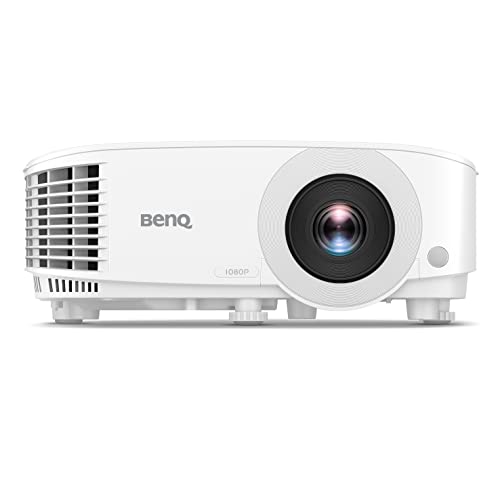
BenQ TH575
- Best for: Console and PC gamers who also watch films in the same room.
- Display technology: DLP
- Native resolution: 1920 x 1080
- Brightness: 3,800 ANSI lumens
- Input lag: 16.7ms in Enhanced Game Mode
Console and PC gamers who also watch films in the same room.
There is no lens shift and the zoom range is small, so measure your throw distance carefully before ordering, because placement flexibility is limited.
BenQ aims this model squarely at players who want their console games on a wall-sized screen without the picture trailing their inputs. The Enhanced Game Mode quotes 16.7ms of input lag at 1080p, the brightness peaks at 3,800 ANSI lumens, and the color is tuned to the Rec.709 standard named in the listing, which keeps film content honest when the gaming session ends. Auto vertical keystone and a 1.1x zoom make setup forgiving on a coffee table, and dual HDMI ports cover a console plus a streaming stick.
Optoma HD146X
- Best for: First-time theater builders mixing movies with casual gaming.
- Display technology: DLP single chip
- Native resolution: 1920 x 1080
- Brightness: 3,600 lumens
- Enhanced Gaming Mode with 16ms response time
First-time theater builders mixing movies with casual gaming.
Single-chip DLP can show rainbow artifacts to sensitive viewers, and this is a long-running model line, so confirm the listing title matches the HD146X exactly before ordering.
The HD146X is the straightforward movie-and-games box in this group: a single-chip DLP with 3,600 lumens and an Enhanced Gaming Mode quoting a 16ms response time. That combination covers the two jobs most buyers actually have, which are film nights in a darkened room and responsive big-screen play afterwards. DLP projection tends to deliver tight, punchy contrast in dark scenes, and the compact lamp design keeps the unit easy to shelf-mount or carry between rooms. It is a sensible default for a first dedicated theater setup.
ViewSonic PX701HDH
- Best for: Ceiling-mounted installs where the projector cannot sit dead center.
- Native resolution: 1920 x 1080
- Brightness: 3,500 lumens
- Color: SuperColor technology
- Vertical lens shift
Ceiling-mounted installs where the projector cannot sit dead center.
The listing pitches streaming via an added dongle rather than a built-in smart system, so plan on a stick or console as your content source.
Installers will spot the feature that sets this ViewSonic apart: vertical lens shift, a control usually missing at this level. It lets you raise or lower the image optically after mounting, instead of tilting the projector and leaning on digital keystone. Around that headline sit 3,500 lumens, SuperColor processing, dual HDMI and a 10W built-in speaker, a rounded specification for a fixed living-room or media-room install. If your ceiling mount position is already decided and slightly off-axis, this is the model designed to forgive that.
XGIMI MoGo 2 Pro (New)
- Best for: Bedroom and portable streaming where the room goes fully dark.
- Native resolution: 1080p Full HD
- Brightness: 430 ISO lumens
- Smart system: Google TV with licensed Netflix
- Speakers: 2 x 8W
Bedroom and portable streaming where the room goes fully dark.
Several MoGo 2 Pro generations share similar names, so check the listing is the current (New) Google TV version, and accept that daylight viewing is off the table.
This is the portable outlier: a compact LED projector with Google TV and licensed Netflix built in, so it streams without any external box. Auto focus and auto keystone handle setup each time it moves, the multi-angle stand tilts it toward a wall or ceiling, and twin 8W speakers remove the need for a separate speaker at bedroom volumes. The trade is brightness, at 430 ISO lumens, which confines it to dark spaces. In return you get a native 1080p picture from a unit that travels room to room in one hand.
Which One Fits Your Situation
Your Living Room Has Windows and Daytime Sports Matter
Choose the Epson Home Cinema 1080. Its 3,400 lumens are quoted for color as well as white brightness, so a midday match keeps its saturation instead of fading to grey. The 3LCD design also avoids rainbow artifacts when a crowd with different sensitivities is watching together, and dual HDMI keeps the cable box and console connected through the whole day.
You Game on Console and Want the Biggest Screen Possible
Take the BenQ TH575. The 16.7ms Enhanced Game Mode keeps inputs feeling direct at 1080p, brightness is the highest in this group, and dual HDMI means the console and a streaming stick never compete for the same port between sessions. Auto keystone also forgives a coffee-table setup that changes every weekend.
The Projector Is Getting Mounted Once and Staying There
The ViewSonic PX701HDH fits a permanent install best. Vertical lens shift corrects the image optically after mounting, protecting the native resolution you paid for, instead of softening it with digital keystone. The 10W speaker plus dual HDMI keep the supporting hardware list short, and 3,500 lumens hold up for evening sports with some lamps still on.
You Want Movie Nights Anywhere, Without Extra Boxes
Pick the XGIMI MoGo 2 Pro (New). Google TV and Netflix are built in, autofocus resets the picture every time it moves, and the stand tilts for ceiling projection in a bedroom or a dorm room. Just promise it a dark room, because 430 ISO lumens cannot fight daylight or bright overhead lighting.
Common Mistakes
- Trusting “1080p supported” in a title instead of checking the native resolution in the specification table.
- Comparing lumen figures across brands as if lamp ANSI lumens, color brightness and ISO lumens were the same measurement.
- Ordering before measuring throw distance, then discovering the image is too big or too small for the wall.
- Relying on digital keystone to fix a bad mounting position, which softens the picture and wastes pixels.
- Expecting a portable projector with a few hundred lumens to work in a sunlit room.
Frequently Asked Questions
What counts as high definition in a projector?
High definition means the imaging chip itself renders at least 1280 x 720 pixels, and Full HD means a native 1920 x 1080 chip. The input signal is irrelevant to the definition: a projector that accepts 4K but projects natively at 480p is not a high definition projector in any useful sense.
Is native 1080p enough, or should I buy a 4K projector instead?
For screens around 100 to 120 inches viewed from normal seating distances, native 1080p stays convincingly sharp, and the money saved buys brightness, which most rooms need more. Step up to 4K when the screen grows past roughly 120 inches, you sit unusually close, or you regularly watch native 4K sources.
How many lumens does a living room projector need?
A dark, dedicated room can work with surprisingly little, but a living room with curtains drawn still leaks light, and the lamp models here in the 3,400 to 3,800 lumen range are built for that reality. Portable LED projectors with a few hundred ISO lumens belong in rooms that can go properly dark.
Can a high definition projector replace a television?
For evening films, sports and gaming, yes, and the image size is something no comparably priced television approaches. As an all-day replacement it is harder: lamp hours accumulate, ambient light fights the picture, and a built-in speaker rarely matches a soundbar. Most households keep the projector for events and a smaller screen for daytime.
FAQ
What counts as high definition in a projector?
Is native 1080p enough, or should I buy a 4K projector instead?
How many lumens does a living room projector need?
Can a high definition projector replace a television?
More from Amazon
Programs that pair well with the guide above. Offers and eligibility are set by Amazon and may change.
Free shipping on eligible items, Prime Video and more. Eligible new members can start with a free trial.
Start a Prime free trialAd-free music streaming. Eligible new subscribers can start with a free trial.
Try Music Unlimited freeA Prime membership for ages 18-24 with a trial period. Eligibility is set by Amazon.
See Prime for Young AdultsAudiobooks and podcasts to listen to on the go. Eligible new members can start with a free trial.
Try Audible freeAs an Amazon Associate we earn from qualifying purchases.