
Our Short List of 3

- Best for: A first ceiling-mounted home theater with built-in streaming and a forgiving install.
- Resolution: 4K PRO-UHD
- Projection technology: 3-chip 3LCD
- Brightness: 2,800 lumens colour and white brightness
- Smart platform: Android TV built in

- Best for: A budget ceiling setup where brightness and low gaming lag matter.
- Resolution: 1080p Full HD
- Brightness: 3,600 lumens
- Contrast ratio: 25,000:1
- Input lag: 16ms at 1080p 60Hz
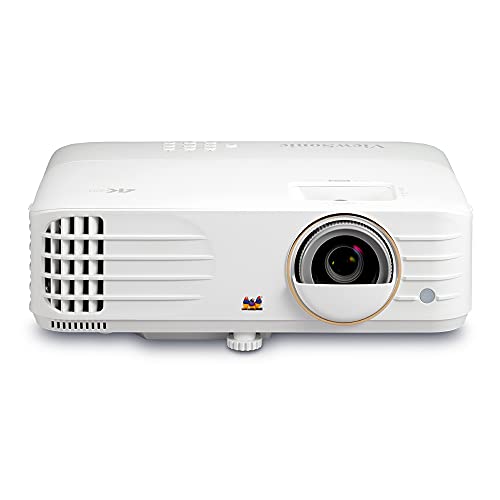
- Best for: Bright living rooms where the projector must fight daylight and serve gaming too.
- Resolution: 4K UHD 3840 x 2160
- Brightness: 4,000 ANSI lumens
- Refresh rate: 240Hz
- Input lag: 4.2ms
All 4 Picks at a Glance
| Product | Specs | Action |
|---|---|---|
| Epson Home Cinema 2350 |
| Check price on Amazon |
| Optoma HD146X |
| Check price on Amazon |
| ViewSonic PX748-4K |
| Check price on Amazon |
 Epson Home Cinema 3800 |
| Check price on Amazon |
Key takeaways
- Find the best ceiling mounted projectors for a clean home theater setup. Compare bright 4K and Full HD models with lens shift, low lag and flexible mounting.
Mounting a projector on the ceiling changes the whole room. The picture hangs on the wall like a cinema screen, the floor stays clear, and nobody walks through the beam during a film. But a ceiling mount also raises the stakes: the projector has to throw a big image from a fixed position, stay quiet above your head, and connect to power and sources without cables dangling across the room. A projector that only works on a coffee table will not survive the move overhead.
The four projectors below were chosen for ceiling mounting, with the throw distance, lens shift, and brightness to fill a proper screen from above. They range from a sharp 1080p value pick to a premium 4K model for a dedicated room. Each one is a real model still sold on Amazon, with resolution and brightness details taken from its listing.
Quick Picks
As an Amazon Associate we earn from qualifying purchases
| Product | Best for | Key spec from title |
|---|---|---|
| Epson Home Cinema 2350 | Smart 4K home theater | 4K PRO-UHD 3LCD projector |
| Optoma HD146X | Budget ceiling setup | 1080p Full HD projector |
| ViewSonic PX748-4K | Bright-room 4K gaming | 4K UHD projector with 4000 lumens |
| Epson Home Cinema 3800 | Premium dedicated theater | 4K PRO-UHD 3LCD projector |
How to Choose
Throw distance and screen size
Throw distance decides where the projector must sit to fill your screen, and a ceiling mount fixes that position, so measure before you buy. A projector with a zoom lens gives you flexibility, letting you fine-tune the image size without moving the mount. Short-throw models suit small rooms, while long-throw models need more distance to reach the same screen size. Map the room, note the distance from the mount point to the wall, and check it against the projector’s throw range before ordering anything.
Lens shift and keystone correction
Lens shift is the feature that makes ceiling mounting forgiving. It lets you move the image up, down, or sideways without moving the projector or distorting the picture, which matters when the mount point is not perfectly centred. Keystone correction fixes a tilted image digitally, but it costs sharpness, so treat it as a backup rather than a plan. A projector with generous lens shift installs cleanly in more rooms and keeps the picture sharp at the edges.
Brightness and the room’s light
Brightness decides whether the picture survives the lamps and windows in your room. A dedicated dark theater can live with modest brightness, but a living room with windows needs more lumens to keep the image punchy during the day. Remember that brightness and black levels trade off against each other: a very bright projector in a dark room can wash out the shadows. Match the brightness to the room you actually have, not the one you wish you had.
Noise, lamp life, and connections
A ceiling-mounted projector sits above your head, so fan noise reaches you directly and matters more than it does on a table. Look for a quiet fan rating and a lamp or light source with a long rated life, since changing a lamp on a ceiling mount is a chore. Check the connections too: HDMI ports for your sources, a power outlet near the mount, and ideally a way to run cables neatly through the ceiling or along a beam. Plan the cables before the mount goes up.
The 4 Best Options
Epson Home Cinema 2350
- Best for: A first ceiling-mounted home theater with built-in streaming and a forgiving install.
- Resolution: 4K PRO-UHD
- Projection technology: 3-chip 3LCD
- Brightness: 2,800 lumens colour and white brightness
- Smart platform: Android TV built in
A first ceiling-mounted home theater with built-in streaming and a forgiving install.
The built-in speaker is fine for casual viewing but will not replace a sound system.
The Home Cinema 2350 is the friendly way into a ceiling-mounted home theater. Its 4K PRO-UHD picture uses pixel shifting to put a sharp image on screen, and the 3-chip 3LCD design shows full colour in every frame without the rainbow effect some viewers notice on single-chip projectors. Android TV is built in, so streaming needs no extra box, and the 10W speaker covers casual viewing when a sound system is not running. Lens shift and a flexible zoom make it forgiving to mount, which is exactly what a first ceiling install needs.
Optoma HD146X
- Best for: A budget ceiling setup where brightness and low gaming lag matter.
- Resolution: 1080p Full HD
- Brightness: 3,600 lumens
- Contrast ratio: 25,000:1
- Input lag: 16ms at 1080p 60Hz
A budget ceiling setup where brightness and low gaming lag matter.
It is 1080p only, so it will not match the 4K models for fine detail.
The HD146X is the budget pick that proves a ceiling mount does not need a premium projector. Its 1080p picture is sharp on a screen up to a large size, and 3,600 lumens of brightness keeps the image punchy in a room that is not fully dark. Input lag is low, so it doubles as a gaming projector for a console mounted nearby. The lamp lasts up to 15,000 hours, which means years of films before a replacement is needed. It lacks the 4K resolution of the others here, but for the money, it is the easiest way to get a big screen on the ceiling.
ViewSonic PX748-4K
- Best for: Bright living rooms where the projector must fight daylight and serve gaming too.
- Resolution: 4K UHD 3840 x 2160
- Brightness: 4,000 ANSI lumens
- Refresh rate: 240Hz
- Input lag: 4.2ms
Bright living rooms where the projector must fight daylight and serve gaming too.
The fan is audible at full brightness, so mount it behind rather than directly above seating.
The PX748-4K is the bright-room pick, with 4,000 ANSI lumens that hold a watchable picture even when the lights are on. Its 4K UHD resolution keeps the image sharp on a large screen, and the 240Hz refresh rate with 4.2ms input lag makes it a genuine gaming projector as well as a movie machine. Dual HDMI and USB-C cover modern sources, and the 1.3x optical zoom plus automatic vertical keystoning ease the ceiling install. For a living room that doubles as a theater, this is the projector that handles daylight best.
Epson Home Cinema 3800
- Best for: A dedicated theater room where contrast, colour, and a precise install matter.
- Resolution: 4K PRO-UHD
- Projection technology: 3-chip 3LCD
- Brightness: 3,000 lumens colour and white brightness
- Contrast ratio: Up to 100,000:1
A dedicated theater room where contrast, colour, and a precise install matter.
It uses a lamp rather than a laser, so brightness fades over time and there are no built-in apps.
The Home Cinema 3800 is the premium pick for a dedicated theater room. Its 4K PRO-UHD image comes from a true 3-chip design that shows the full RGB colour signal in every frame, with no rainbow effect and colour brightness that matches white brightness at 3,000 lumens. Contrast reaches up to 100,000:1, so dark scenes keep their depth, and full 10-bit HDR handles modern sources faithfully. The precision lens offers vertical and horizontal shift for a clean install, and the 18 Gbps HDMI support carries 4K HDR at a full 60 frames per second. It is the projector for a room built around the screen.
Which One Fits Your Situation
For a first home theater
The Epson Home Cinema 2350 is the easiest start. Its 4K picture is sharp, Android TV removes the need for a streaming box, and the lens shift forgives a mount that is not perfectly placed. The built-in speaker covers casual viewing, and the 3LCD picture avoids the rainbow effect entirely. It is the projector that makes a first ceiling install feel straightforward rather than technical.
For a tight budget
The Optoma HD146X gets a big screen on the ceiling for the least money here. Its 3,600 lumens keep the picture bright, the low input lag suits console gaming, and the long lamp life means years before a replacement. The 1080p picture will not match the 4K models for detail, but on a screen viewed from a sofa, the difference is smaller than the price gap suggests.
For a bright living room
The ViewSonic PX748-4K is the answer when the room has windows and lamps that stay on. Its 4,000 lumens hold the picture together in daylight, the 4K resolution stays sharp on a large screen, and the fast refresh rate makes it a gaming projector too. Mount it slightly behind the seating to keep fan noise out of earshot, and it handles a shared living space better than any other pick here.
For a dedicated theater room
The Epson Home Cinema 3800 is the projector for a room with controlled light and a proper screen. Its 3-chip design, high contrast, and full HDR support deliver the most cinematic picture in this guide, and the precision lens with shift in both directions makes the install exact. It costs the most and needs a sound system, but for a room built around film, it is the right machine.
Common Mistakes
- Mounting the projector before checking the throw distance against the screen size, then finding the image is too large or too small for the wall.
- Relying on keystone correction instead of lens shift, which softens the picture.
- Placing the mount directly above the seating, where fan noise is loudest and the projector’s heat drifts down onto viewers.
- Forgetting a power outlet near the ceiling mount and running an extension cord across the room.
- Buying a dim projector for a bright living room and blaming the screen when the picture washes out every afternoon.
Frequently Asked Questions
How high should a ceiling-mounted projector sit?
The mount height depends on the projector’s throw and lens shift, but a common setup places the lens roughly level with the top of the screen. Check the manual for its offset range, and use lens shift to fine-tune the image rather than tilting the projector. A short drop tube often gives a cleaner result than a flush mount.
Do I need a special screen for a ceiling projector?
A dedicated screen gives a brighter, more even picture than a painted wall, and it helps most in rooms with some ambient light. For a dark theater, a matte white screen is the standard choice, while a grey or ambient-light-rejecting screen suits a brighter room. The screen size should match the projector’s throw distance from the mount point.
Can a ceiling projector work in a bright room?
Yes, if the projector is bright enough. The ViewSonic PX748-4K in this guide delivers 4,000 lumens, which holds a watchable image with the lights on, though blacks will look greyer than in a dark room. For the best picture in a bright space, pair a bright projector with an ambient-light-rejecting screen and keep direct sunlight off the screen.
How do I run cables to a ceiling-mounted projector?
Plan the cable route before the mount goes up. Run HDMI and power through the ceiling to a nearby outlet, or along a beam in trunking if the ceiling cannot be opened. A wireless HDMI kit avoids long cable runs, and a streaming stick in the projector removes the need for a source cable. Leave slack for maintenance.
FAQ
How high should a ceiling-mounted projector sit?
Do I need a special screen for a ceiling projector?
Can a ceiling projector work in a bright room?
How do I run cables to a ceiling-mounted projector?
More from Amazon
Programs that pair well with the guide above. Offers and eligibility are set by Amazon and may change.
Free shipping on eligible items, Prime Video and more. Eligible new members can start with a free trial.
Start a Prime free trialAd-free music streaming. Eligible new subscribers can start with a free trial.
Try Music Unlimited freeA Prime membership for ages 18-24 with a trial period. Eligibility is set by Amazon.
See Prime for Young AdultsAudiobooks and podcasts to listen to on the go. Eligible new members can start with a free trial.
Try Audible freeAs an Amazon Associate we earn from qualifying purchases.









