Key takeaways
- System Impact: Look for security suites with lightweight footprints and dedicated gaming modes that suspend scans and notifications while you play to prevent frame drops and latency spikes.
- Device Coverage: Assess your household needs by counting all the PCs, Macs, and mobile devices you need to protect, then match that number to the license tier of the software.
- VPN Inclusion: Prioritize suites that include a reliable VPN service to encrypt your connection and prevent DDoS attacks during competitive multiplayer matches.
- Identity Protection: Opt for packages featuring dark web monitoring and advanced AI scam protection to safeguard your gaming accounts, payment details, and personal data from being sold online.
- Subscription Terms: Check whether the license auto-renews and confirm the duration so you can budget accordingly and ensure your protection never lapses during critical gaming sessions.
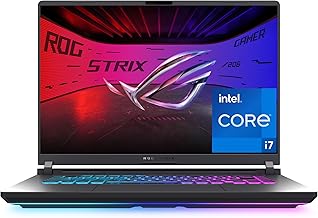
Building a high-end gaming rig is a serious investment, and the last thing you want is malware, ransomware, or a keylogger compromise the performance you have paid top dollar to achieve. Gamers are increasingly targeted by sophisticated phishing scams, malicious mods, and data-stealing malware hidden in seemingly legitimate downloads. Traditional free antivirus tools often lack the real-time protection, secure VPN tunnels, and identity-monitoring features needed to keep your digital life and hardware secure while gaming online.
Our top picks


![Norton 360 Premium, Antivirus software for 10 Devices with Auto-Renewal – Includes Advanced AI Scam Protection, VPN, Dark Web Monitoring & PC Cloud Backup [Download]](https://m.media-amazon.com/images/I/71BOIz4Tx1L._AC_UY218_.jpg)
![Norton 360 Deluxe, Antivirus software for 5 Devices with Auto-Renewal – Includes Advanced AI Scam Protection, VPN, Dark Web Monitoring & PC Cloud Backup [Download]](https://m.media-amazon.com/images/I/71dIA+61J2L._AC_UY218_.jpg)
![Bitdefender Premium VPN | 10 Device | 1 Year [PC/Mac Online Code]](https://m.media-amazon.com/images/I/51PJO994uUL._AC_UY218_.jpg)


As an Amazon Associate we earn from qualifying purchases at no extra cost to you. Ratings are shown as listed on Amazon.
This guide covers the best recommended PC security software tailored for PC gaming hardware enthusiasts. We focus on premium security suites that offer robust malware detection, low system impact, and bundled features like VPNs and dark web monitoring to protect your accounts without causing frame drops. Whether you need coverage for a single dedicated gaming PC or a multi-device household, these top-tier programs deliver comprehensive defense for your high-performance setup.
🛒 Best Price Today on Amazon
Prime members get fast, free shipping on everything above, plus member-only deals. New members get a 30-day free trial — cancel anytime.
Watch: Recommended Pc Security Software: Review & Buyer’s Guide — Video Review
How to Choose a/an Recommended Pc Security Software
- System Impact: Look for security suites with lightweight footprints and dedicated gaming modes that suspend scans and notifications while you play to prevent frame drops and latency spikes.
- Device Coverage: Assess your household needs by counting all the PCs, Macs, and mobile devices you need to protect, then match that number to the license tier of the software.
- VPN Inclusion: Prioritize suites that include a reliable VPN service to encrypt your connection and prevent DDoS attacks during competitive multiplayer matches.
- Identity Protection: Opt for packages featuring dark web monitoring and advanced AI scam protection to safeguard your gaming accounts, payment details, and personal data from being sold online.
- Subscription Terms: Check whether the license auto-renews and confirm the duration so you can budget accordingly and ensure your protection never lapses during critical gaming sessions.
The Best Recommended Pc Security Softwares Reviewed
McAfee Total Protection 2026 Antivirus Software for 5 Devices
This five-device suite provides excellent cross-platform protection with minimal system overhead, making it ideal for households with multiple gaming PCs and mobile devices. Its robust identity monitoring and secure browsing features keep your online gaming accounts safe without interrupting your gameplay.
Bitdefender Total Security 2026
Known for its exceptional malware detection rates and incredibly light system footprint, this five-device suite is perfect for gamers who refuse to sacrifice CPU cycles. The inclusion of a dedicated gaming mode ensures your matches remain uninterrupted while maintaining top-tier ransomware protection.
Norton 360 Premium
Offering coverage for up to ten devices, this premium package includes a generous VPN, dark web monitoring, and advanced AI scam protection alongside robust cloud backup for your save files and captures. It is a comprehensive choice for heavily loaded gaming rigs and large families needing all-around protection.
Norton 360 Deluxe
Delivering the same excellent security engine and AI scam protection as the Premium tier, this five-device option hits the sweet spot for most gaming households. It bundles a no-log VPN and parental controls into an interface that runs quietly in the background during intense gaming sessions.
Bitdefender Premium VPN
For gamers who already have baseline malware protection but want to secure their connection against swatting and DDoS attacks, this ten-device VPN offers fast, encrypted tunnels. It ensures stable routing and low ping times while keeping your real IP address completely hidden from competitive opponents.
Frequently Asked Questions
Does antivirus software slow down gaming performance?
Modern premium security suites are designed with a minimal system footprint and feature specialized gaming modes that suspend background scans, ensuring your CPU and GPU resources remain dedicated to high frame rates.
Do I need a VPN for PC gaming?
Yes, a VPN encrypts your connection, protects against DDoS attacks in competitive games, and helps prevent your ISP from throttling your bandwidth during high-traffic gaming sessions or large downloads.
Is free antivirus enough for a gaming PC?
Free antivirus typically offers basic malware detection but lacks essential features like ransomware shields, dark web monitoring, and secure VPNs, leaving your expensive hardware and online accounts vulnerable to modern threats.
What does dark web monitoring actually do?
Dark web monitoring continuously scans illicit forums and marketplaces for your email addresses, passwords, and personal information, alerting you immediately if your gaming accounts or payment details are compromised in a data breach.
Final Thoughts
Protecting a high-end gaming rig requires a robust security solution that complements rather than hinders your hardware. For a perfect balance of low system impact and top-tier protection, Bitdefender Total Security 2026 and Norton 360 Deluxe stand out as the best choices for dedicated gaming households. If you require maximum coverage and advanced features across a large family setup, Norton 360 Premium is an excellent investment for total digital peace of mind.