Key takeaways
- Sensor and DPI: Modern optical sensors from Logitech, Razer, and Pixart are all excellent above 12,000 DPI, so prioritize flawless tracking and consistent lift-off distance over raw DPI numbers.
- Weight and Shell Design: Mice under 55 grams reduce fatigue during long sessions and improve flick accuracy, but ultra-light shells can feel fragile if you prefer a solid, substantial build.
- Connectivity Modes: Tri-mode mice offering 2.4GHz wireless, Bluetooth 5.1, and wired USB-C give you flexibility for gaming, productivity, and travel, while dedicated esports mice often focus solely on 2.4GHz for maximum performance.
- Battery Life and Charging: Look for at least 80 hours of 2.4GHz battery life to avoid mid-session charging, and prioritize USB-C passthrough so you can keep playing while the mouse charges.
- Switch Type and Durability: Optical switches eliminate double-click issues and offer faster actuation, while mechanical switches provide a more tactile, traditional feel that some players still prefer.
What's inside
Choosing between a wired and wireless gaming mouse in 2026 is harder than it has ever been. Latency, once the defining reason to stick with a cable, has largely been solved at the premium end, and the line between budget and flagship features continues to blur. Buyers are left weighing trade-offs across sensor performance, weight, battery life, connectivity options, and price, often without a clear sense of which specifications actually matter for their preferred genre and grip style.
As an Amazon Associate we earn from qualifying purchases.




This guide breaks down the top wired and wireless gaming mice available right now, comparing real-world performance rather than just spec sheets. Whether you need a featherweight esports pointer, a feature-heavy all-rounder, or a budget-friendly tri-mode option, the recommendations below cover every category so you can make an informed decision without second-guessing your purchase.
🛒 Best Price Today on Amazon
Prime members get fast, free shipping on everything above, plus member-only deals. New members get a 30-day free trial — cancel anytime.
Watch: Wired vs Wireless Gaming Mouse in 2026 — Video Review
How to Choose a Wired vs Wireless Gaming Mouse in 2026
- Sensor and DPI: Modern optical sensors from Logitech, Razer, and Pixart are all excellent above 12,000 DPI, so prioritize flawless tracking and consistent lift-off distance over raw DPI numbers.
- Weight and Shell Design: Mice under 55 grams reduce fatigue during long sessions and improve flick accuracy, but ultra-light shells can feel fragile if you prefer a solid, substantial build.
- Connectivity Modes: Tri-mode mice offering 2.4GHz wireless, Bluetooth 5.1, and wired USB-C give you flexibility for gaming, productivity, and travel, while dedicated esports mice often focus solely on 2.4GHz for maximum performance.
- Battery Life and Charging: Look for at least 80 hours of 2.4GHz battery life to avoid mid-session charging, and prioritize USB-C passthrough so you can keep playing while the mouse charges.
- Switch Type and Durability: Optical switches eliminate double-click issues and offer faster actuation, while mechanical switches provide a more tactile, traditional feel that some players still prefer.
The Best Wired vs Wireless Gaming Mouse in 2026s Reviewed
Razer Viper V3 Pro Wireless
The standout esports pick for competitive players who need an ultra-light 54g frame, a 35,000 DPI optical sensor, and 8,000 Hz polling for the lowest possible input latency. With 95 hours of battery life and Gen3 optical switches, it is the mouse to beat for serious FPS and tactical shooter gameplay.
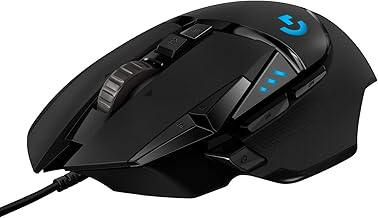
Logitech G502 Hero Wired
A perennial favorite for players who want maximum customization, the G502 Hero delivers 25,600 DPI, 11 programmable buttons, adjustable weights, and vibrant RGB lighting. It remains the best wired option for MMO and productivity users who prioritize features and ergonomics over weight savings.
Logitech G305 Lightspeed Wireless
The G305 Lightspeed pairs Logitech’s trusted HERO sensor with a 250-hour battery life on a single AA, making it the most reliable mid-range wireless mouse available. Its simple, no-nonsense design and six programmable buttons suit players who want consistent performance without paying flagship prices.
Redragon M725 Honeycomb Wireless
At just 49 grams and well under premium pricing, the M725 Honeycomb brings tri-mode connectivity and 8,000 DPI to budget-conscious buyers. The honeycomb shell keeps weight down while the 2.4GHz mode delivers surprisingly solid tracking for casual and competitive gaming on a dime.
INPHIC A9 Wireless
The INPHIC A9 is a strong value pick with tri-mode connectivity, 12,800 DPI, a visible battery indicator, and RGB lighting that punches above its price bracket. It is ideal for users who want a versatile everyday mouse that can handle gaming sessions without demanding a premium investment.
Frequently Asked Questions
Is wireless gaming mouse latency still a problem in 2026?
At the premium level, no. Mice like the Razer Viper V3 Pro using 2.4GHz wireless with 8,000 Hz polling match or exceed wired performance. Budget wireless mice may still introduce minor latency, but even those have improved significantly over recent generations.
How long should a wireless gaming mouse battery last?
Anything over 80 hours of continuous 2.4GHz use is considered good, with flagship models reaching 95 to 250 hours. If you play daily, aim for a mouse that supports USB-C charging while in use so battery anxiety becomes a non-issue.
Do I need 8,000 Hz polling rate?
Only if you play fast-paced competitive titles on a high-refresh-rate monitor of 240Hz or above. At that level, higher polling reduces motion blur and improves cursor smoothness. For general gaming and productivity, 1,000 Hz remains perfectly sufficient.
Are lightweight mice better for everyone?
Not necessarily. While sub-55g mice benefit flick-heavy aim and reduce wrist fatigue, some players prefer heavier mice with adjustable weights for stability and control, especially in tactical shooters or MMOs where precision matters more than speed.
Final Thoughts
For competitive esports performance, the Razer Viper V3 Pro Wireless is the clear top pick thanks to its 54g weight, 35K DPI sensor, and 8,000 Hz polling. The Logitech G502 Hero Wired remains unbeatable for players who want maximum buttons and customization, while the Logitech G305 Lightspeed offers the best balance of price, battery life, and reliability for most gamers.