Key takeaways
- Sound Quality & Surround Sound: Look for 50mm drivers as a reliable baseline and consider 7.1 virtual surround for competitive games where positional audio matters. Stereo is fine for single-player titles, but surround gives an edge in FPS titles like Call of Duty.
- Comfort & Build: Memory foam ear cushions and a lightweight design are non-negotiable for sessions over two hours. Over-ear designs isolate sound better and reduce fatigue compared to on-ear alternatives.
- Microphone Quality: A cardioid or noise-canceling mic ensures your teammates hear you clearly without background interference. Flip-to-mute designs are a practical convenience worth having.
- Wired vs. Wireless: Wireless headsets with 2.4GHz USB dongles offer latency-free freedom, but wired options like the 3.5mm jack remain the most universally compatible and budget-friendly choice.
- Battery Life: For wireless headsets, aim for at least 40 hours of battery life. Some 2026 models push past 70 or even 100 hours, meaning you can go a full week between charges even with heavy use.
Finding the right gaming headset in 2026 means navigating a crowded market filled with flashy RGB, inflated spec sheets, and promises of immersive audio that often fall flat. Whether you’re grinding competitive shooters where directional cues matter or enjoying story-driven RPGs where rich soundscapes elevate the experience, a poorly chosen headset can genuinely hurt your gameplay and comfort over long sessions.
Our top picks


As an Amazon Associate we earn from qualifying purchases at no extra cost to you. Ratings are shown as listed on Amazon.
This guide cuts through the noise. We’ve rounded up the top headsets across wired and wireless categories, evaluating sound quality, microphone clarity, battery life, and platform compatibility. Below, you’ll find our top picks followed by a clear breakdown of what to prioritize when shopping for your next headset.
🛒 Best Price Today on Amazon
Prime members get fast, free shipping on everything above, plus member-only deals. New members get a 30-day free trial — cancel anytime.
Watch: How to Choose a Gaming Headset (2026 Guide) — Video Review
How to Choose a Gaming Headset
- Sound Quality & Surround Sound: Look for 50mm drivers as a reliable baseline and consider 7.1 virtual surround for competitive games where positional audio matters. Stereo is fine for single-player titles, but surround gives an edge in FPS titles like Call of Duty.
- Comfort & Build: Memory foam ear cushions and a lightweight design are non-negotiable for sessions over two hours. Over-ear designs isolate sound better and reduce fatigue compared to on-ear alternatives.
- Microphone Quality: A cardioid or noise-canceling mic ensures your teammates hear you clearly without background interference. Flip-to-mute designs are a practical convenience worth having.
- Wired vs. Wireless: Wireless headsets with 2.4GHz USB dongles offer latency-free freedom, but wired options like the 3.5mm jack remain the most universally compatible and budget-friendly choice.
- Battery Life: For wireless headsets, aim for at least 40 hours of battery life. Some 2026 models push past 70 or even 100 hours, meaning you can go a full week between charges even with heavy use.
The Best Gaming Headsets Reviewed
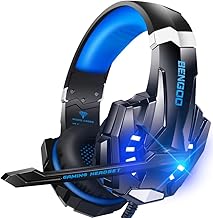
BENGOO G9000
A budget-friendly wired headset that delivers 7.1 surround sound and noise-canceling performance well beyond its price point. The LED accents and memory foam earmuffs make it a solid entry pick for console and PC gamers alike.
Razer BlackShark V2 X
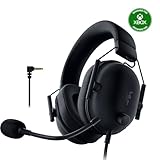
Razer’s lightweight wired headset pairs 50mm drivers with 7.1 surround and a cardioid mic for crisp comms. The memory foam cushioning and noise-isolating earcups make it exceptionally comfortable for marathon sessions.
Razer BlackShark V3 X HyperSpeed Wireless
This wireless standout offers 2.4GHz, Bluetooth, and USB connectivity with an impressive 70-hour battery life. Cross-platform support spanning PC, PS5, Mac, and Switch makes it a versatile all-rounder worth the premium.
AOC 2.4GHz Wireless
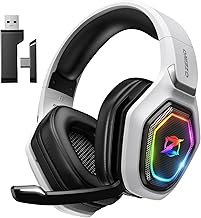
With 45 hours of battery, Bluetooth 6.0, and virtual 7.1 surround, this white AOC model is tailored for FPS gamers who play Fortnite and Call of Duty. The noise-canceling mic ensures clear callouts during intense firefights.
Wireless Gaming Headset (100-Hr)
Boasting a remarkable 100-hour battery life alongside 2.4GHz wireless, Bluetooth 5.4, and 7.1 surround, this headset is ideal for FPS and RPG players who want cross-platform flexibility. Note that it skips Xbox compatibility, so plan accordingly.
Frequently Asked Questions
Is wired or wireless better for gaming?
Modern 2.4GHz wireless headsets deliver latency low enough for competitive play, making them a great choice for most gamers. Wired headsets remain preferable if you want zero charging interruptions and universal 3.5mm compatibility.
Do I need 7.1 surround sound?
Virtual 7.1 surround is most beneficial for competitive shooters where hearing enemy footsteps and reloads provides a tactical edge. For single-player games or music, quality stereo drivers often provide a more natural soundstage.
What battery life should I look for in a wireless headset?
Aim for at least 40 hours, which covers a full week of moderate gaming between charges. Premium 2026 models offer 70 to 100 hours, reducing how often you need to plug in and extending battery longevity over time.
Are gaming headsets compatible with multiple platforms?
Many modern headsets support PC, PS5, PS4, Switch, and mobile via 3.5mm or USB. Xbox compatibility is less universal, so always verify platform support before purchasing if you game across multiple consoles.
Final Thoughts
For most gamers, the Razer BlackShark V3 X HyperSpeed Wireless hits the sweet spot of performance, comfort, and cross-platform flexibility. The Razer BlackShark V2 X remains the top wired value pick, while the 100-hour wireless model is unbeatable if battery life is your top priority.