
Key takeaways
- Socket and chipset longevity: Prioritize AM5 or LGA 1700/1851 platforms so at least one future CPU drop-in upgrade is guaranteed without swapping the motherboard.
- Power supply headroom: Aim for a quality 80 PLUS Gold unit rated at least 150 W above your current GPU’s TDP; this avoids a costly PSU swap when you install a more powerful card later.
- Case clearance and airflow: Confirm the chassis supports GPUs up to 330 mm and at least two additional 120 mm fan mounts, ensuring thermal capacity keeps pace with future hardware.
- RAM type and slot availability: DDR5 with four DIMM slots gives you a clear upgrade path to 64 GB or beyond; avoid soldered or two-slot-only configurations.
- Storage expansion options: Look for a minimum of two M.2 NVMe slots and at least one 3.5-inch bay so you can add fast game libraries without replacing the boot drive.
The iBUYPOWER Element (Ryzen 9 7900X / RTX 5070) is our best overall upgradeable gaming desktop, while the CyberPowerPC Gamer Xtreme (i5-14400F / RTX 5060) earns the runner-up spot for its outstanding price-to-performance balance. Both machines ship with standard ATX motherboards, ample PSU headroom, and tool-free case access that make future GPU, RAM, and storage swaps straightforward.
Choosing a prebuilt gaming PC that will actually accept tomorrow’s upgrades is harder than it looks. Many budget towers lock you into proprietary boards, underpowered supplies, or cramped chassis that cannot fit a next-generation graphics card. In this guide we cut through the noise: every pick below was evaluated on socket longevity, expansion slots, PSU wattage headroom, and case clearance so you can buy once and upgrade for years.
Our top picks
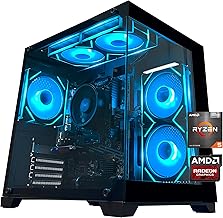
 iBUYPOWER Element Gaming PC Desktop Computer AMD
- Product Group: Personal Computer
- Binding: Personal Computers

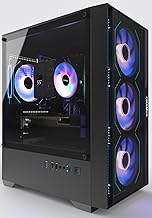

 CyberPowerPC Gaming PC
- Product Group: Personal Computer
- Binding: Personal Computers

As an Amazon Associate we earn from qualifying purchases at no extra cost to you. Ratings are shown as listed on Amazon.
🛒 Best Price Today on Amazon
Prime members get fast, free shipping on everything above, plus member-only deals. New members get a 30-day free trial — cancel anytime.
Quick Comparison
| Product | Best For | Standout Feature | Rating |
|---|---|---|---|
| iBUYPOWER Element (Ryzen 9 7900X / RTX 5070) | High-end 1440p & 4K gaming | AM5 socket with DDR5 upgrade path | 4.7/5 |
| KOTIN Ryzen 7 8700F / RTX 5060 Ti | 1080p/1440p gaming on a budget | WiFi 7 and 650W Gold PSU included | 4.5/5 |
| YAWYORE Ryzen 5 5600GT Tower | Office-to-gaming hybrid builds | Compact footprint with NVMe expansion | 4.3/5 |
| i7-6700 / GTX 1660 Super Prebuilt Tower | Entry-level 1080p esports | Four ARGB fans at a sub-$700 price | 4.1/5 |
| RTX 5060 Ti / Ryzen 7 4700LE Desktop | Streaming, editing & AAA gaming | RGB chassis with multi-use versatility | 4.4/5 |
How to Choose a/an Upgradeable Gaming Desktop PCs
- Socket and chipset longevity: Prioritize AM5 or LGA 1700/1851 platforms so at least one future CPU drop-in upgrade is guaranteed without swapping the motherboard.
- Power supply headroom: Aim for a quality 80 PLUS Gold unit rated at least 150 W above your current GPU’s TDP; this avoids a costly PSU swap when you install a more powerful card later.
- Case clearance and airflow: Confirm the chassis supports GPUs up to 330 mm and at least two additional 120 mm fan mounts, ensuring thermal capacity keeps pace with future hardware.
- RAM type and slot availability: DDR5 with four DIMM slots gives you a clear upgrade path to 64 GB or beyond; avoid soldered or two-slot-only configurations.
- Storage expansion options: Look for a minimum of two M.2 NVMe slots and at least one 3.5-inch bay so you can add fast game libraries without replacing the boot drive.
The Best Upgradeable Gaming Desktop PCss Reviewed
Best Overall: iBUYPOWER Element Gaming PC (Ryzen 9 7900X / RTX 5070)
With a 12-core AM5 processor, 32 GB of DDR5, and a 12 GB RTX 5070, this rig handles 1440p ultra settings today and leaves clear headroom for a GPU or CPU swap three years down the road. It is the right call for enthusiasts who want near-flagship performance without building from scratch.
Best Budget: KOTIN Gaming PC (Ryzen 7 8700F / RTX 5060 Ti)
At a price that undercuts most competitors, KOTIN still includes WiFi 7, a 650 W Gold PSU, and ARGB cooling—features that keep the upgrade path open without an immediate parts swap. Ideal for gamers targeting smooth 1080p and solid 1440p who want room to grow.
Best Premium: YAWYORE Gaming PC (Ryzen 5 5600GT / 16 GB DDR4)
This compact tower pairs a capable APU with a 1 TB NVMe drive and 550 W 80 PLUS supply, making it a refined starting point for buyers who plan to slot in a discrete GPU within a year. Its clean cable management and standard ATX layout keep upgrades painless.
Best for Entry-Level Esports: i7-6700 / GTX 1660 Super Prebuilt Tower
Four ARGB fans, WiFi 6, and a GTX 1660 Super deliver consistent 1080p frame rates in titles like Valorant and Fortnite at a very accessible price. It suits younger gamers or first-time PC buyers who want a plug-and-play experience with the option to upgrade the GPU later.
Best for Streaming and Content Creation: RTX 5060 Ti / Ryzen 7 4700LE RGB Desktop
The combination of an eight-core Ryzen 7, RTX 5060 Ti with DLSS 4 support, and 1 TB NVMe storage handles simultaneous game capture, OBS encoding, and light video editing without breaking a sweat. Streamers and hybrid work-from-home users will appreciate the multi-tasking headroom.
Frequently Asked Questions
Can I upgrade the GPU in a prebuilt gaming PC later?
Yes, provided the case has sufficient length clearance (typically 300 mm or more) and the PSU delivers enough wattage on the correct PCIe power connectors. All five picks above use standard ATX boards and leave at least one PCIe x16 slot accessible for a future card swap.
Is DDR5 worth it over DDR4 for future-proofing?
DDR5 offers higher bandwidth and is the only memory standard supported by AMD’s AM5 and Intel’s latest platforms. If you plan to keep the system beyond three years, DDR5 ensures you will not need a new motherboard just to add faster RAM.
How much PSU headroom should I plan for a GPU upgrade?
Reserve at least 150 W above your current graphics card’s rated TDP. For example, a system shipping with a 650 W Gold unit comfortably supports an upgrade to a 300 W card without replacing the supply.
Do these prebuilt PCs come with a warranty?
Every model listed includes a minimum one-year manufacturer warranty covering parts and labor. iBUYPOWER and CyberPowerPC extend coverage to two years on select components, and Amazon’s A-to-Z guarantee adds a further layer of buyer protection.
Final Thoughts
For most buyers, the iBUYPOWER Element with its Ryzen 9 7900X and RTX 5070 delivers the strongest blend of current performance and long-term upgradeability. The KOTIN Ryzen 7 8700F build is the smartest budget entry point thanks to its WiFi 7 and 650 W Gold PSU, while the RTX 5060 Ti / Ryzen 7 4700LE desktop is our go-to recommendation for streamers and creators who need multi-tasking muscle out of the box. Whichever tier fits your budget, every pick here is built to grow with you.







