Key takeaways
- Upgrading laptop memory is one of the cheapest ways to make an aging machine feel responsive again, but only if you buy the right kind.
Upgrading laptop memory is one of the cheapest ways to make an aging machine feel responsive again, but only if you buy the right kind. Laptop RAM comes as SODIMM modules in several incompatible generations, and the keyword hides a decision most shoppers do not realize they are making: which DDR generation does your laptop use, how many slots does it have, and what is the largest total capacity it will accept? A kit that looks like a bargain is useless if it does not fit the socket.
The eight listings below cover DDR5, DDR4, and older DDR3L modules, in single sticks and two-stick kits. All are SODIMM laptop memory according to their titles. The guidance relies on the stated generation, speed, capacity, pin count, and voltage, and on well-established rules about matching them to your laptop. As of 2026, many thin laptops solder their memory to the board, so the first job is confirming that your model has removable slots.
Quick Picks
Our top picks
 Crucial 32GB DDR5 RAM Kit
- Boosts System Performance: 32GB DDR5 RAM laptop memory…
- Accelerated gaming performance: Every millisecond gained in fast-paced…
- Optimized DDR5 compatibility: Best for 12th Gen Intel…
 Crucial 16GB DDR4 RAM
- Boosts System Performance:16GB DDR4 laptop memory that operates…
- Easy Installation: Upgrade your laptop RAM with ease—no…
- Compatibility Guaranteed: Ensure seamless compatibility with your laptop…


As an Amazon Associate we earn from qualifying purchases at no extra cost to you.
| Product | Best for | Key spec from the title |
|---|---|---|
| Crucial 32GB DDR5 Kit (2x16GB) | Newer DDR5 laptops | 5600MHz, 262-pin SODIMM |
| Crucial 16GB DDR4 | Single-stick DDR4 upgrades | 3200MHz CL22, 260-pin |
| PUSKILL 32GB DDR4 Kit (2x16GB) | Dual-channel DDR4 on a budget | 3200MHz CL22, 1.2V |
| Timetec 16GB DDR3L Kit (2x8GB) | Older DDR3L laptops | 1600MHz, 1.35V/1.5V, 204-pin |
| PUSKILL 16GB DDR4 (1x16GB) | Simple single-module upgrade | 3200MHz CL22, 1.2V |
| Crucial 32GB DDR4 Kit (2x16GB) | Trusted-brand DDR4 dual channel | 3200MHz, downclockable to 2933/2666 |
| A-Tech 16GB DDR4 | Standard 16GB DDR4 upgrade | 3200MHz, Non-ECC, 260-pin |
| Timetec Premium 16GB DDR3L Kit | DDR3L alternative | 2x8GB, 1600MHz, Dual Rank |
How to Choose
Match the DDR generation and pin count
DDR3L, DDR4, and DDR5 are physically different and cannot be swapped. The listings state 204-pin for DDR3L, 260-pin for DDR4, and 262-pin for DDR5. Look up your laptop’s exact model or read the sticker on the existing module, or use a system information tool, to confirm the generation. Buying the wrong one is the most common and most avoidable mistake, and returns on opened memory can be awkward.
Choose capacity by use case
For web browsing and office work, 8GB is the bare minimum and 16GB is comfortable. For gaming, photo editing, programming with virtual machines, and heavy multitasking, 32GB gives lasting headroom. Check your laptop’s maximum supported total, because some older models cap at 16GB or 32GB regardless of what you install. Two sticks in a kit also let the machine run in dual-channel mode, which improves memory bandwidth.
Understand speed, latency, and voltage
The 3200MHz DDR4 modules list CL22 latency, while the DDR5 kit lists 5600MHz. Higher frequency helps most in integrated-graphics laptops and some games, but your laptop may run the memory at a lower speed than the module’s rating. Several titles note that the module can downclock to 2933 or 2666. DDR3L runs at 1.35V and DDR4 at 1.2V, which matters for battery life and compatibility.
Mind compatibility lists and where budget modules cut corners
Brand names with published compatibility tools reduce risk. Cheaper modules from lesser-known sellers can work well, but check the return policy, and avoid mixing modules of different speeds or brands in the same laptop. ECC and unbuffered labels matter: laptops generally need non-ECC unbuffered SODIMM. Ignore claims of “gaming” branding on laptop memory unless a speed and latency are also listed.
The 8 Best Options
Crucial 32GB DDR5 Kit (2x16GB)
A two-module kit of DDR5 SODIMM rated at 5600MHz and noted as compatible with 5200 and 4800MHz platforms, listed for Intel Core and AMD Ryzen 7000 systems. It is for owners of recent DDR5 laptops who want a 32GB dual-channel configuration for heavy multitasking or creative work. A flexible speed note helps with different platforms. Because DDR5 laptops vary in how they handle speed, the lower ratings named in the title are a useful fallback if your system does not run at the top figure. Confirm the slot count and the maximum total your model accepts before buying.
- Strength: 32GB in a dual-channel kit for DDR5.
- Strength: speed note covers 5600, 5200, and 4800MHz platforms.
- Trade-off: only useful if your laptop actually uses DDR5 SODIMM slots.
Skip it if your laptop uses DDR4 or has soldered memory.
Crucial 16GB DDR4
A single 16GB DDR4 SODIMM at 3200MHz CL22 with 260 pins and a note that it can run at 2933 or 2666MHz. The title mentions compatibility with 13th-generation Intel Core and AMD Ryzen 7000, so check the compatibility tool for your exact model. It suits people who need to add or replace one module, for example swapping a failing stick or lifting an 8GB laptop to 16GB. The tidy part of a single-module upgrade is simplicity, but the compatibility wording in the title looks unusual for DDR4, so verify the fit against your laptop’s model page rather than relying on the headline.
- Strength: trusted-brand 16GB module in a simple single-stick form.
- Strength: downclock note improves compatibility with older systems.
- Trade-off: a single stick gives single-channel operation unless you already have a matching module.
Skip it if you want dual-channel performance from one purchase.
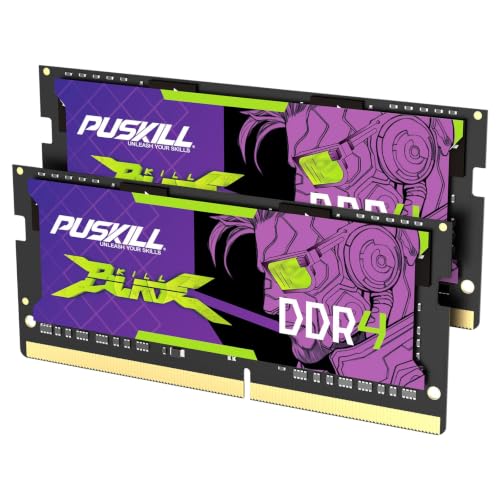
PUSKILL 32GB DDR4 Kit (2x16GB)
A two-stick 32GB DDR4 kit at 3200MHz CL22 and 1.2V, described as plug-and-play and cost-effective for dual-channel use. It targets budget-minded buyers who want 32GB without paying for a major brand name, such as someone upgrading a work laptop for spreadsheets, virtual meetings, and a few dozen browser tabs. Matched pairs matter because both sticks share the same specification, and the plug-and-play wording suggests no manual configuration. Based on the listed specs, it is the value-first path to 32GB on DDR4.
- Strength: 32GB dual-channel kit at a lower cost tier.
- Strength: standard 3200MHz CL22 spec for DDR4.
- Trade-off: a lesser-known brand, so check seller support.
Skip it if you want a major-brand compatibility tool.
Timetec 16GB DDR3L Kit (2x8GB)
A DDR3L and DDR3 kit rated 1600MHz (PC3L-12800), 1.35V/1.5V, CL11, non-ECC unbuffered, dual rank, in a 204-pin SODIMM. It is for owners of older laptops that still use DDR3L, where a memory upgrade can extend usable life. DDR3L at 1.35V is the low-voltage variant used in many older notebooks, and the title also lists DDR3 compatibility, which is worth confirming for your exact model. Pairing a modest processor with 16GB can make browsing and office tasks feel smoother, though the rest of an aging machine still limits what you can do.
- Strength: serves a generation that is hard to find.
- Strength: two 8GB modules for dual-channel mode.
- Trade-off: only useful for older laptops, and the platform itself limits performance.
Skip it if your laptop uses DDR4 or DDR5.
PUSKILL 16GB DDR4 (1x16GB)
A single 16GB DDR4 stick at 3200MHz CL22 and 1.2V, described as plug-and-play. It suits someone adding capacity to a laptop with a free slot or replacing an 8GB module. It is a straightforward, lower-cost way to reach 16GB. If your laptop has two slots and you already own an identical 16GB module, adding this one would give two sticks, but mismatched pairs can fall back to the slower module’s speed. The title gives no compatibility list, so check your laptop’s specification page.
- Strength: simple single-module upgrade.
- Strength: standard DDR4 speed and voltage.
- Trade-off: single-stick use means no dual-channel gain unless paired.
Skip it if you want guaranteed brand compatibility lists.
Crucial 32GB DDR4 Kit (2x16GB)
A two-module 32GB kit of DDR4-3200 (PC4-25600) CL22 SODIMM with 260 pins that can downclock to 2933 or 2666MHz. It is for people who want a major-brand dual-channel kit for a DDR4 laptop, such as a developer or content creator on an older system who runs containers, virtual machines, or large project files. The same downclock note appears here as on the 16GB module, which is a helpful sign for compatibility with laptops that do not run at the top speed. Check the maximum memory your laptop accepts before buying.
- Strength: 32GB dual-channel kit from a recognized memory brand.
- Strength: downclock flexibility helps with older platforms.
- Trade-off: DDR4 is the older standard.
Skip it if your laptop supports only 16GB total.
A-Tech 16GB DDR4
A 16GB DDR4 module at 3200MHz, PC4-25600, non-ECC, CL22, 260-pin, and 1.2V, sold as a notebook memory upgrade. It fits buyers who want a standard, no-frills module for a laptop with a known compatibility spec. The listing mentions both the PC4-25600 rating and the PC4-3200AA label, which makes it easy to match against a manual or existing module. Pick it for a simple one-stick upgrade, or buy two for a dual-channel setup if your laptop has both slots and you want matching modules.
- Strength: clearly states non-ECC and the 260-pin format.
- Strength: standard DDR4 specification.
- Trade-off: single stick, so no dual-channel benefit alone.
Skip it if you want a kit for dual channel.
Timetec Premium 16GB DDR3L Kit
A second DDR3L option: a 16GB kit of two 8GB modules at 1600MHz, non-ECC unbuffered, 1.35V/1.5V, CL11, dual rank, 204-pin. It repeats the other Timetec kit’s core specs under a premium label, so the choice mostly comes down to seller and warranty. Dual rank modules can use more power than single rank, which rarely matters but is worth knowing for older, battery-limited laptops. Before ordering, check your laptop’s manual for supported rank and voltage, because DDR3 era systems were less forgiving than modern ones.
- Strength: dual-channel 2x8GB for older laptops.
- Strength: clear compatibility with DDR3L and DDR3 sockets.
- Trade-off: close to the other Timetec kit, so little separates them on specs.
Skip it if your laptop is a DDR4 or newer model.
Which One Fits Your Situation
You own a recent laptop with DDR5
The Crucial 32GB DDR5 kit is the only DDR5 listing and offers dual-channel capacity for heavy work.
You have a DDR4 laptop and want dual channel
The Crucial 32GB DDR4 kit or the PUSKILL 32GB DDR4 kit both give two 16GB sticks. The Crucial option leans toward brand support, while the PUSKILL leans toward cost.
You only need one extra module
The Crucial 16GB, PUSKILL 16GB, or A-Tech 16GB single sticks cover that need if your laptop has a free slot.
Your laptop is older and uses DDR3L
The two Timetec kits are the only DDR3L choices; they are interchangeable on specs, so choose by seller policy.
Common Mistakes
- Buying DDR4 for a DDR5 laptop, or the reverse.
- Ignoring the maximum memory your laptop supports.
- Mixing different speeds or brands in the same laptop.
- Assuming every laptop has removable memory when many have soldered modules.
- Paying for higher frequency that your processor will not use.
Related guides
- Gaming Headsets For Competitive Fps Directional Audio
- Threadripper Vs Xeon Vs Core I9 For Workstations
- Compact Mini Itx Gaming Pcs For Small Desks
Frequently Asked Questions
How do I know which RAM my laptop takes?
Check the model’s specifications or the existing module’s label, or use a system information tool. A major memory maker’s compatibility tool can also narrow the options.
Is dual channel really worth it?
It increases memory bandwidth, which helps integrated graphics and some workloads. A kit of two matching sticks is the simplest way to get it.
Can I mix a new stick with the old one?
Often yes if the generation matches, but the pair will run at the slower speed and may be less stable. A matched kit is safer.
Will more RAM make games faster?
Only if you were running out of memory. For most games, 16GB is enough, while 32GB helps with heavy multitasking or large projects.