Key takeaways
- Pro: 1000mW amplifier listed
- Pro: Mic input and tone controls
- Pro: USB-C, optical and coaxial inputs
- Con: Impedance range not listed
- Con: Sits near the top of this tier
The best gaming DACs under $100 are the Fosi Audio K5 Pro for a full desktop DAC and amp with mic input, the Creative Sound Blaster Z SE for an internal sound card, and the EPOS GSX 300 for a simple USB gaming DAC. All are compared from listing specifications.
A DAC converts digital audio to analog, and a gaming DAC usually adds a headphone amplifier and sometimes a microphone input. It can give a quieter background and more drive for demanding headphones than the audio jack on a motherboard. This page compares models from their listing text only: inputs, outputs, bit depth and sample rate, and mic support. Nothing here comes from our own use, so check the maker page for anything the listing leaves out.
The group mixes desktop boxes, an internal PCIe card and a small USB unit, because each suits a different desk. Home office, small-space and gaming uses are covered in the buying section and the FAQ below, so you can pick the form that matches your PC and headset.
Quick Comparison
| Model | Key specs per listing | Best for |
|---|---|---|
| Fosi Audio K5 Pro | 1000mW amp, mic input, bass/treble control, USB-C, optical, coaxial, RCA/3.5mm, 24-bit/192kHz | The full-featured desktop pick |
| Fosi Audio Q4 | USB, optical and coaxial inputs, 3.5mm headphone and RCA outputs, desktop HiFi | Music and powered speakers |
| FiiO KA13 | USB-C, 3.5mm and 4.4mm outputs, PCM 384kHz/32bit, DSD256, 550mW | Laptops and portable use |
| Creative Sound Blaster Z SE | Internal PCIe card and DAC, 24-bit/192kHz, 116dB SNR, ASIO, 600 ohm amp, 5.1/virtual 7.1 | Desktop PCs with a free slot |
| Aveek Headphone Amp | Bluetooth 6.0, USB DAC, 5 inputs, 3-band EQ, mic input, 16-100 ohm support | Multiple sources, one desk |
| EPOS GSX 300 | USB, 24-bit/96kHz, 7.1 virtual surround, smart button, LED volume dial, 3.5mm headphone and mic jacks | The simplest USB gaming DAC |
Fosi Audio K5 Pro Gaming DAC Headphone Amp
As an Amazon Associate we earn from qualifying purchases at no extra cost to you.
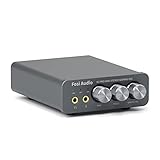
Spec line: Gaming DAC and headphone amplifier, 1000mW, mic input, bass and treble control, USB-C, optical and coaxial inputs, RCA and 3.5mm AUX outputs, 24-bit/192kHz, for PS5, PC and Mac, plug and play.
The K5 Pro has the longest feature list under this ceiling. The listing states a 1000mW headphone amplifier, a mic input, bass and treble controls and a range of inputs: USB-C, optical and coaxial. Outputs include RCA and 3.5mm, so it can drive headphones and active speakers. It lists 24-bit/192kHz, which is plenty for gaming and music, and it works with PS5, PC and Mac. The mic input is the standout for gamers who use a headset with separate plugs. The listing does not give impedance ranges, so check the maker page before pairing high-impedance headphones. It is the priciest in this group, but the most complete.
- Pro: 1000mW amplifier listed
- Pro: Mic input and tone controls
- Pro: USB-C, optical and coaxial inputs
- Con: Impedance range not listed
- Con: Sits near the top of this tier
Fosi Audio Q4 DAC Headphone Amp

Spec line: DAC and headphone amp for PC, USB digital to analog converter, desktop HiFi audio DAC with optical, coaxial and USB inputs, 3.5mm headphone and RCA outputs for powered speakers and home stereo.
The Q4 is the music-leaning option. The listing describes a desktop HiFi DAC with optical, coaxial and USB inputs and both a 3.5mm headphone output and RCA outputs for powered speakers or a home stereo. It does not list a mic input, so it is not a gaming headset solution if you need voice chat through the same unit. It is a good match for players who also care about music, since the RCA outputs connect speakers easily. The listing gives no power rating for the headphone amp, so check the maker page if you use demanding headphones. It sits lower than the K5 Pro and covers the basics well.
- Pro: USB, optical and coaxial inputs
- Pro: RCA outputs for speakers
- Pro: 3.5mm headphone output
- Con: No mic input listed
- Con: Headphone amp power not stated
FiiO KA13 Portable DAC Dongle

Spec line: Portable DAC dongle, USB-C adapter, 3.5mm and 4.4mm outputs, for Android, iOS, PC and music players, PCM 384kHz/32bit, DSD256, 550mW high power, black.
The KA13 is a small dongle rather than a desktop box. The listing gives PCM 384kHz/32bit and DSD256 support, both 3.5mm and 4.4mm outputs, and 550mW of output power, and it works with Android, iOS and PC. That makes it good for a laptop, a handheld PC or a phone, and for travel. The 4.4mm balanced output suits headphones with that cable type. There is no mic input listed and no desktop controls, so it is less convenient at a gaming desk with many peripherals. It is also the most compact, which helps in small spaces. Pick it if portability and a balanced output matter more than a volume knob.
- Pro: Compact USB-C dongle
- Pro: 3.5mm and 4.4mm outputs
- Pro: Listed 384kHz/32bit and DSD256
- Con: No mic input listed
- Con: No desktop controls
Creative Sound Blaster Z SE Internal Sound Card and DAC

Spec line: Internal PCI-e gaming sound card and DAC, 24-bit/192kHz, 116dB SNR, ASIO, 600 ohm headphone amp, mic EQ, discrete 5.1 and virtual 7.1, supports Dolby Digital Live and DTS.
This is the only internal card here, so it needs a free PCIe slot and a desktop case. The listing gives plenty of numbers: 24-bit/192kHz, 116dB signal-to-noise ratio, ASIO support, a headphone amp rated for up to 600 ohm headphones and mic EQ. It also mentions discrete 5.1 and virtual 7.1 surround with Dolby Digital Live and DTS support. That makes it the most gaming-focused pick for a desktop. The drawbacks are that it will not work in a laptop or a small-form-factor case without a slot, and you need to install drivers. If you have the slot, it is a strong value and offers the widest headphone drive range in the group.
- Pro: Headphone amp up to 600 ohm
- Pro: 116dB SNR and ASIO listed
- Pro: 5.1 and virtual 7.1 surround
- Con: Needs a free PCIe slot
- Con: Not usable with laptops
Aveek Bluetooth Headphone Amp and USB DAC
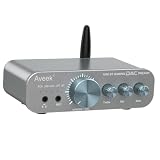
Spec line: Bluetooth 6.0 headphone amp, USB DAC, 5 inputs, 3-band EQ, mic input, mini hi-fi stereo audio preamp with preamp out, for PC, PS5, TV and Mac, supports 16-100 ohm headphones.
The Aveek unit is the flexible multi-source box. The listing mentions five inputs, Bluetooth 6.0, a 3-band EQ, a mic input and a preamp output, which means it can handle a PC, a console and a TV on the same desk. The stated impedance support is 16 to 100 ohm, so it suits typical gaming headsets and mid-impedance headphones but not very hard-to-drive models. The brand is newer, so check the maker page for support and warranty details. The EQ is useful if you want to tune the sound without software. It is a good fit for a desk that serves several devices, and sits in the middle of the tier.
- Pro: Five inputs including Bluetooth 6.0
- Pro: 3-band EQ and mic input
- Pro: Preamp output
- Con: Limited to 16-100 ohm
- Con: Newer brand
EPOS GSX 300 External USB Gaming Sound Card and DAC

Spec line: External USB gaming sound card and DAC, 24-bit/96kHz audio, 7.1 virtual surround sound, smart button, LED volume dial, 3.5mm headphone and mic jacks, PC compatible, black, model SCGD8.
The GSX 300 is the plug-and-play option. The listing describes an external USB sound card with a 24-bit/96kHz DAC, 7.1 virtual surround, a smart button, an LED volume dial and separate 3.5mm headphone and mic jacks. That setup suits any gaming headset with two 3.5mm plugs and gives you a physical volume knob. The sample rate is lower than the HiFi boxes above, so it is more of a gaming audio tool than an audiophile one. It lists PC compatibility only, so do not count on console support without checking the maker page. It is the lowest in the tier, which makes it a low-risk entry point into a gaming DAC.
- Pro: Separate headphone and mic jacks
- Pro: LED volume dial and smart button
- Pro: 7.1 virtual surround
- Con: PC only per the listing
- Con: Lower sample rate than HiFi boxes
How to Choose Under $100
Pick the form that fits your PC
A desktop with a free slot can use an internal card such as the Sound Blaster Z SE. A laptop or small-form-factor case is better served by a USB device like the KA13 or the GSX 300. On a crowded desk, a small box saves space. Check which ports your system offers before ordering.
Match the amplifier to your headphones
Gaming headsets usually sit between 16 and 64 ohm and work with any unit here. For headphones above 100 ohm, pick a model that lists more power or a high-impedance rating, such as the Sound Blaster Z SE at 600 ohm or the K5 Pro at 1000mW. Check the headphone spec first.
Check the inputs, the mic and the outputs
Gamers need a mic input or separate jacks, and the Fosi K5 Pro, Aveek and GSX 300 list them. If you want to feed speakers, RCA outputs matter. Optical and coaxial inputs help with consoles. Skip any unit that does not list the connection you actually plan to use.
Decide what you need the DAC to do
A DAC will not change a bad headset, and a decent onboard codec may be enough for casual play. A DAC helps most with a quiet background, better drive and a physical volume dial. Everything here stays within the $100 ceiling, so budget for decent headphones as well.
A quick decision summary: choose the Fosi Audio K5 Pro for the most complete desktop box, the Q4 for music with speakers, the FiiO KA13 for a portable dongle, the Sound Blaster Z SE for a desktop with a free slot, the Aveek for many sources and the EPOS GSX 300 for the simplest USB gaming DAC. Whatever you choose, set the output level so loud passages do not clip, and update drivers only from the maker page. Compare the listed ports to your gear with a checklist, and read the maker page for impedance and compatibility details that the listing leaves out. If you are unsure between two models, prefer the one whose listing states more about its specifications and fit, because it leaves fewer surprises when the box arrives.
FAQ
What does a gaming DAC do?
It converts digital audio to analog and adds a headphone amplifier. Gaming models also add a mic input, a volume dial and sometimes surround processing for headsets.
Are DACs useful for a home office?
They can help with call clarity and music if the unit has a mic input. The Fosi K5 Pro, Aveek and EPOS GSX 300 list mic connections. Check your headset plugs first.
Which DAC suits a small desk?
The FiiO KA13 dongle is the smallest here, and the EPOS GSX 300 is a compact USB box. Measure your free space, and check the cable length for your PC.
Do I need a DAC for gaming?
Not always. Onboard audio works for most players. A DAC helps with noise, drive and controls, so it is most useful with better headphones or when onboard audio is poor.
Can I use these with a console?
The Fosi K5 Pro lists PS5. The Aveek lists PS5 and TV, while the EPOS GSX 300 lists PC compatibility only. Check the maker page for other consoles.
Last updated: November 2026
FAQ
What does a gaming DAC do?
Are DACs useful for a home office?
Which DAC suits a small desk?
Do I need a DAC for gaming?
Can I use these with a console?
More from Amazon
Programs that pair well with the guide above. Offers and eligibility are set by Amazon and may change.
Free shipping on eligible items, Prime Video and more. Eligible new members can start with a free trial.
Start a Prime free trialAd-free music streaming. Eligible new subscribers can start with a free trial.
Try Music Unlimited freeA Prime membership for ages 18-24 with a trial period. Eligibility is set by Amazon.
See Prime for Young AdultsAudiobooks and podcasts to listen to on the go. Eligible new members can start with a free trial.
Try Audible freeAs an Amazon Associate we earn from qualifying purchases.