Our Top Picks
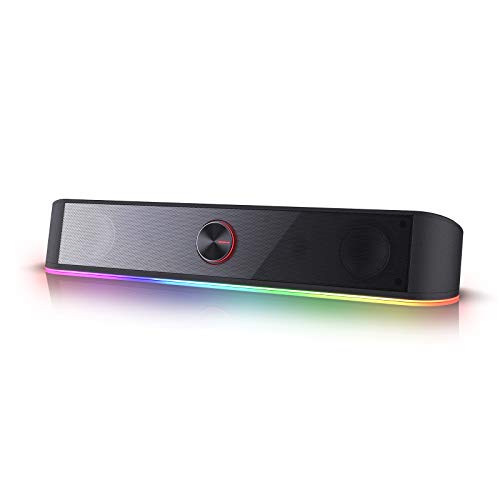

The best pc soundbars under $50 are the Cyber Acoustics CA-2890PRO for its clip-on monitor mount and 20W rating, the Redragon GS560 for RGB and a volume knob, and the ICOREBEI for USB-C and Bluetooth 5.3. All fit under a monitor and need no separate power brick.
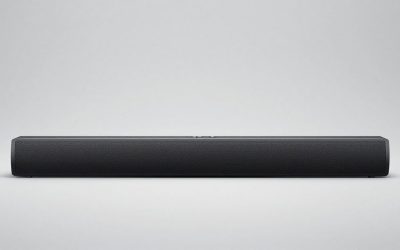
A PC soundbar is a slim, wide speaker that sits under or clips to a monitor, replacing a pair of bulky desktop speakers with one bar. At this price ceiling the options are mostly USB-powered 2.0 bars with a 3.5mm or USB input, and many add Bluetooth and RGB lighting.
Every model below is compared from listing specifications. Home office, small-space and gaming use are covered in the buying section and the FAQ, so you can weigh what the bar needs to do on your desk.
Quick Comparison
| Model | Key specs per listing | Best for |
|---|---|---|
| Cyber Acoustics CA-2890PRO Speaker Bar | 20W, USB and Bluetooth, clip-on monitor mount, speakerphone, plug-and-play | Office desks and video calls |
| Redragon GS560 RGB Desktop Soundbar | 2.0 channel, RGB audio-light sync, touch control, volume knob, USB powered, 3.5mm cable | Gaming desks that want lighting |
| ICOREBEI USB-C Bluetooth Soundbar | USB powered, USB-C, Bluetooth 5.3, hi-fi stereo, 3 RGB modes | Home office with a laptop |
| KASOHQEE Bluetooth Computer Speakers | USB powered, plug and play, Bluetooth 5.3, 3.5mm AUX, small size | Small desks and tight monitor gaps |
| LENRUE G11 Touch Lights PC Speakers | USB C or USB powered, AUX audio, touch lights | Laptops with USB-C and simple desks |
| Tylubio Under-Monitor LED Soundbar | Under-monitor design, flowing LED, Bluetooth and USB 2-in-1 input | Budget desks with lights |
The table uses only listing wording: power rating, connection type, Bluetooth version and lighting. Only the Cyber Acoustics listing gives a wattage and only the Redragon names a 2.0 channel layout, so other models are marked as not listed on those points in the picks below. Treat marketing phrases such as hi-fi or surge clear sound as seller language, not a measurement.
Cyber Acoustics CA-2890PRO Speaker Bar
As an Amazon Associate we earn from qualifying purchases at no extra cost to you.

Spec line: USB and Bluetooth speaker bar, 20W, large clip-on monitor mount design, control buttons with LED status, speakerphone, plug-and-play, for PC and Mac.
Cyber Acoustics is the most office-ready bar in the list. The listing gives a 20W rating, a clip-on monitor mount, LED status buttons and a speakerphone function, which suits video calls as well as music. The mount keeps the bar off the desk, saving space under the monitor, and USB plus Bluetooth means it works with a PC or a Mac and can also pair with a phone. It sits at the top of this price range, so you are paying for the mount and the call features. The listing does not say what monitors the clip supports, so check your bezel thickness.
- Pro: 20W rating listed
- Pro: Clip-on mount frees desk space
- Pro: Speakerphone for calls
- Con: Highest price in this group
- Con: Clip compatibility not detailed
Redragon GS560 RGB Desktop Soundbar
Spec line: 2.0 channel desktop soundbar with dynamic RGB lighting and audio-light sync, touch-control backlit panel with volume knob, USB powered with 3.5mm cable, black.
The Redragon is the gaming pick. The listing names a 2.0 channel layout, an RGB bar that syncs with the audio, a touch-control panel and a physical volume knob, which is useful when a touch control feels fiddly mid-game. Power comes over USB and audio over a 3.5mm cable, so setup is plug in and go with no Bluetooth pairing needed. It is a wired-only design as far as the listing text shows, so it will not pair with a phone. The listing gives no wattage, so do not assume it will fill a large room.
- Pro: Volume knob plus touch controls
- Pro: RGB lighting synced to audio
- Pro: USB power with 3.5mm audio
- Con: Wattage not listed
- Con: No Bluetooth named in the listing
ICOREBEI USB-C Bluetooth Soundbar
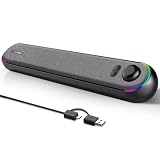
Spec line: USB-powered computer soundbar with USB-C, Bluetooth 5.3, stereo sound and 3 RGB modes, for Mac, laptop and monitor.
ICOREBEI aims at the home office and the laptop user. The listing names USB-C, Bluetooth 5.3 and three RGB modes, so it connects to a modern laptop with one cable or pairs wirelessly with a phone. It is described as a soundbar for a desktop or monitor, which makes it a reasonable all-round bar for work, music and the occasional game. Brand recognition is limited, and the listing states no wattage or driver size, so the sound quality claims remain unverified here. The RGB modes can usually be ignored if you prefer a plain desk.
- Pro: USB-C connection
- Pro: Bluetooth 5.3 listed
- Pro: Three lighting modes
- Con: Wattage not listed
- Con: Newer brand with less history
KASOHQEE Bluetooth Computer Speakers

Spec line: Small USB-powered computer speaker bar, plug and play, Bluetooth 5.3 and 3.5mm AUX input, sized to fit under the monitor.
KASOHQEE is the compact choice. The listing describes a small bar that fits under the monitor, with USB power, Bluetooth 5.3 and a 3.5mm AUX input for a wired fallback. That mix is handy on a small desk where you want one bar that works with both a PC and a phone. It names office work, gaming and music as uses, which is broad but unspecific. A small bar usually means limited bass, and the listing gives no wattage or driver detail, so treat it as a space-saving upgrade over laptop speakers rather than a full desktop speaker replacement.
- Pro: Small enough for tight monitor gaps
- Pro: Bluetooth 5.3 and AUX both listed
- Pro: Plug-and-play setup
- Con: Wattage not listed
- Con: Small size limits bass
LENRUE G11 Touch Lights PC Speakers

Spec line: Computer soundbar-style speakers with touch lights, USB-C or USB powered, AUX audio input, for desktop PC, laptop and desk.
LENRUE’s G11 is a straightforward desktop bar. The listing names touch lights, USB-C or USB power and an AUX audio input, so it can plug into a laptop, a desktop or a monitor with a headphone jack. The lights are a feature you can use or ignore. The listing makes a clear sound claim in marketing language, which we cannot verify, and gives no wattage or Bluetooth information in the text we saw. That makes it a fit for buyers who want a wired bar with simple controls and a lower price than the Bluetooth-heavy models above.
- Pro: USB-C or USB power
- Pro: AUX input for wired audio
- Pro: Touch light controls
- Con: No Bluetooth named
- Con: Wattage not listed
Tylubio Under-Monitor LED Soundbar

Spec line: Under-monitor soundbar with flowing LED, stereo sound, Bluetooth and USB 2-in-1 audio input, black, for monitor and laptop.
Tylubio is the lowest-cost bar in this group, and the listing describes an under-monitor design with a flowing LED and a Bluetooth and USB 2-in-1 input. That means one bar can serve a wired PC and a wireless phone without swapping cables. It is a good entry for someone replacing tinny monitor speakers on a tight budget. The compromise is the lack of detail: the listing gives no wattage, driver size or power spec in the text we saw, and the brand has little history. If you value proven build quality, step up to the Cyber Acoustics or Redragon.
- Pro: Bluetooth and USB inputs together
- Pro: Under-monitor form factor
- Pro: Low entry price within the ceiling
- Con: No power or driver spec listed
- Con: Little brand history
What a PC Soundbar Can and Cannot Replace
A soundbar under $50 improves on built-in monitor or laptop speakers by adding wider stereo spread and more volume, but it is not a replacement for a 2.1 system with a subwoofer. Bass will be limited because the bar has small drivers and no separate bass unit, so music lovers should set expectations accordingly.
Power and connection are the practical limits. Most bars here draw power over USB, which means you need a free USB port or a wall adapter, and audio goes in through a 3.5mm cable, USB or Bluetooth depending on the model. If your PC has few ports, check which connection the bar uses before ordering.
Another detail is placement. An under-monitor bar tilts toward your ears when it sits close to the screen, while a clip-on design like the Cyber Acoustics lifts the bar above the desk. Pick whichever matches your monitor stand height and keep the bar centred for the best stereo image.
Finally, consider noise and lighting. Bars with flowing or RGB lights can distract in a dark room or during video calls, so check whether the lights can be switched off or set to a single colour. Models with touch controls can register accidental taps, while a knob stays predictable. These small details separate bars that look similar on paper.
How to Choose PC Soundbars Under $50
Connection type
Pick by how the bar connects. A USB-C bar like ICOREBEI suits a modern laptop, a USB or 3.5mm bar suits a desktop, and Bluetooth 5.3 adds phone pairing. If you want one cable only, prefer a bar that takes power and audio from the same USB-C port.
Power and controls
Look for a stated wattage. 20W on the Cyber Acoustics is the only rating in this list, and everything else is not listed. A physical volume knob is easier to use during play than a touch panel, so the Redragon is a good fit for gamers.
Home office and small-space use
For a home office, a soundbar for home office use should have a speakerphone or clear mid range for calls, so the Cyber Acoustics fits best. For a small desk, pick the KASOHQEE or Tylubio, because compact bars leave room for a keyboard and notes.
Gaming use and the budget ceiling
For gaming, bars with RGB and a volume knob, such as the Redragon, give you easy control. Under $50 you will not get a real subwoofer, so if heavy bass matters, plan for a separate speaker or a headset instead and use the bar for general listening.
FAQ
Is a soundbar better than desktop speakers under $50?
A soundbar saves desk space and is simpler to set up, while a pair of speakers can sound wider. For most small desks, a bar is the more practical choice.
Do PC soundbars need a separate power supply?
Most budget bars draw power from USB, so no separate brick is needed. Check the listing for USB or USB-C power before you buy.
Can I use a PC soundbar with a phone?
Yes, if the listing names Bluetooth, as the ICOREBEI, KASOHQEE and Tylubio do. Wired-only bars such as the Redragon need a 3.5mm cable.
Are PC soundbars for small spaces loud enough?
Compact bars are enough for a desk or a small room, but they will not fill a large space. Check the wattage if the listing gives one.
Is a PC soundbar good for gaming?
It is a step up from monitor speakers and keeps the desk tidy. Competitive players often still prefer a headset for positional audio.
Last updated: November 2026
FAQ
Is a soundbar better than desktop speakers under $50?
Do PC soundbars need a separate power supply?
Can I use a PC soundbar with a phone?
Are PC soundbars for small spaces loud enough?
Is a PC soundbar good for gaming?
More from Amazon
Programs that pair well with the guide above. Offers and eligibility are set by Amazon and may change.
Free shipping on eligible items, Prime Video and more. Eligible new members can start with a free trial.
Start a Prime free trialAd-free music streaming. Eligible new subscribers can start with a free trial.
Try Music Unlimited freeA Prime membership for ages 18-24 with a trial period. Eligibility is set by Amazon.
See Prime for Young AdultsAudiobooks and podcasts to listen to on the go. Eligible new members can start with a free trial.
Try Audible freeAs an Amazon Associate we earn from qualifying purchases.