Key takeaways
- The best LED light strips for gaming setups compared: RGBIC desk strips, Matter and HomeKit options, with length, sync, brightness, and control explained.
A good LED strip softens the contrast between a bright monitor and a dark room, defines the edge of a desk or shelf, and gives a gaming setup a finished look without a major rebuild.
Strips that look similar can behave very differently once installed. Some show several colours along one length, while others show only one colour at a time. Some need a hub or a particular phone system, while others connect straight to Wi-Fi. Length, cutting points, and sync options all affect whether a strip fits a desk, a monitor, or a whole wall.
As an Amazon Associate, we earn from qualifying purchases.
Quick answer
For most gaming desks, choose the Govee RGBIC Gaming Lights for direct Razer Chroma sync and a flexible neon desk edge. Choose the LIFX strip for hub-free multi-zone colour, the Philips Hue Lightstrip Plus for a polished smart-home system, the Nanoleaf Essentials strip for Matter, and the Eve Light Strip for Apple Home.
How to choose
Start with placement and length. Measure the desk edge, monitor back, shelf, or wall where the strip will sit, and allow extra length for corners and cable runs. Check whether the strip can be cut, where the cutting points are, and how far it can be extended.
Next, decide how colour should behave. A standard RGB strip shows one colour along its whole length. An RGBIC or Polychrome strip divides the length into zones, so several colours can appear at once and gradients can move along the strip. That matters for gaming, because a zoned strip can mirror a scene or shift with music.
Control is the next decision. Some strips use an app and voice control over Wi-Fi, some use Bluetooth, and some use Zigbee, Thread, or Matter through a hub or border router. A hub-free strip is simpler to start with, but a hub-based system can unlock automations and remote control. Check the platform you already use before choosing.
Govee RGBIC Gaming Lights, 10ft Neon Rope Lights

The Govee RGBIC Gaming Lights are built around a desk edge. The neon-style silicone cover diffuses the light, so the strip reads as a smooth line rather than a row of separate points.
The Govee Home app offers 16 million DIY colours, 64 or more scene modes, and 11 music modes. The strip can sync with Razer Chroma and with the Govee AI Gaming Sync Box, although the sync box is sold separately. Control is through the app, Alexa, and Google Assistant, using 2.4 GHz Wi-Fi and Bluetooth. The strip is 10 feet long, can be cut at 12 points, and has a usable length between 7.03 feet and 10 feet. It cannot be spliced after cutting, so measure the desk before trimming.
Specs:
- Length: 10 feet, usable 7.03 to 10 feet after cutting
- Colour: RGBIC, 42 segments, 252 lamp beads
- Modes: 16 million DIY colours, 64 or more scenes, 11 music modes
- Sync: Razer Chroma and Govee AI Gaming Sync Box, sold separately
- Control: Govee Home app, Alexa, Google Assistant, 2.4 GHz Wi-Fi, Bluetooth
- Power: 24 volts DC, 36 watts
- Tier: mid-range
- ASIN: B0BXNCRPS1
Philips Hue Bluetooth Smart Lightstrip Plus 2m Base Kit

The Philips Hue Lightstrip Plus is the polished smart-home option in this guide. It is a 2 metre base kit that fits behind a monitor, under a shelf, or along a desk, and it is designed to grow with a Hue system. Its strength is consistency: one colour at a time, controlled through the Hue app, with voice control and a wide range of white light.
The published specifications list 1600 lumens from 50 light sources, with 10 watts of power at 120 volts. The base kit is 2 metres, or 6 feet, long, and it can be extended to 33 feet with extensions sold separately. Bluetooth allows direct control, while a Hue Bridge unlocks automations and remote control. The strip works with Alexa, Apple HomeKit, and Google Home, and the manufacturer lists a two-year warranty.
Specs:
- Length: 2 metres, or 6 feet, extendable to 33 feet
- Brightness: 1600 lumens from 50 light sources
- Colour: single-colour effect, millions of colours and shades of white
- Control: Hue app, Bluetooth, Alexa, Apple HomeKit, Google Home
- Hub: Hue Bridge for automations and remote control
- Power: 120 volts, 10 watts
- Warranty: two years
- Tier: premium
- ASIN: B08CKJWSFS
Nanoleaf Essentials Matter Lightstrip, 5m Smarter Kit

The Nanoleaf Essentials Matter Lightstrip is the Matter option in this guide. It is a 5 metre kit, listed as 200 inches, that connects through Matter over Bluetooth and Wi-Fi, so it can join Apple Home, Google Home, and other Matter-compatible platforms without a Nanoleaf hub.
The published specifications describe a multicolour strip with RGB and whites, 300 light sources, and 300 colour zones across the 16.4 foot length. The luminous flux is listed as 550 lumens, with white brightness listed as 541 lumens. Power is listed as 15 watts at 120 volts. The model number is NF085K03-5ALS, and the kit includes the lightstrip, controller, and power supply. The long length suits a wall or a large desk, but Matter setup needs a compatible Matter controller in the home.
Specs:
- Length: 5 metres, or 200 inches, listed as 16.4 feet
- Colour zones: 300 colour zones with 300 light sources
- Brightness: 550 lumens luminous flux
- Colour: RGB and whites with app and voice control
- Control: Matter, Bluetooth, and Wi-Fi, Apple Home and Google Home
- Power: 120 volts, 15 watts
- Tier: mid-range
- ASIN: B0D2Y9ZK1Y
LIFX Smart WiFi Light Strip, 6.6ft
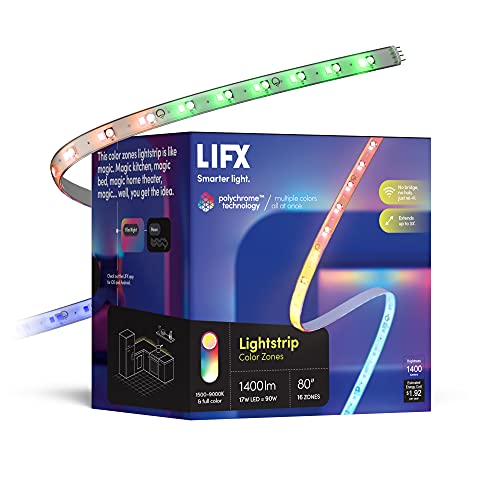
The LIFX Smart WiFi Light Strip is the hub-free multi-zone option in this guide. It connects directly over Wi-Fi, with no bridge or hub required, and it uses Polychrome Technology to show several colours along one strip.
The published specifications list a 6.6 foot kit made from two 39.37 inch sections, with 8 addressable zones and 16 light sources. The strip can be cut to length and extended to 32.8 feet with extension kits sold separately, up to a maximum of 10 LED strips. Brightness is listed as 1400 lumens, with 17 watts of power at 100 volts. The model number is LZHC2M1USUC07, and the kit includes the controller and power supply. Control is through the LIFX app and voice control, with Alexa, Google Home, and Siri listed as compatible.
Specs:
- Length: 6.6 feet from two 39.37 inch sections, extendable to 32.8 feet
- Colour zones: Polychrome Technology with 8 addressable zones
- Brightness: 1400 lumens
- Colours: millions of colours, cuttable and extendable
- Control: LIFX app and voice control, Alexa, Google Home, Siri, Wi-Fi
- Hub: none required
- Power: 100 volts, 17 watts
- Tier: premium
- ASIN: B091ZT4L78
Eve Light Strip, Apple HomeKit

The Eve Light Strip is the Apple Home option in this guide. It is built for households that use iPhone, iPad, and Apple Home, with HomeKit Adaptive Lighting that can adjust colour temperature through the day when a home hub is present. It is a bright, single-colour strip rather than a zoned strip, so it suits a steady glow behind a desk or monitor.
The published specifications list 1800 lumens, with 900 lumens per 3.3 feet at 4200K, from a triple-diode design with full-spectrum white and colour. The strip is 6.6 feet long, can be cut at 11.8 inch intervals, and can be extended to 32.8 feet with 6.6 foot extension strips sold separately. Power input is AC 100 to 240 volts at 50 or 60 Hz, with DC 24 volt, 24 watt output. The strip connects over 2.4 GHz Wi-Fi, with no bridge required for basic control.
Specs:
- Length: 6.6 feet, cuttable at 11.8 inch intervals, extendable to 32.8 feet
- Brightness: 1800 lumens, or 900 lumens per 3.3 feet at 4200K
- Colour: triple-diode full-spectrum white and colour
- Control: Apple Home, Siri, and the Eve app over 2.4 GHz Wi-Fi
- Hub: HomePod or Apple TV, fourth generation or later, for remote control and Adaptive Lighting
- Power: AC 100 to 240 volts input, DC 24 volts and 24 watts output
- Tier: premium
- ASIN: B07MTX8MR4
Who should skip
LED light strips are not the right upgrade for every gaming setup. Skip a strip if the desk is already crowded with cables, monitors, and accessories, because an extra controller, adapter, and cable run can make cable management harder. A strip also adds little value if the room is already bright, or if the monitor sits against a light-coloured wall in daylight, because the glow will be hard to see. Skip hub-based strips if you do not want another hub, bridge, or border router in the home, because a Hue strip without a Bridge, a Matter strip without a Matter controller, or an Eve strip without a HomePod or Apple TV will not deliver the automations and remote control that justify the choice. Also skip outdoor or damp-room use unless the published specifications list that use, because the strips in this guide are intended for indoor use.
FAQ
How long should an LED strip be for a gaming desk?
Measure the edge you want to light, then add a little extra for corners and cable runs. A 6.6 foot strip fits many desks and monitor backs, a 10 foot strip fits a larger desk edge, and a 16.4 foot strip fits a wall or a run across several shelves.
Do I need a hub for a smart LED light strip?
It depends on the strip. LIFX connects over Wi-Fi with no hub, while Philips Hue works over Bluetooth without a Bridge but needs a Bridge for automations and remote control. Nanoleaf Essentials uses Matter, so it needs a compatible Matter controller, and Eve needs a HomePod or Apple TV as a home hub for remote control and Adaptive Lighting.
What is the difference between RGB and RGBIC?
A standard RGB strip shows one colour along its whole length at a time. An RGBIC strip, or a Polychrome strip, divides the length into zones, so several colours can appear at once and gradients can move along the strip. Zoned strips suit gaming and music sync, while a single-colour strip suits a steady glow behind a monitor.
Can LED strips be cut or extended?
Some can, and some cannot. The Govee gaming strip in this guide can be cut at 12 points but cannot be spliced. The LIFX and Eve strips can be cut and extended with compatible kits sold separately. The Philips Hue and Nanoleaf strips can be extended with add-on sections.
Final verdict
The best LED light strip for a gaming setup depends on the desk, the platform, and the effect you want. For a gaming-first desk with Razer Chroma, the Govee RGBIC Gaming Lights are the most direct fit, with a diffused neon edge and segmented colour. For hub-free multi-zone colour and strong brightness, the LIFX strip is the strongest all-round choice. For a Hue home, the Philips Hue Lightstrip Plus is the most polished option, while the Nanoleaf Essentials strip is the best fit for a Matter home that needs a long, zoned run. For an Apple Home household, the Eve Light Strip offers the brightest white light and the cleanest HomeKit integration in this guide. Measure first.
FAQ
How long should an LED strip be for a gaming desk?
Do I need a hub for a smart LED light strip?
What is the difference between RGB and RGBIC?
Can LED strips be cut or extended?
More from Amazon
Programs that pair well with the guide above. Offers and eligibility are set by Amazon and may change.
Free shipping on eligible items, Prime Video and more. Eligible new members can start with a free trial.
Start a Prime free trialAd-free music streaming. Eligible new subscribers can start with a free trial.
Try Music Unlimited freeA Prime membership for ages 18-24 with a trial period. Eligibility is set by Amazon.
See Prime for Young AdultsAudiobooks and podcasts to listen to on the go. Eligible new members can start with a free trial.
Try Audible freeAs an Amazon Associate we earn from qualifying purchases.