Key takeaways
- Compare the best mini PCs for gaming, from quiet integrated-graphics boxes to discrete RTX models, with CPU, GPU, memory, storage and port guidance.
A gaming mini PC trades a tower for a box that fits on a desk, behind a monitor, or beside a television, while still running the games most people actually play. The best ones pair a modern processor with capable integrated graphics or a discrete graphics card, enough memory for smooth multitasking, and fast storage.
This guide compares five gaming mini PCs across budget, mid-range, and premium tiers, using published specifications for processor, graphics, memory, storage, connectivity, and expansion.
As an Amazon Associate, we earn from qualifying purchases.
Quick answer
For most gamers, the Beelink SER8 is the best starting point, with integrated Radeon 780M graphics for 1080p play in a small, quiet box. Choose the GEEKOM A8 for a stronger Ryzen 9 chip and larger storage, the GMKtec K8 Plus for OCuLink expansion, or a discrete-graphics model like the MINISFORUM G1 Pro or ASUS ROG NUC for demanding titles.
How to choose
Start with graphics, because graphics decide what a mini PC can play. Integrated graphics, such as AMD Radeon 780M, suit 1080p play at modest settings in competitive and indie titles, plus older games. A discrete card, such as an NVIDIA GeForce RTX 5060 or RTX 5070 Mobile GPU, suits demanding titles at higher settings. If your library is mostly demanding new releases, choose discrete graphics.
Next, look at processor and memory. An eight-core Ryzen 7 or Ryzen 9 chip handles gaming alongside streaming, voice chat, and a browser. Thirty-two gigabytes of DDR5 is the sensible baseline here, leaving room for a game, a browser, and background apps at the same time. Soldered memory cannot be replaced later, while SODIMM slots let you add memory yourself.
Storage should be fast and roomy. A one terabyte PCIe 4.0 NVMe SSD is a good starting point, and a two terabyte drive is better if you keep several large games installed. Two M.2 slots make later expansion simple.
Ports decide how the machine fits your desk. HDMI and DisplayPort cover monitors and televisions, while USB4 adds a fast port for storage, a dock, or an external graphics enclosure. OCuLink is a dedicated external graphics link on some models, offering a more direct path to an external graphics card than USB4. Count the USB ports you need for keyboard, mouse, headset, and controller. Finally, measure the space where the machine will sit, including room for cables and airflow. Most models here ship with Windows 11 Pro or Windows 11 Home pre-installed, while barebone versions ship without memory, storage, or an operating system.
Beelink SER8

The Beelink SER8 is the budget pick and the best starting point for most gamers. It pairs an AMD Ryzen 7 8745HS processor, with eight cores and sixteen threads and a boost clock of up to 4.9GHz, with AMD Radeon 780M integrated graphics, aimed at 1080p play at modest settings.
The listed configuration includes 32GB of DDR5 memory and a 1TB PCIe 4.0 SSD, with dual M.2 slots and published support for up to 8TB of total storage. Display output covers three displays through HDMI 2.1, DisplayPort 1.4, and USB4, with published support for 4K at 144Hz. Windows 11 Pro is pre-installed. Its main limit is shared by every integrated-graphics model here: demanding new titles will need lower settings.
- Processor: AMD Ryzen 7 8745HS, 8 cores and 16 threads, up to 4.9GHz
- Graphics: AMD Radeon 780M, 12 cores at 2600MHz
- Memory: 32GB DDR5, expandable to 256GB
- Storage: 1TB PCIe 4.0 SSD, dual M.2 slots, up to 8TB total
- Displays: HDMI 2.1, DisplayPort 1.4, and USB4, triple display
- Connectivity: Wi-Fi 6, Bluetooth 5.2, 2.5G LAN, USB4
- Operating system: Windows 11 Pro
- ASIN: B0DKF15XQJ
GEEKOM A8
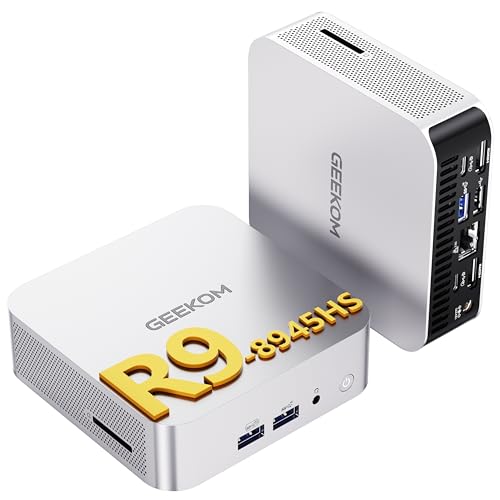
The GEEKOM A8 is the mid-range pick for gamers who want a stronger processor and more storage in a very small box. It uses an AMD Ryzen 9 8945HS processor, with eight cores and sixteen threads and a boost clock of up to 5.2GHz, paired with AMD Radeon 780M integrated graphics. The published design measures 112.4 by 112.4 by 37mm, with a volume of 0.47 liters.
The listed configuration includes 32GB of DDR5 memory at 5600MHz and a 2TB PCIe 4.0 NVMe SSD, leaving room for a larger game library. Published specifications list storage expansion up to 4TB, and the memory uses SODIMM slots, so it can be replaced later. Display output covers four displays through USB4 and two HDMI ports, with published support for up to 8K resolution. Windows 11 Pro is pre-installed.
- Processor: AMD Ryzen 9 8945HS, 8 cores and 16 threads, up to 5.2GHz
- Graphics: AMD Radeon 780M
- Memory: 32GB DDR5 at 5600MHz, SODIMM slots
- Storage: 2TB PCIe 4.0 NVMe SSD, expandable up to 4TB
- Displays: Quad display through USB4 and HDMI, up to 8K
- Connectivity: Wi-Fi 6E, 2.5G LAN, USB4, SD card slot
- Operating system: Windows 11 Pro
- ASIN: B0G3NQLLVN
GMKtec NucBox K8 Plus

The GMKtec NucBox K8 Plus is the mid-range pick for gamers who want an external graphics option built in. It uses an AMD Ryzen 7 8845HS processor, with eight cores and sixteen threads and a boost clock of up to 5.1GHz, paired with AMD Radeon 780M integrated graphics. The OCuLink port gives you a dedicated link for an external graphics card, a more direct upgrade path than USB4 alone.
The listed configuration includes 32GB of DDR5 memory and a 1TB PCIe 4.0 SSD, with dual M.2 slots and published support for up to 8TB of total storage. Display output includes HDMI 2.1 and DisplayPort 2.1, plus two USB4 ports. Connectivity includes dual 2.5G LAN ports, Wi-Fi 6, and Bluetooth 5.2. Windows 11 Pro is pre-installed. The box is larger than the palm-sized models here, so measure your desk space first.
- Processor: AMD Ryzen 7 8845HS, 8 cores and 16 threads, up to 5.1GHz
- Graphics: AMD Radeon 780M, 12 cores
- Memory: 32GB DDR5
- Storage: 1TB PCIe 4.0 SSD, dual M.2 slots, up to 8TB total
- Displays: HDMI 2.1, DisplayPort 2.1, and USB4
- Connectivity: Dual 2.5G LAN, Wi-Fi 6, Bluetooth 5.2, OCuLink, dual USB4
- Operating system: Windows 11 Pro
- ASIN: B0DHNTW3H6
MINISFORUM G1 Pro

The MINISFORUM G1 Pro is the premium discrete-graphics pick for gamers who want a real graphics card in a console-sized box. It pairs an AMD Ryzen 9 8945HX processor, with sixteen cores and thirty-two threads and a boost clock of up to 5.4GHz, with a desktop-class NVIDIA GeForce RTX 5060 graphics card with 8GB of GDDR7 memory. Minisforum describes the card as a 145W low-profile desktop implementation, and lists a 350W internal power supply.
The listed configuration includes 32GB of DDR5 memory and a 1TB PCIe 4.0 SSD, with two M.2 slots and published support for up to 96GB of memory. Display output covers four displays through two HDMI ports and two DisplayPort 2.1 ports, plus a further DisplayPort 1.4 output. Connectivity includes 5GbE wired networking, Wi-Fi 7, and Bluetooth 5.4. The chassis is listed at about 3.8 liters, far smaller than a tower, and it uses an internal power supply, so there is no large external brick on the desk.
- Processor: AMD Ryzen 9 8945HX, 16 cores and 32 threads, up to 5.4GHz
- Graphics: NVIDIA GeForce RTX 5060, 8GB GDDR7, desktop-class low-profile
- Memory: 32GB DDR5, expandable to 96GB
- Storage: 1TB PCIe 4.0 SSD, two M.2 slots
- Displays: Two HDMI, two DisplayPort 2.1, plus DisplayPort 1.4, quad 4K
- Connectivity: 5GbE LAN, Wi-Fi 7, Bluetooth 5.4
- Chassis: About 3.8 liters, 350W internal power supply
- ASIN: B0GHYMV62Q
ASUS ROG NUC (2025)

The ASUS ROG NUC (2025) is the premium pick for gamers who want a polished, brand-name discrete-graphics mini PC. It pairs an Intel Core Ultra 9 275HX processor with an NVIDIA GeForce RTX 5070 Mobile GPU, with 32GB of DDR5 memory at 6400MHz and a 1TB NVMe SSD. The model number is RNUC15JNK9X489AU, and it ships with Windows 11 Home.
The chassis is listed at about three liters, with triple-fan cooling and ARGB lighting, and it supports five 4K displays. Thunderbolt 4 is included, alongside HDMI and DisplayPort outputs. Published specifications list a 330W external power adapter, so plan desk space for the brick as well as the box. Memory is listed as expandable to 96GB.
- Processor: Intel Core Ultra 9 275HX
- Graphics: NVIDIA GeForce RTX 5070 Mobile GPU
- Memory: 32GB DDR5 at 6400MHz, expandable to 96GB
- Storage: 1TB NVMe SSD
- Displays: Five 4K displays, Thunderbolt 4, HDMI, DisplayPort
- Cooling: Triple-fan cooling, ARGB lighting
- Power: 330W external adapter
- Operating system: Windows 11 Home
- ASIN: B0FLBYKK6Q
Who should skip
Skip a gaming mini PC if you want the highest frame rates at 4K in demanding titles, because a tower with a full desktop graphics card and larger cooling will serve that goal better. Skip a discrete-graphics mini PC if your library is mostly competitive and indie games, because integrated graphics can handle those titles in a smaller, quieter box.
Skip a barebone configuration if you do not already own compatible memory, storage, and an operating system licence. Skip any model whose display outputs do not match your monitor, or whose USB count leaves your peripherals short of ports. Skip a model with soldered memory if you expect to upgrade later, and skip upgrading at all if your current machine already runs your games smoothly.
FAQ
Can a mini PC run demanding games?
Yes, if it has discrete graphics. A mini PC with an RTX 5060 or RTX 5070 Mobile GPU is built for demanding titles at higher settings, while a Radeon 780M model suits 1080p play at modest settings in lighter games. Match the graphics to the games you play most.
How much memory and storage should a gaming mini PC have?
Thirty-two gigabytes of DDR5 memory and a one terabyte PCIe 4.0 SSD are a good baseline for gaming alongside a browser and background apps. A two terabyte drive is better if you keep several large games installed.
Is OCuLink better than USB4 for an external graphics card?
OCuLink is a dedicated external graphics link, and it offers a more direct path to an external graphics card than USB4, which shares its bandwidth with other uses. USB4 is more widely available and still supports an external graphics enclosure, fast storage, and a dock.
Do I need a separate monitor, keyboard, and mouse?
Yes, in most cases. A gaming mini PC is the computer only, so you will need a display, keyboard, mouse, and headset or speakers, unless you already own them. Check the display outputs and USB ports before you order.
Final verdict
For most gamers, the Beelink SER8 is the best starting point in this guide. Its Ryzen 7 8745HS processor, Radeon 780M graphics, 32GB of DDR5 memory, and 1TB SSD cover 1080p play in competitive and indie titles in a small, quiet box. If you want a stronger processor and more storage, the GEEKOM A8 is the mid-range step up, with a Ryzen 9 8945HS chip and a 2TB drive.
If you plan to add an external graphics card later, the GMKtec NucBox K8 Plus is the sensible choice, because its OCuLink port gives you a dedicated upgrade path. For demanding titles today, choose discrete graphics: the MINISFORUM G1 Pro pairs a sixteen-core Ryzen 9 chip with a desktop-class RTX 5060, while the ASUS ROG NUC (2025) pairs a Core Ultra 9 chip with an RTX 5070 Mobile GPU.
FAQ
Can a mini PC run demanding games?
How much memory and storage should a gaming mini PC have?
Is OCuLink better than USB4 for an external graphics card?
Do I need a separate monitor, keyboard, and mouse?
More from Amazon
Programs that pair well with the guide above. Offers and eligibility are set by Amazon and may change.
Free shipping on eligible items, Prime Video and more. Eligible new members can start with a free trial.
Start a Prime free trialAd-free music streaming. Eligible new subscribers can start with a free trial.
Try Music Unlimited freeA Prime membership for ages 18-24 with a trial period. Eligibility is set by Amazon.
See Prime for Young AdultsAudiobooks and podcasts to listen to on the go. Eligible new members can start with a free trial.
Try Audible freeAs an Amazon Associate we earn from qualifying purchases.