
Our Short List of 3

- Best for: A family network where several streams run every evening.
- Wi-Fi 6 dual-band AX5400
- OFDMA
- MU-MIMO
- HomeShield

- Best for: Bigger floor plans where the buffering screen is the far one.
- Wi-Fi 6 dual-band AX5400
- Up to 5.4 Gbps as listed
- 6-stream design
- Coverage: 2,500 sq. ft. as stated in the listing title
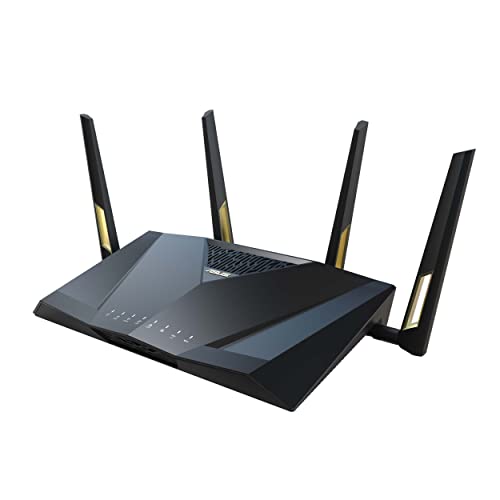
- Best for: Homes that can wire most screens and want ports to spare.
- AX6000 dual-band Wi-Fi 6
- Dual 2.5G ports
- Eight LAN ports
- Adaptive QoS
All 4 Picks at a Glance
| Product | Specs | Action |
|---|---|---|
| TP-Link Archer AX73 |
| Check price on Amazon |
| NETGEAR Nighthawk RAX50 |
| Check price on Amazon |
| ASUS RT-AX88U Pro |
| Check price on Amazon |
 GL.iNet Flint 2 (GL-MT6000) |
| Check price on Amazon |
Our Top Picks
A router that copes with one 4K stream can still fall apart at eight in the evening, when three televisions, a game download and a video call all compete for the same airtime. For a heavy streaming household, the buying decision is about sustained load rather than headline speed: how the router organises many simultaneous streams, how many wired ports remain free for the TV and console, and whether the firmware hands you traffic controls for the moments the network gets busy.
This roundup serves multi-screen homes, cord-cutters who stream everything they watch, and players who game while the rest of the house is watching something else. The four picks were selected from the names and specification fields on their Amazon listings, and they sit in one deliberate class, dual-band Wi-Fi 6 models in the AX5400 to AX6000 range, chosen for stream handling instead of flagship extras a streaming household may never touch.
Quick Picks
As an Amazon Associate we earn from qualifying purchases
| Product | Best for | Key spec from title |
|---|---|---|
| TP-Link Archer AX73 | A streaming-first family network | AX5400 Wi-Fi 6 with OFDMA and MU-MIMO |
| NETGEAR Nighthawk RAX50 | Larger floor plans with many screens | AX5400 6-stream design, 2,500 sq. ft. coverage as listed |
| ASUS RT-AX88U Pro | Wiring every screen and console directly | AX6000 with dual 2.5G ports and eight LAN ports |
| GL.iNet Flint 2 (GL-MT6000) | Tinkerers who want VPN and OpenWrt control | AX6000 with 2 x 2.5G Ethernet and pre-installed OpenWrt |
How to Choose
Count Streams, Not Just Speed
A streaming household loads a router with sessions, not with one big download. Look for the technologies the listings name for exactly this job: OFDMA and MU-MIMO let the router talk to several devices in the same moment instead of queueing them, and a stated stream count, such as the six-stream design on the NETGEAR listing, tells you how the hardware is organised. A multi-core processor also appears in these listings because juggling dozens of active sessions is processing work, not just radio work.
Wire the Screens That Never Move
The cheapest congestion fix is a cable. Televisions, streaming boxes and consoles sit in fixed spots, so every one you wire is a device no longer fighting for airtime, and the wireless capacity left over goes to phones and laptops. That makes the LAN port count a streaming feature, not a footnote: the ASUS in this list carries eight LAN ports plus dual 2.5G ports, while the GL.iNet pairs two 2.5G ports with four gigabit ports. Count your fixed screens before choosing, and leave a port spare.
Look for Traffic Controls You Will Actually Use
When the network does saturate, firmware decides who waits. Adaptive QoS, named in the ASUS listing, lets you prioritise a stream or a game over background traffic. Security suites matter on a network full of televisions and sticks that rarely get updated: TP-Link lists HomeShield on the AX73, and ASUS lists lifetime AiProtection in its title. These are listing-stated features rather than performance promises, but on a streaming network they are the difference between managing congestion and just enduring it.
Be Honest About How Much Setup You Want
The four listings split into two temperaments. The TP-Link and NETGEAR models aim at guided setup and a managed app experience, which suits a household that wants the router forgotten once it works. The GL.iNet Flint 2 ships with OpenWrt pre-installed and adds OpenVPN, WireGuard and AdGuard Home, which rewards a buyer who enjoys configuring things and punishes one who does not. Pick the temperament you will still be happy with during the second hour of setup, not the first ten minutes.
The 4 Best Options
TP-Link Archer AX73
- Best for: A family network where several streams run every evening.
- Wi-Fi 6 dual-band AX5400
- OFDMA
- MU-MIMO
- HomeShield
A family network where several streams run every evening.
It is dual-band only, so every stream shares two bands; a household that later wants a dedicated 6 GHz band will be shopping again.
TP-Link’s own listing title for the AX73 ends with the words “for Streaming”, and the specification fields back the positioning: OFDMA and MU-MIMO for simultaneous device handling, six antennas for coverage, and a 1.5 GHz triple-core processor to run the session load. For a family whose evenings are three televisions, two phones and a tablet deep, this is the balanced default in the group, a dual-band AX5400 design that spends its specification on stream organisation rather than on a third band or a gaming badge.
NETGEAR Nighthawk RAX50
- Best for: Bigger floor plans where the buffering screen is the far one.
- Wi-Fi 6 dual-band AX5400
- Up to 5.4 Gbps as listed
- 6-stream design
- Coverage: 2,500 sq. ft. as stated in the listing title
Bigger floor plans where the buffering screen is the far one.
Coverage figures are the maker’s own listing claim, and walls, floors and neighbouring networks decide what you actually get.
The RAX50 approaches the same problem from the coverage side. Its listing describes a six-stream AX5400 design with speeds up to 5.4 Gbps and states coverage of 2,500 square feet, which speaks to the larger home where the far bedroom’s television is the one that buffers. If your streaming pain is a weak-signal room rather than a crowded network, this is the pick shaped for it. The model number in the listing is RAX50-100NAS, worth matching at checkout because NETGEAR sells several lookalike Nighthawk variants in the same class.
ASUS RT-AX88U Pro
- Best for: Homes that can wire most screens and want ports to spare.
- AX6000 dual-band Wi-Fi 6
- Dual 2.5G ports
- Eight LAN ports
- Adaptive QoS
Homes that can wire most screens and want ports to spare.
The non-Pro RT-AX88U is a separate model with a similar name, so confirm the word Pro appears in the listing title before ordering.
The AX88U Pro is the wired household’s router. Its listing states AX6000 dual-band Wi-Fi 6, dual 2.5G ports and an eight-LAN-port layout, so the television, the console, the streaming box and a desktop can all leave the wireless network entirely. Adaptive QoS gives you a lever when something has to win, AiMesh support lets the unit anchor a future mesh, and the title lists lifetime AiProtection security. Make sure the listing you order from says Pro, because ASUS also sells a non-Pro AX88U that is a different, older model.
GL.iNet Flint 2 (GL-MT6000)
- Best for: Buyers who want router-level VPN and open firmware alongside streaming duty.
- Wi-Fi 6 AX6000: 1148 Mbps on 2.4 GHz plus 4804 Mbps on 5 GHz per the listing
- 2 x 2.5G Ethernet ports and 4 x 1G Ethernet ports
- OpenVPN and WireGuard client and server
- OpenWrt pre-installed
Buyers who want router-level VPN and open firmware alongside streaming duty.
OpenWrt flexibility means more settings under your control, so allow real setup time instead of expecting a ten-minute guided install.
The Flint 2 is the control enthusiast’s streaming router. The listing states AX6000 Wi-Fi 6, split as 1148 Mbps on the 2.4 GHz band and 4804 Mbps on the 5 GHz band, plus two 2.5G Ethernet ports and four gigabit ports for the wired screens. What sets it apart is the software: OpenWrt comes pre-installed, OpenVPN and WireGuard run as client or server, and AdGuard Home is included for network-level filtering. Streaming households that also want a VPN on the router itself, rather than per device, will find this the only listing here built that way.
Which One Fits Your Situation
Three or Four Streams Run Every Night
Start with the Archer AX73. Its listing names the exact tools for the job, OFDMA and MU-MIMO, backs them with a triple-core processor, and says “for Streaming” in the title itself. It is the least specialised and most balanced answer here when the problem is simply that everything is on at once.
The Buffering Screen Is the One Down the Hall
Take the NETGEAR RAX50. The six-stream design and the 2,500 square foot coverage figure in its listing address distance as much as load, which fits a house where the router cannot move but the struggling television is two rooms and a floor away from it.
You Can Run Cables to the TV and Console
Choose the ASUS RT-AX88U Pro and wire everything that does not move. Eight LAN ports plus dual 2.5G ports take the heaviest screens off the wireless network completely, Adaptive QoS arbitrates what remains, and AiMesh support leaves a door open if a dead spot appears later.
You Want the Router Itself to Run a VPN
The GL.iNet Flint 2 is your model. OpenWrt out of the box, WireGuard and OpenVPN at the router level, and AdGuard Home filtering give you control the managed apps on the other listings do not offer, while the AX6000 class and 2.5G ports keep the streaming side properly equipped.
Common Mistakes
- Shopping by the biggest speed number in the title, when a streaming household’s bottleneck is simultaneous sessions, not one device’s peak rate.
- Leaving televisions and consoles on Wi-Fi out of habit when a cable run would remove them from the contention entirely.
- Buying a tri-band or Wi-Fi 7 flagship for streaming alone, then never using the extra band or features the money bought.
- Ordering the non-Pro ASUS AX88U by mistake because the names differ by one word.
- Putting the router in a cabinet or behind the television, then blaming the model for the weak signal at the far end of the house.
Frequently Asked Questions
How many streams can these routers handle at once?
There is no single honest number, because a 4K stream, an HD stream and a music stream load a router very differently. What the listings do state is the machinery for the job: OFDMA, MU-MIMO, stream counts and multi-core processors. Several concurrent HD and 4K streams sit comfortably inside the AX5400 to AX6000 class all four of these models occupy.
Is Wi-Fi 6 enough for streaming, or do I need Wi-Fi 7?
For streaming itself, Wi-Fi 6 in this class is enough, since a single 4K stream uses only a fraction of what these routers list. Wi-Fi 7 buys headroom for very dense device counts and future laptops and phones. A household replacing a router purely because streams buffer will solve that problem with any model in this roundup.
Should the television be wired even with a strong router?
Yes, whenever the cable run is practical. A wired television never competes for airtime, never suffers interference from a neighbour’s network, and frees wireless capacity for the devices that genuinely move around. It is also why the LAN port counts on the ASUS and GL.iNet listings matter to a streaming household.
What does QoS actually do for streaming?
QoS lets the router decide whose traffic goes first when the connection is saturated. With Adaptive QoS, as listed on the ASUS model, you can favour a live stream or a game over a background download, so the download slows down instead of the picture dropping quality. It cannot create bandwidth, but it spends the bandwidth you have more sensibly.
FAQ
How many streams can these routers handle at once?
Is Wi-Fi 6 enough for streaming, or do I need Wi-Fi 7?
Should the television be wired even with a strong router?
What does QoS actually do for streaming?
More from Amazon
Programs that pair well with the guide above. Offers and eligibility are set by Amazon and may change.
Free shipping on eligible items, Prime Video and more. Eligible new members can start with a free trial.
Start a Prime free trialAd-free music streaming. Eligible new subscribers can start with a free trial.
Try Music Unlimited freeA Prime membership for ages 18-24 with a trial period. Eligibility is set by Amazon.
See Prime for Young AdultsAudiobooks and podcasts to listen to on the go. Eligible new members can start with a free trial.
Try Audible freeAs an Amazon Associate we earn from qualifying purchases.









