Key takeaways
- Compare genuine Apple Studio Display and Pro Display XDR with Mac-ready 5K and 4K monitors from LG, Samsung and BenQ, with clear specs and buying advice.
As an Amazon Associate we earn from qualifying purchases.
If you search for the best Apple monitors, it helps to start with an honest fact: Apple itself makes very few standalone displays. At the time of writing, the genuine Apple lineup for a Mac desk is essentially two models — the Apple Studio Display and the Apple Pro Display XDR. Everything else sold as an “Apple monitor” is not made by Apple at all. It is a monitor from another brand that is positioned for Mac users, usually because it offers Thunderbolt or USB-C connection, macOS compatibility, P3 wide colour, or controls that work from a Mac keyboard.
This guide keeps those groups separate. The first two picks are genuine Apple displays. The remaining three are monitors for Mac from LG, Samsung and BenQ, each chosen because its manufacturer or listing explicitly positions it for Mac. All five are monitors that connect over Thunderbolt or USB-C.
Disclosure: This article contains affiliate links to Amazon. If you buy through those links, the site may earn a commission at no additional cost to you.
Quick picks
- Best genuine Apple monitor for most Mac users — Apple Studio Display (B09V3GZD32): 27-inch 5K Retina, standard glass, tilt-adjustable stand, built-in camera, microphones and six-speaker system.
- Best genuine Apple monitor for professional HDR work — Apple Pro Display XDR (B0DZDDQBTW): 32-inch Retina 6K, standard glass, P3 wide colour and reference-oriented design for demanding colour workflows.
- Best 5K monitor for Mac from another brand — LG UltraFine 5K 27MD5KL-B (B0852QDNN9): 27-inch 5K with macOS compatibility and Thunderbolt 3, developed in the UltraFine line long associated with Mac desks.
- Best 5K alternative with a matte screen and camera — Samsung ViewFinity S9 (B0CB71BY87): 27-inch 5K, matte display, 4K SlimFit camera, Thunderbolt 4 and Apple AirPlay.
- Best 4K monitor built specifically for MacBook — BenQ MA270U (B0DBB63XGC): 27-inch 4K monitor for MacBook Pro and Air, with Mac colour matching, dual USB-C and brightness and volume control from the Mac.
Genuine Apple displays
1. Apple Studio Display — Standard Glass, Tilt-Adjustable Stand (B09V3GZD32)
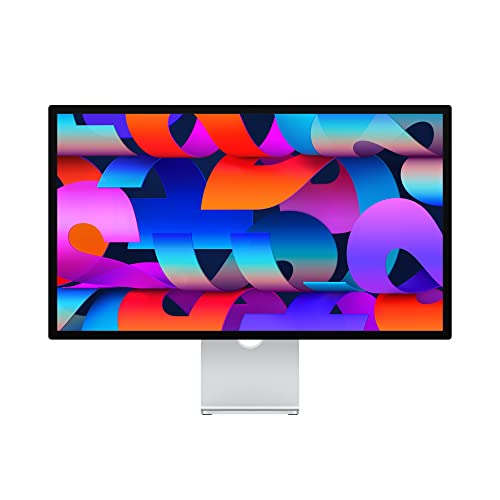
The Apple Studio Display is the genuine Apple monitor most Mac owners should look at first. This listing is the standard glass version with the tilt-adjustable stand, and that variant detail matters, because the Studio Display is also sold with nano-texture glass and with other stand or VESA configurations under different listings. Check the glass and stand in the listing title before you order any Studio Display, so the version in your basket matches the version you intended to buy.
The panel is a 27-inch 5K Retina display at 5120 x 2880 and 218 pixels per inch, with 600 nits of brightness, P3 wide colour, one billion colours and True Tone. That density matters because macOS is designed around Retina scaling, so a 27-inch 5K panel renders text and interface elements cleanly without the softness of lower-resolution screens.
It is also more than a panel. It includes a 12MP Ultra Wide camera with Center Stage, a three-microphone array and a six-speaker system with force-cancelling woofers and Spatial Audio with Dolby Atmos. A Thunderbolt 3 port provides up to 96W of host charging, plus three downstream USB-C ports at up to 10Gb/s. An A13 Bionic chip powers camera and audio processing, so one cable handles picture, charging and a small hub role.
Specifications
- Size and resolution: 27-inch, 5120 x 2880, 218 ppi
- Brightness and colour: 600 nits, P3 wide colour, True Tone, one billion colours
- Glass and stand on this listing: standard glass, tilt-adjustable stand
- Camera and audio: 12MP Ultra Wide camera with Center Stage, three-microphone array, six-speaker system
- Ports: Thunderbolt 3 with up to 96W host charging, three USB-C ports up to 10Gb/s
- Refresh rate: 60Hz
Pros
- Genuine Apple display with the exact 5K scaling macOS handles best
- Camera, microphones and speakers are built in, reducing desk clutter
- Single Thunderbolt connection also charges a MacBook
Cons
- Only one video input, with no HDMI or DisplayPort connector
- 60Hz refresh rate, so it is not aimed at high-refresh gaming
- Stand and glass choices are fixed by the listing variant you buy
View the Apple Studio Display on Amazon
2. Apple Pro Display XDR — Standard Glass (B0DZDDQBTW)

The Apple Pro Display XDR is Apple’s larger, professional genuine display. This listing is the standard glass version. As with the Studio Display, confirm the glass type in the listing before ordering, because a nano-texture glass version is sold separately, and confirm how you plan to mount or stand the display, because the Pro Display XDR buying decision has always involved choosing the right stand or mount arrangement for your desk.
The screen is a 32-inch Retina 6K display at 6016 x 3384, designed for professional work where colour control matters: P3 wide colour, True Tone and reference modes. The larger canvas gives timelines and multi-window layouts more room, and 6K keeps that space sharp rather than simply bigger.
Unlike the Studio Display, the Pro Display XDR focuses on the panel itself rather than on being an all-in-one hub. Choose the Studio Display for built-in camera, microphones and speakers. Choose the Pro Display XDR for the larger 6K panel, if you already handle audio, calls and mounting separately.
Specifications
- Size and resolution: 32-inch, 6016 x 3384 Retina 6K
- Colour: P3 wide colour, True Tone, reference modes for professional workflows
- Glass on this listing: standard glass
- Connection: Thunderbolt 3 over USB-C
- Focus: professional colour and HDR-oriented studio work
Pros
- Largest and highest-resolution genuine Apple standalone display in this guide
- Built for colour-critical professional workflows and reference modes
- Extra screen area suits timelines, large canvases and dense multi-window work
Cons
- No built-in camera and speaker system in the way the Studio Display offers them
- Stand and mounting need careful checking before purchase
- Far more screen than most home and office Mac users need
View the Apple Pro Display XDR on Amazon
Monitors for Mac from other brands
The three monitors below are not Apple products, and this guide does not present them as Apple products. They are included because their listings and manufacturer material explicitly position them for Mac: macOS compatibility, Thunderbolt connection for a Mac, Apple AirPlay, or design and controls built specifically around a MacBook.
3. LG UltraFine 5K Display 27MD5KL-B (B0852QDNN9)

The LG UltraFine 5K has one of the longest associations with the Mac of any third-party display. LG describes the 27MD5KL-B as a 27-inch class 5K IPS monitor with macOS compatibility, and the Amazon listing presents it as an UltraFine 5K UHD monitor for Apple Mac. That explicit Mac positioning, rather than general monitor quality alone, is why it belongs in this guide.
The panel delivers 5120 x 2880 resolution at 218 pixels per inch, the same pixel density class as the Studio Display, with 500 nits of brightness and P3 wide colour coverage listed at 99 percent. Connection is through Thunderbolt 3, which carries the 5K picture, data and charging for a compatible MacBook over a single cable, with up to 94W of power delivery listed for this model. LG also includes a built-in camera and speakers, which keeps a MacBook or Mac mini desk simpler than a panel that needs every accessory added separately.
For Mac users who want true 5K scaling without a genuine Apple display, this is the most direct alternative: a 5K, Thunderbolt, macOS-compatible panel made as a companion for a Mac.
Specifications
- Size and resolution: 27-inch IPS, 5120 x 2880, 218 ppi
- Brightness and colour: 500 nits, 99 percent DCI-P3
- Connection: Thunderbolt 3 and USB-C, with up to 94W charging for a connected MacBook
- Mac positioning: macOS compatibility stated by LG and in the listing
- Extras: built-in camera and speakers
Pros
- True 5K resolution matched to macOS Retina scaling
- Thunderbolt 3 connection designed around Mac use
- Built-in camera and speakers reduce extra desk hardware
Cons
- Older design than the newest 5K rivals
- No HDMI-focused console or PC gaming feature set
- Check the exact renewed or new condition shown on the listing you open
View the LG UltraFine 5K on Amazon
4. Samsung ViewFinity S9 5K (B0CB71BY87)

The Samsung ViewFinity S9 is Samsung’s direct answer to the 5K Mac monitor idea. The listing describes a 27-inch ViewFinity S9 Series 5K computer monitor with Thunderbolt 4, DisplayPort, a matte display, a 4K SlimFit camera and a slim metal design, and it adds Apple AirPlay and smart features. Samsung’s material also notes Mac compatibility for the Thunderbolt 4 and DisplayPort connection, including support focused on Mac computers with Apple silicon. That combination of 5K resolution, Thunderbolt and explicit Apple features earns it a place here.
The panel is 27 inches with 5120 x 2880 resolution, a matte finish that helps in bright rooms, and 99 percent DCI-P3 colour coverage. The detachable 4K SlimFit camera handles video calls without a separate webcam, and AirPlay lets an Apple device mirror or extend wirelessly when a cable is not convenient. Thunderbolt 4 gives the wired Mac connection, while DisplayPort widens compatibility with other computers in a mixed desk setup.
Consider it if you want a matte screen and a monitor that can also serve a second, non-Mac machine. Read the Mac compatibility notes carefully, because Samsung states support limits for some Mac models and macOS versions.
Specifications
- Size and resolution: 27-inch, 5120 x 2880, matte display
- Colour: 99 percent DCI-P3
- Camera: 4K SlimFit camera included in the listing description
- Ports: Thunderbolt 4 and DisplayPort, plus Mini DisplayPort in Samsung’s specification material
- Apple features: Apple AirPlay, smart TV apps and Gaming Hub listed by Samsung
Pros
- 5K sharpness with a matte finish for bright rooms
- Thunderbolt 4 plus DisplayPort suits a mixed Mac and PC desk
- AirPlay and a bundled 4K camera add flexibility beyond a basic panel
Cons
- Mac support notes include limits for some models, so check your exact Mac
- Smart features are unnecessary if you only want a simple display
- Design and software approach differ from Apple’s minimal setup
View the Samsung ViewFinity S9 on Amazon
5. BenQ MA270U — 4K Monitor for MacBook Pro and Air (B0DBB63XGC)

The BenQ MA270U is the clearest example in this guide of a third-party monitor designed from the start for Mac users. Its listing title calls it a 27-inch 4K monitor for MacBook Pro and Air, with Mac colour matching, dual USB-C, a USB hub, and brightness and volume control on the Mac. BenQ’s MA series is built around matching a MacBook screen and working with macOS controls, rather than adapting a generic office monitor after the fact.
The panel is 27 inches at 3840 x 2160, with P3 colour and a height and tilt adjustable stand. One USB-C connection provides up to 90W for a MacBook, while a second hub output can charge a smaller device. Because it is 4K rather than 5K, text will not match the pixel density of the 5K picks, but it offers Mac-specific colour tuning and keyboard control that plain 4K monitors lack.
Choose the MA270U if you want colours and controls consistent between a MacBook and desk screen and are comfortable with 4K at 27 inches. Choose a 5K model if text sharpness is your first priority.
Specifications
- Size and resolution: 27-inch, 3840 x 2160 4K UHD
- Colour: P3 colour gamut with BenQ Mac colour matching
- Ports: dual USB-C, USB hub, HDMI connectivity in the listing description
- Charging: 90W USB-C power delivery for a MacBook, plus 15W hub charging for a smaller device
- Stand: height and tilt adjustable
- Mac controls: brightness and volume control from the Mac
Pros
- Designed specifically for MacBook Pro and Air, not adapted as an afterthought
- Mac colour matching helps the external screen sit comfortably beside a MacBook display
- Brightness and volume control from the Mac improves daily convenience
Cons
- 4K at 27 inches is less sharp than the 5K options under macOS scaling
- No built-in camera in the way the Apple, LG and Samsung picks offer one
- Best value is for Mac users; its Mac-specific features matter less on a Windows desk
View the BenQ MA270U on Amazon
How to choose an Apple or Mac monitor
Start by deciding whether you actually need a genuine Apple display. If seamless macOS integration, a built-in camera and speakers, and the exact 5K Retina experience matter most, the Studio Display is the natural choice. If you do professional colour work on a larger canvas, the Pro Display XDR is the genuine Apple step up. If you want the same 5K idea from another brand, compare the LG UltraFine 5K and the Samsung ViewFinity S9 on glass finish, camera and ports.
Next, take resolution seriously. At 27 inches, 5K lines up cleanly with Retina scaling, which is why Apple, LG and Samsung use it at this size. A 4K monitor such as the BenQ MA270U can still work well with Mac colour matching and USB-C charging, but it involves a scaling compromise.
Then check connection and charging. A MacBook desk is simplest when one cable carries the picture and charges the laptop well. Note the charging figures, from the Studio Display’s 96W to the BenQ’s 90W, and check glass type, stand adjustment and VESA options, which change between listings for the same Apple model name.
Finally, do not buy a monitor for a Mac only because it has USB-C. Look for explicit Mac positioning: macOS compatibility, AirPlay, Mac colour tuning or controls that work from macOS. Every third-party pick here was included on that basis.
FAQs
Does Apple make monitors other than the Studio Display and Pro Display XDR?
For current standalone Mac displays, those are the two genuine Apple models covered in this guide. Other screens marketed for Apple users, including the LG, Samsung and BenQ picks above, are made by those brands for use with a Mac. They are not Apple monitors, even when a listing headline shortens the description.
Is 5K better than 4K for a Mac?
At 27 inches, 5K generally suits macOS better because its 218 ppi density matches Retina scaling, so text and interface elements look especially clean. A well-made 4K monitor can still work well, particularly one designed for Mac colour and controls like the BenQ MA270U, but it does not offer the same native scaling match.
Can I use one of these monitors with a Mac mini or Mac Studio?
Yes, that is a central use case for these displays. A Mac mini or Mac Studio has no built-in screen, so a Thunderbolt monitor such as the Studio Display, LG UltraFine 5K or ViewFinity S9 provides the picture, and on the models that include them, the camera, speakers and USB hub as well. Check the port and compatibility notes for your exact Mac model before ordering.
Which variant of the Studio Display should I check most carefully?
Check three things in the listing title: the glass, the stand or mount, and the model configuration. The Studio Display pick in this guide is standard glass with a tilt-adjustable stand under ASIN B09V3GZD32. Nano-texture glass, a tilt- and height-adjustable stand and a VESA version are different listings, so do not assume they are interchangeable.
Do these monitors work for gaming on a Mac?
They work for Mac gaming within their refresh-rate and input limits, and the Samsung model also lists a Gaming Hub. None of the picks in this guide was chosen as a high-refresh gaming monitor, however. If fast competitive gaming is your main use, a dedicated gaming display would be a different buying decision from the Mac-focused displays covered here.
Conclusion
For a genuine Apple display, the Studio Display is the balanced choice for most Mac desks, while the Pro Display XDR is the larger 6K option for professional colour work. From other brands, the LG UltraFine 5K is the established Thunderbolt 5K alternative, the Samsung ViewFinity S9 adds a matte panel, a 4K camera and AirPlay, and the BenQ MA270U is the 4K pick designed around a MacBook. Decide first whether Apple integration matters to you, then choose by resolution, glass, stand and Mac-specific features.
FAQ
Does Apple make monitors other than the Studio Display and Pro Display XDR?
Is 5K better than 4K for a Mac?
Can I use one of these monitors with a Mac mini or Mac Studio?
Which variant of the Studio Display should I check most carefully?
Do these monitors work for gaming on a Mac?
More from Amazon
Programs that pair well with the guide above. Offers and eligibility are set by Amazon and may change.
Free shipping on eligible items, Prime Video and more. Eligible new members can start with a free trial.
Start a Prime free trialAd-free music streaming. Eligible new subscribers can start with a free trial.
Try Music Unlimited freeA Prime membership for ages 18-24 with a trial period. Eligibility is set by Amazon.
See Prime for Young AdultsAudiobooks and podcasts to listen to on the go. Eligible new members can start with a free trial.
Try Audible freeAs an Amazon Associate we earn from qualifying purchases.