
Our Short List of 3
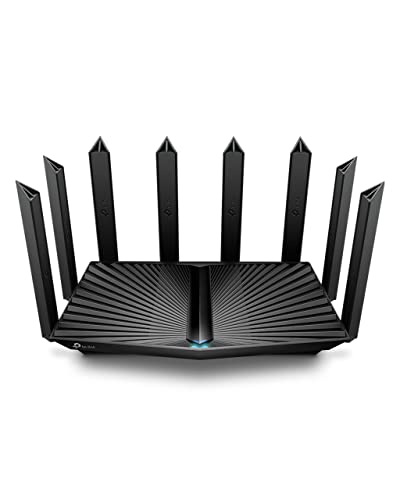
- Best for: Buyers who want the strongest stated class here plus a 2.5 Gbps wired port for a main desk or switch.
- Class: AX6000 dual-band Wi-Fi 6 per listing title
- Beamforming basis: Beamforming stated in the title itself
- Antennas: eight high-gain antennas equipped with Beamforming per listing copy
- Port: 2.5 Gbps WAN/LAN port per listing title
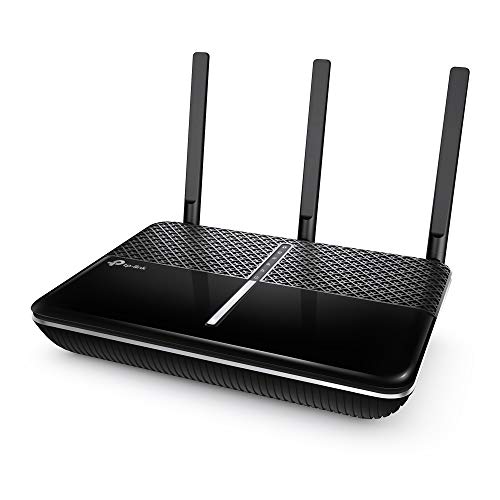
- Best for: Homes with older Wi-Fi 5 devices that want beamforming plus a router-based VPN server.
- Class: AC2600 dual-band Wi-Fi per listing title
- Beamforming basis: listing copy states the router is equipped with beamforming technology that concentrates signal towards connected devices
- Multi-user: MU-MIMO per listing title
- Ports: Gigabit Ethernet ports per listing title

- Best for: Flats and small homes that want stated beamforming at the entry Wi-Fi 6 rung.
- Class: AX1800 dual-band Wi-Fi 6 per listing fields
- Beamforming basis: listing copy states it focuses signal strength to far-away devices using Beamforming technology
- Antennas: 4 high-gain antennas and an advanced front-end module (FEM) chipset per listing copy
- Ports: Gigabit per listing fields
All 4 Picks at a Glance
| Product | Specs | Action |
|---|---|---|
| TP-Link Archer AX80 |
| Check price on Amazon |
| TP-Link Archer A10 |
| Check price on Amazon |
| TP-Link Archer AX21 |
| Check price on Amazon |
 TP-Link Archer AX20 |
| Check price on Amazon |
Our Top Picks
Beam is not a router product line, and no store shelf is labelled with it. The grounded reading of the word is beamforming, the signal-focusing feature some listings state by name: instead of broadcasting its signal evenly in every direction, the router concentrates wireless strength toward the devices connected to it. This guide is built on that reading, and every pick below states beamforming somewhere in its own Amazon listing fields.
The five routers below serve homes with dead zones, flats with one far bedroom and desks that need a faster wired port. All five are TP-Link models, recorded plainly: TP-Link’s listing fields state beamforming as a named feature far more consistently than the other brands’ captured fields, so the verified pool is one brand deep. Every pick was chosen from the names and specifications on its Amazon product page.
Quick Picks
As an Amazon Associate we earn from qualifying purchases.
| Product | Best for | Key spec from title |
|---|---|---|
| TP-Link Archer AX72 | Larger homes where the far rooms lose signal and OneMesh extension may follow later. | AX5400 Wi-Fi 6, Beamforming in spec field |
| TP-Link Archer AX80 | Buyers who want the strongest stated class here plus a 2.5 Gbps wired port for a main desk or switch. | AX6000, Beamforming in title, 2.5 Gbps port |
| TP-Link Archer A10 | Homes with older Wi-Fi 5 devices that want beamforming plus a router-based VPN server. | AC2600, MU-MIMO, VPN Server, Gigabit ports |
| TP-Link Archer AX21 | Flats and small homes that want stated beamforming at the entry Wi-Fi 6 rung. | AX1800 Wi-Fi 6, Easy Mesh, works with Alexa |
| TP-Link Archer AX20 | Households that want parental controls and QoS stated in the listing at the AX1800 rung. | AX1800 Wi-Fi 6, quad-core CPU, WPA3 |
How to Choose
Where the beamforming wording lives matters
Beamforming reaches this guide through three different doors: a title line, a Special Features field and listing copy. All three are the maker’s own words on the product page, but they are not equally easy to verify later, because sellers revise titles and spec tables across hardware revisions. Before ordering, find the word on the live listing yourself. If the live page for a pick no longer states beamforming anywhere, that pick’s basis in this guide is gone, whatever the router can actually do.
Speed class and Wi-Fi generation set the ceiling
The classes here run from AC2600 on Wi-Fi 5 to AX1800, AX5400 and AX6000 on Wi-Fi 6. The class figure is the combined theoretical rate across bands, not a speed any one device will see, but it orders the line honestly: the AX6000 and AX5400 picks carry more stated capacity for busy homes, while the AX1800 pair suits a flat’s worth of devices. Match the class to the number of simultaneous users, not to the fastest internet plan on paper.
Antenna counts are stated, coverage promises are not
The listings state antenna facts plainly: six high-power antennas on the AX72, eight high-gain antennas on the AX80, four high-gain antennas on each AX1800 model. What they do not state in the captured fields is a coverage area, so this guide prints none. Judge reach from the antenna count, the beamforming basis and the router’s class together, and treat any square-footage number you meet elsewhere as marketing rather than a specification you can compare.
Ports and mesh decide the rest of the desk
Beyond wireless, the stated differences are practical. The AX80 alone claims a 2.5 Gbps WAN/LAN port, which matters if a wired desk or a fast fibre feed will ever use it. The A10 alone claims a VPN Server. OneMesh on the AX72 and AX80 and Easy Mesh on the AX21 describe two different extension systems within the same brand, so a buyer planning to add a satellite later should pick the router whose stated system they intend to grow.
The 5 Best Options
TP-Link Archer AX72
The Archer AX72 is the range-led pick of this group. Its beamforming basis sits in the listing’s own Special Features field, which states Beamforming verbatim, and the listing copy adds the hardware behind it: six high-power antennas plus Beamforming. Around that basis the listing states an AX5400 dual-band Wi-Fi 6 class, a dual-core CPU, OneMesh support for extending coverage with compatible units and TP-Link HomeShield. For a larger home where the far rooms are the problem, this is the pick whose stated facts aim squarely at distance.
Specs
- Class: AX5400 dual-band Wi-Fi 6 per listing fields
- Beamforming basis: the listing’s Special Features field states Beamforming verbatim
- Antennas: 6 high-power antennas plus Beamforming per listing copy
- Processor: dual-core CPU per listing fields
- Mesh: OneMesh supported per listing title
- Security: TP-Link HomeShield per listing title
- Model: Archer AX72 per listing
Best for: Larger homes where the far rooms lose signal and OneMesh extension may follow later.
Watch out for: Confirm the live listing still names Beamforming in its features field: TP-Link revises spec tables across hardware revisions, and this pick’s basis is that field.
TP-Link Archer AX80
- Best for: Buyers who want the strongest stated class here plus a 2.5 Gbps wired port for a main desk or switch.
- Class: AX6000 dual-band Wi-Fi 6 per listing title
- Beamforming basis: Beamforming stated in the title itself
- Antennas: eight high-gain antennas equipped with Beamforming per listing copy
- Port: 2.5 Gbps WAN/LAN port per listing title
Buyers who want the strongest stated class here plus a 2.5 Gbps wired port for a main desk or switch.
The title’s 8K streaming wording is the maker’s positioning, not a measured figure: judge the pick on its stated class, port and antenna facts instead.
The Archer AX80 carries its beamforming claim in the title itself, the most visible place a listing can put it, and the copy backs it with eight high-gain antennas equipped with Beamforming. Its stated class is AX6000 dual-band Wi-Fi 6, a step above the AX72, and it adds the group’s only 2.5 Gbps WAN/LAN port for a fast wired feed. OneMesh and WPA3 complete the stated feature set. For a desk that streams in 8K as the title positions it and wants the strongest stated wireless class here, this is the pick.
Watch out for: The title’s 8K streaming wording is the maker’s positioning, not a measured figure: judge the pick on its stated class, port and antenna facts instead.
TP-Link Archer A10
- Best for: Homes with older Wi-Fi 5 devices that want beamforming plus a router-based VPN server.
- Class: AC2600 dual-band Wi-Fi per listing title
- Beamforming basis: listing copy states the router is equipped with beamforming technology that concentrates signal towards connected devices
- Multi-user: MU-MIMO per listing title
- Ports: Gigabit Ethernet ports per listing title
Homes with older Wi-Fi 5 devices that want beamforming plus a router-based VPN server.
This is the group’s Wi-Fi 5 pick: if your phones and laptops are Wi-Fi 6 models, the AX-class picks above will serve them better.
The Archer A10 is the Wi-Fi 5 member of the group, and its beamforming basis is stated in full sentences: the listing copy says the router is equipped with beamforming technology and concentrates signal strength towards connected devices. Its stated class is AC2600 dual band with MU-MIMO, Gigabit Ethernet ports and a VPN Server feature the Wi-Fi 6 picks here do not claim. For a home whose devices are older and whose owner wants the router itself to run a VPN server, the A10’s stated feature set is the honest fit.
Watch out for: This is the group’s Wi-Fi 5 pick: if your phones and laptops are Wi-Fi 6 models, the AX-class picks above will serve them better.
TP-Link Archer AX21
- Best for: Flats and small homes that want stated beamforming at the entry Wi-Fi 6 rung.
- Class: AX1800 dual-band Wi-Fi 6 per listing fields
- Beamforming basis: listing copy states it focuses signal strength to far-away devices using Beamforming technology
- Antennas: 4 high-gain antennas and an advanced front-end module (FEM) chipset per listing copy
- Ports: Gigabit per listing fields
Flats and small homes that want stated beamforming at the entry Wi-Fi 6 rung.
A Renewed listing for this model circulates under a different code: check the live page is the new-unit listing before ordering.
The Archer AX21 is the compact-home Wi-Fi 6 pick. Its beamforming basis is in the listing copy, which says the router focuses signal strength to devices far away using Beamforming technology, four high-gain antennas and an advanced front-end module chipset. The stated class is AX1800 dual-band Wi-Fi 6 with Gigabit ports, Easy Mesh support and Alexa compatibility in the title. Nothing in its record reaches for the AX72’s range or the AX80’s port speed; its case is a stated beamforming feature at the entry Wi-Fi 6 rung of this line.
Watch out for: A Renewed listing for this model circulates under a different code: check the live page is the new-unit listing before ordering.
TP-Link Archer AX20
- Best for: Households that want parental controls and QoS stated in the listing at the AX1800 rung.
- Class: AX1800 dual-band Wi-Fi 6; 574 + 1202 Mbps class as described in the listing
- Beamforming basis: the listing’s Other Special Features field states Beamforming
- Antennas: advanced beamforming and 4 high-gain antennas per listing copy
- Processor: 1.5 GHz quad-core CPU per listing fields
Households that want parental controls and QoS stated in the listing at the AX1800 rung.
Do not confuse this listing with the Archer AX21 above: the two are separate models with separate codes, and their feature fields differ.
The Archer AX20 sits beside the AX21 at the AX1800 rung, separated by its own stated facts. Its beamforming basis is in the listing’s Other Special Features field, which lists Beamforming among Access Point Mode, Parental Control, QoS and WPS, and the copy adds advanced beamforming with four high-gain antennas focusing WiFi strength where it is needed. The listing describes its dual-band split as 574 plus 1202 Mbps class and states a 1.5 GHz quad-core CPU and WPA3. For a household that wants parental controls stated in the same listing, this is the pick.
Watch out for: Do not confuse this listing with the Archer AX21 above: the two are separate models with separate codes, and their feature fields differ.
Which One Fits Your Situation
A house where the far bedrooms drop signal
Take the Archer AX72: six high-power antennas, beamforming stated in its features field and OneMesh support give the stated facts aimed at distance. Its AX5400 class carries a busy family’s traffic while the focused signal works on the rooms at the end of the hall, and OneMesh leaves a clean path to add a satellite later if one corner still struggles.
A streaming desk that also wants a fast wired feed
Take the Archer AX80 for its AX6000 class and the group’s only 2.5 Gbps WAN/LAN port, with beamforming stated in its title. Eight high-gain antennas carry the wireless side, the wired port feeds a desk or switch at full speed, and the title’s 8K streaming positioning matches a household that streams heavily every evening.
A home that wants the router to run a VPN server
Take the Archer A10: it is the only pick whose title states a VPN Server, and its copy states the beamforming technology behind its coverage in full sentences. Its AC2600 Wi-Fi 5 class suits older devices, its Gigabit ports wire the fixed machines, and MU-MIMO keeps simultaneous users from queuing behind each other.
A flat choosing between the two AX1800 models
Take the Archer AX21 for Easy Mesh and Alexa wording in its title, or the Archer AX20 when parental controls and QoS in the features field matter more. Both state beamforming and four high-gain antennas at the same AX1800 class, so the choice is about the extras: mesh naming and voice control on one side, family controls on the other.
Common Mistakes
- Shopping for a Beam brand or product line, when no router is sold under that name: the word resolves to beamforming, a feature stated inside ordinary listings.
- Assuming every modern router listing states beamforming, when many listings never name the feature at all and only the stated ones can be compared honestly.
- Mixing up the Archer AX20 and Archer AX21 listings, which are separate models whose mesh systems and feature fields differ despite the near-identical names.
- Ordering a Renewed unit by mistake, since at least one model here circulates under a separate refurbished listing with its own code.
- Expecting beamforming to rescue a router shut in a cupboard or a metal cabinet, when signal focusing cannot undo a blocked placement.
Frequently Asked Questions
What does beamforming actually do?
In the listings’ own words, it concentrates or focuses the router’s signal strength toward connected devices instead of spreading it evenly. The Archer A10’s copy puts it plainly: beamforming creates stronger, more reliable networks by adapting coverage toward the devices in use. It is a router-side feature; the listings describe no setting the buyer has to switch on.
Which pick states beamforming in its title?
The TP-Link Archer AX80. Its title carries the word outright. The Archer AX72 and Archer AX20 state it in their features fields, and the Archer A10 and Archer AX21 state it in their listing copy. All five bases are the makers’ own listing fields, quoted in each entry above.
Why is every pick from one brand?
Because the admission rule is a stated beamforming line in the listing’s own fields, and TP-Link’s captured fields state the feature far more consistently than the other brands’ records available to this guide. Other makers’ routers may focus signals too, but without the wording in a captured listing field, they cannot be admitted honestly.
Which router here has the fastest wired port?
The Archer AX80, whose title states a 2.5 Gbps WAN/LAN port. The other picks state Gigabit-class ports, with the Archer A10 naming Gigabit Ethernet ports in its title. If a wired desk or a multi-gigabit internet feed is in your plans, that single stated port is the difference that matters.
FAQ
What does beamforming actually do?
Which pick states beamforming in its title?
Why is every pick from one brand?
Which router here has the fastest wired port?
More from Amazon
Programs that pair well with the guide above. Offers and eligibility are set by Amazon and may change.
Free shipping on eligible items, Prime Video and more. Eligible new members can start with a free trial.
Start a Prime free trialAd-free music streaming. Eligible new subscribers can start with a free trial.
Try Music Unlimited freeA Prime membership for ages 18-24 with a trial period. Eligibility is set by Amazon.
See Prime for Young AdultsAudiobooks and podcasts to listen to on the go. Eligible new members can start with a free trial.
Try Audible freeAs an Amazon Associate we earn from qualifying purchases.
