Our Short List of 3

- Best for: Couch play and typing from a sofa without a separate mouse.
- 84 keys in a compact layout
- Built-in 3.5-inch touchpad with left-click and right-click buttons
- Logitech Unifying receiver on the 2.4 GHz band
- Wireless range of up to 33 feet
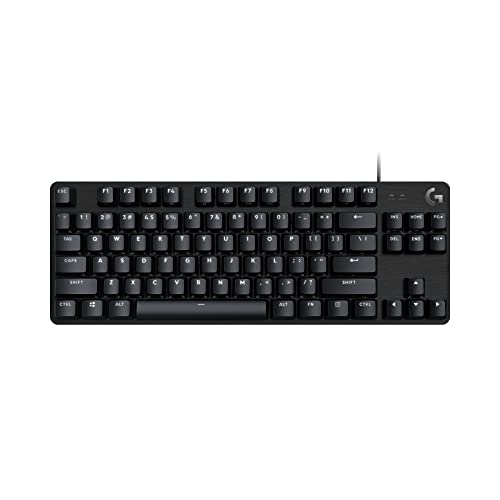
- Best for: Desk setups where a compact mechanical board and room for a mouse matter most.
- Tenkeyless layout with no number pad
- Tactile mechanical switches
- Brushed aluminum top case
- PBT keycaps
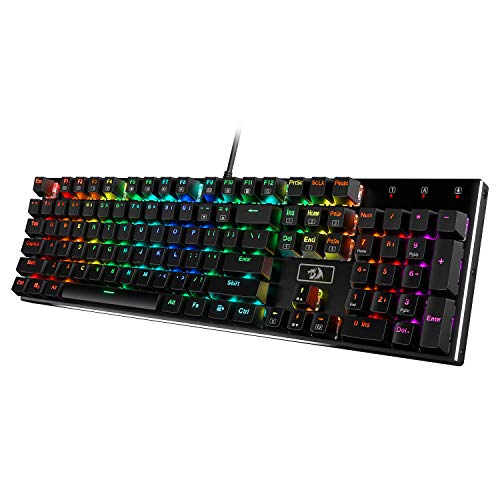
- Best for: Full-size typing and backlit play at a desk with room for a number pad.
- 104 standard keys in a full-size layout
- Aluminum base and metal frame panel
- RGB LED backlight with 6 themed backlights and 18 lighting modes
- Hot-swappable sockets for switch changes
All 3 Picks at a Glance
| Product | Specs | Action |
|---|---|---|
| 1. Logitech K400 Plus Wireless Touch TV Keyboard |
| Check price on Amazon |
| 2. Logitech G413 TKL SE Mechanical Gaming Keyboard |
| Check price on Amazon |
| 3. Redragon K556 RGB Mechanical Gaming Keyboard |
| Check price on Amazon |
Our Top Picks
- Logitech K400 Plus Wireless Touch TV Keyboard for13.95L x 5.5W x 0.93H inches13.95 x 5.5 x 0.93 inches0.86 poundsCheck on Amazon
An Xbox One accepts a standard USB keyboard, which opens a second way to use the console. You can type messages, search the store, and enter text far faster than with a controller, and in the small group of games that accept keyboard input, you can play with keys and a mouse instead of thumbsticks. The catch is that the console has no Bluetooth pairing menu for keyboards, so a Bluetooth-only board will not connect, and most games in the library ignore keyboard input during play entirely.
The three boards below all reach the console through a USB cable or a USB wireless receiver, which is the connection the Xbox One actually accepts. They cover the three setups that make sense: a wireless board with a built-in touchpad for couch play, a compact mechanical board for a desk next to the console, and a full-size mechanical board with backlighting for longer sessions. Each pick below is a keyboard on its own, with no mouse bundled in.
Quick Picks
As an Amazon Associate we earn from qualifying purchases
| Product | Best for | Key spec from title |
|---|---|---|
| Logitech K400 Plus Wireless Touch TV Keyboard | Couch play with a built-in touchpad | 2.4 GHz Unifying receiver with a 33 ft range |
| Logitech G413 TKL SE Mechanical Gaming Keyboard | Compact desk setups | Tenkeyless board with tactile mechanical switches |
| Redragon K556 RGB Mechanical Gaming Keyboard | Full-size backlit mechanical typing | 104 keys on an aluminum base with RGB backlight |
How to Choose
Connection Type Comes First
The Xbox One has no Bluetooth pairing menu for keyboards, so the connection type decides whether a board works at all. A wired USB keyboard plugs into any USB port on the console and works at once for text entry, while a wireless board only connects through a 2.4 GHz USB receiver plugged into the same port. Bluetooth-only boards, no matter how good they feel on a PC, simply have no way to pair with the console. Before you buy anything, confirm the board connects by cable or by a USB receiver, and keep the receiver somewhere safe, because a wireless board without its receiver is a board that cannot connect.
Pick a Layout That Fits Where You Sit
Where you play decides the layout more than any feature list does. A couch setup has no desk surface, so a compact board with a built-in touchpad handles typing and pointer movement from your lap without a second device. A desk next to the console suits a tenkeyless board, which drops the number pad and leaves more room for a mouse beside it. A full-size board fits when you have a proper desk and want a number pad for typing and menus. Measure the space you actually have before choosing, because a board that crowds your mouse hand will annoy you every session.
Switch Feel and Backlighting Matter for Long Sessions
Mechanical switches give a distinct tactile bump and a consistent feel under each key, which suits long sessions in supported games and long typing stretches alike. A membrane board feels quieter and softer, which can suit a shared living room where others are watching television nearby. Backlighting helps in a dark room, and a single white backlight is enough for finding keys at night, while RGB lighting is mainly a look rather than a function. Choose the feel you like for hours of use, not the feature list that reads best, because comfort is what you notice after the first week.
Check Game Support Before You Expect Keyboard Play
Only a small group of games accept keyboard input on Xbox One, and the list is set by each developer rather than by Microsoft. Games known to accept keyboard and mouse on Xbox One include Fortnite and Warframe, plus a handful of others, while the large majority of the library ignores keyboard input during play. A keyboard works for text entry across the dashboard, in messages, and in search fields no matter which game you own. Look up the specific titles you play and confirm they accept keyboard input before you buy, so the board meets the job you actually bought it for.
The 3 Best Options
1. Logitech K400 Plus Wireless Touch TV Keyboard
- Best for: Couch play and typing from a sofa without a separate mouse.
- 84 keys in a compact layout
- Built-in 3.5-inch touchpad with left-click and right-click buttons
- Logitech Unifying receiver on the 2.4 GHz band
- Wireless range of up to 33 feet
Couch play and typing from a sofa without a separate mouse.
The keys are not backlit, so it is harder to use in a dark room, and it needs its Unifying receiver plugged into the console.
The Logitech K400 Plus is the couch pick, and it earns that place by solving the problem a living room creates. It is a compact wireless keyboard with a built-in touchpad on the right side, so it handles both typing and pointer movement from a sofa without a second device on your lap. The board connects through a tiny Logitech Unifying receiver on the 2.4 GHz band, with a stated range of up to 33 feet, which is more than enough to reach a console across a living room. Quiet keys and media controls keep it friendly for shared spaces.
Watch out for: The keys are not backlit, so it is harder to use in a dark room, and it needs its Unifying receiver plugged into the console.
2. Logitech G413 TKL SE Mechanical Gaming Keyboard
- Best for: Desk setups where a compact mechanical board and room for a mouse matter most.
- Tenkeyless layout with no number pad
- Tactile mechanical switches
- Brushed aluminum top case
- PBT keycaps
Desk setups where a compact mechanical board and room for a mouse matter most.
It is wired only, so the cable has to reach from the console to your desk, and there is no number pad for heavy typing.
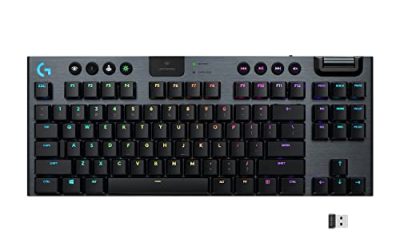
The Logitech G413 TKL SE is the compact mechanical pick for a desk next to the console. It drops the number pad, so the board takes less desk space and leaves more room for a mouse, which suits the games that accept keyboard and mouse input. Tactile mechanical switches give a clear bump on every keypress, and the aluminum top case keeps the board rigid during heavy use. PBT keycaps resist shine and wear over long sessions, and a white LED backlight keeps the keys readable in a dim room without turning the setup into a light show.
Watch out for: It is wired only, so the cable has to reach from the console to your desk, and there is no number pad for heavy typing.
3. Redragon K556 RGB Mechanical Gaming Keyboard
- Best for: Full-size typing and backlit play at a desk with room for a number pad.
- 104 standard keys in a full-size layout
- Aluminum base and metal frame panel
- RGB LED backlight with 6 themed backlights and 18 lighting modes
- Hot-swappable sockets for switch changes
Full-size typing and backlit play at a desk with room for a number pad.
It is the largest board here, so it needs a real desk, and the RGB lighting needs a PC and software to customize beyond the onboard modes.
The Redragon K556 is the full-size mechanical pick, and it is the board to choose when you want a complete layout with backlighting. It has 104 keys on a solid aluminum base, so the board stays planted during fast typing and long sessions. RGB backlighting runs across the keys with multiple lighting modes, and hot-swappable sockets let you change switches later without soldering. Tactile brown switches give a small bump without a loud click, which suits a shared room. The board connects by a wired USB cable, which is the simplest connection the Xbox One accepts.
Watch out for: It is the largest board here, so it needs a real desk, and the RGB lighting needs a PC and software to customize beyond the onboard modes.
Which One Fits Your Situation
You Play From a Couch
Pick the Logitech K400 Plus. Its built-in touchpad replaces a mouse on your lap, and the wireless receiver reaches across a living room, so you can type messages and navigate menus without getting up. The quiet keys suit a shared room, and the long battery life means you rarely think about charging or swapping batteries. Just remember that the keys are not backlit, so keep a small lamp nearby if you type in the dark.
You Have a Desk Next to the Console
Pick the Logitech G413 TKL SE. The tenkeyless layout leaves room for a mouse beside the board, which matters in the games that accept keyboard and mouse input. Tactile switches and PBT keycaps hold up through long sessions, and the white backlight keeps keys readable without fuss. Measure the cable run from the console to your desk first, since this board is wired only.
You Want a Full-Size Backlit Board
Pick the Redragon K556. The full 104-key layout gives you a number pad for typing and menus, and the RGB backlight makes the keys easy to find in a dark room. The aluminum base keeps the board steady, and hot-swappable sockets let you change switches later. It needs a proper desk, so confirm you have the space before it arrives.
You Mostly Type Rather Than Play With a Keyboard
Pick the Logitech K400 Plus again. Most of what a keyboard does on Xbox One is text entry in messages, search fields, and the store, and the K400 Plus handles that from a sofa better than any desk board can. Its touchpad covers pointer movement too, so you never need a mouse for dashboard tasks. A mechanical board only pays off if you play the few games that accept keyboard input.
Common Mistakes
- Buying a Bluetooth-only keyboard, which has no way to pair with the Xbox One.
- Assuming every game accepts keyboard input, when only a small group of titles does.
- Choosing a full-size board for a couch setup, where there is no flat surface for a mouse.
- Losing the USB wireless receiver, which leaves a wireless board unable to connect.
- Expecting RGB software customization on the console, when lighting controls need a PC.
Frequently Asked Questions
Do all Xbox One games work with a keyboard?
No. Only a small group of games accept keyboard input on Xbox One, and each developer decides whether their game supports it. Games known to accept keyboard and mouse include Fortnite and Warframe, plus a handful of others. The large majority of the library ignores keyboard input during play. A keyboard works for text entry across the dashboard, in messages, and in search fields no matter which game you own.
Can I use a Bluetooth keyboard with Xbox One?
No. The Xbox One has no Bluetooth pairing menu for keyboards, so a Bluetooth-only board cannot connect to the console. A wireless keyboard only works if it connects through a 2.4 GHz USB receiver plugged into one of the console USB ports. If you already own a Bluetooth keyboard, check whether it also ships with a USB receiver or a wired mode before you try it on the console.
Do I need a mouse as well?
It depends on what you do with the console. A keyboard alone covers all text entry, including messages, search, and store browsing. A mouse is only needed for the games that accept keyboard and mouse input, since those titles expect both devices. The Logitech K400 Plus has a built-in touchpad that covers pointer movement for dashboard tasks, so a separate mouse is optional unless you play supported games.
Will these keyboards work on Xbox Series X and Series S too?
Yes. The newer consoles accept standard USB keyboards the same way the Xbox One does, through a wired USB connection or a 2.4 GHz USB receiver. The same limit applies there as well: only the games that accept keyboard input will respond to it during play. A board you buy for an Xbox One will keep working if you move to a newer console later.
FAQ
Do all Xbox One games work with a keyboard?
Can I use a Bluetooth keyboard with Xbox One?
Do I need a mouse as well?
Will these keyboards work on Xbox Series X and Series S too?
More from Amazon
Programs that pair well with the guide above. Offers and eligibility are set by Amazon and may change.
Free shipping on eligible items, Prime Video and more. Eligible new members can start with a free trial.
Start a Prime free trialAd-free music streaming. Eligible new subscribers can start with a free trial.
Try Music Unlimited freeA Prime membership for ages 18-24 with a trial period. Eligibility is set by Amazon.
See Prime for Young AdultsAudiobooks and podcasts to listen to on the go. Eligible new members can start with a free trial.
Try Audible freeAs an Amazon Associate we earn from qualifying purchases.