Our Top Picks
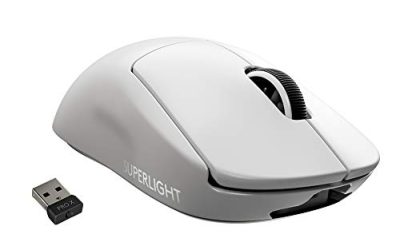
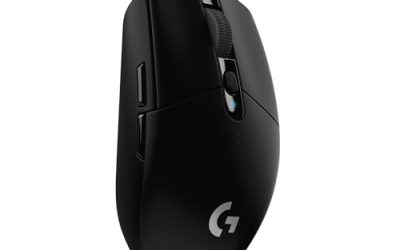
 Logitech G Pro X Superlight 2 Lightspeed WirelessClassic1.57 x 2.5 x 4.92 inches0.1 poundsCheck on Amazon
Pros & cons
- 95-hour battery life reduces how often you need to charge
- 60-gram weight suits fast, low-effort mouse movement
- HERO 2 sensor tracks up to 44,000 DPI with no smoothing
- POWERPLAY wireless charging pad is sold separately
- Premium features add a more complex setup than basic mice
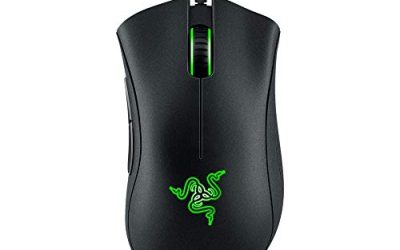
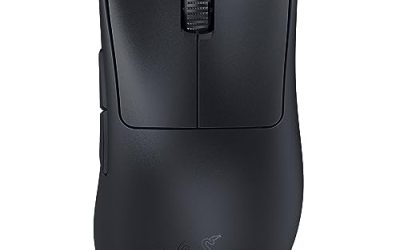
 Razer DeathAdder V3 Pro Wireless Gaming Mouse1000 Hz5.01 x 2.65 x 1.69 inches0.1 poundsCheck on Amazon
Pros & cons
- Up to 250 hours of play on a single AA battery
- Lightweight 3.4-ounce body aids fast, precise movement
- Built-in receiver storage keeps the dongle from getting lost
- Relies on a AA battery rather than a built-in rechargeable cell
- Endurance mode trade-off needed to stretch battery life further


MOBA matches are won in the space between a click and a cast. A mouse fine for browsing can cost you a last hit, a missed skillshot, or a teamfight where your cursor lands a pixel short. The real decision is not about the highest DPI number on the box; it is about a light body that stays precise through a forty-minute game, a sensor that tracks every small correction without drift, and just enough side buttons for items and pings without turning it into a keypad.
This guide covers five mice chosen from Amazon listing details for players of League of Legends, Dota 2, and similar titles, from ranked climbers to weekend players building their first serious setup. Every pick below is light, carries a sensor built for fast, exact tracking, and keeps its button count in the range MOBA play actually uses. Read the buying notes first, then match a mouse to your grip and session length.
Quick Picks
As an Amazon Associate we earn from qualifying purchases.
| Product | Best for | Key spec from title |
|---|---|---|
| Logitech G Pro X Superlight 2 | Ranked players who want a proven ultralight wireless mouse | 60g, 44K DPI sensor, 8kHz report rate |
| Razer Viper V3 Pro | Flick-heavy players who want the lightest shell here | 54g, 35K DPI optical sensor, 8K polling |
| Razer DeathAdder V3 Pro | Long sessions with a palm-friendly ergonomic shape | 63g, Focus Pro 30K optical sensor, 90 hr battery |
| Logitech G305 LIGHTSPEED | First serious MOBA mouse on a modest setup | 99g, HERO 12K sensor, 250h battery life |
| Glorious Model O 2 Wireless | Ambidextrous players who switch between desk and laptop | 68g, 26K BAMF 2.0 sensor, hybrid 2.4GHz and Bluetooth |
How to Choose
Weight decides how long your aim stays sharp
A MOBA session runs far longer than a single round of a shooter, and your wrist pays for every extra gram across hundreds of small movements. Mice in the 54 to 68 gram range let you reposition the camera, last-hit, and kite without the drag that creeps in during a long match. The 99 gram G305 still counts as light by general standards, yet the gap is noticeable after an hour of play. If your sessions regularly stretch past the forty-minute mark, treat weight as the first filter and only then compare sensors and buttons, because a heavy mouse punishes you on every single click.
Sensor precision matters more than the top DPI figure
Every mouse here lists a maximum DPI far above what any MOBA player actually uses, since most players sit between 800 and 1600 DPI for map control and precise clicking. What matters instead is clean tracking at low speeds, no smoothing or acceleration, and a sensor that keeps up when you snap across the screen to check a lane. The HERO 2, Focus Pro, and BAMF 2.0 sensors in this guide are all built for that kind of exact, low-speed work. Pick the sensor family you trust and set your in-game sensitivity to match, rather than chasing the biggest number on the listing.
Button count should match MOBA, not MMO
MOBA play needs a handful of well-placed controls: two side buttons for items or camera, a scroll wheel for zoom, and a DPI switch for the occasional adjustment. Five to eight programmable buttons cover that comfortably, which is why every pick here sits in that range. Twelve-button side grids belong to MMO mice, where a full ability bar lives under the thumb, and on a MOBA mouse they mostly add weight and misclicks. Before you buy, map your current keybinds and count how many you truly press with the mouse, then choose a shell with that many buttons and no more.
Shape, grip, and wireless trade-offs
Symmetrical shells like the Viper V3 Pro and Model O 2 suit claw and fingertip grips and work for either hand, while the DeathAdder V3 Pro curves for a right-handed palm grip across long games. Wireless models free you from cable drag during fast camera pans, and their listed battery figures run from 90 hours to 250 hours, so charging is a weekly habit rather than a nightly one. If you play at a fixed desk and never move the mouse, a wired model removes battery worry entirely. Match the shape to your hand first, then let the connection type follow your desk setup.
The 5 Best Options
Logitech G Pro X Superlight 2
The Superlight 2 pairs a 60 gram body with a HERO 2 sensor that lists up to 44,000 DPI, a combination built for players who want their mouse to disappear during a match. Five programmable buttons keep the layout simple for item actives and camera control, while LIGHTSPEED wireless and an 8kHz report rate keep clicks and cursor movement tight. USB-C charging matches most modern desks, and the symmetrical shape suits claw and fingertip grips. It is the pick for ranked players who already know their grip and want a light, no-fuss mouse that stays out of the way.
Specs
- 60g pro-grade wireless design
- HERO 2 sensor, up to 44,000 DPI
- 5 programmable buttons
- 8kHz report rate
- LIGHTSPEED wireless with USB-C charging
Best for: Ranked MOBA players who want a proven ultralight wireless mouse for long sessions.
Watch out for: Confirm it is still sold before buying, since the listing page could not be opened directly during verification; check that the symmetrical shape suits your grip before ordering.
Razer Viper V3 Pro
At 54 grams, the Viper V3 Pro is the lightest mouse in this guide, and that weight shows up in the quick camera snaps and last-hit adjustments that fill a MOBA match. Its Focus Pro 35K optical sensor lists up to 35,000 DPI, Gen-3 optical switches sit under the main clicks, and eight programmable buttons give you room for items, pings, and a DPI switch without crowding the shell. The symmetrical shape works for claw and fingertip grips, and the listed 95 hour battery keeps wireless play going across many sessions. Choose it when every gram matters to your wrist.
Specs
- 54g lightweight symmetrical design
- Focus Pro 35K optical sensor, up to 35,000 DPI
- 8K polling
- Gen-3 optical switches
- 8 programmable buttons
- Up to 95 hr battery
Best for: Flick-heavy MOBA players who want the lightest shell in this guide.
Watch out for: Confirm it is still sold before buying, since the listing page could not be opened directly during verification; the symmetrical shell may feel small for large palm-grip hands.
Razer DeathAdder V3 Pro
The DeathAdder V3 Pro trades a few grams for an ergonomic right-handed shape that supports the palm through long ranked sessions, which is where comfort turns into steadier aim late in a match. Its Focus Pro 30K optical sensor lists up to 30,000 DPI, Gen-3 optical switches handle the main clicks, and five programmable buttons cover items and camera without clutter. HyperSpeed wireless and a listed 90 hour battery mean the cable stays in the drawer, and at 63 grams it remains light for an ergonomic shell. Pick it when your sessions run long and your hand rests on the mouse rather than clawing it.
Specs
- 63g ultra-lightweight ergonomic design
- Focus Pro 30K optical sensor
- Gen-3 optical switches
- HyperSpeed wireless
- 5 programmable buttons
- Up to 90 hr battery
Best for: Palm-grip players who want comfort across long MOBA sessions.
Watch out for: Confirm it is still sold before buying, since the listing page could not be opened directly during verification; the right-handed shape does not suit left-handed players.
Logitech G305 LIGHTSPEED
The G305 is the sensible starting point for a first serious MOBA mouse, pairing a HERO 12K sensor with LIGHTSPEED wireless in a compact 99 gram body. Six programmable buttons cover items, pings, and camera control, on-board memory keeps your settings when you move between machines, and a single AA battery lists up to 250 hours of play, so there is no charging cable to think about. The 1ms report rate keeps clicks responsive in teamfights. It gives up the ultralight feel of the pricier picks, yet it covers every MOBA need without asking you to learn a new grip or layout.
Specs
- 99g lightweight design
- HERO 12K sensor, up to 12,000 DPI
- 6 programmable buttons
- LIGHTSPEED wireless, 1ms report rate
- Up to 250h battery life on one AA battery
- On-board memory
Best for: Players buying their first serious MOBA mouse for a modest setup.
Watch out for: Confirm it is still sold before buying, since the listing page could not be opened directly during verification; it connects through its USB receiver only, with no Bluetooth fallback.
Glorious Model O 2 Wireless
The Model O 2 Wireless brings an ambidextrous 68 gram shell to players who split time between a desktop and a laptop, with hybrid 2.4GHz and Bluetooth wireless listed. Its BAMF 2.0 sensor lists up to 26,000 DPI, six buttons cover the usual MOBA binds, and PTFE feet help the mouse glide across a pad during long camera pans. RGB lighting runs along the shell for players who like a lit setup. It sits between the ultralight esports models and the budget pick on weight, and its two wireless modes make it the most flexible mouse here for a player with more than one machine.
Specs
- 68g superlight ambidextrous design
- Hybrid 2.4GHz and Bluetooth wireless
- 26K BAMF 2.0 sensor
- 6 buttons
- RGB lighting
- PTFE feet
- Long battery life as listed
Best for: Ambidextrous players who move between a desktop and a laptop.
Watch out for: Confirm it is still sold before buying, since the listing page could not be opened directly during verification; check the listed battery figure on the page, as it is stated only in general terms in the title.
Which One Fits Your Situation
You climb ranked and play for hours at a time
Pick the DeathAdder V3 Pro. Its ergonomic right-handed shape supports a palm grip through back-to-back matches, and the 63 gram weight keeps it light for its size. The Focus Pro 30K sensor and five programmable buttons cover everything a ranked match asks for, while the listed 90 hour battery means wireless play never interrupts a session.
You flick constantly and want the lightest mouse possible
Pick the Viper V3 Pro. At 54 grams it is the lightest mouse here, and the symmetrical shell suits the claw and fingertip grips that flick-heavy players favour. Eight programmable buttons leave room for extra binds, and the 8K polling keeps cursor movement tight during fast camera work across long sessions.
You want a solid first MOBA mouse without overthinking it
Pick the G305 LIGHTSPEED. Six buttons, a HERO 12K sensor, and a 250 hour AA battery cover every MOBA need, and the compact 99 gram body suits smaller hands and smaller desks. It is the easiest pick for a new player to set up and the simplest to live with day to day.
You play on two machines or share a desk
Pick the Model O 2 Wireless. Hybrid 2.4GHz and Bluetooth connections let it move between a desktop and a laptop without swapping receivers or replugging anything, and the ambidextrous 68 gram shell suits either hand. It is the flexible choice when one mouse has to cover more than one setup.
Common Mistakes
- Buying a twelve-button MMO mouse for MOBA play, where the extra side grid adds weight and misclicks instead of useful binds.
- Chasing the highest DPI figure on the listing when most MOBA players use a fraction of it and gain nothing from the extra headroom.
- Ignoring grip style and hand size, then discovering a symmetrical shell cramps a palm grip or an ergonomic shell fights a claw grip.
- Forgetting to check the connection type, and ending up with a receiver-only mouse on a laptop setup that needed Bluetooth.
- Skipping the live listing check before ordering, and finding the exact colour or variant you wanted is no longer sold.
Frequently Asked Questions
How many buttons does a MOBA mouse need?
Five to eight programmable buttons cover MOBA play well: two side buttons for items or camera, a scroll wheel, and a DPI switch. That range keeps every bind within easy reach without crowding the shell. Twelve-button MMO grids add weight and misclicks for most MOBA players, so treat them as a different tool for a different genre rather than an upgrade.
Is wireless fast enough for ranked MOBA matches?
Yes, when the mouse uses a dedicated low-latency wireless link such as LIGHTSPEED or HyperSpeed with a 1ms report rate. Every wireless pick here lists that kind of connection, and the difference from a wired mouse is not something most players notice in MOBA play. Keep the receiver close to the mouse and the battery charged, and wireless holds up across ranked sessions.
What DPI should I use for League of Legends or Dota 2?
Most MOBA players sit between 800 and 1600 DPI, paired with an in-game sensitivity that lets them cross the screen with a short wrist movement. Start at 800 DPI, play a few normal matches, and raise it only if you run out of pad space during camera pans. A high maximum DPI on the box does not mean you should use it.
Does mouse weight really matter in MOBA games?
Yes, because a MOBA match involves hundreds of small clicks and camera movements over thirty to fifty minutes. A lighter mouse asks less of your wrist on each one, so your aim stays steadier in the late game when teamfights decide the match. The gap between 54 grams and 99 grams is easy to feel after an hour, even if it sounds small on paper.
FAQ
How many buttons does a MOBA mouse need?
Is wireless fast enough for ranked MOBA matches?
What DPI should I use for League of Legends or Dota 2?
Does mouse weight really matter in MOBA games?
More from Amazon
Programs that pair well with the guide above. Offers and eligibility are set by Amazon and may change.
Free shipping on eligible items, Prime Video and more. Eligible new members can start with a free trial.
Start a Prime free trialAd-free music streaming. Eligible new subscribers can start with a free trial.
Try Music Unlimited freeA Prime membership for ages 18-24 with a trial period. Eligibility is set by Amazon.
See Prime for Young AdultsAudiobooks and podcasts to listen to on the go. Eligible new members can start with a free trial.
Try Audible freeAs an Amazon Associate we earn from qualifying purchases.