
Key takeaways
- Find the best hard drives for time machine backups in our guide. Compare rugged, desktop and portable drives that work with macOS and keep your files safe.
Time Machine only protects your Mac when the drive behind it is reliable, roomy enough for version history, and formatted the way macOS expects. A drive that is too small fills up fast, a slow connection turns every backup into a chore, and a model that needs reformatting adds friction before the first backup even starts. The right drive disappears into the background: it plugs in, backs up on schedule, and stays out of the way until you need an old file back.

We compared portable and desktop drives that work with Time Machine straight away, weighing capacity against portability, connection speed against everyday convenience, and ruggedness against desk-bound designs. The four picks below cover the most common Mac backup setups, from a pocketable drive for a laptop to a high-capacity hub that lives beside a desktop. Each one is a real model still sold on Amazon, with the capacity and connection details taken from its listing.
Quick Picks
As an Amazon Associate we earn from qualifying purchases
| Product | Best for | Key spec from title |
|---|---|---|
| WD My Passport Ultra for Mac 2TB | Portable Mac backups | 2TB USB-C portable drive |
| Seagate Backup Plus Hub for Mac 4TB | Desktop backup hub | 4TB desktop drive with USB hub |
| Samsung T7 Shield 2TB | Rugged portable backups | 2TB portable SSD with USB 3.2 Gen 2 |
| LaCie Rugged USB-C 2TB | Tough travel backups | 2TB rugged USB-C drive |
How to Choose
Capacity for version history
Time Machine stores hourly backups for a day, daily backups for a month, and weekly backups for older months, so the drive fills steadily even when your files barely change. A drive that matches your Mac’s internal storage leaves little room for that history, and once it fills, the oldest snapshots disappear first. As a rule, buy a backup drive at least twice the size of the data you plan to protect, and larger if you edit video or keep big photo libraries. The portable picks here start at two terabytes, while the desktop hub offers four, which suits a Mac with a large internal drive.
Connection speed and ports
A backup drive is only useful if it stays connected long enough to finish, so the interface matters more than it first appears. USB-C is the natural fit for modern Macs, and a portable SSD on a fast USB connection finishes an initial backup far sooner than a spinning drive on an older port. Check which ports your Mac actually has before ordering, because an adapter adds a point of failure and a cable you can lose. Desktop drives usually need their own power supply, which is fine on a desk but rules them out for a bag.
Portability or a permanent desk drive
Portable drives suit laptops because they travel in the same bag and back up wherever you work, yet a drive you carry everywhere is also a drive you can drop, forget, or leave behind. A desktop drive stays plugged into one Mac and backs up every time that machine is on, which makes it the steadier choice for an iMac or a Mac mini that never moves. Decide which pattern matches your routine, then pick the form factor that supports it, rather than buying the biggest drive and hoping it fits your habits.
Durability and everyday handling
Backup drives spend most of their life sitting still, but the ones that travel take knocks, weather, and dust in their stride or they do not. A rugged enclosure with drop resistance and a sealed design protects the data inside when a bag falls off a chair or a drive slides across a car seat. For a drive that never leaves a desk, durability matters less than ventilation and a stable base. Either way, treat the drive gently, keep it away from heat, and remember that a backup drive is not a second copy of your files unless a second drive holds them too.
The 4 Best Options
WD My Passport Ultra for Mac 2TB
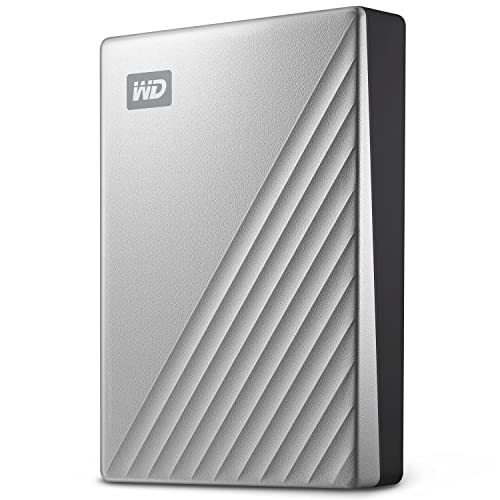
The My Passport Ultra for Mac is the straightforward choice for a MacBook owner who wants Time Machine running with the least fuss. It arrives formatted for Mac, so setup is a matter of plugging it in and letting macOS ask whether to use it for backups. The slim metal enclosure slips into a laptop sleeve without adding noticeable bulk, and the two-terabyte capacity gives a typical MacBook plenty of room for months of version history. USB-C keeps transfers brisk for a spinning drive, and the drive draws its power from the port, so no separate adapter rides along.
Specs
- Capacity: 2TB
- Interface: USB-C
- Format: Formatted for Mac
- Time Machine: Ready out of the box
- Power: Bus powered through USB-C
Best for: MacBook owners who want a pocketable Time Machine drive with no setup steps.
Watch out for: It is a spinning hard drive, so the first full backup takes longer than on a portable SSD.
ASIN: B07GKK35BT
Seagate Backup Plus Hub for Mac 4TB
The Backup Plus Hub for Mac suits a desk-bound Mac that needs a large, always-connected backup target and a couple of extra ports. Four terabytes holds a deep version history for a Mac with a roomy internal drive, and the hub design adds two front USB ports for charging a phone or attaching another accessory without reaching behind the machine. It is formatted for Mac and works with Time Machine right out of the box, so the first backup starts as soon as you confirm the prompt. The trade-off is that it needs mains power and stays on the desk.
Specs
- Capacity: 4TB
- Interface: USB 3.0
- Format: Formatted for Mac
- Time Machine: Fully compatible right out of the box
- Extra ports: Two integrated USB ports on the front
Best for: iMac and Mac mini owners who want a large desktop backup drive with a built-in hub.
Watch out for: It needs its own power supply, so it is not a travel drive.
ASIN: B01JP2ACP6
Samsung T7 Shield 2TB
The T7 Shield is the pick for anyone whose backup drive rides in a bag through rain, dust, and the occasional drop. Its solid-state design has no moving parts, and the rubberised shell carries an IP65 rating against dust and water, so a spill or a dusty commute is less of a threat. Two terabytes is enough for a full MacBook backup with generous version history, and the USB 3.2 Gen 2 connection moves data far faster than a spinning drive. The blue finish is easy to spot in a crowded bag, which is a small but real advantage.
Specs
- Capacity: 2TB
- Interface: USB 3.2 Gen 2
- Sequential read speed: Up to 1,050 MB/s
- Protection: IP65 dust and water resistance
- Drop resistance: Designed to withstand drops
Best for: People who carry their backup drive everywhere and want speed plus ruggedness.
Watch out for: Two terabytes may feel tight if your Mac holds a very large photo or video library.
ASIN: B09VLJ7VBM
LaCie Rugged USB-C 2TB
LaCie built its reputation on drives that survive field work, and the Rugged USB-C is the classic example. The bright orange bumper is easy to find in a bag, and the enclosure resists drops, crushing, and rain, which makes it a natural partner for a MacBook that travels to shoots, sites, or studios. Two terabytes covers a full system backup with room for history, and the USB-C connection works with current Macs without an adapter. It is a spinning drive inside, so expect the first backup to run longer than on an SSD.
Specs
- Capacity: 2TB
- Interface: USB-C
- Drop resistance: MIL-STD-810G rated
- Crush resistance: Rated for 1-ton crush resistance
- Rain resistance: Rain resistant enclosure
Best for: Photographers and field workers who need a tough drive for on-location backups.
Watch out for: The rugged shell adds bulk, and the spinning drive is slower than an SSD.
ASIN: B01N7QFZLQ
Which One Fits Your Situation
For a MacBook you carry daily
The WD My Passport Ultra for Mac is the natural fit here: slim, bus powered, and formatted for Mac before it leaves the box. Plug it in when you sit down to work and Time Machine handles the rest, with two terabytes covering a laptop and months of snapshots. If your commute is rough on gear, step up to the Samsung T7 Shield for the same capacity with faster transfers and a shell.
For an iMac or Mac mini on a desk
The Seagate Backup Plus Hub for Mac wins on a desk, where its four terabytes hold a deep history and its front USB ports earn their keep every day. It stays plugged in, so backups run whenever the Mac is awake, and you never have to remember to attach anything. The only cost is desk space and a power socket, both of which a desktop setup has to spare.
For travel and field work
The LaCie Rugged USB-C is made for bags, boots, and bad weather, with an enclosure that resists drops, crushing, and rain. It is the drive to reach for when backups happen on location rather than at a desk. If speed matters more than crush resistance, the Samsung T7 Shield is the lighter, faster alternative, and its sealed design still handles dust and splashes with ease.
For a large photo or video library
Capacity decides this one, so the four-terabyte Seagate hub is the starting point for a Mac whose library runs into hundreds of gigabytes. A two-terabyte portable drive fills fast when every project adds new footage, and a full Time Machine drive starts deleting the oldest snapshots first. Pair the hub with a portable SSD for trips, and the library stays protected at home and on the road.
Common Mistakes
- Buying a drive the same size as your Mac’s internal storage, which leaves almost no room for version history.
- Choosing a drive that needs reformatting and then skipping that step, so Time Machine refuses to use it.
- Unplugging a portable drive mid-backup, which can corrupt the backup and force Time Machine to start over.
- Keeping the only backup on a drive that travels in the same bag as the Mac it protects.
- Assuming a backup drive lasts forever, instead of checking its health and replacing it when errors appear.
Frequently Asked Questions
How large should a Time Machine drive be?
Aim for at least twice the size of the data you want to protect, because Time Machine keeps hourly, daily, and weekly snapshots that accumulate over months. A drive that only matches your Mac’s storage fills quickly and starts deleting the oldest versions first. Larger libraries, especially photos and video, call for a four-terabyte drive or more.
Does Time Machine work with any external drive?
Most USB drives work once they are formatted with a Mac-compatible format, and several drives in this guide arrive formatted for Mac already. A drive formatted for Windows needs reformatting in Disk Utility before Time Machine will accept it, which erases everything on the drive. Check the format first if the drive came from a Windows machine.
Can one drive back up two Macs?
Yes, Time Machine can back up more than one Mac to the same drive, with each Mac keeping its own backup folder and its own version history. The shared capacity fills faster, so a larger drive is wise when two machines share one target. Keep in mind that losing the drive would lose both backups, so a second drive is worth considering.
How often does Time Machine back up?
Time Machine runs automatically once an hour while the drive is connected, keeping hourly backups for a day, daily backups for a month, and weekly backups for older months. The first backup copies everything and takes the longest, while later backups only copy files that changed. Leaving the drive connected keeps the schedule running without any action from you.
FAQ
How large should a Time Machine drive be?
Does Time Machine work with any external drive?
Can one drive back up two Macs?
How often does Time Machine back up?
More from Amazon
Programs that pair well with the guide above. Offers and eligibility are set by Amazon and may change.
Free shipping on eligible items, Prime Video and more. Eligible new members can start with a free trial.
Start a Prime free trialAd-free music streaming. Eligible new subscribers can start with a free trial.
Try Music Unlimited freeA Prime membership for ages 18-24 with a trial period. Eligibility is set by Amazon.
See Prime for Young AdultsAudiobooks and podcasts to listen to on the go. Eligible new members can start with a free trial.
Try Audible freeAs an Amazon Associate we earn from qualifying purchases.









