Our Short List of 3

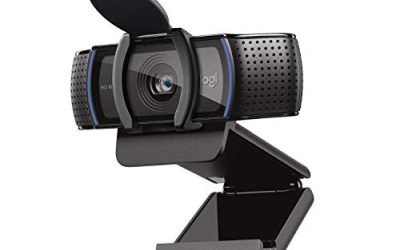
- Best for: Remote workers who want autofocus, background blur and dependable call quality in one camera.
- Full HD 1080p video at 30 fps
- HD autofocus with automatic light correction
- Stereo audio with dual microphones
- 78-degree diagonal field of view
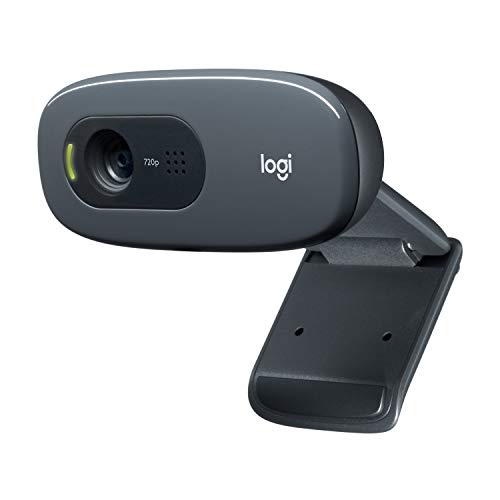
- Best for: Travellers, teachers and hot-desk workers who carry their webcam between rooms and laptops.
- Full HD 1080p video at 30 fps
- Autofocus with HD light correction
- Glass lens
- 360-degree swivel with fold-and-go design

- Best for: Small group calls, tutoring and shared desks where more than one person needs to stay in frame.
- Full HD 1080p video
- 110-degree wide-angle field of view
- Glass lens with privacy cover
- Software control for field of view and zoom
All 4 Picks at a Glance
| Product | Specs | Action |
|---|---|---|
| Logitech C920x HD Pro |
| Check price on Amazon |
| Logitech C615 HD |
| Check price on Amazon |
| NexiGo N60 1080P |
| Check price on Amazon |
 EMEET C960 1080P |
| Check price on Amazon |
Our Top Picks
- Logitech C920x HD Pro PC Webcam with Microphone1 Pack2.8 x 1.7 x 3.7 inches0.4 poundsCheck on Amazon
- Logitech C270 720p Webcam Plug-and-Play Wide Screen Video1 Pack6 x 4 x 8 inches0.16 poundsCheck on Amazon
A laptop camera makes you look washed out, a phone perched on a stack of books slides out of frame, and the real decision is which compromise you are willing to live with every day. Resolution is only the starting point. A fixed-focus camera keeps you sharp only at one distance, a narrow lens cuts a second person out of the shot, and a microphone that picks up every keystroke can undo the clearest picture. The choice comes down to how you actually sit, light your desk and share your screen.
This guide is for remote workers, teachers, streamers and students who need a dependable 1080p camera for video calls on a desktop or laptop. The five webcams below were chosen from the names and specifications stated on their Amazon product pages, covering autofocus workhorses, a foldable travel camera, a wide-angle option and a budget pick with a privacy cover, so you can match a camera to your room instead of buying on resolution alone.
Quick Picks
As an Amazon Associate we earn from qualifying purchases.
| Product | Best for | Key spec from title |
|---|---|---|
| Logitech C920x HD Pro | Video calls with background blur and autofocus | Full HD 1080p/30fps video, HD light correction |
| Logitech C920S HD Pro | Daily calls where privacy matters between meetings | Full HD 1080p/30fps video, privacy shutter |
| Logitech C615 HD | A portable camera for laptops and shared desks | Full HD 1080p camera, fold-and-go design |
| NexiGo N60 1080P | Group calls and wide shots from a small desk | 1080P webcam, software control, privacy cover |
| EMEET C960 1080P | Simple budget calls with a privacy cover | 1080P webcam, 90-degree field of view |
How to Choose
Resolution and Frame Rate Decide the Baseline
A webcam labelled HD should record at 1080p, or 1920 by 1080 pixels, and every camera in this guide does exactly that. Frame rate matters just as much, because 30 frames per second keeps normal conversation smooth, while 60 frames per second only helps if you move around a lot. A 720p camera at 60 frames per second can look worse than a 1080p camera at 30 frames per second on a large meeting screen, so check the resolution at the frame rate you will actually use. If your internet connection is slow, a 1080p camera that also offers a 720p mode gives you a useful fallback without buying a second device.
Autofocus Beats a Fixed Lens for Moving Speakers
Autofocus keeps your face sharp when you lean in to read a document or lean back to think, and it is the feature buyers notice missing only after their first week of calls. A fixed-focus camera is tuned for one distance, often around half a metre, so anyone who sits closer or further away looks soft. That trade-off suits a camera that never moves and a chair that never shifts, but it frustrates teachers who stand up mid-lesson and streamers who reach off camera. If you move at your desk, put autofocus near the top of your list and treat a fixed-focus model as a second camera, not your main one.
Field of View Shapes Who Fits in the Frame
Field of view is measured diagonally in degrees, and it decides how much of your room the camera shows. A 78-degree lens frames one person neatly with a little background, which suits most solo calls. A 90-degree lens fits two people side by side, which helps tutoring and interviews where both speakers should stay visible. A 110-degree lens covers a small group around a table, but it also shows the clutter behind you and can bend straight lines near the edges. Measure your seating distance: two people sharing one camera need at least 90 degrees, while a solo caller in a messy room is better served by a narrower lens.
Microphones, Privacy and Mounting Finish the Decision
The built-in microphone decides whether colleagues hear your voice or your keyboard, so check whether the listing states stereo microphones, a mono microphone or noise reduction. Dual microphones capture a more natural voice from a wider area, while a noise-reduction microphone helps in a shared room. A privacy shutter or sliding cover matters if the camera stays mounted on your monitor between calls, because it removes the doubt about whether the lens is live. Finally, look at the mount: a universal clip with a tripod thread fits a monitor, a laptop lid and a small tripod, while a camera that only clips to a thick monitor can wobble on a thin laptop screen.
The 5 Best Options
Logitech C920x HD Pro
- Best for: Remote workers who want autofocus, background blur and dependable call quality in one camera.
- Full HD 1080p video at 30 fps
- HD autofocus with automatic light correction
- Stereo audio with dual microphones
- 78-degree diagonal field of view
Remote workers who want autofocus, background blur and dependable call quality in one camera.
There is no privacy shutter on this model, so you need a separate lens cover or to unplug the camera between calls.
The C920x is the most complete version of the long-running C920 line, and it earns its place here because it pairs autofocus with a software extra that the other Logitech models skip. Its five-element glass lens records Full HD 1080p video at 30 frames per second, and HD light correction adjusts the image when a window sits behind you or the room lighting changes through the day. Dual microphones capture stereo audio, and the included three-month XSplit VCam licence lets you blur or replace your background without a green screen, which is handy for calls from a shared living space.
Watch out for: There is no privacy shutter on this model, so you need a separate lens cover or to unplug the camera between calls.
Logitech C920S HD Pro
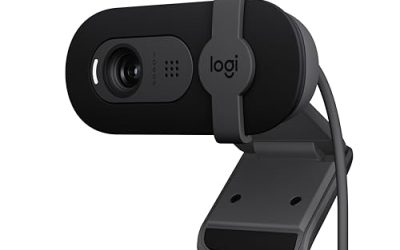
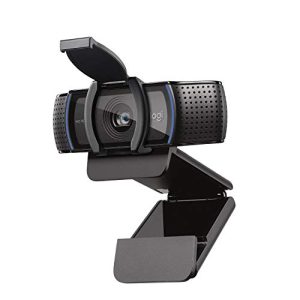
The C920S takes the same proven C920 design and adds the one feature office workers ask for most: a privacy shutter that flips down over the lens. It records Full HD 1080p video at 30 frames per second through a glass lens, with HD autofocus and light correction keeping the picture steady as you move or the light shifts. Two microphones on either side of the lens capture stereo audio, and the 78-degree field of view frames one or two people without pulling in too much of the room behind them. The attached five-foot cable reaches a desktop tower under the desk without an extension.
Specs
- Full HD 1080p video at 30 fps
- HD autofocus with automatic light correction
- Stereo audio with dual microphones
- 78-degree diagonal field of view
- Glass lens with privacy shutter included
- Attached 5-foot USB-A cable
- Works with Skype, Zoom, FaceTime, Hangouts, PC, Mac, laptop, tablet and Xbox
- Model number 960-001257
Best for: Anyone who leaves a webcam mounted on a monitor and wants a physical shutter for privacy between calls.
Watch out for: It does not include the XSplit VCam licence that comes with the C920x, so background blur needs separate software.
Logitech C615 HD
- Best for: Travellers, teachers and hot-desk workers who carry their webcam between rooms and laptops.
- Full HD 1080p video at 30 fps
- Autofocus with HD light correction
- Glass lens
- 360-degree swivel with fold-and-go design
Travellers, teachers and hot-desk workers who carry their webcam between rooms and laptops.
The single microphone is mono, so voice quality on long calls is thinner than the stereo microphones on the C920 models.
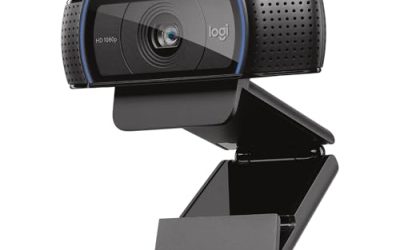
The C615 is the camera to pack when your desk changes from day to day, because it folds flat and swivels a full 360 degrees on its mount. It records Full HD 1080p video at 30 frames per second with autofocus and a glass lens, and HD light correction brightens the picture in dim rooms. The fold-and-go design protects the lens in a bag and lets the camera sit on a laptop lid, a monitor or a small tripod, which suits hot-desking, classrooms and anyone who presents from different rooms. Its single built-in microphone keeps the body compact, so a headset is the better audio choice for long calls.
Watch out for: The single microphone is mono, so voice quality on long calls is thinner than the stereo microphones on the C920 models.
NexiGo N60 1080P
- Best for: Small group calls, tutoring and shared desks where more than one person needs to stay in frame.
- Full HD 1080p video
- 110-degree wide-angle field of view
- Glass lens with privacy cover
- Software control for field of view and zoom
Small group calls, tutoring and shared desks where more than one person needs to stay in frame.
The wide lens shows more of the room behind you, so a cluttered background stays visible unless you tighten the field of view in software.
The NexiGo N60 is the wide-angle pick in this guide, and that single difference changes who it suits. Its 110-degree field of view fits two or three people around a small table, which makes it a practical choice for group calls and small meeting rooms where a narrow lens would cut someone out. It records 1080p video through a glass lens, includes a privacy cover that slides over the lens, and comes with software control for adjusting the field of view and zoom, so you can tighten the frame when only one person is on camera. Dual stereo microphones with noise cancelling handle voices from across a desk.
Watch out for: The wide lens shows more of the room behind you, so a cluttered background stays visible unless you tighten the field of view in software.
EMEET C960 1080P
- Best for: Budget buyers who want a straightforward 1080p camera for daily calls with a privacy cover included.
- Full HD 1080p video
- 90-degree field of view
- Two built-in microphones with noise reduction
- Fixed focus
Budget buyers who want a straightforward 1080p camera for daily calls with a privacy cover included.
Fixed focus means the picture softens if you sit much closer or further away than the camera is tuned for, so keep your seating distance steady.
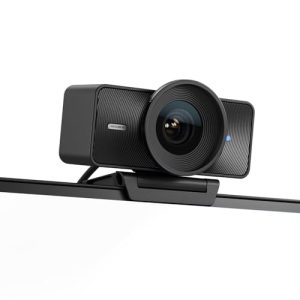
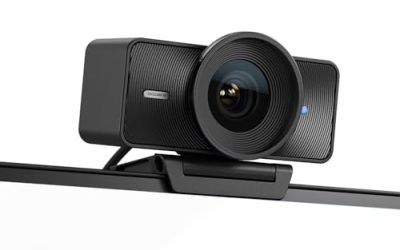
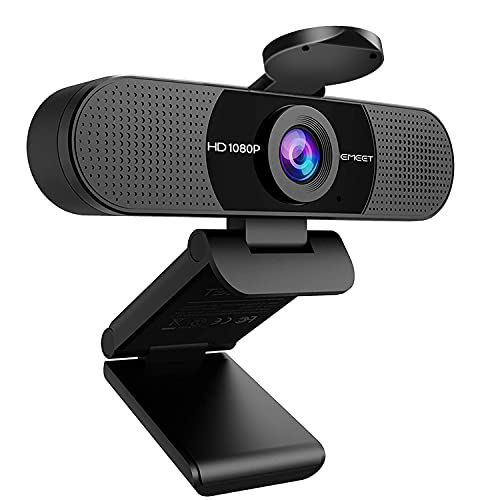
The EMEET C960 is the simplest camera in this guide, and that is exactly its appeal for anyone who wants a cheap, reliable 1080p webcam without extra software to learn. It records Full HD 1080p video with a 90-degree field of view, wide enough for two people at a desk, and two microphones with noise reduction keep voices clear on routine calls. A privacy cover slides over the lens between meetings, the mount rotates 180 degrees, and the EMEETLINK software lets you adjust brightness, contrast and white balance if the default picture looks flat. Its fixed focus suits a caller who sits at a steady distance.
Watch out for: Fixed focus means the picture softens if you sit much closer or further away than the camera is tuned for, so keep your seating distance steady.
Which One Fits Your Situation
You Work From Home and Take Calls All Day
Choose the Logitech C920S HD Pro. Autofocus and light correction keep you sharp through long meetings, dual microphones capture a natural voice without a headset, and the privacy shutter answers the question of whether the camera is live the moment a call ends. The five-foot cable also reaches a tower under the desk, so you are not forced to keep the computer close to the monitor.
You Present, Teach or Stream With Background Blur
Choose the Logitech C920x HD Pro. It shares the C920S picture quality and adds the three-month XSplit VCam licence, which blurs or replaces your background without a green screen. That matters when you teach from a shared room or stream from a bedroom, and the autofocus holds you sharp when you lean in to point at something on screen.
You Carry Your Camera Between Rooms or Offices
Choose the Logitech C615 HD. The fold-and-go body protects the lens in a bag, the 360-degree swivel finds the right angle on any laptop or monitor, and 1080p autofocus video works the same in a classroom, a meeting room or a kitchen table. Pair it with a headset for long calls, since its single microphone is the weakest part of an otherwise portable package.
Two or Three People Share One Camera
Choose the NexiGo N60 1080P. Its 110-degree lens is the only one here wide enough for a small group, and the software control lets you narrow the frame back down for solo calls. The privacy cover and dual noise-cancelling microphones suit a shared desk, and the plug-and-play USB connection means no driver hunt before a meeting starts.
Common Mistakes
- Buying on resolution alone and ignoring autofocus, so the picture looks soft whenever you shift in your chair.
- Picking a narrow 78-degree lens for a two-person setup, then discovering one speaker sits half out of frame.
- Assuming a built-in microphone replaces a headset in a noisy room, when a single mono microphone picks up every sound around the desk.
- Mounting the camera below eye level on a laptop, which films up your nose instead of framing your face straight on.
- Leaving the camera uncovered between calls instead of using the privacy shutter or cover that came in the box.
Frequently Asked Questions
Is 1080p enough for video calls in 2026?
Yes, 1080p is enough for almost every video call, because meeting apps compress the stream well below full quality. A sharp 1080p camera with good autofocus and light correction looks better than a higher-resolution camera with a poor lens. Spend the extra money on autofocus, a wider lens or better audio before chasing a higher resolution.
Do I need autofocus on a webcam?
You need autofocus if you move at your desk, lean in to read, or stand up during lessons. A fixed-focus camera stays sharp only at one distance, so anyone who shifts position looks blurry. If you sit still at a fixed distance from a monitor that never moves, a fixed-focus camera such as the EMEET C960 works fine and costs less.
What field of view should I choose for one person?
A 78-degree lens suits one person at a normal desk distance, framing head and shoulders with a small amount of background. Go wider, around 90 degrees, if two people share the camera. A 110-degree lens is best for small groups, but it shows more of the room, so it needs a tidy background or software adjustment.
Can a webcam microphone replace a headset?
A dual-microphone webcam can handle quiet one-to-one calls, but it cannot match a headset in a noisy room or on a long meeting. Microphones built into a camera sit further from your mouth and pick up keyboard noise, fans and other voices. Use the webcam microphone for short calls and switch to a headset when clarity matters or the room gets loud.
FAQ
Is 1080p enough for video calls in 2026?
Do I need autofocus on a webcam?
What field of view should I choose for one person?
Can a webcam microphone replace a headset?
More from Amazon
Programs that pair well with the guide above. Offers and eligibility are set by Amazon and may change.
Free shipping on eligible items, Prime Video and more. Eligible new members can start with a free trial.
Start a Prime free trialAd-free music streaming. Eligible new subscribers can start with a free trial.
Try Music Unlimited freeA Prime membership for ages 18-24 with a trial period. Eligibility is set by Amazon.
See Prime for Young AdultsAudiobooks and podcasts to listen to on the go. Eligible new members can start with a free trial.
Try Audible freeAs an Amazon Associate we earn from qualifying purchases.