Our Short List of 3
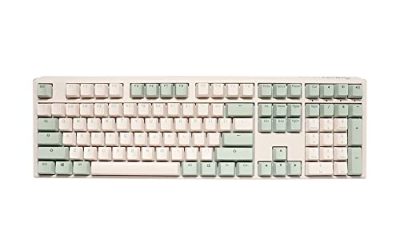
- Best for: Builders chasing a creamy sound who want strong stock switches and a knob.
- 75 percent layout with 5-pin hot-swappable sockets
- Gasket mount design
- Rotary knob
- RGB backlighting

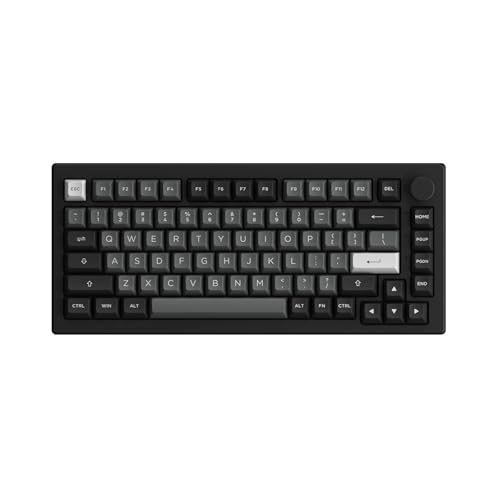
- Best for: Modders who want a screen, VIA remapping, and a gasket mount in one affordable base.
- 75 percent gasket-mounted layout with hot-swappable sockets
- VIA programmable firmware
- Built-in screen showing connection, battery, and time
- Bluetooth 5.0, 2.4GHz wireless, and USB-C connections

- Best for: Desk-bound modders who want wired QMK control and a clean, simple base.
- 75 percent layout with 81 keys and hot-swap sockets for 3-pin and 5-pin switches
- QMK and VIA programmable firmware
- K Pro Red switches rated for 50 million keypresses
- USB-C wired connection with 1000Hz polling rate
All 4 Picks at a Glance
| Product | Specs | Action |
|---|---|---|
| Akko 5075B Plus |
| Check price on Amazon |
| EPOMAKER TH80 Pro V2 |
| Check price on Amazon |
| Keychron V1 |
| Check price on Amazon |
 AULA F75 |
| Check price on Amazon |
Key takeaways
- Five hot-swappable keyboards for modding, compared on QMK and VIA support, gasket mounts, foam, and switches to help you build a board that sounds right.
A keyboard you plan to mod is bought for what it lets you change, not for how it sounds out of the box. The real decision is which base gives you the most room to work: hot-swappable sockets so you can pull switches without a soldering iron, firmware you can remap, a mount that leaves space for foam and tape, and keycaps you can swap without fighting a nonstandard layout. Buy the wrong base and every mod becomes a workaround; buy the right one and each change stacks into a board that feels like yours.
This guide is for first-time modders and hobbyists who want a hot-swappable board they can tune switch by switch, plus experienced builders looking for a solid base for a deeper project. We picked five keyboards from their Amazon titles and specifications, comparing hot-swap support, QMK and VIA programmability, mounting style, switches, and keycaps so you can match a board to the mods you actually plan to do.
Quick Picks
As an Amazon Associate we earn from qualifying purchases.
| Product | Best for | Key spec from title |
|---|---|---|
| Keychron V1 Max | Wireless modding with full remapping | QMK and VIA wireless custom keyboard with knob |
| Akko 5075B Plus | Creamy sound straight from the box | 75 percent RGB hot-swappable keyboard with knob |
| EPOMAKER TH80 Pro V2 | A screen and VIA tuning on a budget base | VIA mechanical keyboard with screen, Shadow Black |
| Keychron V1 | Wired QMK modding at the lowest fuss | QMK and VIA wired keyboard, hot-swappable Red switches |
| AULA F75 | Pre-lubed switches and heavy foam | 75 percent wireless keyboard, pre-lubed Reaper switches |
How to Choose
Hot-Swap Sockets Come First
Every board in this guide has hot-swappable sockets, and that is the single feature that decides whether a keyboard is worth modding at all. Hot-swap means the switches press into sockets instead of being soldered to the circuit board, so you can pull a switch with a simple tool and press a new one in within seconds. Check whether the sockets accept three-pin and five-pin switches, because five-pin support gives you a wider choice of switches without clipping legs. Also check that the board is hot-swappable in the exact variant you order, since some models sell assembled versions with soldered switches alongside hot-swap versions that look identical in photos.
QMK and VIA Decide How Deep Remapping Goes
Remapping is the mod that costs nothing and changes how a board feels every day, so firmware matters as much as hardware. QMK is open-source firmware that lets you rebuild the keymap, add layers, and assign macros, while VIA is a companion app that lets you change keys on the fly without reflashing. A board with both gives you the easiest path: tweak in VIA today, dig into QMK later when you want tap dances or custom layers. Boards without QMK or VIA can still be modded for sound and feel, but their layouts stay fixed, so weigh how much you care about moving keys around before you settle.
Mounting Style Sets the Sound Ceiling
The way the plate and circuit board sit inside the case shapes the sound more than any single switch swap. Gasket mounting suspends the plate on rubber gaskets, which softens keystrokes and leaves a deeper, more muted tone that many modders prefer. Tray mount boards, where the circuit board screws straight to the case, tend to sound firmer and brighter. Foam between the plate and the circuit board, and case foam underneath, damps hollow echoes and is easy to add yourself. Look for a board that already ships with foam and a gasket mount, since that base needs fewer fixes before it starts sounding good.
Switches, Keycaps, and Stabilizers Are the Next Mods
Once the base is right, the next three mods are switches, keycaps, and stabilizers, and the stock parts decide how soon you need to touch them. Pre-lubed linear switches save you an afternoon of lubing, while a board with scratchy stock switches pushes you toward a swap on day one. Double-shot PBT keycaps resist shine and keep legends crisp, and a standard bottom row matters more than it looks: nonstandard spacebars and modifiers make finding replacement keycap sets much harder. Screw-in stabilizers hold larger keys steadier than clip-in ones and are worth lubing first, since rattling stabilizers are the most common complaint on an otherwise good board.
The 5 Best Options
Keychron V1 Max
The Keychron V1 Max is the most flexible base in this guide, and it suits a modder who wants wireless freedom without giving up deep firmware control. Its gasket-mounted build already sounds composed before any mods, and the combination of QMK and VIA means layers, macros, and key swaps are all within reach. The rotary knob adds a volume or scrolling control you can reassign, and the large battery keeps a wireless setup practical for daily use. If you want one board that covers typing, gaming, and experimenting with switches, this is the safest starting point.
Specs
- 75 percent gasket-mount layout with hot-swap sockets for 3-pin and 5-pin switches
- QMK and VIA support for remapping, layers, and macros
- 2.4GHz wireless, Bluetooth 5.1, and USB-C wired connections
- Rotary knob for volume or custom controls
- Double-shot PBT OSA profile keycaps
- Gateron Jupiter switches
- 4000mAh battery
- 1000Hz polling rate on 2.4GHz and wired connections
Best for: Modders who want wireless, QMK and VIA, and a gasket mount in one board.
Watch out for: Confirm the exact variant before ordering, since Keychron sells several V1 Max configurations with different switches and keycaps.
Akko 5075B Plus
- Best for: Builders chasing a creamy sound who want strong stock switches and a knob.
- 75 percent layout with 5-pin hot-swappable sockets
- Gasket mount design
- Rotary knob
- RGB backlighting
Builders chasing a creamy sound who want strong stock switches and a knob.
Order only the Yellow Pro variant, since the same model sells with Blue Pro and Fairy switches that feel and sound different.
The Akko 5075B Plus is the pick for a modder who wants a creamy, muted sound with the least work up front. Its gasket mount and five-pin hot-swap sockets give you a forgiving base for switch rolling, and the stock Creamy Yellow Pro switches are already smooth enough that many builders will leave them in place. The knob handles volume without a key combination, and the ASA profile keycaps have a sculpted shape that suits long typing sessions. This is a board you can enjoy on day one and still take apart later.
Watch out for: Order only the Yellow Pro variant, since the same model sells with Blue Pro and Fairy switches that feel and sound different.
EPOMAKER TH80 Pro V2
- Best for: Modders who want a screen, VIA remapping, and a gasket mount in one affordable base.
- 75 percent gasket-mounted layout with hot-swappable sockets
- VIA programmable firmware
- Built-in screen showing connection, battery, and time
- Bluetooth 5.0, 2.4GHz wireless, and USB-C connections
Modders who want a screen, VIA remapping, and a gasket mount in one affordable base.
Check the variant carefully at checkout, since the TH80 Pro V2 sells in many colorways and switch options under different listings.
The EPOMAKER TH80 Pro V2 stands out for modders who like a screen on the board and want VIA tuning without paying for a premium kit. Its gasket-mounted case and hot-swap sockets cover the two fundamentals, and the small display shows connection mode, battery, and time at a glance. The Mulan switches in this variant are smooth linears that pair well with the stock foam, and VIA support means you can remap keys without touching firmware files. It is a strong choice when you want a modern-looking base with room to grow.
Watch out for: Check the variant carefully at checkout, since the TH80 Pro V2 sells in many colorways and switch options under different listings.
Keychron V1
- Best for: Desk-bound modders who want wired QMK control and a clean, simple base.
- 75 percent layout with 81 keys and hot-swap sockets for 3-pin and 5-pin switches
- QMK and VIA programmable firmware
- K Pro Red switches rated for 50 million keypresses
- USB-C wired connection with 1000Hz polling rate
Desk-bound modders who want wired QMK control and a clean, simple base.
Stock signals for this listing have disagreed across mirrors, so confirm it is in stock on Amazon before ordering.
The wired Keychron V1 is the simplest route into serious modding, and it suits builders who would rather spend their budget on switches and stabilizers than on wireless features. Its hot-swap sockets accept three-pin and five-pin switches, QMK and VIA cover remapping, and the acoustic silicone pad inside the case tames hollow sounds before you add foam of your own. The board also accepts third-party stabilizers, which matters once you start lubing and tuning the spacebar. If your desk setup never moves, this is the most focused modding base here.
Watch out for: Stock signals for this listing have disagreed across mirrors, so confirm it is in stock on Amazon before ordering.
AULA F75
- Best for: First-time modders who want foam, pre-lubed switches, and a knob at a friendly starting point.
- 75 percent layout with 80 keys and hot-swap sockets for 3-pin and 5-pin switches
- Pre-lubed LEOBOG Reaper linear switches
- Gasket mount with multiple layers of foam
- Bluetooth 5.0, 2.4GHz wireless, and USB-C connections
First-time modders who want foam, pre-lubed switches, and a knob at a friendly starting point.
Stick to this exact Cedar Green Reaper variant, since the F75 line has many colorways and a separate Pro model under different listings.
The AULA F75 is the best value base for a modder who wants heavy foam and pre-lubed switches without assembling a kit. Its gasket mount sits over several layers of foam, which gives the board a deep, muted sound that usually takes extra modding to reach on other boards. The pre-lubed Reaper linear switches are smooth from the first keystroke, and the knob plus tri-mode connectivity cover both desk and couch setups. It is an easy recommendation for a first modding project where the goal is great sound with minimal extra spending.
Watch out for: Stick to this exact Cedar Green Reaper variant, since the F75 line has many colorways and a separate Pro model under different listings.
Which One Fits Your Situation
You Want the Deepest Modding Platform
Pick the Keychron V1 Max when you want every option open at once. Wireless, QMK and VIA, a gasket mount, and a knob give you a base that supports switch swaps, foam, tape mods, remapping, and stabilizer tuning without compromise. It costs more than the wired boards here, but it is the one base that never forces you to choose between connectivity and control.
You Want Great Sound With Minimal Extra Work
Pick the Akko 5075B Plus when you would rather type than tinker for weeks. Its creamy stock switches and gasket mount already sound settled, so your first mods can be small ones like lubing stabilizers or trying a different keycap set. The knob and tri-mode connection keep daily use simple while you decide which switches to try next.
You Want a Screen and VIA on a Tighter Budget
Pick the EPOMAKER TH80 Pro V2 when a display and easy remapping matter more than wireless range or a big battery. VIA lets you reshape the layout in minutes, the screen keeps connection and battery status visible, and the gasket mount leaves room for foam and switch experiments as your skills grow.
You Want the Cheapest Path to a Fully Modded Board
Pick the AULA F75 when your budget goes to switches, lube, and keycaps instead of the base itself. Its foam stack and pre-lubed switches mean the board already sounds good, so your money stretches further on the mods that change feel. The wired Keychron V1 is the alternative if you value QMK depth over the F75’s foam and want a simpler wired setup.
Common Mistakes
- Buying a board that looks hot-swappable but is soldered in the exact variant you ordered, so check the listing for hot-swap in that colorway and switch option.
- Choosing switches without checking pin count, since three-pin switches fit five-pin sockets but five-pin switches need clipping or a five-pin socket.
- Skipping stabilizer tuning, because rattling stabilizers ruin the sound of an otherwise well-modded board.
- Picking a keycap set with a nonstandard bottom row that leaves the spacebar or modifiers uncovered.
- Modding everything at once, which makes it impossible to tell which change actually improved the sound.
Frequently Asked Questions
Do I need to solder anything to mod these keyboards?
No, all five boards in this guide have hot-swappable sockets, so you can pull switches with a switch puller and press new ones in by hand. Soldering only comes into play if you buy a separate kit board or want to change components on the circuit board itself. For switch swaps, stabilizer changes, foam, and keycaps, no soldering iron is needed at any step.
What is the difference between QMK and VIA?
QMK is open-source firmware that you flash onto the keyboard to define its keymap, layers, and macros, while VIA is an app that talks to a QMK board and lets you remap keys live without reflashing. Boards with both give you the best of both worlds: quick tweaks in VIA and deep customization in QMK when you are ready. Boards with VIA alone still cover everyday remapping.
Can I use any MX-style switch in a hot-swap board?
Most MX-style switches fit hot-swap sockets, but you should check the pin count first. Three-pin switches fit both three-pin and five-pin sockets, while five-pin switches need five-pin sockets or clipped legs. All five boards here accept both three-pin and five-pin switches, so your switch choices stay wide open.
Should I lube switches and stabilizers on a new board?
Lubing stabilizers is almost always worth doing first, since it removes rattle on the spacebar and larger keys with little effort. Lubing switches is optional: pre-lubed switches like the ones on the AULA F75 are smooth already, while dry stock switches improve noticeably with a thin coat. Start with stabilizers, type for a week, and lube switches only if they still feel scratchy.
FAQ
Do I need to solder anything to mod these keyboards?
What is the difference between QMK and VIA?
Can I use any MX-style switch in a hot-swap board?
Should I lube switches and stabilizers on a new board?
More from Amazon
Programs that pair well with the guide above. Offers and eligibility are set by Amazon and may change.
Free shipping on eligible items, Prime Video and more. Eligible new members can start with a free trial.
Start a Prime free trialAd-free music streaming. Eligible new subscribers can start with a free trial.
Try Music Unlimited freeA Prime membership for ages 18-24 with a trial period. Eligibility is set by Amazon.
See Prime for Young AdultsAudiobooks and podcasts to listen to on the go. Eligible new members can start with a free trial.
Try Audible freeAs an Amazon Associate we earn from qualifying purchases.